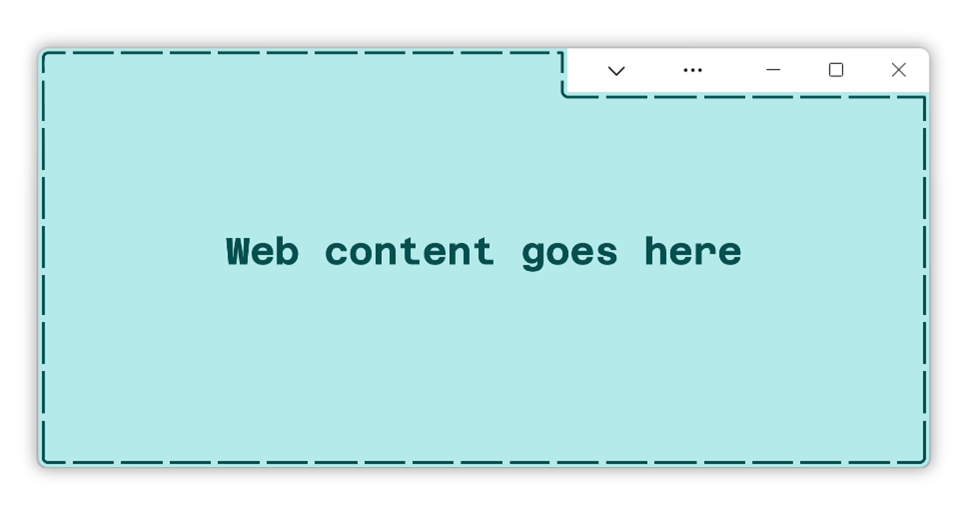
> ability to create their own title bar experiences It was a sad day, IMHO, in UX-world when this became possible in desktop apps. The window system should own the chrome and the apps should not be able to touch it.
>We talk a lot about Progressive Web Apps (PWA) in the context of mobile devices, but they have an enormous potential on desktop operating systems that’s only beginning to materialize.
Do we? I think we talk about PWA's on mobile and desktop equally, if not more so in the Desktop (e.g. with Electron and regular browser-viewed PWAs).
I actually wish programs do not put content in the Title bar area. The title bar area is meant for users to move the Window around. Try opening Microsoft Word, make the window narrow and drag the window. You have to hunt for a small bit of empty space in the title bar or you have to understand you could drag on the Title text, Search box and the Sign in Username, but not the Auto Save text, Upcoming Features icon, or…
I don't disagree.
It's for this kind of nonsense that I have "alt-space -> s -> down -> right" burned into my fingertips followed by moving the mouse cursor to resize a window deterministically (along with "alt-space -> m -> any arrow" for move, doubly useful to "rescue" an off screen window)
With all this Electron and PWA focused development a cannot shake a feeling that we add an extra layer of a "runtime" on top of an operating system, that could be avoided. An extra layer which occupies RAM space and processor time which feels unnecessary but it is where we are headed. I wonder if the reason is simple, that we (myself included) have not provided anything better or the reason is that big corporations w…
The obvious solution to this is to remove the bottom layer so that the browser is not a layer on top of the OS, but is the OS.
That won't meaningfully change performance at all. Browsers aren't slow because they have to make slow syscalls - they mostly don't. They are slow because web technologies themselves are slow, sometimes by design, sometimes because of security/abuse concerns, but often just because HTML & CSS are absolutely crap platform for interactive UIs, something they were never intended to be and retrofitting that doesn't result in a very efficiency stack.
I think you're right, but that also poses the possibility that Windows will get left behind, as a kernel. If the future of development happens on the web, the significance of Windows as a kernel is going to greatly diminish. We've already reverse-engineered a huge amount of Windows API calls, and you can run vast amounts of fairly complex Windows software without the NT kernel at all. If our future does shift towards…
>"If our future does shift towards thin-clients and web-browsers" Please no. I like to control what I have. No way for me to be fed by thin client. Sure I do not mind web apps / services where it makes sense (banking for example). But the possibility to be suddenly cut off for whatever reason (maybe my app provider does not like my political views) - fuck that. Or when everything goes through some portal what will pr…
I don't see how an offline-first browser app is worse then a native app in terms of control.
Looks like the perfect place to fake some browser chrome and trick people... https://www.theregister.com/2017/01/19/browser_line_of_death...
That was my first thought as well, but I couldn't remember the name for that boundary. I hope there is a well-designed per-site control/setting/user consent system to keep tech support scam sites (or worse!) from adding one more tool to their arsenal.
I actually wish programs do not put content in the Title bar area. The title bar area is meant for users to move the Window around. Try opening Microsoft Word, make the window narrow and drag the window. You have to hunt for a small bit of empty space in the title bar or you have to understand you could drag on the Title text, Search box and the Sign in Username, but not the Auto Save text, Upcoming Features icon, or…
I don't disagree. It's for this kind of nonsense that I have "alt-space -> s -> down -> right" burned into my fingertips followed by moving the mouse cursor to resize a window deterministically (along with "alt-space -> m -> any arrow" for move, doubly useful to "rescue" an off screen window)
> alt-space -> s -> down -> right
> alt-space -> m -> any arrow
Are those keybindings default on a particular OS/DE/WM/WC or are they just your personal config?
I agree with you. On the other hand, in the case of a native application, we can hope that the antivirus removes it. I hope that Microsoft has planned to update Defender accordingly.
JavaScript malware has been a thing for a while now, and antiviruses have been targeting it accordingly.
It's not necessarily a JavaScript malware. A pure HTML page with a tag could suffice to steal credentials.
I actually wish programs do not put content in the Title bar area. The title bar area is meant for users to move the Window around. Try opening Microsoft Word, make the window narrow and drag the window. You have to hunt for a small bit of empty space in the title bar or you have to understand you could drag on the Title text, Search box and the Sign in Username, but not the Auto Save text, Upcoming Features icon, or…