Live data from Hacker News

Show HN: I made CSS Scan 3.0, a fast way to check and copy CSS

getcssscan.com

71–80 of 102 posts

Re: Show HN: I made CSS Scan 3.0, a fast way to check and copy CSS

#71

I can tell you put a lot of work in, but it's still very expensive for what it is. It's something I would expect to find for free in my browser's extension store if I'm being honest. Is there any guarantee the extension will be supported for a long time after purchase? Or is it's possible a year down the line CSS Scan gets abandoned and the extension falls out of date? If it was a one time $5-$10 or $1/mo purchase, I…

This comment sums up the difficulty faced by independent developers.
Re: Show HN: I made CSS Scan 3.0, a fast way to check and copy CSS

#72

Earlier quoted context omitted.

Agreed. Are there advantages to this over say Firefox Web Developer Tools, where not only can you see the css as you hover but actually edit the css to see the changes? What am I missing? If there are benefits, I'm not sure the site is doing a very good job of selling them.

> Check the CSS of any element you hover over, instantly, and copy its entire rules with a single click. Is there a way to do that in Firefox Developer Tools? If so, I would like to know because I would use it.

Absolutely. (FOR FREE!) - do a search for something like "Firefox web developer tools css tutorial". Some of the older (Web 2.0) videos will mention Firebug (~kind of the same thing). Basically you can hover over any css element, and even SELECTIVELY copy just the applicable css class or id (usually more useful than copying the whole stylesheet). Better still, it allows you to edit/insert/delete rules right in there in the Document Object Model (DOM) to see the effect it has.

You could start with something like this - https://www.youtube.com/watch?v=S36N8RGdY2U

Re: Show HN: I made CSS Scan 3.0, a fast way to check and copy CSS

#74

Earlier quoted context omitted.

> Check the CSS of any element you hover over, instantly, and copy its entire rules with a single click. Is there a way to do that in Firefox Developer Tools? If so, I would like to know because I would use it.

Absolutely. (FOR FREE!) - do a search for something like "Firefox web developer tools css tutorial". Some of the older (Web 2.0) videos will mention Firebug (~kind of the same thing). Basically you can hover over any css element, and even SELECTIVELY copy just the applicable css class or id (usually more useful than copying the whole stylesheet). Better still, it allows you to edit/insert/delete rules right in there…

Not sure those are the same at all? The submission copies all applied styles, complete with breakpoints. A class / id is only a portion of applicable styles, multiple selectors can match the same element. This is more like copying the non-auto rules in the "Computed" tab, with breakpoints.

Chrome has "Copy Styles", but that doesn't get breakpoints. I don't know if Firefox does, but I haven't looked very much. It doesn't look like Safari does either.

Re: Show HN: I made CSS Scan 3.0, a fast way to check and copy CSS

#75

Earlier quoted context omitted.

Can you share details on how you implemented paid license keys in a browser extension? I have an extension already written that is like to do the same with. And will the chrome and Firefox stores still host it?

This extension can be used for free without paying unfortunately by changing the code. I don't think there is any solid way of preventing that.

I’m not interested in a hack-proof system.

Re: Show HN: I made CSS Scan 3.0, a fast way to check and copy CSS

#76
post #74

Earlier quoted context omitted.

Absolutely. (FOR FREE!) - do a search for something like "Firefox web developer tools css tutorial". Some of the older (Web 2.0) videos will mention Firebug (~kind of the same thing). Basically you can hover over any css element, and even SELECTIVELY copy just the applicable css class or id (usually more useful than copying the whole stylesheet). Better still, it allows you to edit/insert/delete rules right in there…

Not sure those are the same at all? The submission copies all applied styles, complete with breakpoints. A class / id is only a portion of applicable styles, multiple selectors can match the same element. This is more like copying the non-auto rules in the "Computed" tab, with breakpoints. Chrome has "Copy Styles", but that doesn't get breakpoints. I don't know if Firefox does, but I haven't looked very much. It does…

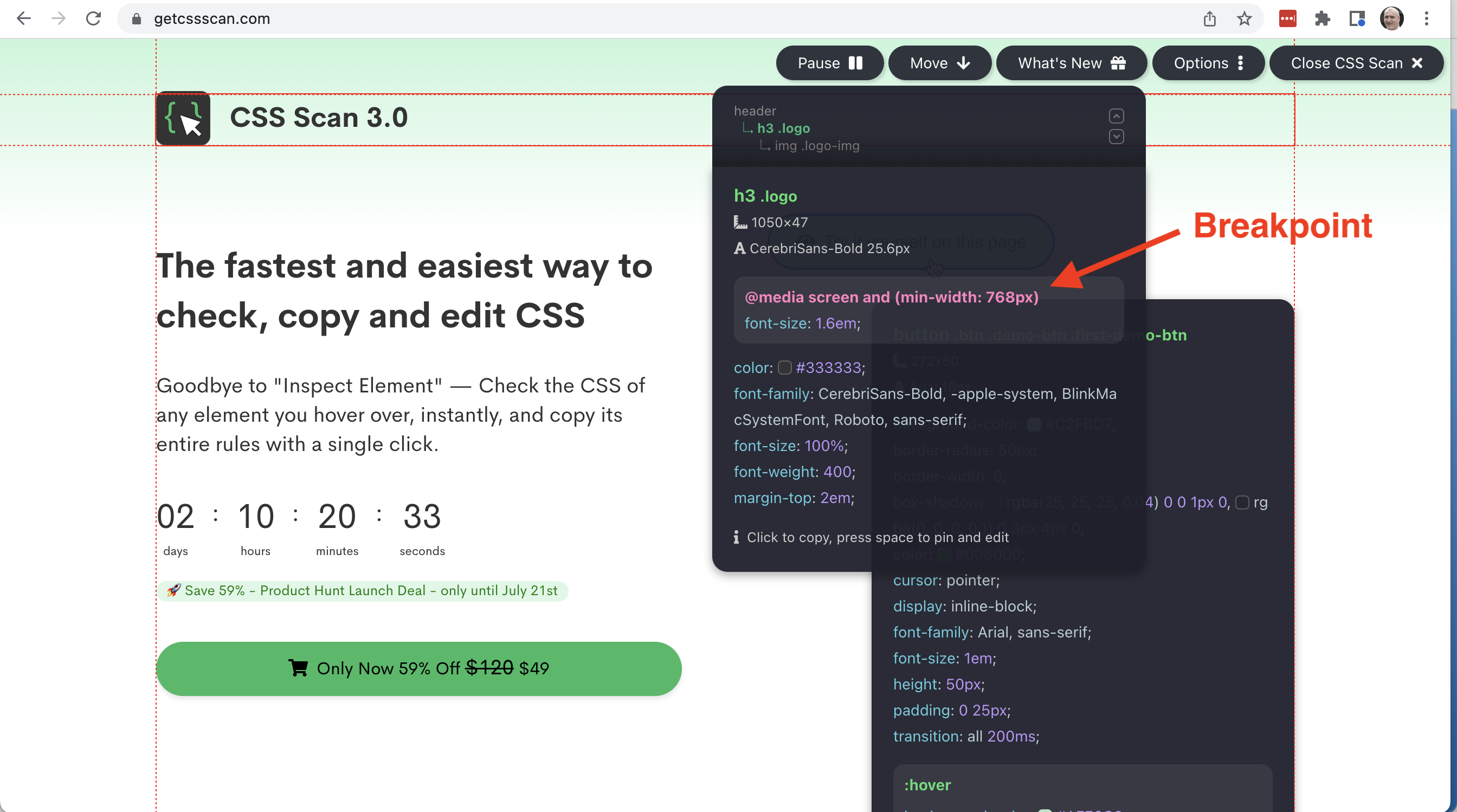
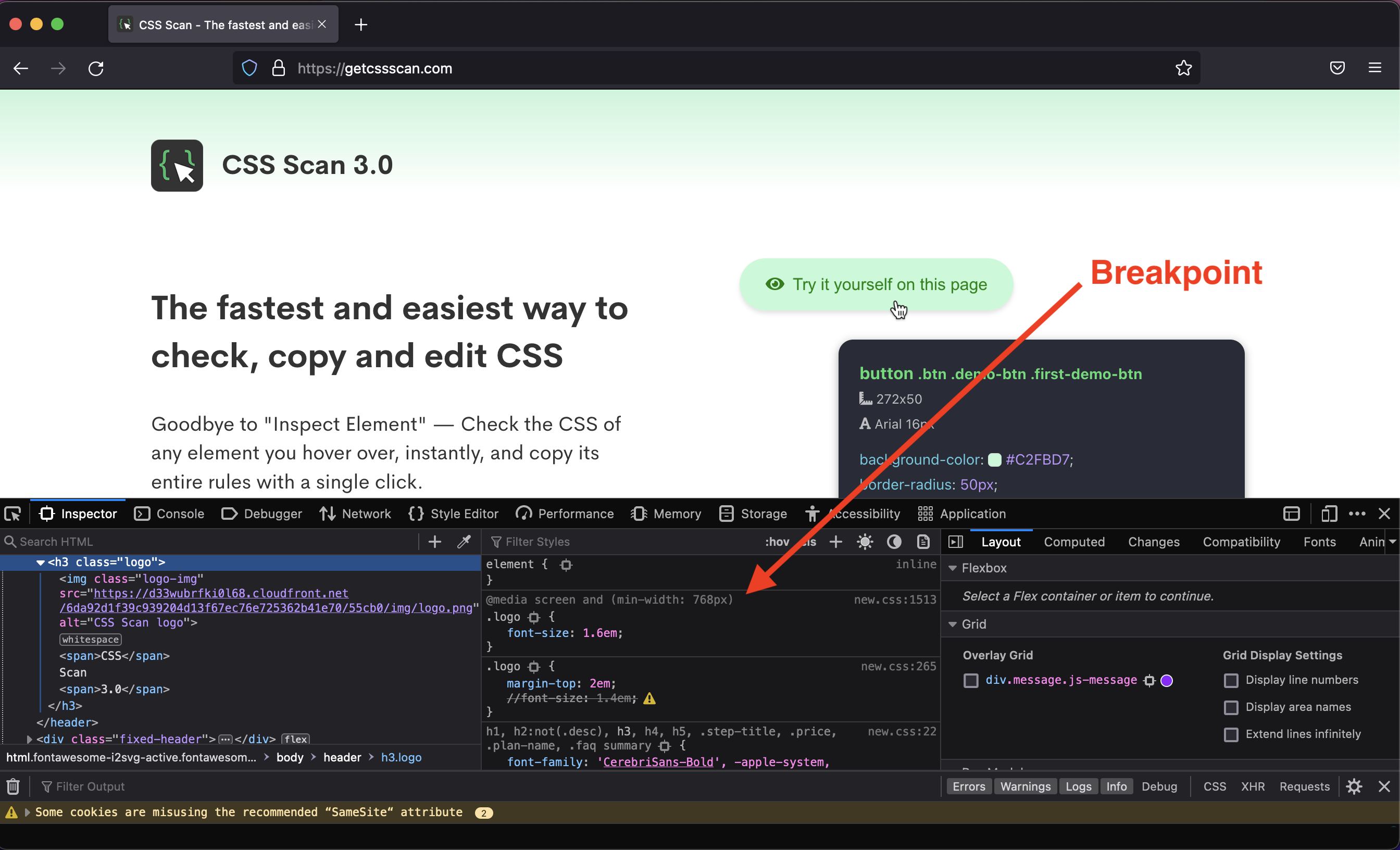
Perhaps I am not understanding you correctly. Firefox Web Developer Tools shows css breakpoints [0] much the same as getcssscan.com [1] - here the examples are with the h3 logo class. Firefox WDT actually shows the entire css cascade.

[0] https://repository.embode.net/Firefox-breakpoint.png

[1] https://repository.embode.net/getcssscan.png

Re: Show HN: I made CSS Scan 3.0, a fast way to check and copy CSS

#77
post #74

Earlier quoted context omitted.

Not sure those are the same at all? The submission copies all applied styles, complete with breakpoints. A class / id is only a portion of applicable styles, multiple selectors can match the same element. This is more like copying the non-auto rules in the "Computed" tab, with breakpoints. Chrome has "Copy Styles", but that doesn't get breakpoints. I don't know if Firefox does, but I haven't looked very much. It does…

Perhaps I am not understanding you correctly. Firefox Web Developer Tools shows css breakpoints [0] much the same as getcssscan.com [1] - here the examples are with the h3 logo class. Firefox WDT actually shows the entire css cascade. [0] https://repository.embode.net/Firefox-breakpoint.png [1] https://repository.embode.net/getcssscan.png

And back to the original question, how do you copy the font size from the breakpoint rules, the margin from the second set of rules, and the font family from the third, with a callout to the breakpoint, in a single click using Firefox dev tools?

Re: Show HN: I made CSS Scan 3.0, a fast way to check and copy CSS

#78

Earlier quoted context omitted.

It's not a trick. It's a sale. Have you never seen anything go on sale before?

An analogy to help explain: You see someone dressed as a hotdog holding a giant promotional "50 OFF, TODAY ONLY!!!" sign outside a restaurant. Is that restaurant somewhere you'd consider taking a client for fine-dining?

No, but I might just dip in there for lunch. Why does it have to be taking a client out for fine dining?

Re: Show HN: I made CSS Scan 3.0, a fast way to check and copy CSS

#79
post #40

Earlier quoted context omitted.

It's not hostile, it's helpful. For everyone who takes the time to explain why they bounced, 1000 people did so without taking the time to explain. I am sure the majority of people here who saw this hit back the second they saw the ticking countdown timer. Few bothered to come back and advise against it.

CAPS, "fake", "BS"... ...pretty hostile

It's "hostile" in so far as they are being brutally honest. You pull this kind of crap, and you get called out for it. This has all the professionalism of a late night infomercial. DON'T DELAY, CALL TODAY!

End of story.

Re: Show HN: I made CSS Scan 3.0, a fast way to check and copy CSS

#80

HN =/= Y Combinator. Maybe drop the YComb logo from the site?

Yeah. It was my first time seeing a rather simple extension by solo dev getting YC funded. Not saying that it's not possible but highly unlikely.

Agree with above. It gives a false impression.

Post reply on HN