This is a nice collection of graphical user interfaces. This reminds me of the well known Toasty Tech collection ( http://toastytech.com/guis/ ), but with a narrative tying together the evolution of these GUIs. Some feedback: 1. All interfaces presented were graphical user interfaces for desktop personal computers. However, there's a wide world of user interfaces for computers beyond conventional point-and-click GUIs…
Actually, the NeXTStep style was adopted by Windows 3.1 and that made it look subtly different from 3.0. Given the timing, I think the actual direct influence on Windows 3.1 was Motif, which in turn was inspired by NeXTStep. When the NeXT was announced I thought it had been influenced by Randy Smith's (Xerox Parc) ARK (Alternate Reality Kit): http://worrydream.com/refs/Smith%20-%20Experiences%20With%20... But it migh…
The History of User Interfaces
91–100 of 117 posts
Re: The History of User Interfaces
#92This is a nice collection of graphical user interfaces. This reminds me of the well known Toasty Tech collection ( http://toastytech.com/guis/ ), but with a narrative tying together the evolution of these GUIs. Some feedback: 1. All interfaces presented were graphical user interfaces for desktop personal computers. However, there's a wide world of user interfaces for computers beyond conventional point-and-click GUIs…
Re: The History of User Interfaces
#93I really miss Windows 95/98 era UIs. They were so much more practical and less noisy than current generation UIs. Opening the start bar on my Windows 11 I literally have no idea what's going on. All the "apps" at the top of my start bar are things I've never used and I don't think I've ever even installed. Stuff like Tiktok and XBox. Then below that I get recommendations, but I don't want recommendations, I just want…
Don't worry if there isn't a text box to type into, or if the text box at the top of the menu isn't selected. You don't need to click on it, just start typing. This has worked ever since Windows 7 (or maybe Vista).
Re: The History of User Interfaces
#94This is a nice collection of graphical user interfaces. This reminds me of the well known Toasty Tech collection ( http://toastytech.com/guis/ ), but with a narrative tying together the evolution of these GUIs. Some feedback: 1. All interfaces presented were graphical user interfaces for desktop personal computers. However, there's a wide world of user interfaces for computers beyond conventional point-and-click GUIs…
It also misses all the "text GUI" interfaces found on eg. MS-DOS and mainframes. These are super-efficient to navigate and use using just a keyboard, and extremely fast for data entry in comparison to modern systems.
Re: The History of User Interfaces
#95I liked seeing the hardware in the first two pictures. It gave an idea of what it was like interacting with the computer. Do you think you could add this for some of the other interfaces, even multiple form factors if they existed for the operating system?
Re: The History of User Interfaces
#96I really miss Windows 95/98 era UIs. They were so much more practical and less noisy than current generation UIs. Opening the start bar on my Windows 11 I literally have no idea what's going on. All the "apps" at the top of my start bar are things I've never used and I don't think I've ever even installed. Stuff like Tiktok and XBox. Then below that I get recommendations, but I don't want recommendations, I just want…
After you hit Start, just start typing the name of the app you want to run. You don't need to hunt for it in the menu. Don't worry if there isn't a text box to type into, or if the text box at the top of the menu isn't selected. You don't need to click on it, just start typing. This has worked ever since Windows 7 (or maybe Vista).
And maybe to help find those applications.
And offer a streamlined mode for applications where you just need a quick response where the application doesn't open a new window but just provides a response in the same invocation-dialogue.
Maybe apps could even take modifiers or specifications when invoked, so you don't have to hunt and peck around in menus and additional dialogues after launch.
Maybe there's a place for this?
Re: The History of User Interfaces
#97The title promises more than is delivered: computer user interfaces existed before the GUI, and interfaces to physical machines in general have existed for centuries, and a lot of those antecedents have influenced present-day computer interfaces.
Re: The History of User Interfaces
#98Is "workbench" truly a different metaphor from "desktop," or is it just a different word used to avoid legal hassles?
Re: The History of User Interfaces
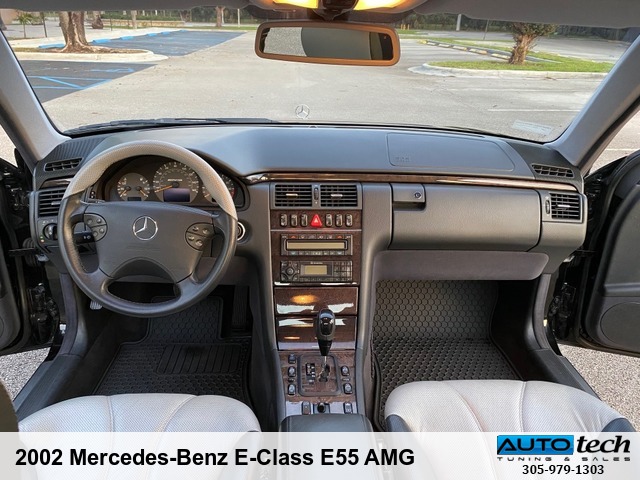
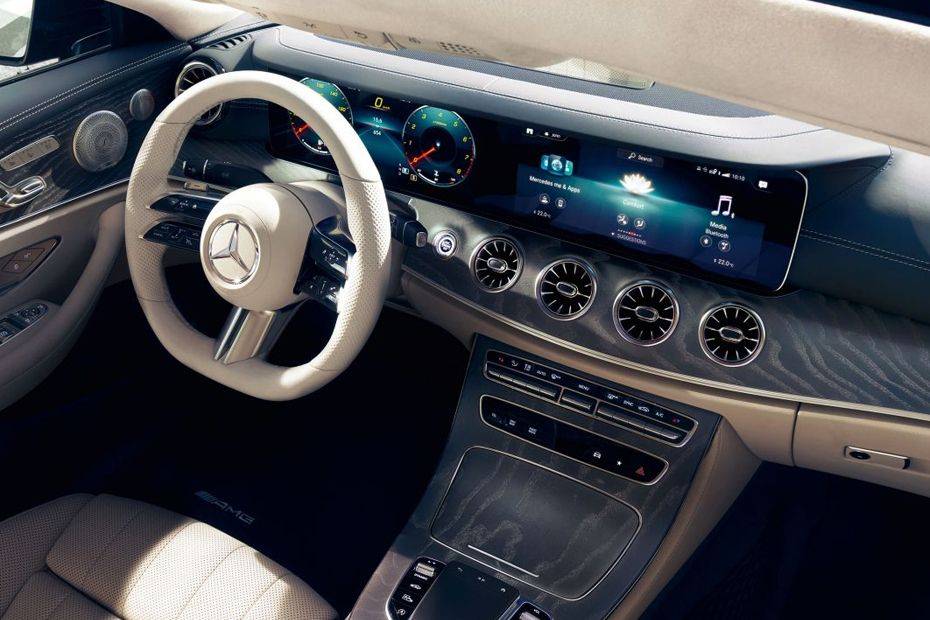
#99My first reaction is that it is disappointing that GUIs haven't changed all that much from Xerox. However, on second thought, how different is the user interface on a car from the 30s from a modern car? So maybe it isn't surprising that the GUI hasn't radically changed
A lot I would say, even on a much smaller time scale.
The features are completely different besides the very basic odometers which anyway look very different and present much different information. A modern car not only has much more features, but even the way of consuming the old ones is radically different, and not just because of the switch from analog to digital, e.g. steering wheels have seen a massive amount of analog buttons and levers.
2002 Mercedes Benz E class interior[1]
2022 Mercedes Benz E class interior[2]
[1] https://autotech-miami.com/images/watermarked/3039zg.jpg
[2] https://imgcdn.zigwheels.my/large/gallery/interior/17/481/me...
Re: The History of User Interfaces
#100My first reaction is that it is disappointing that GUIs haven't changed all that much from Xerox. However, on second thought, how different is the user interface on a car from the 30s from a modern car? So maybe it isn't surprising that the GUI hasn't radically changed
There's only so much efficiency and clarity that can be squeezed out of a GUI.
Familiarity and consistency are themselves powerful elements of UI/UX.
Upshot: stop fucking with the interface.
Apple, renowned for design, has essentially only ever offered two GUIs, "Classic Mac" (1984--1999) and "Aqua" (1999--2022) Note that the second has been in use longer than Classic, by over 60% (23/16 ~= 1.64).
Good UIs don't change.
Apple have tweaked at the edges, changed some of the styling and colours, and added features (e.g., workspaces / virtual desktops). But a user of the Classic Mac could sit down at a modern OSX system and figure it put pretty quickly.
(I'm actually not a fan of the interface, though I generally use one based on a precursor / ancestor of it, WindowMaker, based on NeXTStep from the NeXT Machine.)