Live data from Hacker News

The History of User Interfaces

history.user-interface.io

51–60 of 117 posts

Re: The History of User Interfaces

#51
post #22

I really miss Windows 95/98 era UIs. They were so much more practical and less noisy than current generation UIs. Opening the start bar on my Windows 11 I literally have no idea what's going on. All the "apps" at the top of my start bar are things I've never used and I don't think I've ever even installed. Stuff like Tiktok and XBox. Then below that I get recommendations, but I don't want recommendations, I just want…

> I really miss Windows 95/98 era UIs. They were so much more practical and less noisy than current generation UIs.

This. I miss the practicality of these designs. It feels like designers today make changes to justify having work to do to maintain their jobs, and don't actually care about user experience, and in fact many are actively user hostile (see 'dark patterns').
Re: The History of User Interfaces

#52
post #5

This is a nice collection of graphical user interfaces. This reminds me of the well known Toasty Tech collection ( http://toastytech.com/guis/ ), but with a narrative tying together the evolution of these GUIs. Some feedback: 1. All interfaces presented were graphical user interfaces for desktop personal computers. However, there's a wide world of user interfaces for computers beyond conventional point-and-click GUIs…

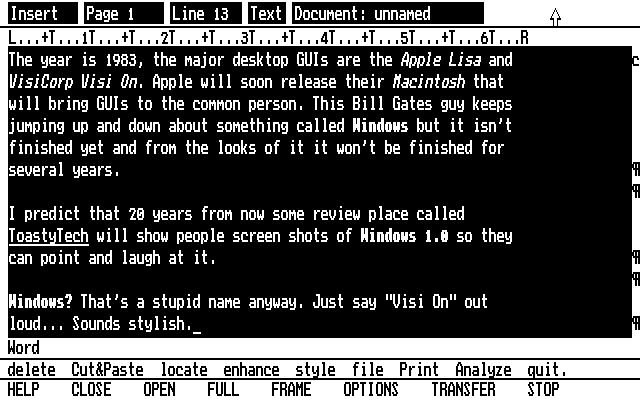
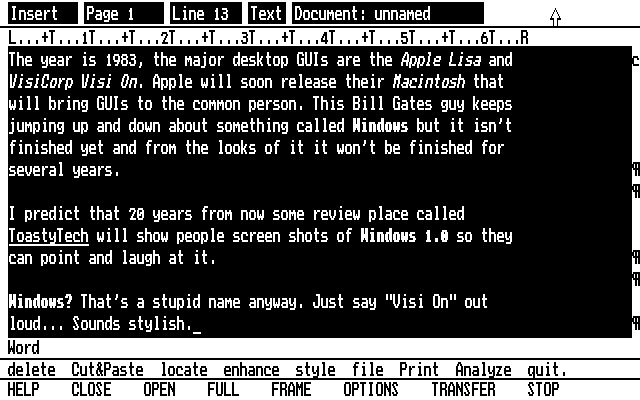
Thanks for the Toasty Tech link. It looks like some of the screenshots in the featured article are actually from Toasty Tech, e.g., this Visi On Word screenshot:

https://history.user-interface.io/img/visi-on/word.gif

http://toastytech.com/guis/visionword.gif

Re: The History of User Interfaces

#53
post #3

What's the theme here? That is, even in the context of desktop graphical UIs I expected Englebart's oN-Line System (NLS), Sutherland's Sketchpad, X Windows, NeWS, and/or NeXTStep. Broaden that and there's smartphone UIs. Or Raskin's The Humane Environment (THE). EDIT: OPEN LOOK tried to "fill the need for an easy to use desktop for Unix workstations, similar" long before KDE 1.0. There's also the Common Desktop Envir…

random fact, CDE is open source these days and you can run it on Linux, for entertainment I guess

(HPUX's SAM not included ;p )

https://sourceforge.net/projects/cdesktopenv/

There's also a 4DWM clone as well https://docs.maxxinteractive.com/

Re: The History of User Interfaces

#54
post #50

Earlier quoted context omitted.

Settings is the gear above the "power" icon? The apps at the top of my start menu are ones that were most recently installed. TBH 95% of the time I just type in the name anyway.

Icons are ambiguous. Everybody violates expectations about what an image does. The older UIs had text. More than that, settings was a folder just like every other folder, so you knew what would happen if you clicked on particular section. Things were fairly unified, even though the standards didn't integrate everything. You knew what would open a new dropdown, and what would open a new window, at a glance. There was…

I've definitely used UIs that have these issues, but I can't say the Windows start menu is one of them generally. The idea that "settings" would be a folder seems quite unintuitive/jarring to me now.

Re: The History of User Interfaces

#55
Two things I noticed from looking at the screenshots:

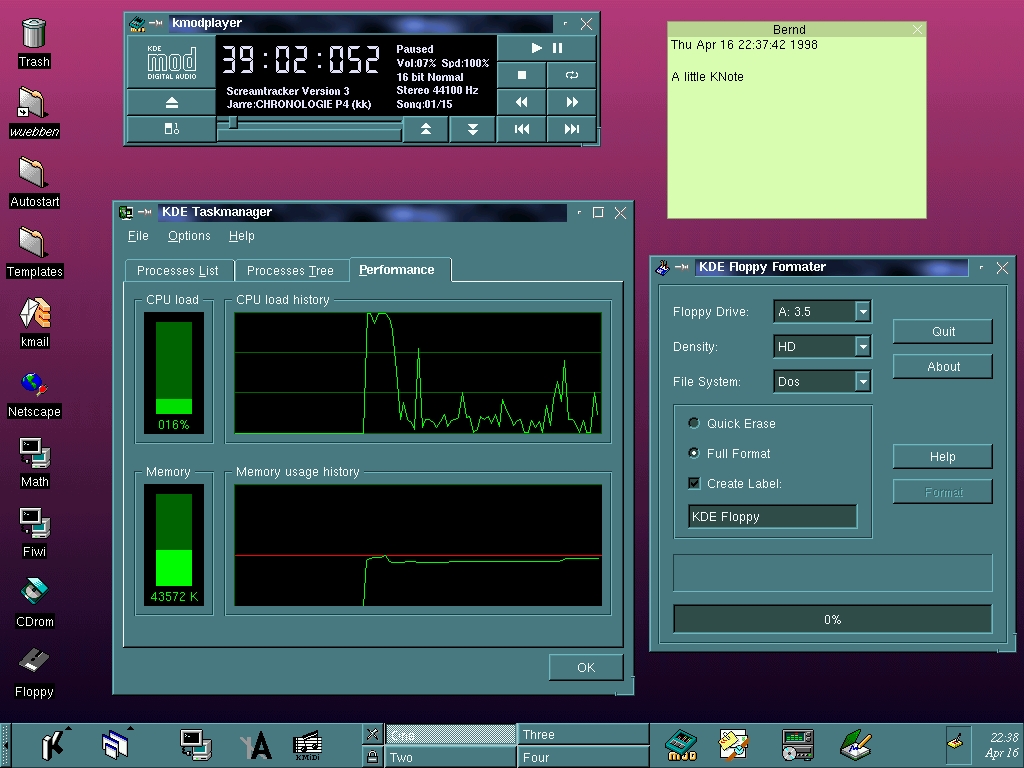
1. The MS Windows 7 Task Manager look very similar to the KDE 1 version (from the late nineties): https://history.user-interface.io/img/kde-1/task-manager.jpe...

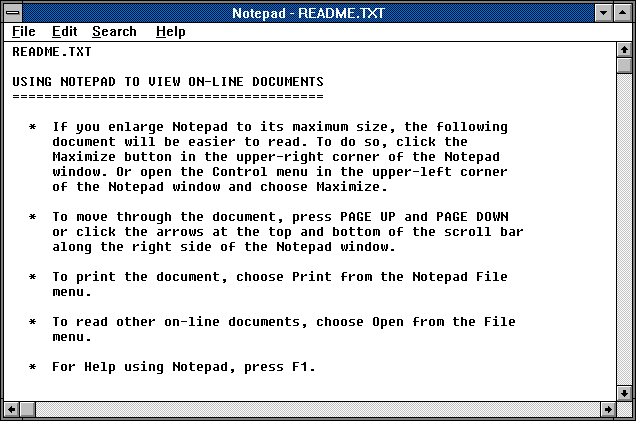
2. In 1990, Microsoft referred to plain text files on the local system as “on-line documents”: https://history.user-interface.io/img/windows-3.0/notepad.pn...

Re: The History of User Interfaces

#56

Earlier quoted context omitted.

There are also some interesting GUI elements in GENESYS, a parametric image animation program for the TX-2 at MIT, by Ronald M. Baecker (1969) [1,2]. [1] https://www.youtube.com/watch?v=GYIPKLxoTcQ [2] Baecker, Ronald M. (1969). Interactive Computer-Mediated Animation. PhD Thesis, MIT. http://publications.csail.mit.edu/lcs/pubs/pdf/MIT-LCS-TR-06... Also mind the use of a mouse in another video animation software from…

Ah the TX-2! That takes us back to Sutherland and the famous key frame animator, always good Check out the IBM 2250 John Whitney is using in this 1968 video https://m.youtube.com/watch?v=jIv-EcX9tUs where he basically invents screensavers for an earlier foray into animation

Regarding books, I've always opted for a book named "Glass" on various display technologies and methodologies, along the lines of "Core Memory" by John Alderman and Mark Richards (who does this amazing CHP photography) [1]

[1] https://www.amazon.com/Core-Memory-Visual-Vintage-Computers/...

Re: The History of User Interfaces

#58
post #22

I really miss Windows 95/98 era UIs. They were so much more practical and less noisy than current generation UIs. Opening the start bar on my Windows 11 I literally have no idea what's going on. All the "apps" at the top of my start bar are things I've never used and I don't think I've ever even installed. Stuff like Tiktok and XBox. Then below that I get recommendations, but I don't want recommendations, I just want…

I agree. Win 95/98 UI was pretty ugly, but it was consistent and followed a good design language: eg everything that was clickable looked like a button: buttons, table headers, scroll bars etc. Once you learned the basics of the UI, you could mostly figure things out. Nowadays buttons look like plain text labels half the time and every app has its own inconsistent style and even I, someone who has used computers for…

> Win 95/98 UI was pretty ugly

I disagree. I find it much better looking than modern UIs.

Re: The History of User Interfaces

#59
post #5

This is a nice collection of graphical user interfaces. This reminds me of the well known Toasty Tech collection ( http://toastytech.com/guis/ ), but with a narrative tying together the evolution of these GUIs. Some feedback: 1. All interfaces presented were graphical user interfaces for desktop personal computers. However, there's a wide world of user interfaces for computers beyond conventional point-and-click GUIs…

I think they just took random screenshots from toasty tech and presented them differently, often mislabeling them in the process.
Post reply on HN