Live data from Hacker News

Guest WiFi using a QR code

blog.jgc.org

221–230 of 284 posts

Re: Guest WiFi using a QR code

#221
post #65

Earlier quoted context omitted.

Nice, but I don't like such being forced to be a static PSK. Instead, could also make an e-paper device for this. Perhaps it would work on badgerOS?

Isn't there qr codes that can automatically update their values? That could work. Otherwise just buying those picture viewers and setting a qr image would be easiest.

A picture of a QR code will always be the same QR code. There are QR code generators that purport to let you update the value... but they're basically just hosting a link shortener service, giving you a QR code encoding that link, and letting you change where the link redirects to. That wouldn't work with a QR code for wifi, since the QR code does not point to a link, it directly encodes the SSID and password for a wifi network.
Re: Guest WiFi using a QR code

#223

Earlier quoted context omitted.

Vistor: Ok, I took a picture of it. Now what? Do I send it to you? Me: Is it doing anything? What did you do? Vistor: No. I pointed my phone at it like you said. Then I took a picture. Me: What app are you using? Visitor: The photo app I always use. Me: Can you be more specific? Visitor (showing where the icon is): That one. I always use it. Me: That one sucks. Do you have any others? Visitor: I don't know. There's p…

I'm in an Airbnb and the access point has the same name for 5ghz and 2.4ghz. Apple doesn't let you manually switch. The only way I've found to switch when one is not working is to toggle the wifi on/off fifty times. I think there must be some sort of crazy interference going on because I can literally be sitting right next to the router and 5ghz has about 5k of bandwidth available.

In my experience, Apple devices tend to connect to whichever seems stronger at the time of connection, and then only ever change to a different AP when the connection gets extremely weak. Or randomly, just to mess with you.

Re: Guest WiFi using a QR code

#225

Earlier quoted context omitted.

To be pedantic, it doesn't require the owner to give permission. It'll get it from anyone else near enough who has it on their device. My kids give away our primary WiFi to their friends with some annoying regularity, even though I keep telling them to scan the QR code on the wall for the guest network.

Why have a non-'guest' network? Force anything secure over a proper VPN E.G. wireguard.

Not sure I could enforce QoS priority on the wireguard traffic. Easier with a non-guest SSID. Is there a huge performance benefit if there's just one SSID running in my airspace?

Also, for the OP, sounds like it's time to put the kids on the guest network.

Re: Guest WiFi using a QR code

#226
post #38

It uses the form of: WIFI:T:WPA;S:{ssid};P:{password};; Can generate these on Linux with the qrencode program. Wikipedia has information on this https://en.wikipedia.org/wiki/QR_code#Joining_a_Wi%E2%80%91F... Section of the Wikipedia article: Joining a Wi‑Fi network By specifying the SSID, encryption type, password/passphrase, and if the SSID is hidden or not, mobile device users can quickly scan and join networks wi…

What a weird design. Alphanumeric QR code encoding includes [0-9A-Z $%*+-./:]. So many characters to choose from and they decided to choose ';' ruining the possibility of using compact alphanumeric encoding. Perfectionist inside me is angry!

Re: Guest WiFi using a QR code

#227

Earlier quoted context omitted.

Why have a non-'guest' network? Force anything secure over a proper VPN E.G. wireguard.

Not sure I could enforce QoS priority on the wireguard traffic. Easier with a non-guest SSID. Is there a huge performance benefit if there's just one SSID running in my airspace? Also, for the OP, sounds like it's time to put the kids on the guest network.

> sounds like it's time to put the kids on the guest network

I have considered that, for sure.

Re: Guest WiFi using a QR code

#228
post #212

Earlier quoted context omitted.

It definitely asks for permission, and only prompts mutual contacts to begin with, as far as I know.

It asks the sender for permission, which is not the same as asking the WiFi owner. My kids have their friends as contacts, so it happily shares with them.

My wording was probably a bit wrong but there is no concept in wifi of ownership so by owner I meant the person who set it up but not exclusively them, just that they would have it.

Re: Guest WiFi using a QR code

#229
post #203

Earlier quoted context omitted.

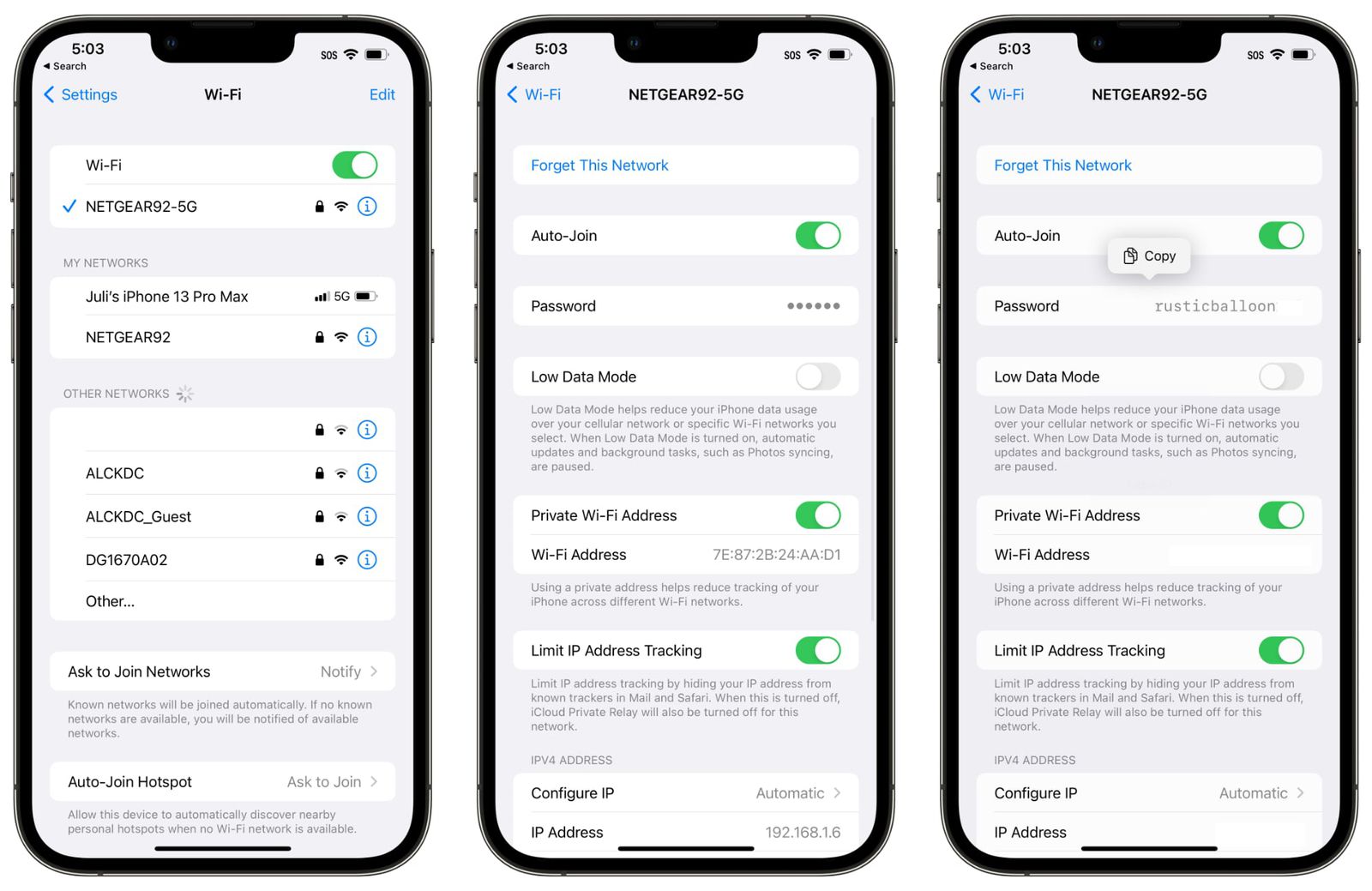
Okay so how do I find out the wifi password of a network an iOS device is connected to, using that device? On android it’s easy: go to Wi-Fi settings, hit “share”, show QR code.

That's just a normal security feature, passwords are input only. Just because Android lets you read them doesn't make it an ideal choice or any kind of standard. Besides, I don't want my kids to get the password from their devices and then share with their friends. And how would that constitute lock-in anyway?

iOS 16 allows to look up a saved password.

https://images.macrumors.com/t/3REfPfn3TRhO5oOFqVsyqdR9qcI=/...

Re: Guest WiFi using a QR code

#230
post #196

Earlier quoted context omitted.

I have solved this (and a surprising number of similar problems) by pulling out the powerful camera I carry everywhere and taking a picture of the text I would otherwise need to remember.

I have an iPhone 13Pro Max and this solution is cumbersome. When I walk back to my desk, my phone locks (due to time out or intentional habit of keeping it locked). Then I have to tap buttons to unlock phone, launch the photo app, and find the image I just took. Then I have to spend time later to delete the image. iOS has OCR on images. I can copy and paste the password from the photo, but still not as efficient as n…

Is Face ID so terrible? I'm still on iPhone 8 with fingerprint reader and unlocking is not something I notice, it's absolutely smooth.
Post reply on HN