Live data from Hacker News

LG 28-inch 16:18 DualUp Monitor

lg.com

141–150 of 310 posts

Re: LG 28-inch 16:18 DualUp Monitor

#141

On a similar note, does anyone know of a squarish monitor that doesn't cost an arm and a leg, and preferably has a good color gamut coverage? There was an 1920*1920 monitor ( https://www.inputmag.com/reviews/square-monitor-eizo-flexsca... ) but that's over 1k USD :( There are other nice displays like Huawei's Mateview at 3000*2000 but nothing costs less than ~550-600$/€. It's a bit of a pity because you can get a dec…

I run the EIZO you linked and love it... since I'm such a fan of this monitor I've always kept an eye out for anything more affordable. Unfortunately, this LG is the first and only thing that I've seen that comes close with a My specs are 1:1 or as-close as I can get.

I also have this Eizo 1:1 (1920x1920) monitor and I use it in quadrants for status/monitoring.

I wouldn't want it on my actual workstation ...
Re: LG 28-inch 16:18 DualUp Monitor

#142
post #125
post #103

My cervical vertebrae are cowering in fear. I'd rather twist left to right and put the burden on muscles, than over-articulate my neck.

can't you just move your eyes

To be fair to the poster, we have in general horizontally distributed eyes. Yes the display is squarish, so the focus uses similar distances, but maybe the game of peripheral vision gives the L↔R space some advantage.

I would install extra eyes.

Re: LG 28-inch 16:18 DualUp Monitor

#143
post #139

EIZO makes a 1:1 monitor you can buy off the shelf right now: https://www.eizo.com/products/flexscan/ev2730q/

I like how they target programmers specifically on their landing page.

I wonder how well it works in practice. I typically have multiple tabs open so I don’t mind going wide over long. But it is easier to look down rather than sideways.

Re: LG 28-inch 16:18 DualUp Monitor

#144

I don't much care for the aspect ratio. But I have been dying for a decent sized 1080p USB-C monitor like this that has no power brick. Is there anything similar?

I went on this quest recently. I wanted a small display to tuck _under_ my main widescreen monitor, so that I could have chat apps & video streaming in my periphery. The category I ended up targeting is portable monitors aimed at the business laptop market. These are slim, have a kickstand for support, and can receive data & power over a single usb-c. Not sure about product marketing restrictions on HN so I won't say…

You can absolutely mention brands and even link to product pages.

If you're going to use an affiliate link, it is common courtesy to disclose that.

I'm interested in having a USB-C powered screen as a second monitor for my MacBook Pro, but would want it to more closely match the same resolution. 1080 just won't cut it.

Re: LG 28-inch 16:18 DualUp Monitor

#145

I find panning my eyes left and right to other monitors more natural than up and down, and I think most ergonomics experts would agree. As such a 32:9 widescreen seems preferable to a 16:8. But if you are pressed for space, either because of small desks or because of everything else going on on your desk (people who work not only in the virtual world) this seems like a great compromise.

Also don't forget that our eyes are… you know… next to each other. Rather than stacked vertically. The aspect ratio for the average binocular human is almost 2:1 (vertical FOV is around 100°, while horizontal is up to 190°). [1] https://en.wikipedia.org/wiki/Human_eye#Field_of_view

Yes, but for visually analytical practice - what I do in front of a monitor - I find a more squarish than stripey proportion much better.

I am not enjoying a panorama.

Re: LG 28-inch 16:18 DualUp Monitor

#146
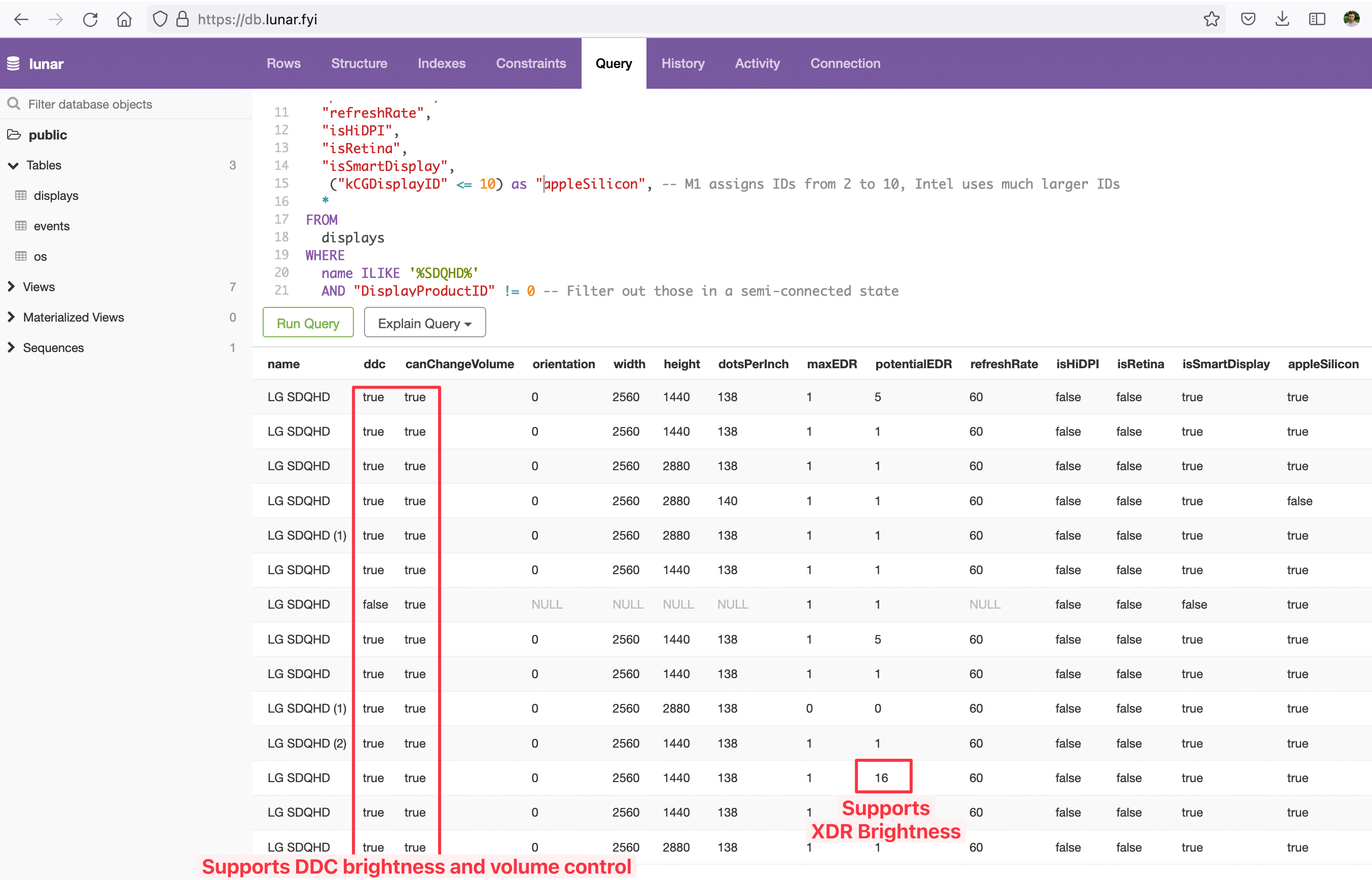
Looks like some users of Lunar (https://lunar.fyi) are already using this monitor: https://files.alinpanaitiu.com/6a7515174ddd729a3df47063ee760...

Some notable data points:

    - supports DDC brightness control (controlling the real brightness of the monitor using Lunar on Mac, TwinkleTray on Windows or ddcutil on Linux)
    - supports DDC volume control
    - supports Lunar's XDR Brightness feature (https://lunar.fyi/#xdr) which means that in HDR mode the full brightness of the display can be unlocked and used for SDR content
        - although the specs page reports a typical brightness of 300nits so not sure if this has any effect
    - it isn't recognized as HiDPI by macOS (this used to cause blurry text, not sure if this is the case here but BetterDisplay is a thing these days so not an issue)
If you want to dig deeper, you can find the same data here: https://db.lunar.fyi

And here's the query I used:

    SELECT
        name,
        ddc,
        "canChangeVolume",
        orientation,
        width,
        height,
        "dotsPerInch",
        "maxEDR",
        "potentialEDR",
        "refreshRate",
        "isHiDPI",
        "isRetina", 
        "isSmartDisplay",
         ("kCGDisplayID" 

Re: LG 28-inch 16:18 DualUp Monitor

#147

I've been using 43 inch 4k displays as monitors for 3 years now and don't think I could go back to anything smaller. Font size at native scaling is just right for me and there's plenty of real estate.

I’m up to dual 75 inch 8k and it feels just right. Tried going down to 43 inches and it felt cramped.

I was considering this recently, but didn't find a good curved version. What do you use?

Re: LG 28-inch 16:18 DualUp Monitor

#148
I’ve been looking for a replacement for my 16:10 HP zr30w with either high-dpi or high-fps (not that this is particularly either) and have been coming up high-and-dry. This looks like an alternative worth exploring instead of the garbage 16:9 flooding the market with unusable high-dpi real estate.

But it doesn’t have VESA? I’m all for the “save desk space” mantra that’s plastered all over their marketing materials, but my solution was a wall/stud-mounted gas spring fully-articulated VESA mount that I’ve used across several monitors. I definitely don’t want a desk-clamped alternative that will flatter and shake as I type vigorously on my mechanical keyboard (on anything that isn’t a solid, handcrafted wood desk that takes four people to move).

Re: LG 28-inch 16:18 DualUp Monitor

#149
post #126
post #25

Earlier quoted context omitted.

Pretty sure that's backwards. Ergonomically you want the entire display to be at and below eye level. The neck rotates easily on the horizontal and really sucks at flexing in the vertical.

Yes, except most people wind up looking at the leftmost third of the screen the vast majority of the time (see visual heat map research) which results in chronically bad posture with very wide screens.

Yeah, not advocating for big wide screens, either. A 17x17 square display would be pretty sweet. You can achieve this by setting the right mode on a 27-inch widescreen, because they are 17 inches tall.

Re: LG 28-inch 16:18 DualUp Monitor

#150

Earlier quoted context omitted.

I'm double-extending vscode: top monitor gets the code, bottom laptop screen gets the terminal (vscode click-to-goto file/line in stdout/stderr output is just too powerful)

why can't those be put in different spaces and just switch between spaces using keyboard. Whats the advantage of putting terminal in another monitor. This has puzzled me for a long time as to why ppl use multiple monitors at all. Is the idea that your peripheral vision is monitoring terminal window ?

I don’t know about terminals but having live reload on multiple monitors is a god send for frontend developer productivity. You’re experimenting most of the time.
Post reply on HN