Live data from Hacker News

Ask HN: Has anyone successfully used LibreOffice for their business?

news.ycombinator.com

81–90 of 165 posts

Re: Ask HN: Has anyone successfully used LibreOffice for their business?

#81

Earlier quoted context omitted.

Yeah, whenever dealing with someone who uses O365 you are going to run into issues with everything from formatting to formulas to error messages. Not worth it imo.

the funny thing is I get formatting issues and errors just going between O365 browser apps and the MS Office desktop Apps, using all latest versions.

While I don't think that it happens any more, you used to be able to do that using the same version of desktop Office apps, but a different default printer (not in print preview, just regular editing with a different default printer set.)

Re: Ask HN: Has anyone successfully used LibreOffice for their business?

#82

Earlier quoted context omitted.

I think it depends on what kind of user you are. If you're doing ad-hoc formatting all the time, maybe the ribbon is OK. But if you are used to managing styles and religiously applying them and using templates, I found that the new UI sucks (on both Windows and Mac). The "ribbon" was widely mocked when it came out; I'm curious as to what you find easier about it.

I wasn't a big Word user prior to the ribbon so I can't compare before and after, however I've found applying styles about as easy as it can be (select text, click the style in the ribbon). Were they in a more convenient location before?

There was always a style drop-down in the toolbar. My experience goes back to Word for Windows (named thusly to differentiate it from the DOS version). Check it out: https://www.idgcdn.com.au/article/images/750x750/dimg/m_img_...

It's the management and use of styles that I find has regressed drastically. When I press the Style drop-down, I want to see only MY styles. I don't want to scroll through a shitload of canned styles that Microsoft has laden the application with, featuring every variety of color and thickness of underline. The last time I tried Word (not that long ago), there was no way to get rid of this huge pile of crap.

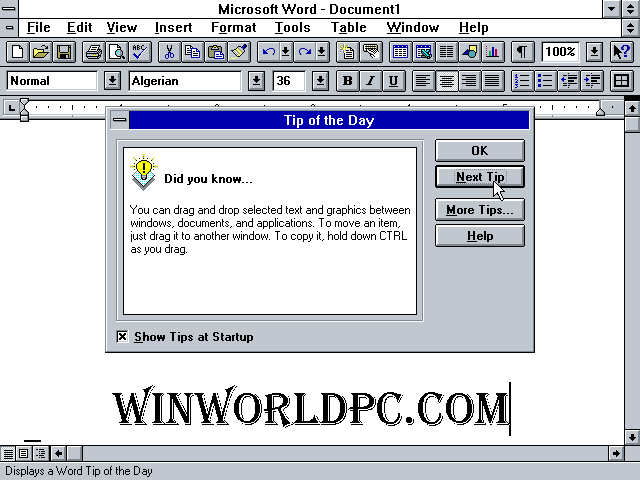
Word peaked at version 6, I think. Is there anything important missing from this toolbar? https://www.versionmuseum.com/images/applications/microsoft-...

Re: Ask HN: Has anyone successfully used LibreOffice for their business?

#83
post #19
post #4

Earlier quoted context omitted.

There are a few IT people and Managed Service Providers I deal with that have become pretty adept at cutting over small and midsize businesses from G Suite to Microsoft 365. The office suite is better, the email client configurability is significantly better (from what they claim, I'm a Thunderbird on Linux person), and you get single sign on too. My firm uses our own mailserver (with DKIM and SPF), LibreOffice for d…

> the email client configurability is significantly better I'm gonna have to disagree on this one. Outlook 365 is ass-tastic. It doesn't even have feature parity with the web app, and is full of weird bugs and limitations. Just off the top of my head: - Moving old messages between folders in the native app requires downloading the full message then uploading it again - Calendar subscriptions sync from web client to n…

It depends on the user and how they use Outlook. Microsoft’s tools for managing email are hot garbage for folks who get alot of mail.

But… many folks don’t understand how to use GMail effectively with things like labels, and Google lacks alot of the things that users rely on. (Drag and drop of messages into messages, folder structure, lack of message view, etc)

Unless you have a know how to be a good Gmail user, you’re gonna miss messsages.

In the long run, Outlook is in the middle of a long re-engineering process and will probably be better for it. Google definitely underinvests in their products… perhaps the webifying of Outlook will drive change there.

Re: Ask HN: Has anyone successfully used LibreOffice for their business?

#84

Earlier quoted context omitted.

I wasn't a big Word user prior to the ribbon so I can't compare before and after, however I've found applying styles about as easy as it can be (select text, click the style in the ribbon). Were they in a more convenient location before?

There was always a style drop-down in the toolbar. My experience goes back to Word for Windows (named thusly to differentiate it from the DOS version). Check it out: https://www.idgcdn.com.au/article/images/750x750/dimg/m_img_... It's the management and use of styles that I find has regressed drastically. When I press the Style drop-down, I want to see only MY styles. I don't want to scroll through a shitload of cann…

I've been fortunate enough that the canned styles have worked for my requirements but I can definitely see how they won't work for every case.

Re: Ask HN: Has anyone successfully used LibreOffice for their business?

#85
post #8

We're a ~40 person wholesale distribution company and I moved our company to LibreOffice. We also use Google Suite. The issues I face with my company are usually accountants/bookkeepers are used to using Excel. LibreOffice usually can handle anything they are wanting to do. It just means a little extra time googling/playing around with it to work the same way. I try to keep everything on Google Sheets however. That s…

>LibreOffice usually can handle anything they are wanting to do. It just means a little extra time googling/playing around with it to work the same way. Have you done a cost analysis of what the sum of that "little extra time googling" adds up to? If it's >$10 a month, then youre company is flat-out worse-off. Especially when LibreOffice / Google Sheets just doesn't even come close to the ease of use or power that Ex…

You're completely ignoring the risks of locking into a proprietary software. It's not guaranteed that it's going to cost $10 a month forever.

Re: Ask HN: Has anyone successfully used LibreOffice for their business?

#86

Earlier quoted context omitted.

I think it depends on what kind of user you are. If you're doing ad-hoc formatting all the time, maybe the ribbon is OK. But if you are used to managing styles and religiously applying them and using templates, I found that the new UI sucks (on both Windows and Mac). The "ribbon" was widely mocked when it came out; I'm curious as to what you find easier about it.

The review ribbon has been very convenient. I use it constantly as an author. Flipping between landscape and portrait and changing margins isn’t buried in an obscure dialog box. (I do this often to make signs.)

OK, I could see how review controls would be useful. Could they not be added to the toolbar before?

With due respect to your opinion, I don't think sign-making is a major use case for a word processor. I would think that a vector-art program would be far better suited to that, even a free one like Inkscape.

Re: Ask HN: Has anyone successfully used LibreOffice for their business?

#87
post #19

Earlier quoted context omitted.

> the email client configurability is significantly better I'm gonna have to disagree on this one. Outlook 365 is ass-tastic. It doesn't even have feature parity with the web app, and is full of weird bugs and limitations. Just off the top of my head: - Moving old messages between folders in the native app requires downloading the full message then uploading it again - Calendar subscriptions sync from web client to n…

Thinking about just giving everyone Macbooks instead of O-365? Think again. The Mac client is similarly limited vs the classic Windows fat client. Microsoft is balancing on a knife edge because if the non-Windows fat clients and O-365 had feature parity, there would be no compelling reason for many to run Windows. Unfortunately the user community is caught in the middle. Even so to address the original question - it'…

Honestly, I don’t think that’s true anymore. Microsoft runs so many different release channels between Windows. Office, Office 365 and Mac wtf knows when new features arrive.

Re: Ask HN: Has anyone successfully used LibreOffice for their business?

#88

Earlier quoted context omitted.

Yeah, I am curious why the OP is wanting to avoid Microsoft here. It is one thing if you just want to use open source and maintain that ethos, but if the reason is to save money it makes no sense. Spending $400 a month for a 40 person startup is going to be a negligible cost. If it adds even a few hours a month of extra effort across your entire team, the cost savings are already gone. Use the thing everyone knows.

The thing that everyone knows these days is Google Docs, not Office.

Depends on the field. I think the main sticking point is Excel, a large number of businesses still rely on Excel-specific features.

Re: Ask HN: Has anyone successfully used LibreOffice for their business?

#89

Earlier quoted context omitted.

Thinking about just giving everyone Macbooks instead of O-365? Think again. The Mac client is similarly limited vs the classic Windows fat client. Microsoft is balancing on a knife edge because if the non-Windows fat clients and O-365 had feature parity, there would be no compelling reason for many to run Windows. Unfortunately the user community is caught in the middle. Even so to address the original question - it'…

Honestly, I don’t think that’s true anymore. Microsoft runs so many different release channels between Windows. Office, Office 365 and Mac wtf knows when new features arrive.

Not sure which part you don't think is true any more? So I'm switching from a Windows virtual desktop to a Macbook and the experience I'm talking about is as of the last few weeks. Hopefully MS will eventually catch up and gain feature parity everywhere, but as stated above, there's at least one disincentive for doing so; namely it'll impact Windows revenue.
Post reply on HN