Earlier quoted context omitted.
That setting doesn't do what you think it does. As per the tooltip[1], all that does is cause notifications from uber to be delivered regardless of focus settings (eg. if you have work focus on and uber sends you a notification it will show up immediately rather than being hidden/delayed). You'll still get other notifications if you don't have focus on. [1] random image result: https://static1.makeuseofimages.com/wor…
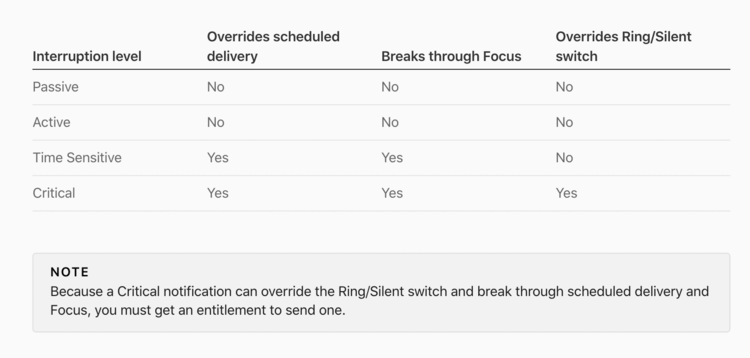
I remember at WWDC that Apple added a method for developers to classify types of notifications https://developer.apple.com/design/human-interface-guideline... I would think that if you disable the three notifications at the bottom and enable “time sensitive notifications”, if Uber is a well behaved app, it should only notify you for things that are time sensitive. I won’t know for sure for awhile. https://www.plotpro…
[1] https://www.plotprojects.com/wp-content/uploads/2021/10/inte...