My rule is: if I get a single notification that I find useless, I'll immediately disable that notification channel (I'm on Android; I'm not sure if iOS has a concept of channel-specific settings) for that app. Even if the channel can include useful notifications, as the article discusses. If the app doesn't bother to categorize its notifications into channels at all, I turn off its notifications entirely, and I won't…
> I'm on Android; I'm not sure if iOS has a concept of channel-specific settings Sadly iOS doesn't really have this in the same way :(
I only care about the helpful notifications, not the promotional ones
271–280 of 366 posts
Re: I only care about the helpful notifications, not the promotional ones
#272I have a somewhat similar gripe about apps, which has some recent implications: there seems to be some school of thought for engagement, which suggests that something that's not used at least weekly is useless. For this reason Google started automatically removing permissions from apps I didn't use for some time and it's also suggested I could delete them "to save space" which is frankly quite stupid -- I have quite…
Sadly, features aren't added to Android because they're good for users, they're added because they'll look good in someone's promotion packet.
Re: I only care about the helpful notifications, not the promotional ones
#273Asshole companies can still be useful. I use UberEats but have their notifications turned off.
I’ll also add that I’m amazed that after using an iPhone for 15 years, I’ve never gotten a spam push from Apple. And their temptation must be great.
Re: I only care about the helpful notifications, not the promotional ones
#274Earlier quoted context omitted.
That turns it off for the whole app, not only marketing stuff.
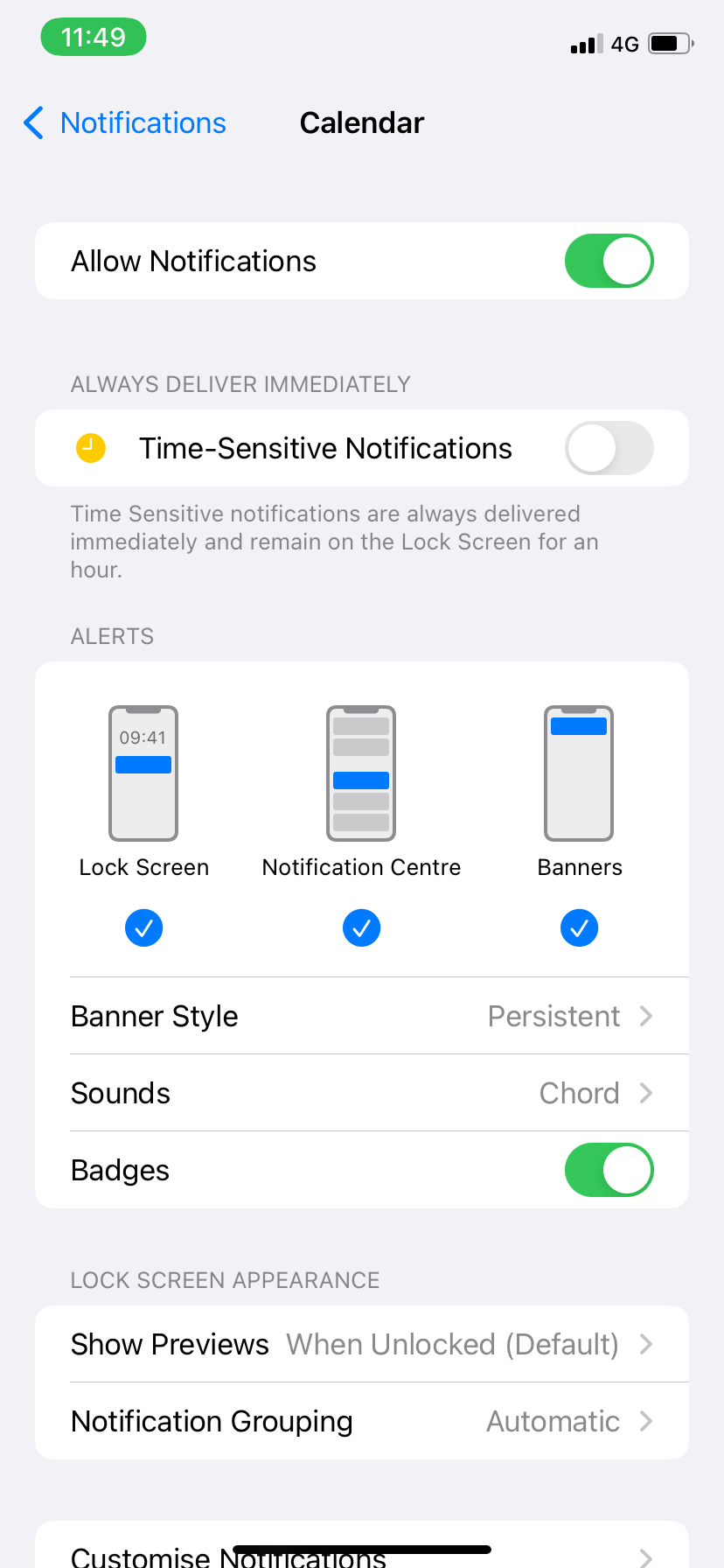
Settings -> notifications -> Uber. Turn off Lock Screen, Notifications, Banners. Leave on “Time Sensitive Notifications”
[1] random image result: https://static1.makeuseofimages.com/wordpress/wp-content/upl...?
Re: I only care about the helpful notifications, not the promotional ones
#275Earlier quoted context omitted.
Settings -> notifications -> Uber. Turn off Lock Screen, Notifications, Banners. Leave on “Time Sensitive Notifications”
That setting doesn't do what you think it does. As per the tooltip[1], all that does is cause notifications from uber to be delivered regardless of focus settings (eg. if you have work focus on and uber sends you a notification it will show up immediately rather than being hidden/delayed). You'll still get other notifications if you don't have focus on. [1] random image result: https://static1.makeuseofimages.com/wor…
https://developer.apple.com/design/human-interface-guideline...
I would think that if you disable the three notifications at the bottom and enable “time sensitive notifications”, if Uber is a well behaved app, it should only notify you for things that are time sensitive. I won’t know for sure for awhile.
https://www.plotprojects.com/blog/ios-15-push-notifications-...
> Apple has provided developers with the freedom to categorize the outgoing notifications from their apps, with guidance from a new notification classification scale. Developers can decide on the appropriate interruption level for their app notifications, however Apple has warned that users can completely turn off app notifications if they feel a high level of urgency is being used unnecessarily.
Re: I only care about the helpful notifications, not the promotional ones
#276Earlier quoted context omitted.
I'll hack site CSS to disable any nags. uBlock Origin's element remover is excellent for this, though I often go directly into CSS using Stylus, a CSS management extension for Firefox and other browsers. I also don't use any mainstream social media apps. Mastodon and Diaspora* limit notifications to other users' actions only.
Well, I have my browser (Vivaldi) set to automatically block desktop notification requests without even asking (the default is to ask) but as you point out many sites will also show an obnoxious banner and yes, uBlock is a good solution to that. I'm surprised EasyList lets so many of these through, so I built my own (very few rules for now): https://majid.info/adblock.txt
All desktop notifications are blocked.
Sites will still throw up their own notification icons --- for many that's a dark-patterns false icon (e.g., appears w/o any account). That and a whole host of other annoyances: chumboxes, overlays, interstitials, fixed headers /footers, social link-litter, "engagement" stats, newsletters & other registrations, nags, cookie banners, etc., etc.
The set of CSS hacks I'd created for Buzzfeed a few years back was pretty remarkable. Stripped of its cruft, the site was ... moderately tolerable. (It was, of course, still Buzzfeed...) I called it "unBuzzed".
Re: I only care about the helpful notifications, not the promotional ones
#277My rule is: if I get a single notification that I find useless, I'll immediately disable that notification channel (I'm on Android; I'm not sure if iOS has a concept of channel-specific settings) for that app. Even if the channel can include useful notifications, as the article discusses. If the app doesn't bother to categorize its notifications into channels at all, I turn off its notifications entirely, and I won't…
> My rule is: if I get a single notification that I find useless, I'll immediately disable that notification channel (I'm on Android; I'm not sure if iOS has a concept of channel-specific settings) for that app. Even if the channel can include useful notifications, as the article discusses. Well, the developers have started fighting against that by not splitting notifications into channels anymore. Now you just get "…
Re: I only care about the helpful notifications, not the promotional ones
#278My rule is: if I get a single notification that I find useless, I'll immediately disable that notification channel (I'm on Android; I'm not sure if iOS has a concept of channel-specific settings) for that app. Even if the channel can include useful notifications, as the article discusses. If the app doesn't bother to categorize its notifications into channels at all, I turn off its notifications entirely, and I won't…
> My rule is: if I get a single notification that I find useless, I'll immediately disable that notification channel (I'm on Android; I'm not sure if iOS has a concept of channel-specific settings) for that app. Even if the channel can include useful notifications, as the article discusses. Well, the developers have started fighting against that by not splitting notifications into channels anymore. Now you just get "…
Re: I only care about the helpful notifications, not the promotional ones
#279Earlier quoted context omitted.
I follow the same rule. But I will also then go one star review it. I will also one-star review any app that prompts me to review it by first asking me if I like it (sneaky sneaky!)
Lol I do this too. If I see an "are you enjoying our app" banner I will immediately click yes, follow the link to the store, and then immediately 1 star. Even if I enjoy the app and use it daily. Companies that attempt to filter out negative feedback can pound sand.
Re: I only care about the helpful notifications, not the promotional ones
#280I've noticed this in social networks as well. If you don't get enough transactional notifications for a while they start making up fake ones like Twitter's "in case you missed this Tweet", Facebook's "[someone] posted for the first time in a while", all the while lighting up the notifications badge. Leads to a "boy who cried wolf" scenario in which I stop trusting notifications entirely and just ignore them, possibly…
Linkedin is just the worst company ever doing stuff like that, I try to disable all their notifications and almost never engage with anything there (and I check the platform maybe 3-4 times a year max), and they continue to try to tell me some people more or less in my network are doing things I never cared about. God I hate this company.