Live data from Hacker News

The benefits of “low tech” user interfaces

uxdesign.cc

241–250 of 410 posts

Re: The benefits of “low tech” user interfaces

#241

Earlier quoted context omitted.

I still daily drive a Classic 900 (1987) and not only is everything a real button or knob, but it's all controlled by vacuum, not electronics. It's fun to hear the hisses when you change the vent settings.

Re: vent I still think the HVAC vent knob on my Saab was the most innovate knob I've ever seen and nothing compares today. It allowed you to redirect the air in a fluid full 360 degree (semi-circular) position seamlessly. All other cars it's 2 separate horizontal and vertical controls.

Yes, it goes from "0" at the bottom to defrost at the top and every step in between makes perfect sense. Just twist the knob and it works. No thinking.

Re: The benefits of “low tech” user interfaces

#242

To anyone designing low-tech user interfaces: I'm all for something simple but please, oh please, use something with a better feedback than the membrane "keyboard" shown in the article. Membrane keys are the absolute shittiest piece of shit ever produced. I use three everyday: my safe has one. My projector's remote control and my LED strip light (I use a LED strip to give a "home cinema" feel to the room) has one. Th…

> On the projector there's a delay between any press and the projector giving you any feedback, so you don't know if a press registered or not.

This a related issue with slow response times of modern UIs. I spent a decent chunk of my career replacing AS-400 systems with ones accessed through the browser. Those AS-400 systems were often hosted in the building and were written to run on servers from the 80s or earlier. With modern hardware they rendered screens within single digit ms and I think the emulator did some input queueing.

Users would know that to, as an example, change someone's address they'd have to hit 7, 3, enter, 3, tab, tab and start typing. With a browser interface they couldn't do that because the latency was unpredictable and the page might not be ready for their input. Usually we ended up slowing the users down significantly.

Re: The benefits of “low tech” user interfaces

#243
post #5

Modern cars seem to be moving towards all controls on a touch screen somewhere. I suppose this allows for more frequent updates, but in my experience it just leads to more bugs and more painful factory updates. Not to mention using a touchscreen to adjust the temperature while driving is incredibly dangerous compared to a dial you can feel for without taking your eyes off the road.

> using a touchscreen to adjust the temperature while driving I've read this argument again and again but I wonder: How often do you people change the temperature in your car? Mine is set to 21°C since two years, never felt the need to change it.

Multiple times a year, mostly in late spring and autumn, and that's infrequent compared to some people I know.

People use cars differently. Your experience may not be universal just because it is consistent. Besides individual variation people also differ in whether and how many passengers they regularly transport and how many drivers share the car (e.g. my wife and I share one car and often drive together).

Re: The benefits of “low tech” user interfaces

#244
post #61

Earlier quoted context omitted.

Commercial heavy-duty microwaves and the cheapest plastic microwaves share the same interface: two dials. One is time, the other is power cycle. Sometimes it's just one dial for time.

> two dials. One is time, the other is power cycle This is the ideal design and no one can convince me otherwise. Same thing goes for ovens. All I care about is "how hot do I cook/bake this?" and "For how long?" Two dials is perfect.

Personally I really like the sensor modes of my microwave. For most of my leftovers, I can toss the plate/bowl in the microwave, hit REHEAT, and it figures it out. If it thinks I need to stir/rotate, it'll beep at me to do so while its cooking. Seems a lot simpler as a user than thinking about how long to cook it, what power level, etc.

Re: The benefits of “low tech” user interfaces

#245
post #184
post #169

Earlier quoted context omitted.

I think that's true only as long as the only electric cars you have driven are Teslas. The BMW i3 has pretty much resisted this tendency. Ok, it's already a pretty old design at this point and getting phased out, but it has lots of physical buttons (even for the seat warmer!). And I don't think electric cars that are variants of existing petrol cars (which are more and more common) will eliminate the physical control…

Made me check that one out, it's actually not an insane price, it competes with most new normal-person petrol cars... I mean I still wouldn't buy one new, and that's still a bit of a dodgy range, but maybe in ten years there will finally be an affordable 2nd hand market and some infra to make it reliable. In the mean time I will continue to run my petrol car into the ground like a good holistic environmentalist.

Would anyone trust a 2nd hand market for an EV when the battery is basically guaranteed to be dead long before more affordable ICE vehicles?

Re: The benefits of “low tech” user interfaces

#246
post #11

Earlier quoted context omitted.

I really wonder if the possibility of updates alone can make software worse. Because you don't have to "get it right" on the first try. And the updates always contain something more than bug and security fixes, which often help keeping the quality of the experience low, despite fixed bugs. All the smart TVs I ever had lasted a long long time physically, but after a couple years they invariably started being noticeabl…

> I really wonder if the possibility of updates alone can make software worse. Absolutely does. You see this in console video games. As soon as online updates became possible, game-breaking bugs at launch became practically the norm, instead of incredibly rare ( minor bugs were common enough before ["I AM ERROR"], sure, but game-breaking ones, while not unheard of, were rare). Charging $60 for a late-alpha-quality pr…

I agree with what you are saying, except that "I AM ERROR" isn't actually a bug. The character is intentionally named that in Zelda II, even in the original Japanese.

Re: The benefits of “low tech” user interfaces

#247
post #5

Modern cars seem to be moving towards all controls on a touch screen somewhere. I suppose this allows for more frequent updates, but in my experience it just leads to more bugs and more painful factory updates. Not to mention using a touchscreen to adjust the temperature while driving is incredibly dangerous compared to a dial you can feel for without taking your eyes off the road.

>Not to mention using a touchscreen to adjust the temperature while driving is incredibly dangerous compared to a dial you can feel for without taking your eyes off the road. I understand this concern and opinion. I just wish that people who had this opinion realized that their car has a very modern voice interface that can reliably understand commands for temperature changes. I know, I know, it's not the buttons you…

> voice interface that can reliably understand commands for temperature changes.

Unless... - The radio is playing. - The windows are open. - You're driving in heavy wind/rain/hail pelting the car or other driving conditions making an awful racket. - You don't drive a super expensive car, but one designed by marketing, bean counters, and summer interns. - Other people in the car are talking/conversing. - Other people in the car are sleeping (long road trips aren't uncommon for many). - You have an accent. - You don't speak a language supported by the car maker. - You have a speech impediment. - You have a physical disability preventing clear or any speech. - A software update breaks the system.

So what exactly is the benefit of moving to touch screens / voice control? I'm pretty sure physical buttons and dials don't suffer from any of those problems except for maybe physical disabilities, but at least with physical buttons/switches/dials, you or a third party could modify and/or tie into them to suit the specific needs of the disabled driver. Good luck getting the auto makers to let you modify their software for a similar purpose. I just don't see the point in moving from something that works well in the vast majority of scenarios to something that works measurably less well, with virtual no real benefit. Fine if voice control is in addition to physical, tactile interfaces, but the trend toward replacement doesn't fill me joy.

Re: The benefits of “low tech” user interfaces

#248
post #95
post #75

Earlier quoted context omitted.

I think Honda have returned to at least partial physical controls for heating, air, and music for the Honda e. But it still has a lot of screen.

Backup cameras are legally mandated on new us vehicles. The screens are not going anywhere so they're going to get used for other stuff too.

My backup camera screen is embedded in my reear view mirror. You wouldn't know when it's not on. Sure, it's small, but sufficient, considering it's not a replacement for mirrors and area awareness.

Re: The benefits of “low tech” user interfaces

#249
The comment about the marketing person saying users would feel like the lower-tech UX was archaic was interesting because of the insight it implied.

The value a product expresses really is the product. The user has to feel something about it. A medical device in a hospital setting used by nurses on patients needs to express professional sophistication to the patient and reliability to the RN. The simple LCD display makes sense for expressing something purpose-built, e.g. for a doctor doing a test, but for the RN, who does most of the care and patient interaction, things like rapport, trust, and familiarity go a lot further, hence asking for a touch screen.

Once as a PM on a security product, I entered into the UX development with the perspective of producing a consumer product that just told you the thing you needed to know, believing that the value we were providing was from our ML analytics back end we had invested so much in. What came back from enterprise sales was, "we want more widgets on the screen, can you just make it look like it's doing something?" My reaction was, "find smarter customers," which of course was the the most uniquely and profoundly wrong response in almost every way at once. After going out on some sales calls, what customers wanted was our data. They didn't care about our huge ML pipeline with a calm and decisive consumer oriented UX, because in their environment, having smooth products was not what made them express power to their own stakeholders - they expressed their own value by showing whizzing screens of data. What they really wanted in hindsight was a private telemetry and surveillance API for fleet devices, like a more featureful MDM, but scriptable so they could demonstrate their own value - and not an ML model that did that for them. A low tech command line or API was the real product they wanted. Customers who did like it were enterprise managers who wanted to show they were hip to silicon valley driven tech change.

I'd wonder if we could make a radial web chart of the values a customer really has and the result would indicate the design language elements the UX of a product should have. You'd have to figure out what things like "powerful" mean to your customers, and what would equip them to become that through using your product. Other sub values are things like authoritative, safe, precision, virtuotic, calm, belonging, competent, inventive, hidden depth, compliant and aligned, elevated, the exception, etc. Based on these, I'd design a product UX around a stack ranked set of values like these.

Makes me think there is a future in new kinds of input devices though.

Re: The benefits of “low tech” user interfaces

#250
post #22

Earlier quoted context omitted.

The touch screens are the only thing keeping me on dino juice cars. I want to go electric, but they all have these awful touchscreens! I don’t want to navigate a menu to change the temperature or turn on a seat warmer. I’m just not buying an EV until there’s one that doesn’t rely on a giant touch screen for everything or I can’t buy an ICE vehicle anymore.

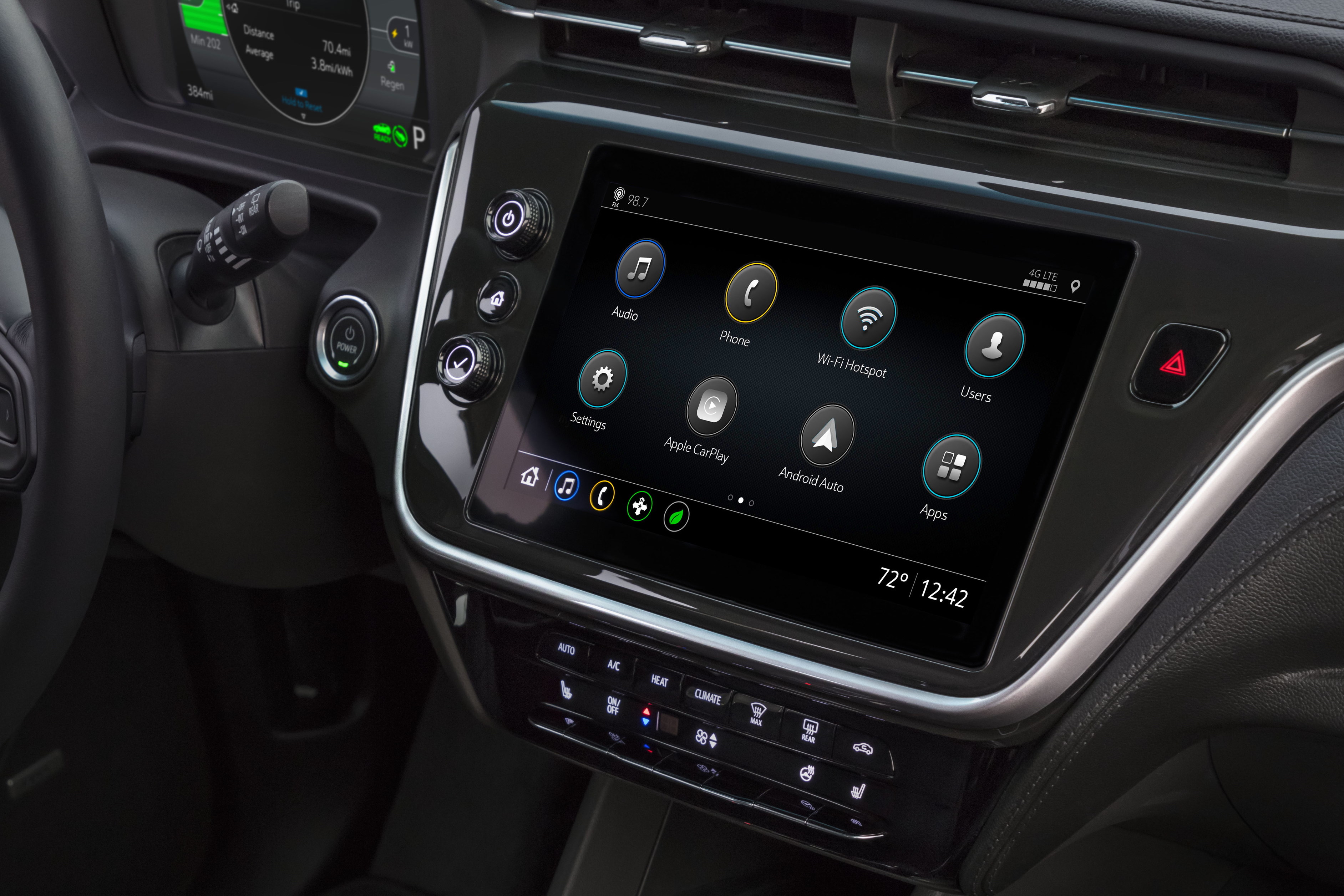
My chevy bolt is a nice mix I find. It has physical buttons for: climate controls, cruise control, media volume, media channel, lane keep assist, sport mode, gear selection, park brake. There are also voice commands, which I use for selecting navigation destinations. Touchscreen for other things: android auto, apple car play (which provide maps) and more complicated user settings (such as whether you want the lights…

I fully agree, the 2019-2021 Bolt [1] has been my gold standard for the right combo of touch and tactile. Climate and radio preset buttons fully separate and easy to see/touch.

It's a shame they went more "slick" with the 2022 refresh, still tactile, but just more flush and less accessible without a glance. [2]

[1] https://cdn.motor1.com/images/mgl/OYAqe/s1/2020-chevy-bolt-e...

[2] https://electrek.co/wp-content/uploads/sites/3/2021/02/2022-...

Post reply on HN