Thanks. Nit-picking here but ground is usually abbreviated GND, not GRD.
USB Cheat Sheet
151–160 of 174 posts
Re: USB Cheat Sheet
#152Earlier quoted context omitted.
There already exists some fiber-optic USB cables that come in lengths >50m and with support for USB 3.1 so it doesn't seem like a very unrealistic option.
That sounds more like fiber optic adapters/converters that fit into usb-ports and talk usb, rather than USB-cables that can be 50+ meters.
https://www.amazon.com/FIBBR-Female-Active-Extension-Optical... provides USB-to-fibre-to-USB in a single cable, and a copper pair in parallel for power.
Re: USB Cheat Sheet
#153Fun fact: USB 2.0 webcams have been existing for over 10 years. USB 2.0 is 60 MB/s. A pixel of an image is 3 Bytes. A 1920x1080 FullHD image is 6.2 MB. At 30 frames per second, second of a FullHD video is 186 MB. How did they do that? Answer: frames are transferred as JPEG files. Even a cheap $15 webcam is a tiny computer (with a CPU, RAM, etc), which runs a JPEG encoder program.
Most webcams, especially 10 years ago are not 1080p, or even 60fps. Many aren't even 720p. 1280 x 720 x 3 bytes x 30 fps = ~80MB/second. 480p @ 30 fps = 26MB. That is how many webcams can get by without hardware JPEG/H264 encoding.
4K @ 60fps = 1.4GB/sec. USB 3, even with 2 lanes, will have trouble with that.
Re: USB Cheat Sheet
#154Earlier quoted context omitted.
3m is beyond the max cable length specified by Thunderbolt, so it requires active extenders (they're hidden in the plugs) and tight manufacturing and shielding. You're paying extra for the ability to break that max length spec, and it's one of only a handful of products that do it. The only other one I'm aware of is the Corning Active Optical Cable series which costs $360 for a 10m Thunderbolt 3 cable or $479 for a 3…
> 3m is beyond the max cable length specified by Thunderbolt, so it requires active extenders (they're hidden in the plugs) and tight manufacturing and shielding. You're paying extra for the ability to break that max length spec, and it's one of only a handful of products that do it. I'm pretty sure it's not breaking the spec. Are you sure about that claim? And the main factor is almost always decibels of signal loss…
> I'm pretty sure it's not breaking the spec. Are you sure about that claim?
Actually we're both wrong... it appears max length for a passive cable is 18 inches for full performance. Passive cables technically max out at 18 inches for 40gbps and drop to 20gbps at 2 meters. Past that you need an active cable (which has signal repeaters).
Active cables generally run up to 2 meters (the Apple is the first 3m active cable except for the Corning AOC cables), but in most cases (everyone except apple) you start dropping features like USB 3.1 or displayport. AFAIK Apple's solutions are unique in that they don't - like for example I looked up a 2 meter Belkin cable advertised as TB3 and it doesn't carry the DisplayPort channel.
Which is why the advice for Thunderbolt is "just shut up and pay apple their money".
https://appleinsider.com/articles/17/08/15/psa-thunderbolt-3...
Not absolutely positive what the official standard is - they might well only say the passive number (ie 18 inches) because active can obviously be more or less arbitrarily long with things like fiber, it might not make sense to define a maximum cable length in that context. Or they might amend it as they go... obviously Apple has now broken the 2 meter barrier with their active copper cable.
I thiiiiink this becomes 0.8m for a passive cable in USB4/TB4 as the official passive spec? CableMatters seems to have a 2 meter active cable out though.
> I don't think any of the high speed wires are ever half duplex?
High-speed is half-duplex, yeah. It looks like SuperSpeed is full-duplex though so I'm wrong on that bit.
I just remember it being a nightmare trying to use USB external hard drives (which would have been back in the USB 2.0/High-speed era when I used them last!) and reading/writing at the same time tanked performance far beyond what you'd get with even an internal HDD. Read or write, one at a time, mixing both was a trip to hell.
Re: USB Cheat Sheet
#155Earlier quoted context omitted.
> 3m is beyond the max cable length specified by Thunderbolt, so it requires active extenders (they're hidden in the plugs) and tight manufacturing and shielding. You're paying extra for the ability to break that max length spec, and it's one of only a handful of products that do it. I'm pretty sure it's not breaking the spec. Are you sure about that claim? And the main factor is almost always decibels of signal loss…
> I'm pretty sure it's not breaking the spec. Are you sure about that claim? Actually we're both wrong... it appears max length for a passive cable is 18 inches for full performance. Passive cables technically max out at 18 inches for 40gbps and drop to 20gbps at 2 meters. Past that you need an active cable (which has signal repeaters). Active cables generally run up to 2 meters (the Apple is the first 3m active cabl…
> Actually we're both wrong... it appears max length for a passive cable is 18 inches for full performance. Passive cables technically max out at 18 inches for 40gbps and drop to 20gbps at 2 meters. Past that you need an active cable (which has signal repeaters).
I'm still pretty sure it's based on signal loss, and the lengths are just estimates of what you can reliably get out of a cost-optimized manufacturing process.
> High-speed is half-duplex, yeah. It looks like SuperSpeed is full-duplex though so I'm wrong on that bit.
By "the high speed wires" I mean the pairs introduced with USB 3. Not USB's dumb naming conventions.
> I just remember it being a nightmare trying to use USB external hard drives (which would have been back in the USB 2.0/High-speed era when I used them last!) and reading/writing at the same time tanked performance far beyond what you'd get with even an internal HDD. Read or write, one at a time, mixing both was a trip to hell.
I think a big part of that is also the mass storage protocol combined with slow responses off a hard drive. I have a USB 2.0 SSD-class drive around here and it actually performs pretty well even on mixed workloads.
Re: USB Cheat Sheet
#156Earlier quoted context omitted.
AFAIK, according to the standard you still cannot use the B port as a host, it should instead be an AB port (a socket in which both A and B plugs fit).
I had an iRiver H320 with USB-OTG support. At the time I thought it was just a straight-up mini-B port but you're right, that's actually a mini-AB port! https://www.guru3d.com/miraserver/images/reviews/soundcards/... I am not sure I have ever seen mini-A anywhere. God, what a wacky standard. (USB-OTG specifically but really USB plugs in general)
Another example of mini-AB is the TI-84 series. Two calculators can be directly connected but a USB A-A cable is verboten by the spec (although I sometimes see them nonetheless), so TI put an AB port on the calculator and sold a mini-A to mini-B cable. It is somewhat confusing to users that a cable with two different ends was nonetheless completely transposable.
I'm not sure of this at all but I sort of doubt the TI-84 used spec compliant OTG, because in general the USB implementation on that calculator was very weird and unreliable and gave the feeling that they were doing something uncouth like bit-banging and not quite fast enough. I remember it routinely taking multiple attempts to get something to transfer successfully.
Re: USB Cheat Sheet
#157Earlier quoted context omitted.
You're talking about processed color frames. The GP was suggesting that the camera stream the raw sensor data, which doesn't have individual color channels, just a monochrome grid with 10 or 12 bits of usable data per pixel. A bayer filter[0] is placed in front of the sensor so that a given color of light falls on each cell. The USB host would be responsible for applying a demosaicing[0] algorithm to create the color…
> it has a native resolution of 2304H x 1296V Seems to me like that kills the idea dead? GGP assumed 8bpp and that the raw resolution matched the output, and came out... well wrong (the effective bulk transfer rate of USB 2.0 is 53MB/s on a good day), but by just a few megs. However the raw resolution is 40% higher than the final output, meaning even at 8bpp you're at 85MB/s and you've blown way past any hope of reco…
Native resolution at 10bpp requires 40% less data per frame than the final Full HD RGB output at 8bpp per channel (24bpp total), so it would represent some savings.
The problem is that neither format fits within the limits of USB 2.0 at 15 FPS or higher. To achieve a reasonable framerate you need to apply compression, and generally speaking you'll get better compression if you demosaic first.
Re: USB Cheat Sheet
#158Earlier quoted context omitted.
My older Logitech C920 has an on-board H.264 encoder. Newer revisions of the same model does not. I haven't figured out why they chose to remove it, but your point about licensing cost combined with them not advertising it much as a feature, and most of their competitors not including "proper" video encoding might explain it. Edit: Found an official explanation here: https://www.logitech.com/en-us/video-collaboration…
Unfortunately, this makes it much harder to use these as webcams on a Raspberry Pi (which even has H.264 hardware acceleration – the bottleneck is decoding the MJPEG stream from the camera, for which ffmpeg does not have hardware acceleration on the RPi).
As an alternative to ffmpeg, GStreamer provides hardware accelerated MJPEG decoding on the Pi. I think there are bugs, though, which makes it unsuitable for some use cases. Here's an example pipeline - https://forums.raspberrypi.com/viewtopic.php?p=1989575#p1989...
Re: USB Cheat Sheet
#159So on the next versions of USB, the cable length will get shorter and shorter until the max gets to 5cm? While I get the technical reasoning about high frequency/attenuation etc that limits cable length as speeds go higher, there are obviously some practical limits to how short cables can be. How would that be solved, I don't know.
Keep the same speeds, add more wires.
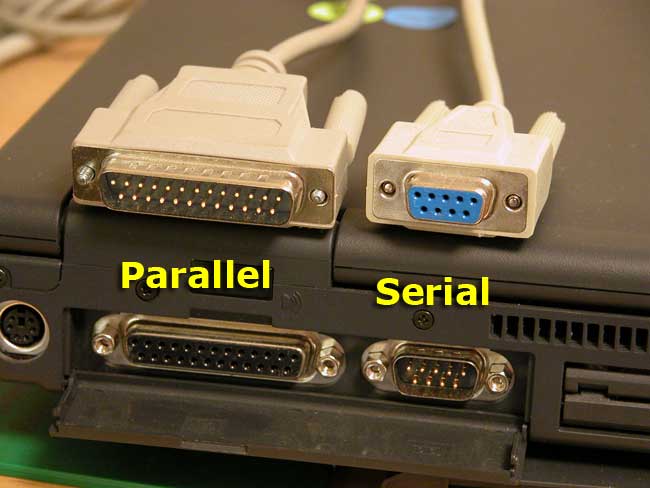
Printers hate this trick
Re: USB Cheat Sheet
#160Earlier quoted context omitted.
That sounds more like fiber optic adapters/converters that fit into usb-ports and talk usb, rather than USB-cables that can be 50+ meters.
https://www.amazon.com/FIBBR-Female-Active-Extension-Optical... provides USB-to-fibre-to-USB in a single cable, and a copper pair in parallel for power.
$169+47 shipping for those curious
Can't say it's not unique and cool, to be fair