Live data from Hacker News

Moving a macOS window by clicking anywhere on it

mmazzarolo.com

161–170 of 314 posts

Re: Moving a macOS window by clicking anywhere on it

#161

Earlier quoted context omitted.

Because those like me who don't install any of those apps don't have anything to share on HN. Showing that you have a nearly default desktop isn't interesting except when people are claiming that no one does that.

I completely agree. I have used macOS since 2007 and the only thing I have really used as an extension is Alfred in place of Spotlight (although nowadays I am just using Spotlight). I am very happy with the UI as it is (on Linux I used everything from WindowMaker, KDE, GNOME, to tiling window managers). Also I have many friends and family members who use macOS and I think none of them have third-party programs instal…

https://www.rectangleapp.com and https://www.raycast.com/ are game changers. They are the only two apps I use which change/improve macOS’ behaviour, I can’t live without them.

And Raycast actually has the Rectangle functionality built in, although I prefer the separate app, there are some ‘defaults write’ values I can change on the command line that I like (to give me a wider bottom margin on my screen - I stick Silicio in the corner of my screen for instance.)

Give them both a go.
Re: Moving a macOS window by clicking anywhere on it

#162
post #158

Something I use all the time to handle applications which might have multiple instances opened at once. For example, web browsers. Press CMD-TAB to bring up the list of opened applications and then pressing UP or DOWN over a selected application to show the opened instances. After that use LEFT or RIGHT to select the instance you want to show.

You can also use cmd-` (the `/~ button between shift and z on my keyboard, left of 1 on others) to switch between windows of the currently activated application.

Re: Moving a macOS window by clicking anywhere on it

#163
post #152

Earlier quoted context omitted.

Which is pretty ironic when the scroll bars are so elusive when you actually want to drag them

I haven't dragged a scroll bar in any OS since windows XP. When do you find it's necessary/convenient?

It can still be a lot more efficient to grab the scrollbar to jump to a section of a large document. For example, you can instantly get to say 3/4 of the way through by moving the scroll bar a very short distance, which when done with the scroll wheel or trackpad gestures could take a very long time.

The scroll bar is also sometimes a nice visual cue to the size of a document you've just opened for the first time, again something the wheel/gestures don't necessarily inform.

I have permanent scroll bars enabled in macOS too.

Re: Moving a macOS window by clicking anywhere on it

#164
post #149

Earlier quoted context omitted.

> If you need any proof of this, just click the little green dot in the upper left of an open window… It goes full-screen - isn't that an expected outcome?

"It goes full-screen - isn't that an expected outcome?" Not exactly ... First of all, for most of the life of OSX, clicking the green dot caused the window to resize larger, but not occupy full screen, by some measure I could never discern. That was always braindead. Second of all, while the current behavior that I see (expand to literally full screen) is sort of an improvement (that is, at least it makes some sense)…

>it's still badly behaved because bringing a window to literally full screen blanks out my other monitors

Really? That's not what it does for me. Right at this very moment I have a full screen app running on my MacBook Pro screen and a desktop on my monitor. Do you have "Displays have separate Spaces" turned off in Mission Control preferences?

I rather disbelieve in the idea that these things have "correct" semantics; only "what I am used to". At this point, I'm very used to the way macOS works and I find it considerably more pleasant than other windowing environments. Being able to full screen an app and then multi-swipe left or right between spaces or up for App Exposé is natural to me.

I've no doubt I could unlearn this and learn something else though.

Re: Moving a macOS window by clicking anywhere on it

#165
post #97
post #84

Earlier quoted context omitted.

Have you ever noticed that you can't cut and paste files with right click or the drop down menu in OSX? It's been a few years since I've used OSX, but every version I've ever tried has this intentional bug. I say intentional because when I first got a mac in the 10.4 days I noticed that 'cut' was greyed out in the menu so I thoughtfully filed a bug report. To their credit they did answer the bug report several years…

I think this may be a misunderstanding on your part (no disrespect). Cut/paste works slightly differently on macOS compared to Windows. There's no actual concept of "cut". You just "copy" whatever files you want. When you're ready to paste, you can hit Cmd+V to "paste" or Cmd+alt+V to "paste and remove the original file(s)". The benefit is that you don't have to decide whether you want to just "copy" or "cut" before…

Now how do I do this with a mouse? (I already know the answer, but I'm curious if you do. It isn't very discoverable.)

Re: Moving a macOS window by clicking anywhere on it

#166

I use https://rectangleapp.com/pro and really enjoy this app (I paid for it, it gets a lot of updates/fixes). It mostly takes care of snapping and resizing windows with hot keys, but has a less obvious feature in preferences to use mouse. My setup is: CMD+SHIFT will move any window under mouse pointer CMD+SHIFT+CTRL will resize any window under mouse pointer

I'll throw another option: https://magnet.crowdcafe.com/index.html

I bought it in '17 for $1 - possibly the best dollar I've spent. Looks like it's $4 now. Coupled with a QMK keyboard, the modifiers are even easier to use.

Re: Moving a macOS window by clicking anywhere on it

#168

Another question - I've looked before for any documentation on building tools for Mac, and can't really figure out anything besides "run this xyz app to trigger an AppleScript and do magic". Does anyone know of any Swift APIs for interacting at the level of the OS itself?

Would Hammerspoon fit your use case? It lets you write lua to interact with all kinds of system APIs. It's roughly the first thing I install on a new mac.

Re: Moving a macOS window by clicking anywhere on it

#169
post #147

Earlier quoted context omitted.

That Wi-Fi button truck also works with the volume and Bluetooth buttons. You can also quickly toggle focus mode by option clicking on the time (or the Notification Center button)

Meanwhile on Windows, the same functionality for choosing which output you want to use is accessible by just clicking the dang volume icon Why does MacOS hide such a useful feature behind an obscure trick?

It’s also a normal click in macOS to change the output device. Option + Click is only needed when you want to change the input device without changing the output device

Re: Moving a macOS window by clicking anywhere on it

#170
post #146

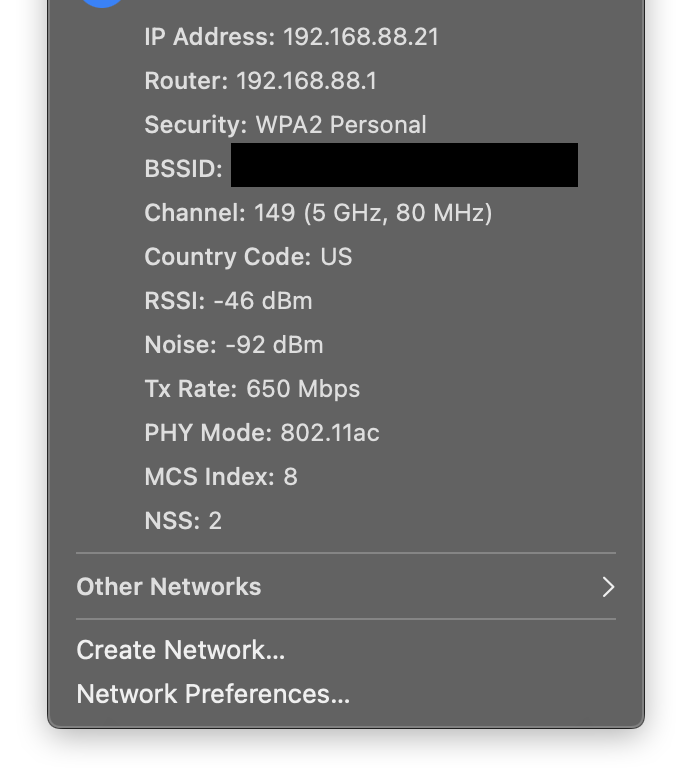
MacOS is full of these UI "tricks" that remain undiscovered by 99% of users because they are: - not obvious - not discoverable For example: if you hold option when you click the Wifi button, you actually can view a lot of information about the Wifi networks you are connecting to. This is invaluable when you're dealing with a Wifi issue, and completely undiscoverable! I think MacOS is a perfectly usable operating syst…

> full of these UI "tricks" that remain undiscovered by 99% of users

What percentage of users can actually make useful decisions based on the advanced WiFi info? Here's a screenshot for example: https://dl.dropboxusercontent.com/s/227iup97ivdaurw/Screen%2...

I suspect it's around 1%, and most of those 1% already know about the hold option trick (which works on many menus). I agree with you it's frustrating how this useful information is obscured, but I also think this is a reasonable compromise for Apple as they try to balance power with usability and simplicity for the sake of the non-technical majority.

Post reply on HN