Live data from Hacker News

USB Cheat Sheet

fabiensanglard.net

101–110 of 174 posts

Re: USB Cheat Sheet

#101

Earlier quoted context omitted.

FWIW, Monoprice's 1m USB4/TB4 cable (100W) is $25. https://www.monoprice.com/product?p_id=41946

Apple's cable is 3m, which is likely most of why it's more expensive. https://www.apple.com/shop/product/MWP02AM/A/thunderbolt-4-p...

Their 1.8m cable is $129, so still >2x the price of competitors. It’s an extremely well made cable, but overkill, probably?

Re: USB Cheat Sheet

#102

So where exactly does USB-C fall into? I have 2 different generations of USB-C hosts, and they behave quite differently when approaching max cap, especially with high-quality low-latency audio (USB-C was supposed to be de-facto replacement for FireWire).

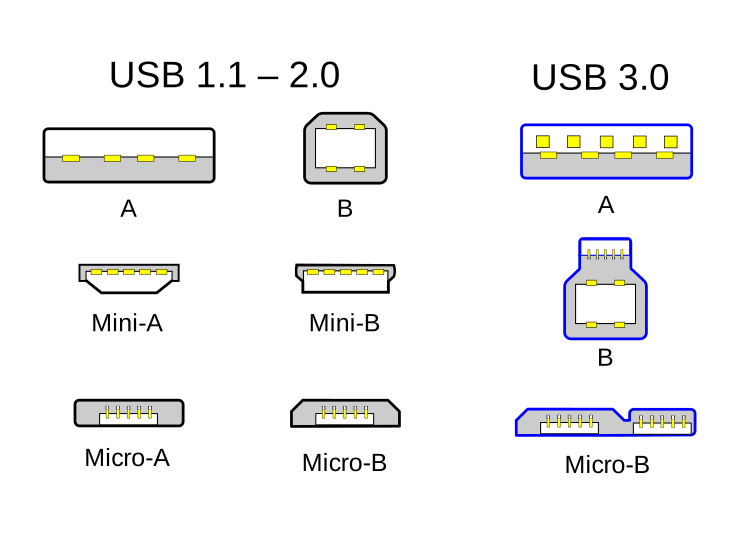
USB-C is a connector type, like USB-A (usually known as the classic USB plug) and USB-B (usually the other side of said plug, a square kind of connector). USB-B had other offspring like miniUSB and microUSB (note that in these cases on the other side of the cable you usually have a USB-A plug). USB-C is the first time cables have the same connector on both sides, so it obsoletes USB-A and USB-B. But what is sent over…

>note that in these cases on the other side of the cable you usually have a USB-A plug

Usually a full-size USB-A, you mean, because what we commonly know as mini-USB and micro-USB are actually mini-B and micro-B, which have corresponding (but now rarely used) micro-A and micro-A ports. Before USB-OTG, USB used to be an explicitly directional protocol, with a master and a slave device.

https://upload.wikimedia.org/wikipedia/commons/8/82/USB_2.0_...

https://en.wikipedia.org/wiki/USB_hardware

Re: USB Cheat Sheet

#103
post #37

Earlier quoted context omitted.

Of course USB-C makes this worse, but the problem already started earlier: a few years ago I connected my phone to my computer with a USB-A to micro USB cable and was scratching my head why it didn't work. Then I remembered that the cable had come with some Bluetooth headphones and was only a charging cable without data lines...

Desktop speakers do this still. Instead of simply being a USB speaker set, they use the line out jack for audio and a USB plug for power.

There's actually a reason for that. Standard USB can (obviously) only transfer digital audio, and most speakers are "dumb" devices designed to just amplify an analog signal. In order to convert digital to analog, you need a DAC (Digital-to-Analog-Converter), and good DACs are still a nontrivial cost to a manufacturer, so whatever DAC you already have in your computer is probably better than the crappy one that would come with cheap consumer speakers.

Re: USB Cheat Sheet

#104

Fun fact: USB 2.0 webcams have been existing for over 10 years. USB 2.0 is 60 MB/s. A pixel of an image is 3 Bytes. A 1920x1080 FullHD image is 6.2 MB. At 30 frames per second, second of a FullHD video is 186 MB. How did they do that? Answer: frames are transferred as JPEG files. Even a cheap $15 webcam is a tiny computer (with a CPU, RAM, etc), which runs a JPEG encoder program.

It needs a uC with some special hardware anyways to do demosaic or else it would require special drivers that would peg some people's crappy laptop CPUs.

Also the raw YUV 4:2:0 is 1.5 bytes per pixel so that's doing half of the "compression" work for you.

Re: USB Cheat Sheet

#105
post #87

Fun fact: USB 2.0 webcams have been existing for over 10 years. USB 2.0 is 60 MB/s. A pixel of an image is 3 Bytes. A 1920x1080 FullHD image is 6.2 MB. At 30 frames per second, second of a FullHD video is 186 MB. How did they do that? Answer: frames are transferred as JPEG files. Even a cheap $15 webcam is a tiny computer (with a CPU, RAM, etc), which runs a JPEG encoder program.

Hm. But then wouldn't it make more sense to just stream the raw sensor data, which is 1 byte per pixel (or up to 12 bits if you want to get fancy), and then demosaic it on the host? Full HD at 30 fps would be 59.33 MB/s, barely but still fitting into that limit. But then also I think some webcams use H264? I remember reading that somewhere.

It would need a funny driver and since that stuff is big parallel image processing it's easy in HW but if someone has a netbook or cheap/old Celeron crap it would peg their CPU to do the demosaic and color correction.

Re: USB Cheat Sheet

#106

Earlier quoted context omitted.

USB-C is a connector type, like USB-A (usually known as the classic USB plug) and USB-B (usually the other side of said plug, a square kind of connector). USB-B had other offspring like miniUSB and microUSB (note that in these cases on the other side of the cable you usually have a USB-A plug). USB-C is the first time cables have the same connector on both sides, so it obsoletes USB-A and USB-B. But what is sent over…

Can be USB 3 [...] USB 2, so it is a bit hard to tell. ...or Thunderbolt, USB 4, DisplayPort (through Alt-mode or encapsulated in Thunderbolt), or HDMI (Alt-mode), or MHL (Alt-mode), USB Power Delivery... Unfortunately, not every cable with USB-C connectors can carry all of these. E.g. there are USB-C cables that can only carry USB 2. Or cables that can carry USB 3, but not Thunderbolt. Also, not all cables can carry…

Worse, there are no "best" cables longer than 0.5m: any longer than that, Thunderbolt 3 requires active cables which don't pass non-Thunderbolt data beyond, IIRC, 480 Mbps.

As someone who spent many years using a mix of 25/50/68/80-pin fast/ultra/… single-ended, LVD and HVD parallel SCSI devices, however, USB-C/Thunderbolt cabling still feels like a breath of fresh air.

Re: USB Cheat Sheet

#107

Earlier quoted context omitted.

No, some of your rates are wrong. The so-called 5 Gb/s USB has a data rate of 4 Gb/s. The marketing data rates for Ethernet are true, i.e. 1 Gb/s Ethernet has a 1 Gb/s data rate, but a 1.25 Gb/s encoded bit rate over the cable. The marketing data rates for the first 2 generations of PCIe, for all 3 generations of SATA, and for USB 3.0 a.k.a. "Gen 1" of later standards, are false, being advertised as larger with 25% (…

Is that the same intel that “forgot” to mention that they overclocked a demo cpu and used ndustrial water chiller?

My favorite is when Intel demoed the new ivybridge iGPU by having a guy fire up VLC player to play some footage of a racing game while he pretended to control it with a steering wheel controller.

I looked this up and it's actually even worse than than I thought. When called out he claimed it was being control from backstage.

https://www.techpowerup.com/158448/that-dodgy-intel-ivy-brid...

Re: USB Cheat Sheet

#108
post #31

Earlier quoted context omitted.

There already exists some fiber-optic USB cables that come in lengths >50m and with support for USB 3.1 so it doesn't seem like a very unrealistic option.

That sounds more like fiber optic adapters/converters that fit into usb-ports and talk usb, rather than USB-cables that can be 50+ meters.

Some USB4 / Thunderbolt cables are like that, but with copper in the middle. The drivers on the device end wouldn't be able to maintain signal integrity over that size of cable, so there's a pair of transceivers in each end of the cable to convert the signal into a format that'll survive transmission.

Re: USB Cheat Sheet

#109
post #67

USB 4 AKA USB 4 Gen2x2 USB 4 (opt) AKA USB 4 Gen3x2 They had a chance to fix their colossal fuckup and they decided not to.

Their issue was not the naming for consumer or tech user, their issue was "how do we allow any random laptop from claiming latest usb despite not actually supporting it". It was super obvious with usb 3 and its sub versions, and it gets even worse with 4.

Yes. The "IF" in "USB-IF" stands for implementers forum, it is a consortium of hardware companies who make devices. It's preferable to them if they can slap "USB 3.2 support!" on the box without having to redo their boards with a new, expensive component.

In other words, the incentives here are for USB-IF to promote customer confusion, not to reduce it, because that confusion can sell devices and push profit margins.

It's absolutely terrible that the EU is giving this group a legal monopoly on the ability to create and proliferate new standards. Their incentives fundamentally run against the consumer and they have repeatedly acted against the interests of the consumer. Unlike HDMI, there is no VESA to counterbalance them, it is USB or nothing, so you'll have to deal with these crappy standards going forward.

--

HDMI is doing something similar now too - "HDMI 2.1" is a completely hollow standard where every single feature and signaling mode added since HDMI 2.0 is completely optional. You can take HDMI 2.0 hardware and get it recertified as HDMI 2.1 without any changes - actually you must do this since HDMI Forum is not issuing HDMI 2.0 certifications any more, only HDMI 2.1 going forward, the new standard "supercedes" the old one entirely.

So - "HDMI 2.1" on the box doesn't mean 4K120 support, it doesn't mean VRR support, it doesn't mean HDR support. It could actually just literally be HDMI 2.0 hardware inside. You need to look for specific feature keywords if that is your goal.

https://arstechnica.com/gadgets/2021/12/the-hdmi-forum-follo...

https://www.youtube.com/watch?v=qo9Y7AMPn00
Re: USB Cheat Sheet

#110

Some of the entries seem incorrect: "USB 3.2 (USB 3.2 Gen 2x2) and "USB 4" (USB 4 USB4 Gen 2×2) should have the same nominal data rate of 2500MB/s, they're 2 lanes (x2) of 10GB/s. Though they are apparently coded differently electrically, so they're distinct protocols. The tables would benefit from mentioning the coding (8/10 or 128/132) as IMO it's one of the most confusing bits when you see the effective data rates…

Thank you for noticing these issues, I have updated the table.

I would be happy to improve it and add encoding. I am surprised by some of the summary entries on Wikipedia (https://en.wikipedia.org/wiki/USB4). Looks like USB4 "reverted" to 128b/132b. It is accurate?

Post reply on HN