Home lab beginners guide (2021)
haydenjames.io
Home lab beginners guide (2021)
1–10 of 191 posts
Re: Home lab beginners guide (2021)
#2Reminds me of the best homelab setup I've ever seen:
https://www.reddit.com/r/homelab/comments/cgi5gq/homelab_wit...
Re: Home lab beginners guide (2021)
#3Anyone else annoyed at how narrow the term Homelab really is relative to what it could be? Any scientific or maker hobbies could take place in a "home lab," from breeding seedlings, to soldering and electronics work, to 3D printing. But it really means just networking and servers?
Seems too narrow to me.
Re: Home lab beginners guide (2021)
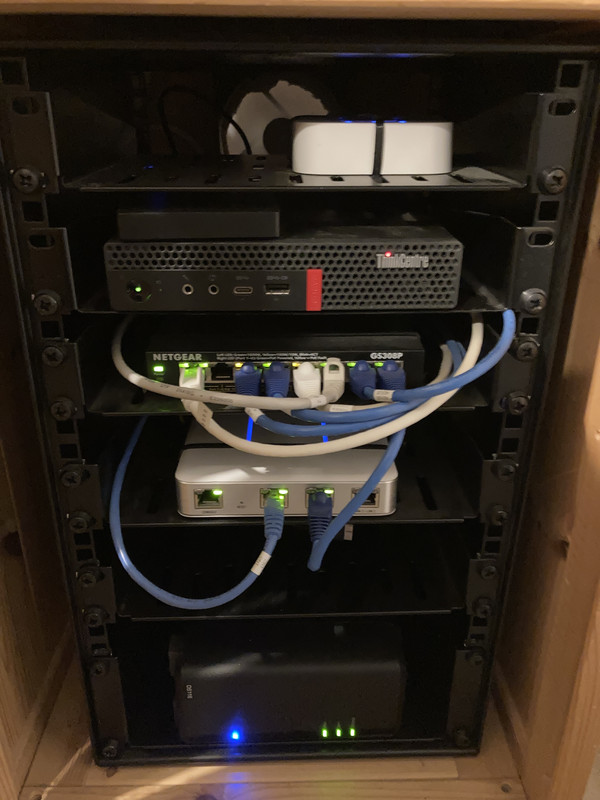
#4I’m always sad that 10”/10.5” racks aren’t more common for this sort of thing. I have my “homelab” in one and it’s the perfect size for a home router, an 8 port switch, a Raspberry Pi, a Thinkcentre tiny, and a 1-bay NAS.
Basically nothing actually rack-mounts in 10.5” so I currently have things cable-tied to shelves, but I’m planning to 3d print some adaptors.
My setup: https://i.postimg.cc/xTpLPFQD/image.jpg
Re: Home lab beginners guide (2021)
#5Reminds me of the best homelab setup I've ever seen: https://www.reddit.com/r/homelab/comments/cgi5gq/homelab_wit...
Excellent taste in Linux distros, pedestal rackmount cabinets, and space heaters.
But everyone please be careful not to do much keyboarding work without your keyboard and monitor straight in front (as well as observing other usual ergonomics advice).
Re: Home lab beginners guide (2021)
#6This is fun. I'm more of a minimalist with my homelab setup. It's a laptop and an old NAS. I love it either way: running a homelab is a nonsensical and fun hobby in any case.
I feel like we live in a world in which it's either racks or cheap VPSs. In reality, at home, we have some serious CPU horsepower just spinning billions of empty cycles per second. Consumer hardware is insane.
I've handled 10's of thousands of unique visitors per minute and more than a couple front page of Reddit + Hacker News herds on this little laptop through a residential ISP.
Here's my setup (pic down at the bottom): https://kiwiziti.com/~matt/wireguard/
Re: Home lab beginners guide (2021)
#7Anyone else annoyed at how narrow the term Homelab really is relative to what it could be? Any scientific or maker hobbies could take place in a "home lab," from breeding seedlings, to soldering and electronics work, to 3D printing. But it really means just networking and servers? Seems too narrow to me.
I don't think anyone would object to wider usage, it's just that the sysadmin community is the only group to have adopted the term so far.
Re: Home lab beginners guide (2021)
#8I’m always sad that 10”/10.5” racks aren’t more common for this sort of thing. I have my “homelab” in one and it’s the perfect size for a home router, an 8 port switch, a Raspberry Pi, a Thinkcentre tiny, and a 1-bay NAS. Basically nothing actually rack-mounts in 10.5” so I currently have things cable-tied to shelves, but I’m planning to 3d print some adaptors. My setup: https://i.postimg.cc/xTpLPFQD/image.jpg
Yeah, though one of the benefits of a 19" standard rack is you can pick up old data center gear cheap. Including some exotic stuff (like the big blue Palo Alto Networks box I owned, until the novelty wore off).
For mixing small gear with it, there's a lot to be said for rackmount shelves, including with zip ties or velcro.
For people that really only want something small, I've seen people 3D print out of plastic, build out of wood, IKEA desk organizers and furniture...
Re: Home lab beginners guide (2021)
#9This is fun. I'm more of a minimalist with my homelab setup. It's a laptop and an old NAS. I love it either way: running a homelab is a nonsensical and fun hobby in any case. I feel like we live in a world in which it's either racks or cheap VPSs. In reality, at home, we have some serious CPU horsepower just spinning billions of empty cycles per second. Consumer hardware is insane . I've handled 10's of thousands of…
> Consumer hardware is insane.
With less technical management, I've had repeated, and bewildered, conversations trying to get them to understand that our one "computer" sitting on my desk is many many times faster than the "server" our IT team provides. "But it's a server!".
Re: Home lab beginners guide (2021)
#10This is fun. I'm more of a minimalist with my homelab setup. It's a laptop and an old NAS. I love it either way: running a homelab is a nonsensical and fun hobby in any case. I feel like we live in a world in which it's either racks or cheap VPSs. In reality, at home, we have some serious CPU horsepower just spinning billions of empty cycles per second. Consumer hardware is insane . I've handled 10's of thousands of…
looks better than my quick and dirty wireguard setup to get NAT Type: A behind CGNAT on game consoles - Basically put whatever is connected to a device in a "public DMZ", separate from your network: https://raw.githubusercontent.com/genewitch/opensource/maste...
Wireguard is both very frustrating and very cool. I'm currently using it similarly to give a VM a public IP, and i'm testing the details on getting multiple SSL/https hosts behind that single IP, which is something you couldn't easily do a decade ago without the host with the single IP having all of the certificates and "MITM" the entire session.
Speaking of "CPU horsepower" i just replaced a 1.5kW HP[0] server with a .2kW Ryzen 5950x "server" that is about 5% faster overall - don't forget that old stuff, while capable, adds to the electric bill, usually at a constant rate.
[0] the iLO (lights out) actually reported the server's power usage in BTU. It drew the same power as a portable space heater.