Live data from Hacker News

Image file formats that didn’t make it

tedium.co

101–110 of 210 posts

Re: Image file formats that didn’t make it

#101

Earlier quoted context omitted.

Sort of but not really. You can write out PNG files with deflate blocks that aren't compressed, so in that sense they are uncompressed PNG files, but all of the complexity of supporting compression is still there in the data format in a way that is not fully avoidable even if you don't actually compress the data. BMPs on the other hand are simple to write, only a very small portion of the header data is required and…

BMP is quite complex and poorly documented (it's a bunch of random Microsoft structs and #defines), more so than PNG. BMP has compression too (RLE and Huffman). PNG is simpler here since you can just drop a DEFLATE library straight in. Images are usually stored in memory as RGBA in scanline order. You can dump this representation straight to a PNG file (edit: this is wrong, you can't). BMPs are typically written with…

If you're going to drop a library in, sure use PNG or whatever else, but the premise of this subthread was about ease of dumping an in-memory representation of the pixels into a valid file, and BMP makes that way easier than PNG does.

In a couple lines of code with no external library you can create a valid BMP file with just enough header bits to tell the BMP reader how your pixels are arranged and let it deal with the conversion.

Virtually all of the complexity of BMP files is optional and can be ignored by a BMP writer and just let the BMP reader worry about it. This is not true for PNGs where you have to have a significant understanding of the file format to write a PNG file.

Libraries make that not matter so much but are kind of outside of the scope of where this discussion was at the time this came up.

I'm certainly not advocating for BMP over PNG and most people should just include a flexible image handling library that's relevant for their given language and be done with it, but I also understand why even today programmers working in languages like C/C++ will use BMPs just to get a simple and functional export working without dealing with the complexity of using a third party library when their needs for the file format are minimal and internal to their own use and not being exposed to users.
Re: Image file formats that didn’t make it

#102

In a summer tech program for pre-college high school tech-interested//inclined students, my group of three created four different VRML world-spaces. We each made our own, and I made the "gateway" world-space where you would enter a Parthenon-like structure with three hyperlink objects inside which you could click on to travel to each of the other places. Each place had a similar hyperlink object to get back to the Pa…

VRML Sourcebook [0]. I did a similar little project in VRML. I took the general organization of my homepage and VRMLized it. Authoring it was such a pain in the ass.

I loved the concepts behind VRML, and still do. Unfortunately all of the implementations around it were terrible.

When it was in vogue PCs weren't powerful enough to handle anything but the most trivial models. Dial-up was entirely insufficient to deliver anything but the most trivial models as well.

[0] https://archive.org/details/vrml20sourcebook00ames

Re: Image file formats that didn’t make it

#105
post #11

Wasn't VRML support in browsers usually plugins and not native?

I distinctly recall installing QuickTime to view some VRML stuff in the mid/late 90's.

QuickTime's QTVR wasn't the same as VRML. While VRML was a fully 3D world/object, QTVR was pre-rendered scenes with custom navigation controls.

There was an "object" view which was basically a bunch of still images of an object from different angles. The cursor moved a virtual camera that just displayed the still frame for the appropriate angle.

The "panorama" view was a panoramic image mapped to view angles from a central point. Images could be cubic or spherically mapped IIRC.

Both types supported hyperlinks. So clicking a linked region could load another scene which could have yet more links to more scenes.

The Star Trek Interactive Technical Manual was a famous use of QTVR. It enabled visual fidelity a real-time 3D rendered of the era couldn't deliver. It was made by actually photographing the Star Trek production sets.

Re: Image file formats that didn’t make it

#106
post #34

JPEG2000 is a big one that seems to be missing. It is used in medical imaging or something, because laws? But its visual quality is worse than old JPEG, despite a PSNR advantage. Apparently, compression researchers used to think that people care about PSNR.

I've always been curious about the distinction between JPEG and JPEG2000. From what I can find online, everyone says that the visual quality is better than JPEG, it just flopped due to slow adoption. Could you elaborate on your claim that it's worse?

[deleted]

Re: Image file formats that didn’t make it

#107

JPEG2000 is a big one that seems to be missing. It is used in medical imaging or something, because laws? But its visual quality is worse than old JPEG, despite a PSNR advantage. Apparently, compression researchers used to think that people care about PSNR.

Digital cinema uses a kind of Motion-JPEG2000. The encoding of the coefficients is so convoluted that cinema projector systems require custom hardware to do decoding in 2K at full speed. The only software algorithm that could decode it at relative speed was patented by someone involved with the format: otherwise, software decoding is very slow compared to other formats.

JPEG2000 is also sometimes used to encode images embedded in PDFs.

Re: Image file formats that didn’t make it

#108

PCX! It's such a simple format. I remember reading about it as a kid, punching in some code to read the header, then the data, then the palette, having an image appear before my eyes. Fixing the bugs in my code made the image appear correct, what a great intro to debugging and seeing the results. It seemed like magic at the time. Taking this binary data that was gibberish when looking at it with EDIT.COM and making i…

Yep. In fact, I've been planning to write a PCX codec for my retrogaming/gfx project. The RLE scheme is simple but still reasonably effective.

Re: Image file formats that didn’t make it

#109
post #34

Earlier quoted context omitted.

I've always been curious about the distinction between JPEG and JPEG2000. From what I can find online, everyone says that the visual quality is better than JPEG, it just flopped due to slow adoption. Could you elaborate on your claim that it's worse?

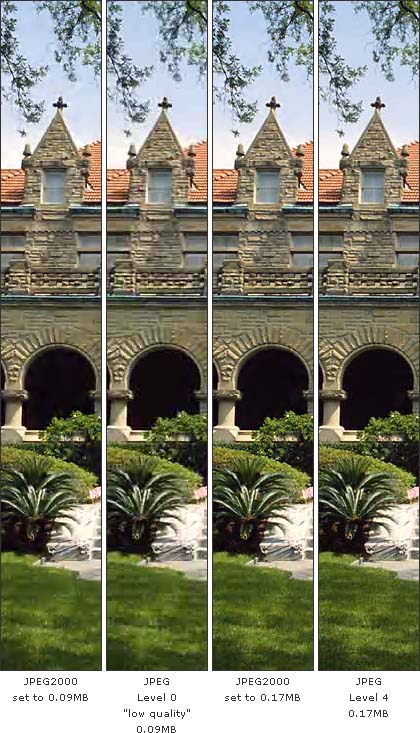
The technology is very different. Both translate the image into a representation where it's easier to remove "unimportant" data. JPEG is based on discrete cosine transform (DCT), JPEG2000 on wavelet transform. Visually, where JPEG produces ringing artifacts, JPEG2000 produces blurriness. JPEG artifacts look "sparkly" and are often a reasonable replacement for the original texture, JPEG2000 artifacts look offensively…

I've found a nice example. Compare the lawn, the part above the arc (especially on the right) and the uppermost window on the two 0.17 MB images. There are parts that look like the JPEG2000 encoder inserted big blotches where details should be. JPEG2000 seems to be better at large, gentle gradients and strong discontinuities between solid colored regions. https://www.imagepdf.com/images/jpeg2000.jpg

Re: Image file formats that didn’t make it

#110
post #7

Tiff is very much not dead. It is likely one of the image formats more widely used today. Terabytes of new tiff images are prodced every hour and distributed by many remote sensing operators. It is a really flexible and robust format also. How else are you going to store a floating-point multispectral image of 8 bands and 50.000 x 50.000 pixels, arranged tile-wise for easy cropping?

That was my reaction. To be fair author says: "Of the formats listed here, TIFF is probably the one most likely to still be in wide use, but it has evolved into a more specialized format for professionals, in comparison to something like JPG."

TIFFs are uncompressed or compressed with zip or lzw which is lossless. JPEGs are lossy and can't possibly be lossless. Pitting one as an alternative to the other is apples an oranges. When I read that sentence you quoted, I figured that the author is either lacking knowledge on the topic they're blogging about or they are trolling.
Post reply on HN