Live data from Hacker News

M1 Pro First Impressions: Core Management and CPU Performance

eclecticlight.co

161–170 of 234 posts

Re: M1 Pro First Impressions: Core Management and CPU Performance

#161

Earlier quoted context omitted.

> My M1 Macbook Air blows my 16" That is the issue though. Intel macbooks were notoriously badly cooled. That hurts the performance a lot. If all you have used is that, of course you find the new one a lot better. However, compared to any other high end Intel/AMD laptop, you would not perceive this much difference in speed. Pick up a Macbook 16 and XPS 15 from 2019 with the same specs (CPU/RAM) and the XPS absolutely…

And weirdly one of the major design changes for the new M1 Pro & Max machines were significantly improved cooling. Weird how suddenly Apple cared about airflow when it was their 100w SoC in the machine instead of Intel's....

> Weird how suddenly Apple cared about airflow when it was their 100w SoC in the machine instead of Intel's….

The previous setup was closer to 200W SoC (100W each for CPU and GPU) than 100W total.
Re: M1 Pro First Impressions: Core Management and CPU Performance

#162
post #130

I have an M1 Max. If anyone wants me to benchmark any workflows, I'd be glad to help!

I'm having a hard time finding mips/flops for the M1 CPU, can you measure one of them?

~100G fp32 FMA/s per core on my M1 air last I checked.

Re: M1 Pro First Impressions: Core Management and CPU Performance

#163

Earlier quoted context omitted.

> My M1 Macbook Air blows my 16" That is the issue though. Intel macbooks were notoriously badly cooled. That hurts the performance a lot. If all you have used is that, of course you find the new one a lot better. However, compared to any other high end Intel/AMD laptop, you would not perceive this much difference in speed. Pick up a Macbook 16 and XPS 15 from 2019 with the same specs (CPU/RAM) and the XPS absolutely…

And weirdly one of the major design changes for the new M1 Pro & Max machines were significantly improved cooling. Weird how suddenly Apple cared about airflow when it was their 100w SoC in the machine instead of Intel's....

Lol what is this vaguely accusatory tone?

First off the M1 Air has no fans.

Second the MBP 16" was the one with the improved cooling, so it wasn't throttled randomly by using the wrong charging port.

And finally the whole reason the M1s are so well cooled is there's no 100W SoC, or 200W probably when you consider the additional dedicated GPU in my 16".

My M1 has a 10W TDP!

10!

I don't think the GPU alone in my 16" could have been cooled by a solution handling 10W.

-

Also note: in your other comments you keep mixing TDP and wall power draw, my 16" would have had higher wall power than my M1 Air by far.

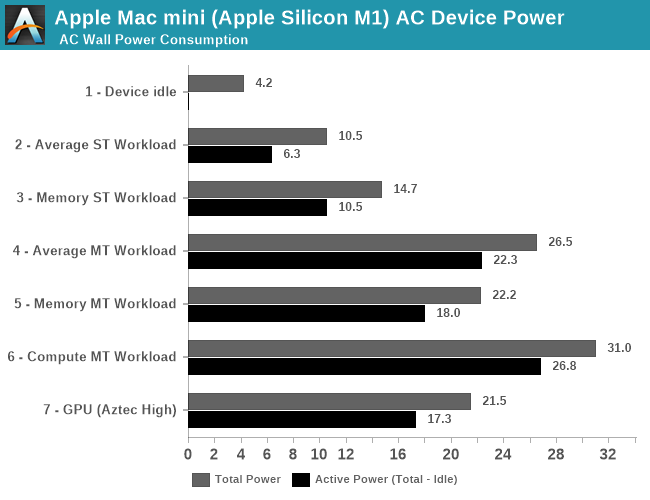
Even the M1 Mac Mini maxed out at like 30W from the wall: https://images.anandtech.com/graphs/graph16252/119344.png

And my M1 has a lower rated version of that (10W vs 24W)

For desktops I don't care about TDP but a laptop is the exact opposite.

Re: M1 Pro First Impressions: Core Management and CPU Performance

#164
post #122

Earlier quoted context omitted.

> Why not both? Because buying new stuff is wasteful and only a temporary solution to the problem? Look, I like nice, fast machine as much as the rest of the crowd here, but let's not kid ourselves. In a years time the software we run on it will have become even more bloated and things will be just as slow as they were. And then a new machine comes out we all want to buy that. There will be some ecstatic blog posts a…

> And each time I read a post like this I wonder: what do these people _do_ with these machines? To give you an idea, I don't have Macs, but I have a beefy desktop because I run my own OpenStreetMap server on it. My old machine: i7 3770, 32GB ram, 1 TB sata SSD: 3 days to import Europe's map. The new one: Ryzen 5800, 32GB ram, 1 TB NVME: 10 hours to import Europe's map. I will probably need to upgrade my ram and NVME…

> because I run my own OpenStreetMap server on it.

What do you do with it?

Re: M1 Pro First Impressions: Core Management and CPU Performance

#165

Any devs here switched from an old 15.4" MBP to a new 14" MBP? I'm curious how you find the screen size for doing work? My 15.4" can scale to "looks like 1920x1200" and the 14" to "1800x1169" so there's not a lot of difference. Does the smaller size make it feel cramped?

I did not do such a switch, I wondered about the same but in the end I looked at my current devices: a personal 2010 15" at 1680x1050 which has been dying for years now, and a work 14" at 1920x1080 display; the comfort provided by the additional physical real-estate of the 15" way beats the additional logical real-estate of the 14". It took me about 2 days to decide, but in the end I went with a 16", working on the 14" without an external display is really not enjoyable (even ignoring the cramped keyboard).

That the 16" also has more battery and better cooling don't hurt any, but they're the cherry on top.

Re: M1 Pro First Impressions: Core Management and CPU Performance

#166

Earlier quoted context omitted.

I've seen little to no hype based on synthetic benchmarks. M1 macs are just really damn fast for daily usage. My M1 Macbook Air blows my 16" out of the water in every conceivable way. I'd elaborate but there seriously isn't any dimension of it that isn't an improvement. Maybe the smaller display?

> My M1 Macbook Air blows my 16" That is the issue though. Intel macbooks were notoriously badly cooled. That hurts the performance a lot. If all you have used is that, of course you find the new one a lot better. However, compared to any other high end Intel/AMD laptop, you would not perceive this much difference in speed. Pick up a Macbook 16 and XPS 15 from 2019 with the same specs (CPU/RAM) and the XPS absolutely…

My XPS' thermals are a disaster. After 5 minutes of any remotely intensive game, the UI became a slideshow, unusable even for basic browsing for a few minutes after closing the game.

I hope they improved in 2019, mine was only from a year before that.

Re: M1 Pro First Impressions: Core Management and CPU Performance

#167
post #103
post #20

Earlier quoted context omitted.

Unity is slow on any machine. With that said, there is a huge M1 hype on HN. It reminds me of the 64-bit ARM hype when someone benchmaked encryption (because ARMv8 has AES instructions) and everyone were made to belive that the new iPhone would be 3-4 times faster.

> With that said, there is a huge M1 hype on HN. I wonder how much of that is due to a "finally, a good laptop" sentiment. I have used a lot of laptops over the years, and each and every one of them have been terrible in lots of ways, especially recently. If M1s "solve" the laptop problem, that would be great.

They pretty much do. The M1 macbook is, unironically, the first laptop I've had that doesn't have any glitches.

It's less powerful than a modern desktop, but not by much. More importantly, none of the power management, suspend, wifi, whatever... ever seems to fail.

Re: M1 Pro First Impressions: Core Management and CPU Performance

#168
post #152

Any devs here switched from an old 15.4" MBP to a new 14" MBP? I'm curious how you find the screen size for doing work? My 15.4" can scale to "looks like 1920x1200" and the 14" to "1800x1169" so there's not a lot of difference. Does the smaller size make it feel cramped?

Can you help me understand what that means? Is it not possible to run it at the "full" resolution? Will it be scaled to what equates to the 1800x1169 that you mention? That would equate to less "real estate" than what I have on my T460s FHD screen? Of course the screen would be light years ahead to look at. But just sounds a little bit strange with regards to actual pixels/space on the screen?

> Can you help me understand what that means? Is it not possible to run it at the "full" resolution? Will it be scaled to what equates to the 1800x1169 that you mention?

Yes, Apple doesn't provide for running at the native resolution out of the box (utilities like SwitchResX make those options available, though I don't know if they work with the M1s yet), all the display modes they propose are scaled.

Historically there was a default mode at 2x scaling with 2 above and 2 below, apparently on the M1s the default 2x scaling is the second-to-last and you only have one mode above.

So on the 14" with a physical 3024 x 1964 display, the modes provided natively by macOS are:

    1800 x 1169 (1.68x)
    1512 x 982 (2x, default)
    1352 x 878 (2.24x)
    1147 x 745 (2.64x)
    1024 x 665 (2.95x)
Don't ask me why they selected these wonky-ass resolutions aside from the 2x one though. The 1024 one could make some sense but it seems like adjusted luck: the 16" bottoms out at 1168 instead. Could be a question of pixel density I guess but you'd have to run the computation.

Re: M1 Pro First Impressions: Core Management and CPU Performance

#169

These laptops are too expensive. What the hell is the markup on these things

I believe these are actually one of the lowest markups Apple has and in general a great deal. Consider this: 1. 14” or 16” custom miniLED display 2. Anodized one-piece aluminum clamshell 3. Completely custom SoC (much more expensive than buying Intel’s latest, at least in the short-term) 4. Completely custom OS with a full suite of native apps 5. Custom MagSafe adapter 6. Thunderbolt 4 (3 of them) Now consider that t…

> Now consider that this laptop outperforms most desktop workstations that cost $4k+

You can spec the 14” & 16” to well past $4k also.

Re: M1 Pro First Impressions: Core Management and CPU Performance

#170

Earlier quoted context omitted.

> After upgrading our app's dependency chain to run native arm64 builds Would you mind sharing your research results? I am getting one soon and I am in progress of drafting notes for stuff like migration & setup.

It was mostly stuff specific to our specific situation. We were still on node 12 because, until recently, Google Cloud Functions didn’t support anything newer. But when I installed it, I noticed it was running on x86 via Rosetta. So I upgraded to the latest node (17) which installed as native arm64. Almost everything “just worked” but there were build errors with installing: webpack, node-sass, gprc, and node-canvas.…

iirc node-sass was rewritten in dart and now you just need to use the package `sass` should work as a drop-in.
Post reply on HN