Live data from Hacker News

A different kind of keyboard

ianthehenry.com

71–80 of 152 posts

Re: A different kind of keyboard

#71
post #52

I'm really keen on things like this. I love (in theory at least) the concept of being able to work from literally anywhere, and the concept of some sort of smart display (glasses, lenses, etc) but having a physical keyboard to type out code is always a major barrier. Something like this starts to edge towards that vision which is cool. I wonder as well if there's a way to have some sort of bracelet (but probably some…

Some people already can and do this. See e.g.:

- Steve Mann: https://en.m.wikipedia.org/wiki/Steve_Mann_(inventor)
- https://chordite.com

Re: A different kind of keyboard

#72
I really like this. I hate moving my fingers off of home row, and have a bunch of "layers" to put more keys on home row (extra thumb keys on the opposite hand define what; for example, I have ({}) on jkl;). I hadn't had the idea to "arpeggio", or to optimize normal letters, but now that seems really appealing to me. (I tried the demo and I love it.)

What's nice about having the full keyboard is that you can keep normal keybindings and just not use them when you're feeling lazy. I'll have to play with this more, it's a really good idea.

Re: A different kind of keyboard

#73
iOS actually has a multi-touch based braille keyboard built-in. So you can have a rather similar behaviour, however, without extra hardware, with native iOS. In Settings > Accessiblity > VoiceOver, add "Braille keyboard" to the rotor options, and then use two fingers in a circular motion until you hear "Braille input". You can now hold the screen away from you in landscape mode, and use three fingers from each hand to type 6-dot braille.

Re: A different kind of keyboard

#74
post #65

Earlier quoted context omitted.

How about “one day I'll be able to walk around in the forest while working”?

Why not just walk around in the Forrest? I mean, why do you feel it's desirable to shoehorn doing work into any and all type of human activity? GP has a good point: that sounds terribly dystopian.

Some people have to work in order to not die.

Re: A different kind of keyboard

#76
post #73

iOS actually has a multi-touch based braille keyboard built-in. So you can have a rather similar behaviour, however, without extra hardware, with native iOS. In Settings > Accessiblity > VoiceOver, add "Braille keyboard" to the rotor options, and then use two fingers in a circular motion until you hear "Braille input". You can now hold the screen away from you in landscape mode, and use three fingers from each hand t…

A demonstration: https://www.youtube.com/watch?v=wueLXCbm_KY

Re: A different kind of keyboard

#77

For anyone looking, you can already use a chorded keyboard on your iPhone. It has Braille input available through accessibility settings https://support.apple.com/en-us/HT210066

I remember seeing a demo of that (Braille keyboard on a phone) was crazy. What's also neat is the StuffMadeHere guy on YT added vision to that via Lidar in an iPad... the vibrations(?)/raising pins fed into a similar brail keyboard position.

Possibly this demo: https://www.youtube.com/watch?v=wueLXCbm_KY

Re: A different kind of keyboard

#78
post #52

I'm really keen on things like this. I love (in theory at least) the concept of being able to work from literally anywhere, and the concept of some sort of smart display (glasses, lenses, etc) but having a physical keyboard to type out code is always a major barrier. Something like this starts to edge towards that vision which is cool. I wonder as well if there's a way to have some sort of bracelet (but probably some…

Like this? https://www.tapwithus.com/

Re: A different kind of keyboard

#79
Calculus teaches us the nature of optima. Sometimes they're at one extreme. Sometimes the sweet spot is somewhere in the middle.

This is one extreme. The sweet spot is in the middle, using tap/hold keys on a more conventional keyboard as supported by QMK firmware. It's brilliant to keep your fingers near home row. It's dogmatic to not have the other keys even be there, or to force yourself to use one hand if you have two.

A finger of one hand holds a key to select a mode, a finger on the other hand taps a key using that mode. This mode selection layout should be mirror images for the two hands. The Matias one-handed keyboard established beyond a doubt that our brains are wired to support this.

I use custom modes for punctuation, exotic "control-xylophone" editor commands, and controlling my computer. And yes, a cat walking across my keyboard will rearrange the orbits of the planets. However, the decades I spent thrashing would have been all worth it just to realize I shouldn't have to reach so far from home row for shift and modifier keys.

Re: A different kind of keyboard

#80

I've always thought it was a bit odd that for touchscreen phones we just decided to grab the near exact keyboard layout we use with physical keyboards, and just stick them on a tiny touchscreen. Sure, everyone knows how to use it and its fine for early smartphones, but it seems like a really terrible place for a full keyboard to go; imagine using a keyboard the size of your phone keyboard (so about the third the size…

I was quite surprised when I went to China and looked at people texting with their phones, wondering how many keys they would need in their touchscreen keyboard, and finding out that most of them use... 9. The classic pre-smartphone phone keyboard, where you write in pinyin and the corresponding Chinese characters get predicted.

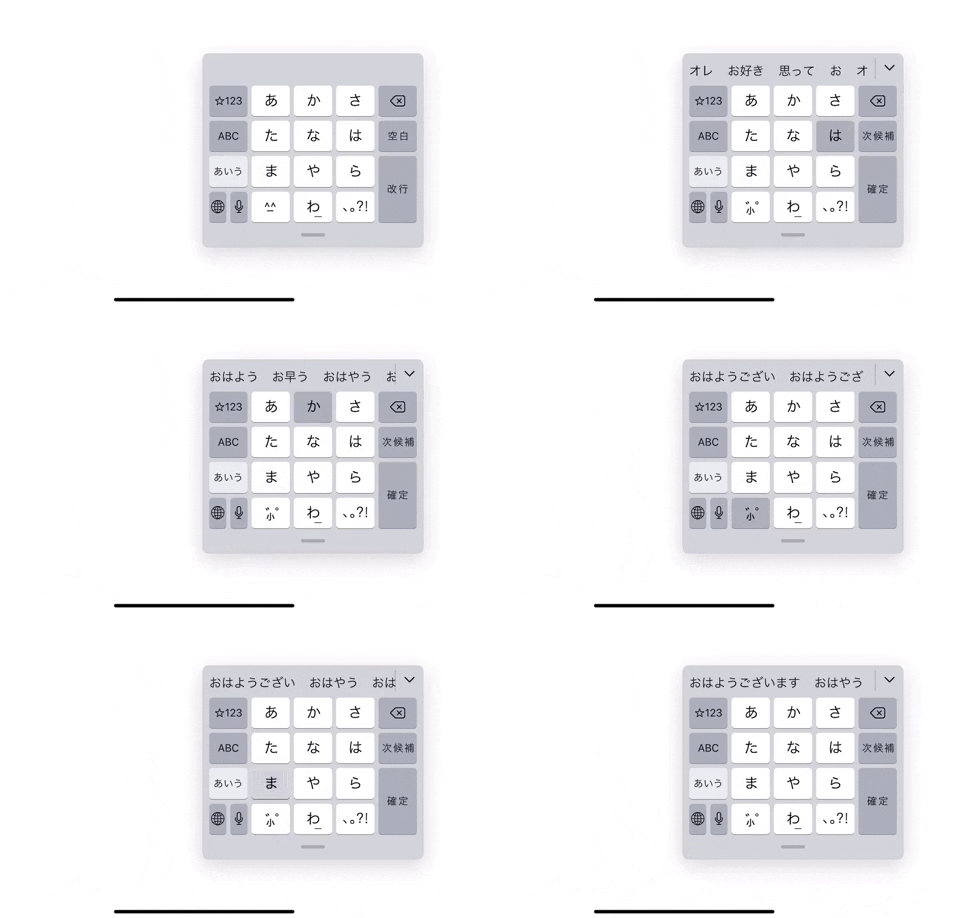
The most common input method on Japanese smartphones is also a 12-key keyboard modeled after feature phones, since it has the lucky coincidence that it maps onto the Japanese phonetic system perfectly - あかさたなはまやらわ+modifiers. On feature phones you had to multi-tap to get from あ to い to う, but on a touchscreen they added "flicking" into different directions to jump directly to a character. Once you get used to it, you can get really fast at it!

Animated demonstration: https://media.giphy.com/media/gjOWCOlhd98wI4dYcd/giphy.gif

Post reply on HN