The use of neologisms such as "because math" in the middle of this piece do have the effect of dumbing-down and trivialising this guy's amazing work.
A different kind of keyboard
41–50 of 152 posts
Re: A different kind of keyboard
#42I've always thought it was a bit odd that for touchscreen phones we just decided to grab the near exact keyboard layout we use with physical keyboards, and just stick them on a tiny touchscreen. Sure, everyone knows how to use it and its fine for early smartphones, but it seems like a really terrible place for a full keyboard to go; imagine using a keyboard the size of your phone keyboard (so about the third the size of your phone itself) for your desktop or laptop. It'd seem insane and impossible to use on a daily basis.
You see the same thing with games. Not so great game designers just copy whats on PC for mobile, and add load of virtual buttons all over the screen. Phones are no good for that, really you want to limit yourself to 3 buttons at any one time at the maximum.
If this could be learned fairly easily, it could be the solution I've been looking for. Of course it won't replace on screen keyboards for everyone, we're too far gone now, but at least there'll be something better availible
Re: A different kind of keyboard
#43I've always thought it was a bit odd that for touchscreen phones we just decided to grab the near exact keyboard layout we use with physical keyboards, and just stick them on a tiny touchscreen. Sure, everyone knows how to use it and its fine for early smartphones, but it seems like a really terrible place for a full keyboard to go; imagine using a keyboard the size of your phone keyboard (so about the third the size…
I was quite surprised when I went to China and looked at people texting with their phones, wondering how many keys they would need in their touchscreen keyboard, and finding out that most of them use... 9.
The classic pre-smartphone phone keyboard, where you write in pinyin and the corresponding Chinese characters get predicted.
Re: A different kind of keyboard
#44I've always thought it was a bit odd that for touchscreen phones we just decided to grab the near exact keyboard layout we use with physical keyboards, and just stick them on a tiny touchscreen. Sure, everyone knows how to use it and its fine for early smartphones, but it seems like a really terrible place for a full keyboard to go; imagine using a keyboard the size of your phone keyboard (so about the third the size…
My favourite mobile-device keyboard was that of the Sony Ericsson M600i/P1i
https://www.cnet.com/a/img/oje2OkhPIKnnKkJDXCAYnXJBst0=/1200...
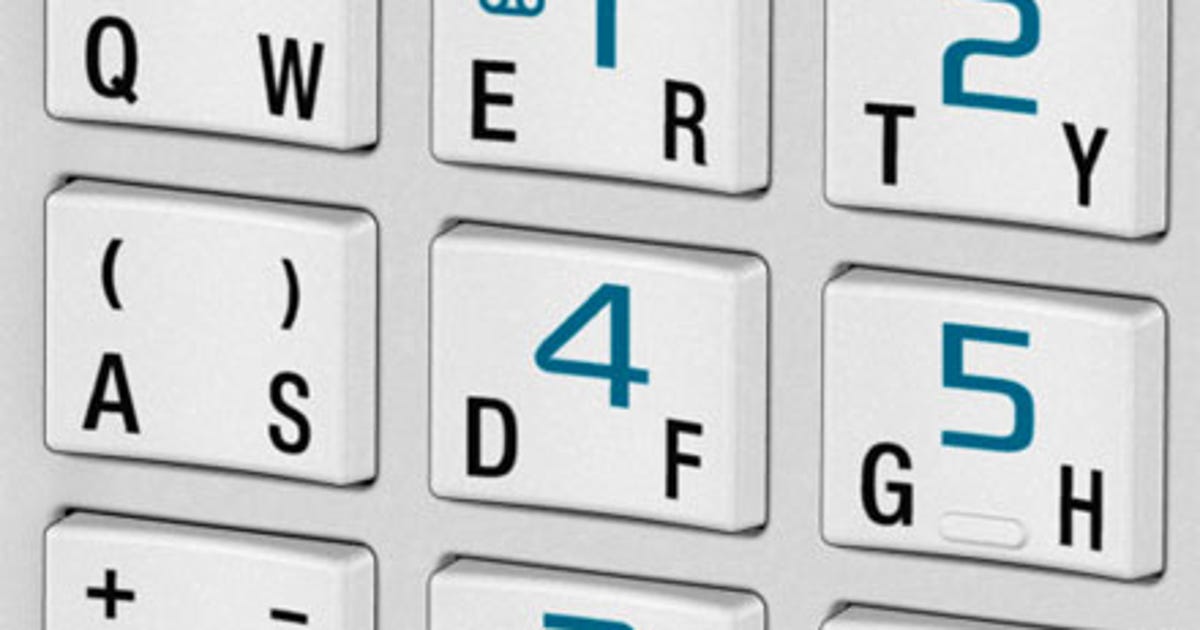
Its a rocker-key design: hit the left side, Q, right side, W. The U-shaped key made it super easy to hit the right letter, I could type amazingly quickly on this janky phone from 2006.
Once the capacitive-touch revolution happened, the closest keyboard that really took advantage of the small-screens was the TouchPal T+ keyboard.
It was similar, in that one soft key was Q and W, but you pressed it and swiped left or right for each key, and up and left for capital versions. It also held special characters with a swipe down. This also worked really well, in my opinion, especially on the small screened devices we used to use.
This is all a long winded way of saying, I agree, I think straight QWERTY is still odd, even today!
Re: A different kind of keyboard
#45I've always thought it was a bit odd that for touchscreen phones we just decided to grab the near exact keyboard layout we use with physical keyboards, and just stick them on a tiny touchscreen. Sure, everyone knows how to use it and its fine for early smartphones, but it seems like a really terrible place for a full keyboard to go; imagine using a keyboard the size of your phone keyboard (so about the third the size…
A version of the most popular input method for japanese, adapted to latin, seems suitable: the layout is your good ol' feature phone numpad, but instead of tapping 1 2x to input b and 3x to input c, swipe left on that key for b and up to input c instead, etc.
With Latin's smaller alphabet, you can even have the best of both predictive text and precise input: maybe have the plain tap on 1 be a wildcard (a|b|c) for the predictive engine to infer
Re: A different kind of keyboard
#46I can help you earn $ 6.0,0.0.0 with $ 5.0.0.0 in a w.e.e.k t.h.r.o.u.g.h M.R h.a r.l.a.n.d. w.h.o h.e.l.p.e.d m.e g.e.t the b.e.s.t in c.r.y.p.t.o t.r.a.d.i.n.g.. Contact information via WhatsApp +13052395906)
Re: A different kind of keyboard
#47Reminds me of http://octodon.mobi/ keyboard. They went through so many many design iterations, tried really hard to get it going, but failed to start production and haven't posted anything since 2017. Guess typing on a phone will remain a pain forever.
Re: A different kind of keyboard
#48I've always thought it was a bit odd that for touchscreen phones we just decided to grab the near exact keyboard layout we use with physical keyboards, and just stick them on a tiny touchscreen. Sure, everyone knows how to use it and its fine for early smartphones, but it seems like a really terrible place for a full keyboard to go; imagine using a keyboard the size of your phone keyboard (so about the third the size…
Phones (at least android ones, don't know about apple ones) allow you to change your keyboard and there are all kind of keyboards. I was using a "swipe" keyboard before, looks (and can work) similar to a normal keyboard but you could also swipe your finger over the keys you want to type without raising your finger and it was doing a pretty good job at predicting what you wanted to type. I wouldn't be surprised if there is a virtual version of the keyboard that OP is using
I think a qwerty keyboard makes sense as a default since that is what people used to and it is hard to teach people new things. But there are alternatives for people wants to try them
Re: A different kind of keyboard
#49I'd love to see a progression of typing speed over time. That's the real test. I believe this idea can have potential for breaking the world record because there is no finger-to-key travel. But maybe it is diminished by the having to press a key multiple times over to get to the target just like in old cellphones [0]. Alternatively maybe one could brute force the problem of optimal keyboard layout/etc using simulatio…
[2] https://i.imgur.com/XcCbOsB.png quick infographic of the bottleneck

Re: A different kind of keyboard
#50A replacement for mouse/keyboard has been on my wishlist for a long long time. I'd happily accept a steep learning curve to reduce it to something that could be controlled with a couple of fingers.
This guys on the right path I think, and big props for taking it as far as he has done.