XTerm: It's Better Than You Thought
aduros.com
XTerm: It's Better Than You Thought
1–10 of 159 posts
Re: XTerm: It's Better Than You Thought
#2OMG UTF8! Next I suppose someone will show me how to disable those !@#%ing colour control codes that always make my text blink? I don't want colour. I don't want syntax highlighting. I just want my old-school terminal. Mind you I'll probably have to sacrifice my cherished 8x15bold font (still installable after all these years) if I really want to go UTF8.
Re: XTerm: It's Better Than You Thought
#3My absolutely essential XTerm settings:
  ! Convert Meta-x into "ESC x", not "ø"
  XTerm.VT100.metaSendsEscape: true

  ! Allow HT (TAB) in paste; i.e. do not convert to space character
  XTerm*VT100.DisallowedPasteControls: BS,DEL,ESC

  ! Assume window titles are UTF-8 encoded
  XTerm.VT100.utf8Title: true
Re: XTerm: It's Better Than You Thought
#4OMG UTF8! Next I suppose someone will show me how to disable those !@#%ing colour control codes that always make my text blink? I don't want colour. I don't want syntax highlighting. I just want my old-school terminal. Mind you I'll probably have to sacrifice my cherished 8x15bold font (still installable after all these years) if I really want to go UTF8.
I do!
I use the terminal everything and even my IDE.
Give me all the fancy features and dream up more.
Just actually support vt100 when it is needed and in sometimes worse situations.
Our “serial” console solution is even worse then the old school days. God help us if we need to use it for more then the occasional evaluation.
Re: XTerm: It's Better Than You Thought
#5OMG UTF8! Next I suppose someone will show me how to disable those !@#%ing colour control codes that always make my text blink? I don't want colour. I don't want syntax highlighting. I just want my old-school terminal. Mind you I'll probably have to sacrifice my cherished 8x15bold font (still installable after all these years) if I really want to go UTF8.
You might be interested in https://no-color.org/ I implemented it for my mail client (listed on the website)
Re: XTerm: It's Better Than You Thought
#6For people interested in playing around with different terminal emulators, you’d do yourself a service trying kitty [https://github.com/kovidgoyal/kitty].
It made my experience on high DPI screens far better. You can find it packaged up in the usual places (e.g. Debian).
Re: XTerm: It's Better Than You Thought
#7https://medium.com/@donhopkins/the-x-windows-disaster-128d39...
The Nongraphical GUI
XCalc After Several Resizings
https://miro.medium.com/max/434/0*LIDAYbj5NRANRGl7.gif
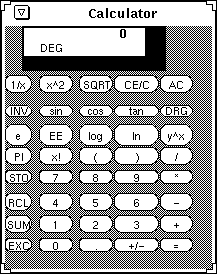
X was designed to run three programs: xterm, xload, and xclock. (The idea of a window manager was added as an afterthought, and it shows.) For the first few years of its development at MIT, these were, in fact, the only programs that ran under the window system. Notice that none of these program have any semblance of a graphical user interface (except xclock), only one of these programs implements anything in the way of cut-and-paste (and then, only a single data type is supported), and none of them requires a particularly sophisticated approach to color management. Is it any wonder, then, that these are all areas in which modern X falls down?
Ten years later, most computers running X run just four programs: xterm, xload, xclock, and a window manager. And most xterm windows run Emacs! X has to be the most expensive way ever of popping up an Emacs window. It sure would have been much cheaper and easier to put terminal handling in the kernel where it belongs, rather than forcing people to purchase expensive bitmapped terminals to run character-based applications. On the other hand, then users wouldn’t get all of those ugly fonts. It’s a trade-off.
Re: XTerm: It's Better Than You Thought
#8I use xterm because I'm too lazy to switch, I guess. It was never bad enough for me to switch and it's present virtually everywhere, so I don't need to bother installing my favorite niche term (kind of like sticking with bash when zsh was indisputably more awesome).
To the best of my knowledge, one downside is the text rendering is synchronous. Read a character off the tty, try to display it on the screen. It's fine until you go and cat /dev/mem or something like that. Many GNOME-ish terminals use vte which drops frames if it can't keep up rendering.
I also run into problems with bad display managers or DEs that don't load ~/.Xresources or ~/.Xdefaults (looking at you Debian gdm).
Re: XTerm: It's Better Than You Thought
#9https://medium.com/@donhopkins/the-x-windows-disaster-128d39...
Date: Wed 10 Apr 91 08:14:16 EDT
From: Steve Strassmann
To: UNIX-HATERS
Subject: the display from hell
I have a “window system” on my unix box. You see, in the unix world, “system” means “a bunch of unrelated programs.” But that’s not what I want to talk about here today. I want to talk about overlay planes.
My HP 9000/835 console has two 19" color monitors, and some extremely expensive Turbo SRX graphics hardware to drive them. You’d think that I could simply tell X windows that it has two displays, the left one and the right one, but that would be unthinkably simple. After all, if toys like Macintoshes can do this, unix has to make it much more difficult to prove how advanced it is.
So, what I really have is two display devices, /dev/crt0 and /dev/crt1. No, sorry, I lied about that.
You see, the Turbo SRX display has a graphics plane (with 24 bits per pixel) and an overlay plane (with 4 bits per pixel). The overlay plane is for things like, well, window systems, which need things like cursors, and the graphics plane is to draw 3D graphics. So I really need four devices:
/dev/crt0 — — the graphics plane of the right monitor
/dev/crt1 — — the graphics plane of the left monitor
/dev/ocrt0 — — the overlay plane of the right monitor
/dev/ocrt1 — — the overlay plane of the left monitor
No, sorry, I lied about that.
/dev/ocrt0 only gives you 3 out of the 4 overlay bits. The fourth bit is reserved exclusively for the private use of federal emergency relief teams in case of a national outbreak of Pixel Rot. If you want to live dangerously and under threat of FBI investigation, you can use /dev/o4crt0 and /dev/o4crt1 in order to really draw on the overlay planes. So, all you have to do is tell X windows to use these o4 overlays, and you can draw graphics on the graphics plane. No, sorry, I lied about that.
X will not run in these 4 bit overlay planes. This is because I’m using Motif, which is so sophisticated it forces you to put a 1" thick border around each window in case your mouse is so worthless you can’t hit anything you aim at, so you need widgets designed from the same style manual as the runway at Moscow International Airport. My program has a browser that actually uses different colors to distinguish different kinds of nodes. Unlike a PC Jr, however, this workstation with $150,000 worth of 28 bits-per-pixel supercharged display hardware cannot display more than 16 colors at a time. If you’re using the Motif self-abuse kit, asking for the 17th color causes your program to crash horribly.
So, thinks I to myself cleverly, I shall run X windows on the graphics plane. This means X will not use the overlay planes, which have special hardware for cursors. This also means I cannot use the super cool 3D graphics hardware either, because in order to draw a cube, I would have to “steal” the frame buffer from X, which is surly and uncooperative about that sort of thing. What it does give me, however, is a unique pleasure. The overlay plane is used for /dev/console, which means all console messages get printed in 10 Point Troglodyte Bold, superimposed in white over whatever else is on my screen, like for example, a demo that I may be happen to be giving at the time. Every time anyone in the lab prints to the printer attached to my machine, or NFS wets its pants with a timeout, or some file server threatens to go down in only 3 hours for scheduled maintenance, another message goes onto my screen like a court reporter with Turett’s syndrome.
The usual X commands for refreshing the screen are helpless to remove this incontinence, because X has no access to the overlay planes. I had to write a program in C to be invoked from some xterm window that does nothing but wipes up after the mess on the overlay planes. My super 3D graphics, then, runs only on /dev/crt1, and X windows runs only on /dev/crt0. Of course, this means I cannot move my mouse over to the 3d graphics display, but as the HP technical support person said “Why would you ever need to point to something that you’ve drawn in 3D?”
Of course, HP claims X has a mode which allows you to run X in the overlay planes and “see through” to the graphics planes underneath. But of course, after 3 months of calls to HP technical support, we agreed that that doesn’t actually work with my particular hardware configuration. You see, I have the top-of-the-line Turbo SRX model (not one, but two on a single workstation!), and they’ve only tested it on the simpler, less advanced configurations. When you’ve got a hip, forward-thinking software innovator like Hewlett-Packard, they think running X windows release 2 is pretty advanced.
Re: XTerm: It's Better Than You Thought
#10Here's a few other useful binds related to zooming out, in and resetting zoom:
    Ctrl  minus: smaller-vt-font() \n\
    Ctrl  plus: larger-vt-font() \n\
    Ctrl  0: set-vt-font(d) \n\
    xterm*highlightSelection: true
    xterm*trimSelection: true