Earlier quoted context omitted.
For who?
All of us on a Pentium II 300MHz with 32MB RAM
Sweet. How many BogoMIPS ya got?
71–80 of 756 posts
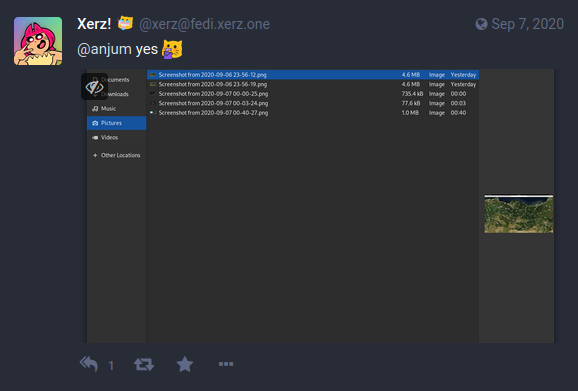
So I just checked on my install (Gnome 3.38.2, Debian testing) and all the GTKFileChooser windows I could find had the thumbnails representing the underlying images. Interestingly I checked a few apps I have installed through Flatpak, and they generally didn't have thumbnails for the same dialogues, although sometimes did for the "recents". Unless this has been recently added as a feature, it sounds more like he has…
Older builds of Gnome only seemed to use the generic icon for the file type, so it does sound like there has been progress here - if not enough to satisfy the OP.
In this time and age, do we really need "desktops"? If you only need a full-screen terminal and a full-screen browser (as is the case for many people), the whole desktop thing is unnecessary clutter.
Several years ago, I started turning desktop icons off (both GNOME and Windows make this easy) and it really helped my organization, as I was then forced to competently organize files into Downloads, Documents, Pictures, Videos directories instead of vomiting everything onto the desktop. Simply _knowing_ where files are located is faster than scanning a cluttered desktop.
As a bonus I don't ever have to worry about the positions of my desktop icons changing.
File picker definitely needs thumbnails though.
There's more serious reasons this file picker is broken. Here's a trivial to reproduce and obvious issue that's been there for several years now: 1. Open a directory that loads slowly (e.g. one with thousands of files on a smb3 mount) 2. While the list is loading, select a file (but do not open it) 3. Wait for the whole list to load Once the list finishes loading, the file on the very top of the list gets automatical…
In fact I have never since directly uploaded anything from my own personal file directories, instead I make a copy of it under /tmp for the upload process.
Not sure if this is the same bug you are talking about
This has somehow gotten worse in recent years. When saving, it used to be you could use the mouse to navigate to a directory, then type the desired filename, and press enter. Now, typing the filename initiates a contextual search within the current directory. Clicking in the filename textbox and starting to type doesn’t work either. You have to highlight the base (not the extension or “.”) of the filename. At that po…
Doing some introspection (all too rare for me!), I find that this is the reason I've started avoiding creating new files in LibreOffice, and why my Downloads and Pictures folders are flat, unstructured messes. Too many programs use the GNOME file selector.
If I could just “accio my black jeans” I wouldn’t bother organizing my closet.
There's more serious reasons this file picker is broken. Here's a trivial to reproduce and obvious issue that's been there for several years now: 1. Open a directory that loads slowly (e.g. one with thousands of files on a smb3 mount) 2. While the list is loading, select a file (but do not open it) 3. Wait for the whole list to load Once the list finishes loading, the file on the very top of the list gets automatical…
So I just checked on my install (Gnome 3.38.2, Debian testing) and all the GTKFileChooser windows I could find had the thumbnails representing the underlying images. Interestingly I checked a few apps I have installed through Flatpak, and they generally didn't have thumbnails for the same dialogues, although sometimes did for the "recents". Unless this has been recently added as a feature, it sounds more like he has…
Can you provide a screenshot?
Omg, this is insane, I now realize I automatically memorize the first 3 and last 3 parts of filenames I need in the picker... For screenshots I read the date very carefully and fear the day I upload a wrong one. I was going to the toilet with a plunger, not even realizing it. Btw, if you work on MacOS (which has been a while for me now), you get very used to hitting space everywhere to get previews. What a feature!
Death by a thousand small inefficiencies, quirks and bugs... It's such a shame, because fixing most of these small bugs is far less work than building new features. Nobody wants to put the work in though... Nobody has the overarching vision of a consistent UX that just works out of the box without oddities, quirks and workarounds.
Developers frequently hate it when "product people" get a say in the direction of the product, but the alternative is commonly to have developers prioritize perceived code purity over actual user interests. And emphasis on "perceived", because usually the codebase is a hot mess but maintainers want it to be their hot mess, not someone else's.
no desktop, no system tray icons.. gnome is a joke
Tools and features have ergonomics and affordances that suggest a certain way of using them, and desktop filling just seems to encourage people to make a massive mess. Even when I was a Windows user, desktop icons were the first thing to go. Not having quick access to a dumping ground meant that I had to go out of my way to make a mess. As for a lack of system tray icons, the practical upshot is that my system bar is…
Plasma Desktop's System Tray widget that lets you hide icons you don't want to see. You can disable the widget, or configure it to show no icons at all.