Live data from Hacker News

The beautiful Silent ThunderBolt-3 PC

fabiensanglard.net

81–90 of 213 posts

Re: The beautiful Silent ThunderBolt-3 PC

#81

This is great! I’ve been eyeing the same motherboard to get a similar setup but I do have a GPU. Wouldn’t that break the setup? I could only connect peripherals to the dock and handle the monitors separately. I believe that would end the one cable dream :(

You plug the GPU into the motherboard and it then asses the displayport over the thunderbolt connection.

Re: The beautiful Silent ThunderBolt-3 PC

#82
post #11

Something I highly recommend avoiding (though it may look tempting) is the TB16 thunderbolt dock from dell. There is something really screwy with the USB controller in that device, the ETH is on the USB hub and corrupts Ethernet frames, under Linux you can force disable hardware offloaded CRC checksumming as a workaround, but still the USB devices that are directly connected can just stop functioning. It also has the…

I was really impressed with the Dell WD19TB dock I was issued from work for COVID. I had never used a dock before, but having all my external displays (I used 2 DP, but I think it could handle 3 at once if using HDMI too), Ethernet, all the USB, and charging all through one port was amazing.

Re: The beautiful Silent ThunderBolt-3 PC

#83

Thunderbolt 3 really is amazing. Im using a OWC Thunderbolt Dock to connect my MacBook to: an eGPU thats driving a 5K monitor, a 1TB TB3 SSD, and 24/96 USB audio to my stereo. All over one cable. BTW if your using TB3 as your main connection to your laptop I highly recommend a magnetic TB3 adapter. This has been working great in my setup for over a year and makes docking/undocking a snap. https://www.amazon.com/Magne…

Amazing, like MagSafe again. I'm thinking that may be the way forward to avoid a KVM. With TB — can you literally just unplug from one Laptop/PC and connect to another and everything is back up and running on the 2nd computer?

Yes, that is the primary motivation/intent of The type C connector and USB-C/TB.

It’s still early days so compatibility isn’t super yet, as this discussion shows. Also, being USB, there are many possible subsets and no such thing as a “universal cable”. The silicon is still immature and the analog issues are fiendishly complex.

The cheapo vendors will implement the minimal standard (or less). The higher end devices will be more compliant, but bugs remain (as I said, still early days).

But last year I switched to buying type C devices whenever I had the choice (even electric toothbrush) and so far it’s been fine.

Re: The beautiful Silent ThunderBolt-3 PC

#84
post #48

Looks like that board is the sole option for Thunderbolt && AMD && ITX. Bummer that there are no options with passively-cooled B550 chipsets. I do something similar to the post's two-cable configuration: - Mac to Caldigit TB dock to two displays. - PC to one of the displays - Keyboard and mouse to a USB switch, which connects to the PC and the TB dock It's kind of a pain to manually flip both the USB switch and the m…

You're obviously correct for ITX, but I was surprised when I found out that (on larger boards) you can simply get a Thunderbolt PCIe card from Asus, Dell, etc. and it will just work. It appears that in many cases, the infamous THB_C header on mainboards doesn't serve any purpose.

Re: The beautiful Silent ThunderBolt-3 PC

#85
The diagram shows he is only plugging in peripherals like keyboard, mouse, webcam. For things like that, USB2 should be fine, and you save a lot of headache. If you have a high performance usb3 storage device connected, you probably don't want it to switch with your KVM anyway.

Re: The beautiful Silent ThunderBolt-3 PC

#86
post #33
post #19

Earlier quoted context omitted.

The Thunderbolt in this case is coming from the chipset on the motherboard, not the CPU. He lists the motherboard as an X570 Phantom Gaming-ITX/TB3 which supports 2nd gen Ryzen, and which has that support built in.

Does this explain the author’s surprise that apple’s fanless MacBooks can handle thunderbolt 3 without getting hot? If they’re doing it on cpu then I suppose that could bring about a lot of cpu i/o efficiency.

The X570 chipset is strange. It's just a Zen 2 IO die backported to GlobalFoundries 14nm. Presumably they were able to remove the unnecessary parts (memory controller) while backporting, but maybe they're reusing excess chips if they chose late in the process to move the IO die to 12nm. I'd guess there's some inefficiency from being a clever hack and not exactly designed for purpose.

Additionally, the X570 chipset supports a lot of peripherals:

- 16x PCIe 4.0 lanes + 4x lanes to the CPU - 12 SATA 3 ports (some PHYs are shared with PCIe lanes so you can't have all of both) - 8 USB 3.0 10Gbps (I'm not going to google the "official" nomenclature, ugh) - 4 USB 2.0 - Other things like SuperIO and SMBus which don't use much power

Far more peripherals than M1. (Probably, it seems there's still no detailed specs about the thing anywhere).

Then there's the process advantage, 14nm GF to 5nm TSMC is a huge difference for all the logic involved. The advantage is dampened somewhat for IO because a significant portion of the power is used to drive the signals out of the chip, which is not affected by process changes. Apple's PCIe 4.0 PHYs may be more efficient considering X570 is a first generation PCIe 4.0 design.

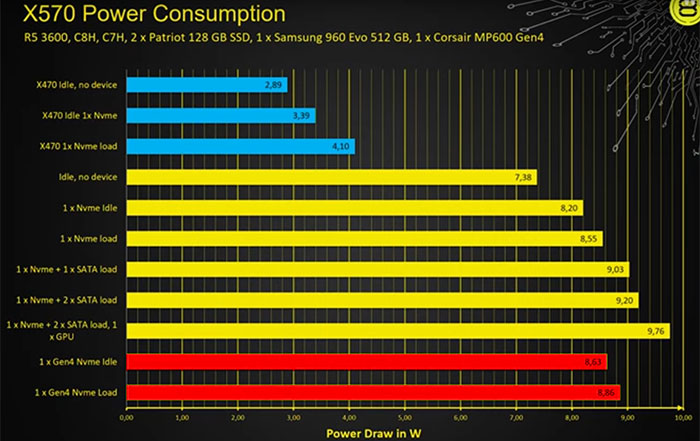
Also, the power consumption of X570 is not that bad for what it is, 7-10W [0]. AMD must be a stickler about the 15W TDP because the fan seems unnecessary. This article is basically the worst case scenario: small heatsink on a cramped ITX motherboard in a passive case with no airflow. Maybe BCLK overclocking would run the fan? Or a dust clogged no-airflow case in a hot climate running all the peripherals at full bore?

[0]: https://hexus.net/media/uploaded/2019/7/b3affde4-8a75-4475-b...
Re: The beautiful Silent ThunderBolt-3 PC

#87
post #48

Looks like that board is the sole option for Thunderbolt && AMD && ITX. Bummer that there are no options with passively-cooled B550 chipsets. I do something similar to the post's two-cable configuration: - Mac to Caldigit TB dock to two displays. - PC to one of the displays - Keyboard and mouse to a USB switch, which connects to the PC and the TB dock It's kind of a pain to manually flip both the USB switch and the m…

Having used only a MacBook for 4 USB-c/thunderbolt ports for several years, and having moved all of my stuff (even my cordless shaver!) to USB-c / thunderbolt, I was really surprised and annoyed when I built an AMD gaming PC and realized I could only get 1 or 2 USB-c ports and almost no options for thunderbolt. It made me realize why most mice, etc are USB-a still.

Well up until late last year or so, Thunderbolt was an Intel only thing. They then released it to the USB consortium and USB4 is an extension of Thunderbolt. So this motherboard the OP used is probably one of the first ones with USB4 compat.

I expect a lot more AMD mobos to support thunderbolt in the next year. Music producers especially really like the interface for it's low latency and bandwidth, and Ryzen would be an awesome pairing for the resource hungry applications they tend to gravitate towards.

Re: The beautiful Silent ThunderBolt-3 PC

#89
post #35
post #11

Something I highly recommend avoiding (though it may look tempting) is the TB16 thunderbolt dock from dell. There is something really screwy with the USB controller in that device, the ETH is on the USB hub and corrupts Ethernet frames, under Linux you can force disable hardware offloaded CRC checksumming as a workaround, but still the USB devices that are directly connected can just stop functioning. It also has the…

I have the WD19TB and it is great. I've never had problems with it, though Dell updates its firmware frequently, so it seems they are still tuning it.

I do have it, too and I have to say despite it's being a fucking computer on its own it works astonishingly well under Linux, especially compared to the docking stations I had before. Feels like they really cared about their Linux support. Tested with both my XPS 9310 and my Precision 7530.

Re: The beautiful Silent ThunderBolt-3 PC

#90

Thunderbolt 3 really is amazing. Im using a OWC Thunderbolt Dock to connect my MacBook to: an eGPU thats driving a 5K monitor, a 1TB TB3 SSD, and 24/96 USB audio to my stereo. All over one cable. BTW if your using TB3 as your main connection to your laptop I highly recommend a magnetic TB3 adapter. This has been working great in my setup for over a year and makes docking/undocking a snap. https://www.amazon.com/Magne…

Offtopic: if you plug in a pair of Apple ear/headphones into the headphone jack on the OWC, can you control the volume via the built in controls on the cable of the headphones, like you can when connected to the Macbook?
Post reply on HN