Also, plugging in the NVME over USB3 makes them show up as /dev/sdx devices (not /dev/nvme0x)? Is USB3 still allowing a PCI bus lane connection? I thought you needed a thunderbolt connect for that.
Upgrade Raspberry Pi 4 with a NVMe boot drive
71–80 of 99 posts
Re: Upgrade Raspberry Pi 4 with a NVMe boot drive
#72Just wanted to note that you DO get a large (measurable) performance increase using NVMe natively via the Pi's PCIe bus vs. through a USB 3.0 adapter; see my notes in my Compute Module 4 review: https://www.jeffgeerling.com/blog/2020/raspberry-pi-compute-... I should probably dedicate a post and video to NVMe support, but basically you get double the random IO numbers if using NVMe vs NVMe-via-USB3. You can't boot of…
Re: Upgrade Raspberry Pi 4 with a NVMe boot drive
#73Earlier quoted context omitted.
There are some M.2 SATA SSDs around that get regularly confused with NVMe SSDs. He for sure wanted to warn against SATA SSDs. Though for the Pi a SATA SSD would be fast enough.
Often, most parts will just plain fail to fit, and fit exactly one way. But the keys for the different type of M.2 slots are not large enough on M.2 SATA vs M.2 SSD to prevent them from mixing up. It's easy to force, and forcing it will be fatal for the device. I know this from an expensive lesson I learned, long ago :(
A M.2 SATA SSD will fit into any socket designed for M.2 SATA or M.2 PCIe SSDs, without damage. A M.2 PCIe SSD that only uses two PCIe lanes will fit into any socket designed for M.2 SATA or M.2 PCIe SSDs, without damage.
The only way to run into trouble is to force a M.2 PCIe SSD keyed for four lanes of PCIe into a M.2 socket keyed for SATA only with no PCIe lanes. Forcing this requires you to install the drive upside down and overcome the 0.5mm misalignment of the 1.2mm wide notch in the drive (meant to be filled by a 1.1mm key in the slot).
If you merely install a SATA SSD in a slot only wired for PCIe, or a PCIe x2 SSD into a slot only wired for SATA, the drive will fail to work but nothing will be damaged.
(You could theoretically also end up in trouble by forcing a SATA or PCIe x2 M.2 SSD into an appropriate slot, but upside down. However, this requires considerably more stupidity on the part of the user because in this scenario the SSD has two notches in the connector, so it is fairly obvious that any mechanical difficulty with installation could be due to having the card upside down. When installing a drive with only one notch, it's less obvious that the difficulty arises from a fundamental and intentional incompatibility.)
Re: Upgrade Raspberry Pi 4 with a NVMe boot drive
#74Earlier quoted context omitted.
There are some M.2 SATA SSDs around that get regularly confused with NVMe SSDs. He for sure wanted to warn against SATA SSDs. Though for the Pi a SATA SSD would be fast enough.
And likely even a Pi4 couldn't take full advantage of an NVME drive except in specific workloads or setups. I'd use a SATA M.2 if needed to save 40% of the cost on the same size SSD. Or just a random thumb drive I have around. The Pi4 compute unit has a PCIe x1 slot, I think, and that could better put an NVME drive to use. But at that cost, for the drive and Pi, I don't see it being widely used outside of hobby or ho…
There are now lots of low-end M.2 NVMe SSDs on the market, and M.2 SATA SSDs are becoming uncommon. So there's no price remaining price advantage for M.2 SATA over M.2 NVMe—certainly not 40%—and it is not uncommon to find M.2 NVMe sale prices that are better than any M.2 SATA SSD price, since the more popular NVMe SSDs get better and more frequent discounts than the niche M.2 SATA SSDs.
And the M.2 SSDs on the market with the lowest absolute cost (rather than per GB) are usually the Intel Optane Memory 16GB NVMe SSDs that were intended for use as cache devices, but have enough capacity for lots of embedded Linux use cases while also outperforming SATA SSDs of any capacity.
Re: Upgrade Raspberry Pi 4 with a NVMe boot drive
#75Earlier quoted context omitted.
Power consumption would be my guess for why one would choose NVME over SATA in this application.
Hrm, maybe over USB it's different because of the performance limitations, but my understanding was that SATA was lower power draw. Though maybe I'm wrong and/or potentially this differs on a per-drive/per-controller basis.
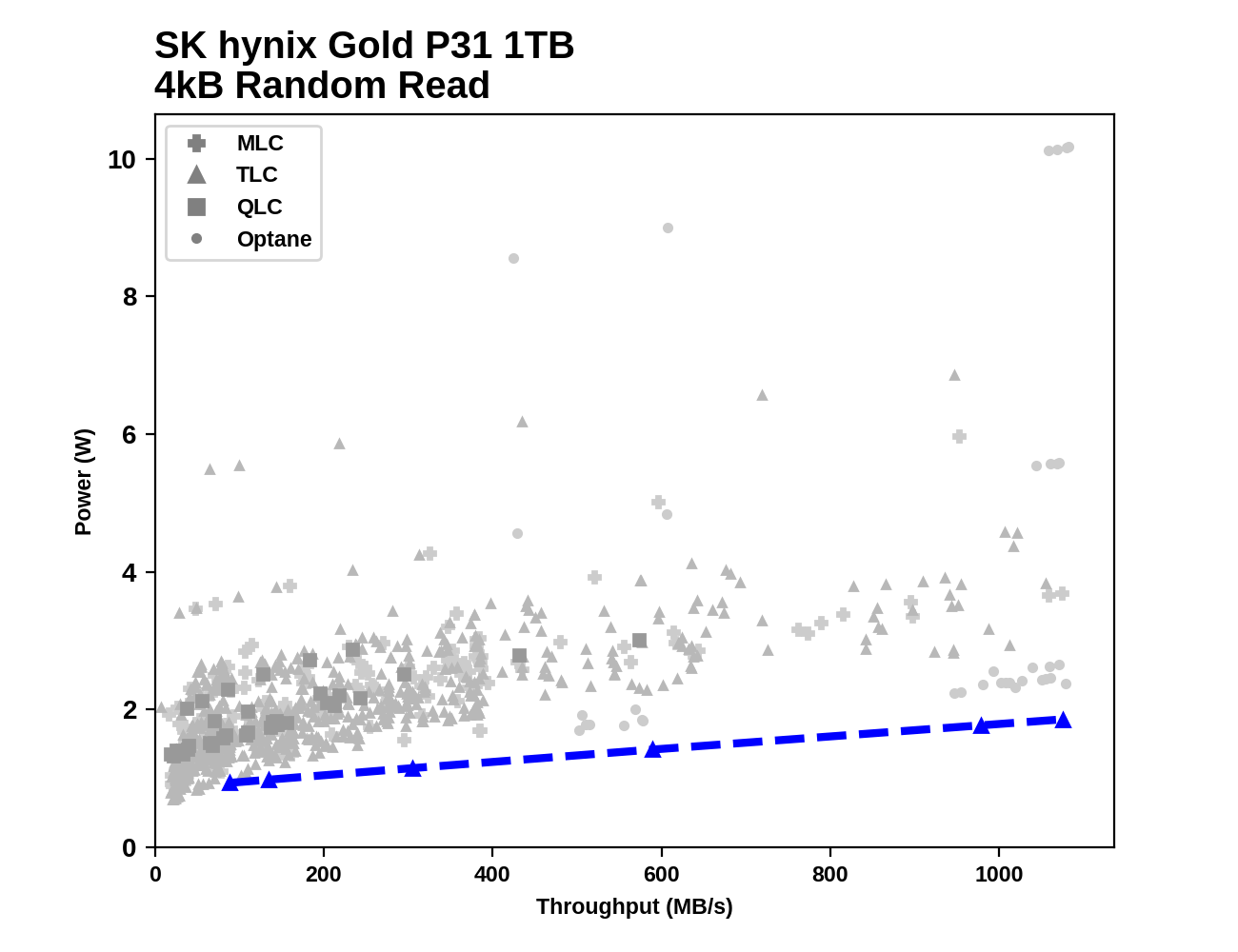
On a performance per Watt basis, most M.2 NVMe SSDs are much more efficient than M.2 SATA SSDs. The most efficient M.2 NVMe SSDs are also at least competitive with M.2 SATA SSDs in terms of absolute power consumption, despite outperforming the SATA SSDs by at least a factor of 2-3x. Power consumption from a M.2 NVMe SSD will also drop slightly when only one or two of its four PCIe lanes are used, which is the case when the drive is behind a USB to NVMe bridge.
For example, comparing a SK hynix NVMe drive against of dozens of other M.2 NVMe and 2.5" SATA drives: https://images.anandtech.com/doci/16012/rr-all.png Unfortunately, I don't think there are any M.2 SATA results in there, and those are often a little bit more efficient than their 2.5" counterparts (running off 3.3V rather than 5V, but stepping it down to at least one or two lower voltages on the drive in either case).
Re: Upgrade Raspberry Pi 4 with a NVMe boot drive
#76Earlier quoted context omitted.
> An unnecessary additional failure point seems counterproductive One of the leading reasons for using USB attached storage on the Pi is to avoid SD card corruption issues.
You can get the same corruption on ssds if power draw is more then pi allows or if power goes down. With an SSD you are increasing power consumption on USB which is limited to around 1.2A or however much power supply allows. Note: I havent had any corruptions past year on pi3... all I changed was power supply, sd card and using aarch64
Re: Upgrade Raspberry Pi 4 with a NVMe boot drive
#77Earlier quoted context omitted.
There are some M.2 SATA SSDs around that get regularly confused with NVMe SSDs. He for sure wanted to warn against SATA SSDs. Though for the Pi a SATA SSD would be fast enough.
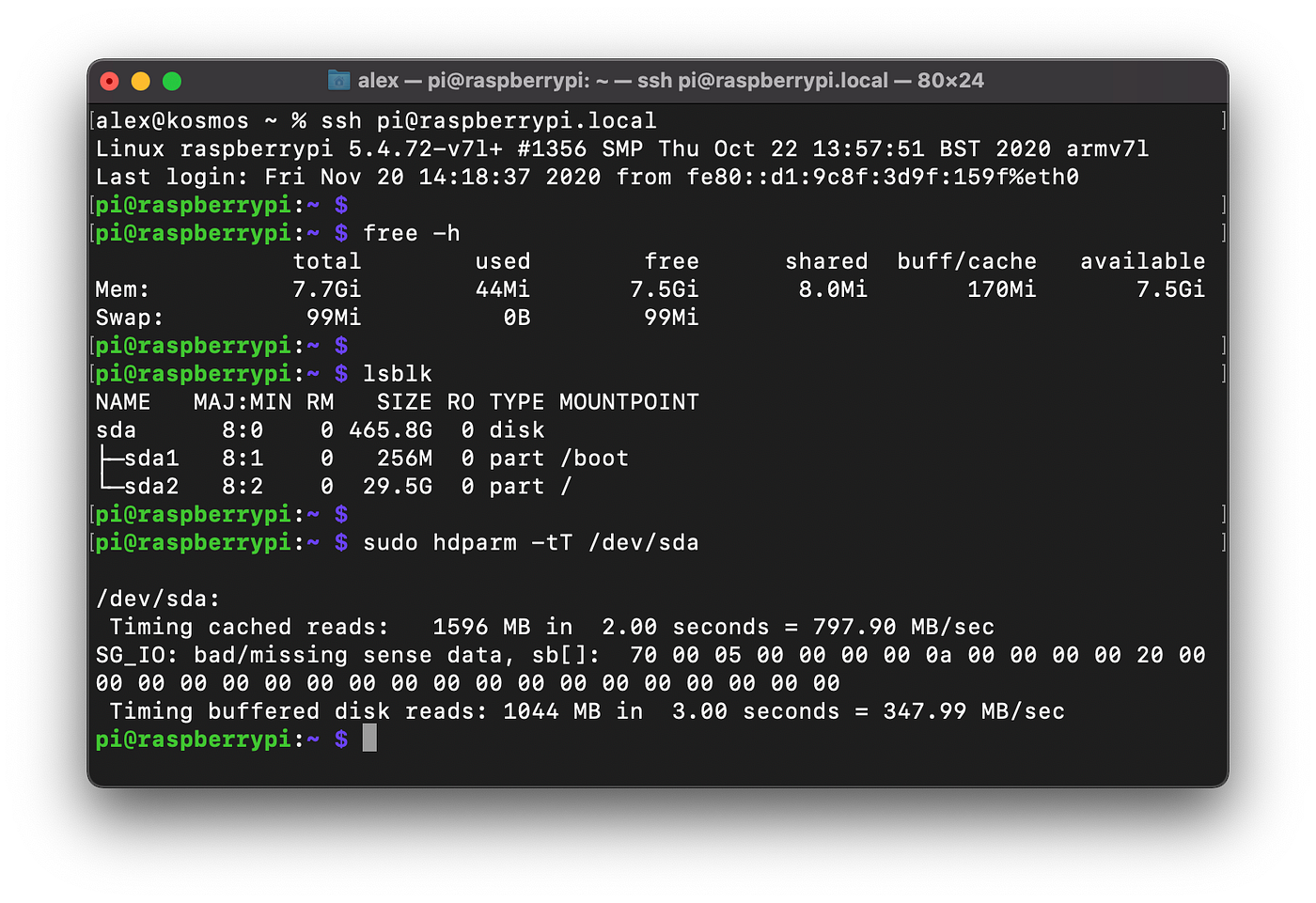
For what it’s worth, unless you’re somehow able to dedicate a PCI-E lane to a USB port, the USB spec will be what limits you. I switched a Pi4 to boot from an older, spare USB SATA SSD a few weeks ago, and it’s reporting 1566MB/924MB on the same hdparm tests as the article (about a 10% drop-off).
Re: Upgrade Raspberry Pi 4 with a NVMe boot drive
#78Earlier quoted context omitted.
For what it’s worth, unless you’re somehow able to dedicate a PCI-E lane to a USB port, the USB spec will be what limits you. I switched a Pi4 to boot from an older, spare USB SATA SSD a few weeks ago, and it’s reporting 1566MB/924MB on the same hdparm tests as the article (about a 10% drop-off).
SATA III is 600MB/s max. So either something is funky with the hdparm test (host side cache?) or it's not SATA.
[0] https://miro.medium.com/max/1400/1*xcGnOTsPvZtPdGSj8yODiA.pn...
Re: Upgrade Raspberry Pi 4 with a NVMe boot drive
#79Just wanted to note that you DO get a large (measurable) performance increase using NVMe natively via the Pi's PCIe bus vs. through a USB 3.0 adapter; see my notes in my Compute Module 4 review: https://www.jeffgeerling.com/blog/2020/raspberry-pi-compute-... I should probably dedicate a post and video to NVMe support, but basically you get double the random IO numbers if using NVMe vs NVMe-via-USB3. You can't boot of…
Thanks for the write up. That was enlightening. PCIe is a really nice "bus" all things considered. At DSSD we liked it so much that we ran it directly to clients, over custom cables & connectors.
Re: Upgrade Raspberry Pi 4 with a NVMe boot drive
#80Honestly I'd get rid of the USB and use the Pi 4 compute module with NVMe next year. USB connectors suck balls, one bump or connector dangling over the edge of your desk that gets hit by a hip and you have a device reenumeration, no idea what havoc that would have on the kernel that's running off it. USB is evil. Never use it for anything mission critical.
> one bump or connector dangling over the edge of your desk that gets hit by a hip and you have a device reenumeration It’s fun to think about the horrors which might result with similar mistreatment of old school external SCSI hardware. USB is fine; use quality cables and don’t run your computer in a disco if you can help it.
I often have to design 3D printed housing to go around the USB plug housing to hold and lock the plug snugly in place, because the designers of both the USB ports and plugs are incompetent at designing something industrial grade that locks down firmly.
SCSI cables were fine, their ports were secured to the housing and they had nice screw locks so the cables wouldn't go anywhere. Any cantilever forces were absorbed by metal casing, not PCB. Super reliable.