Live data from Hacker News

Material Shell – A modern desktop interface for GNOME

material-shell.com

131–140 of 271 posts

Re: Material Shell – A modern desktop interface for GNOME

#131
post #69

when is this material crap gonna die? There are gaps everywhere who wants more gaps in their DE?

I do. I don’t need them when every pixel counts but I think they are useful If not pleasing in many cases.

That’s why I created what I believe was the first tiling wm "useless gaps" patch for dwm 10 years ago. Since then, it has been adopted by other wm, i3 being a notable exception.

I don’t use a DE, but I guess a little space between those fat bars and backdrop’d windows might help to see through the bloat.

Re: Material Shell – A modern desktop interface for GNOME

#132
post #57

Earlier quoted context omitted.

Doesn’t GNOME at least have a setting to change alt-tab to window- instead of app-based?

It does, but the fact that the default is so braindead and annoying, and that I have to configure it to make it usable, is well.. very annoying. Like, why would they think that it is a good idea? No other desktop does this.

Isn't Gnome just copying Mac OS X?

Cmd+Tab switches between applications, and Cmd+~ switches between windows of the current application.

Re: Material Shell – A modern desktop interface for GNOME

#133
post #95

Earlier quoted context omitted.

It's interesting. Microsoft agreed with this philosophy and fought tooth and nail against tabbing in browsers, opting instead that each browser tab be it's own window and accessible from the task bar. After all other browsers had switched, they were forced to introduce that in IE as well. The worst offender here is OSX. I still haven't figured out a good way to switch between multiple open windows of the same applica…

Just press Command-` to switch between windows of the same application. Command-Tab to switch between windows of other applications.

Weirdly enough this doesn't work when apps are in full screen mode, which Apple has been pushing lately.

Re: Material Shell – A modern desktop interface for GNOME

#134
post #84
post #39

I find the app-based window navigation in vanilla GNOME 3 rather frustrating, and try as I might, I just can't get comfortable navigating between what I think of as applications. This is because I have a few applications (Firefox, Terminal) that are really not applications in and of themselves; the applications are really Outlook, JIRA, Confluence, Slack, OpenShift (logged in as cluster admin), OpenShift (logged in a…

Very this. My mind is not app-centric. I want the shell where I'm looking at logs, the editor where I'm taking notes, the browser where I'm checking some doc. I don't care to think about which terminal application the shell is inside, select that, then find I've opened a different terminal window and have to search through the windows separately. I don't care whether the doc is loaded in Firefox or Chromium so don't…

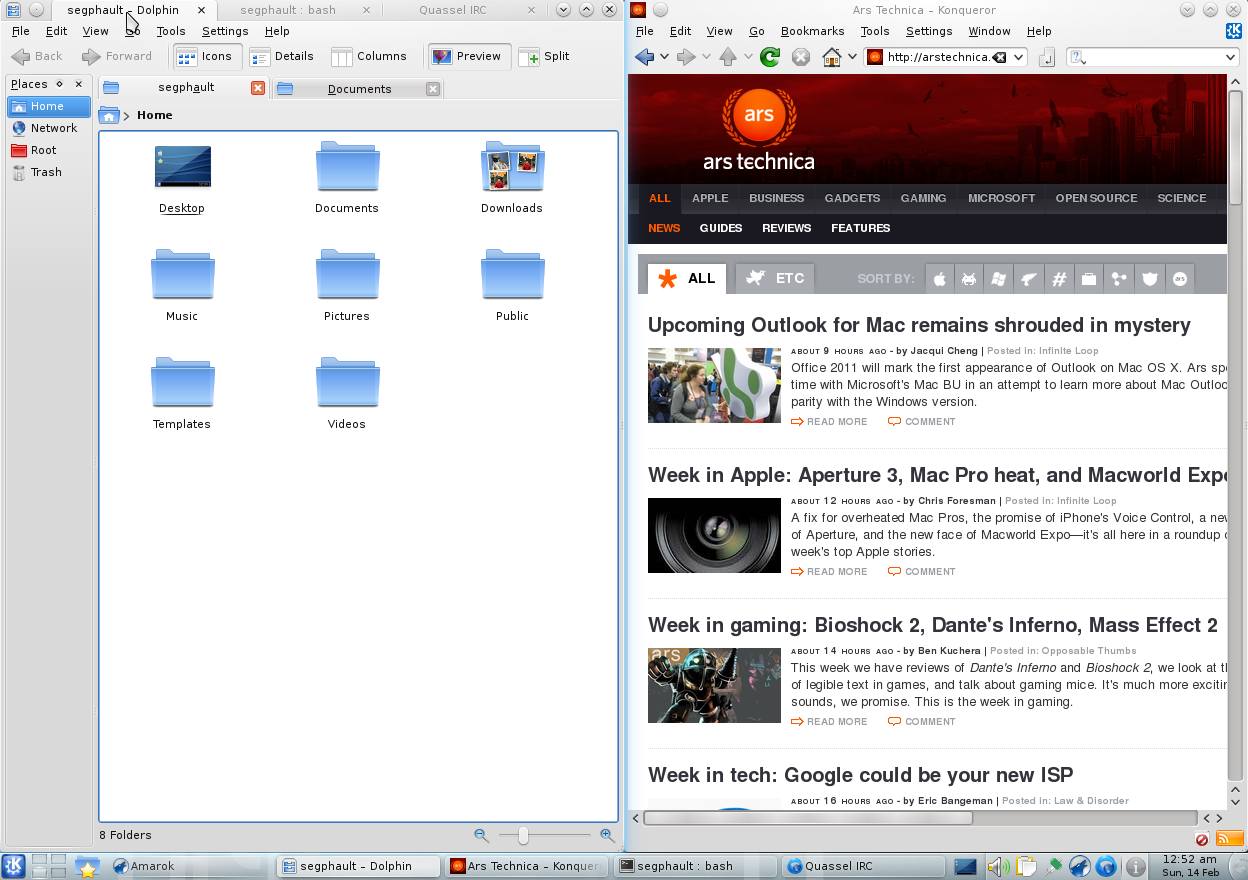
I miss an older KDE feature, which was custom tabbed windows. You could easily Alt+Tab between windows, and then use another shortcut to move between tabs.

https://cdn.arstechnica.net/wp-content/uploads/archive/kde44...

That way, I could put the service logs/terminal on one side, and the IDE and e.g. running website in another window.

You can get this with i3 or any other tiling window manager, but I found too many cases of odd behaviour with i3 and gave up on it.

Re: Material Shell – A modern desktop interface for GNOME

#135

The word "modern" is really overused in tech, and it doesn't really tell you all that much, just that "this is better because it's new, and new stuff is better than old stuff". Consider a more descriptive word, such as: - minimal - streamlined - sleek - simple - opinionated - spatial - comprehensive etc...

I would argue all of you suggested words are just as overused and meaningless as "modern". At the end of the day, I would still need to see the product to understand what it does.

It's hard to describe a complex program with one word but I would argue they are at least more informative than "modern". Unless you're intentionally using old technology or going for a "retro-style", pretty much anything written in 2020 could be described as "modern".

The alternatives listed as just examples, I would need to understand the program better to come up with a truly apt adjective.

Re: Material Shell – A modern desktop interface for GNOME

#136

Trying this out as it's typed. For background: I really want to love tools like i3 or awesome, but I always go back to Gnome because it juts gets stuff done. I liked Gnome 2, I like 3. So: just like the site says. Top is the taskbar, which also has a left icon for the current tiling pattern (fullscreen, tiled vertically, etc). The left side panel starts at the top-left with the search button that does the Gnome activ…

> I really want to love tools like i3 or awesome, but I always go back to Gnome because it juts gets stuff done. I liked Gnome 2, I like 3

My approach is to use the window manager best suited for the task, but all at the same time.

That means for my highly structured multi-desktop, multi-git-workspace programming tasks I use i3, which is ideal for those.

However for my less structured tasks like writing or consuming documentation, email, and personal web browsing, I use a more conventional, less constrained desktop environment (i.e gnome), which is more ideally suited for those tasks.

If I'm willing to abuse the term window manager a little further, Vim running inside i3 serves as a third window management environment I run in parallel, optimized specifically for code editing.

The trick is that I use i3 in its own separate Linux desktop window (In my case running on a remote machine, but you could just as well do this running in a local VM). this allows me to have both environment successful on the same screen at the same time.

This also has the added benefit of making it very easy to find my code editing window among the tons of other windows I have open.
Re: Material Shell – A modern desktop interface for GNOME

#137

Trying this out as it's typed. For background: I really want to love tools like i3 or awesome, but I always go back to Gnome because it juts gets stuff done. I liked Gnome 2, I like 3. So: just like the site says. Top is the taskbar, which also has a left icon for the current tiling pattern (fullscreen, tiled vertically, etc). The left side panel starts at the top-left with the search button that does the Gnome activ…

I use cinnamon, for that very reason. Just works, and works well for my use case, is very stable, and I've no wish to learn and configure another desktop paradigm.

Lack of Wayland support is the single thing I have wish it had.

Gnome is so smooth on Nvidia in comparison but in every other way I prefer and still use cinnamon

Re: Material Shell – A modern desktop interface for GNOME

#138

Earlier quoted context omitted.

They were wrong. Emphatically. Ridiculously wrong. Remember for context that virtually nobody was using virtual desktops for windows as it not part of the UI unless you installed it and it sucked besides. Also remember most people's internet was very very slow. Screens were also not that big. Not that they are much bigger now with everyone using laptops. Grouping related windows in the task bar makes it frustrating t…

They weren't wrong, they just did an awful job of making it so individual apps wouldn't have to reinvent the wheel to get tabs. There's no reason browsers should have to implement it themselves or that other apps shouldn't be able to have the same semantics. Ironically the pieces were there with MDI but that was also a bad implementation of the same semantic concept. For whatever reason, only tiling wms like i3 have…

I still use tabs in apps despite using i3 for years. This firefox window has 13 tabs and would be much much crappier if I used 13 i3 tabs.

I couldn't open new firefox windows in the background and opening others in the foreground within firefox.

I would have to use i3's horizontal tabs instead of tree style tabs making it harder to read the titles.

I couldn't switch tabs separately from switching windows. This would make having firefox alongside another window suck because it would trivially become hard to navigate. I would have to manually put only the firefox windows in a tabbed layout with the other window outside of it. I would have to focus parent and then focus direction to switch to the other. This would be so for any window I want to use alongside it even briefly.

I couldn't close entire trees of tabs at once. I couldn't close everything except the current tree.

I couldn't save a particular set of tabs as a session to be restored later.

In theory could these features be implemented in an i3 specific nature? Perhaps so long as you are willing to do so for every specific environment and for every individual app.

If we pick 100 apps and the most popular 10 environments and the most desired 10 features we will find we only have 10,000 tasks ahead of us!

Tabbed environments within i3 ARE useful but not as a replacement for tabbed interfaces within applications.

Re: Material Shell – A modern desktop interface for GNOME

#139
looks okay, tried it and bang! everything is in disarray. I found organising windows to be a pain. suddenly everything is in full screen mode. I thought the search would've been like the search provided by kde, i.e search through open windows no matter what app. that's one thing I miss about kde. and wish I could get in gnome.

Re: Material Shell – A modern desktop interface for GNOME

#140

The word "modern" is really overused in tech, and it doesn't really tell you all that much, just that "this is better because it's new, and new stuff is better than old stuff". Consider a more descriptive word, such as: - minimal - streamlined - sleek - simple - opinionated - spatial - comprehensive etc...

I would argue all of you suggested words are just as overused and meaningless as "modern". At the end of the day, I would still need to see the product to understand what it does.

without trying to nitpick I had a similar reaction as pimlottc. the Gnome-Shell title page is: "GNOME Shell, next generation desktop shell"

so when I read modern on your description I just chuckled a bit.

in any case great work on this. looks like a ton of work

Post reply on HN