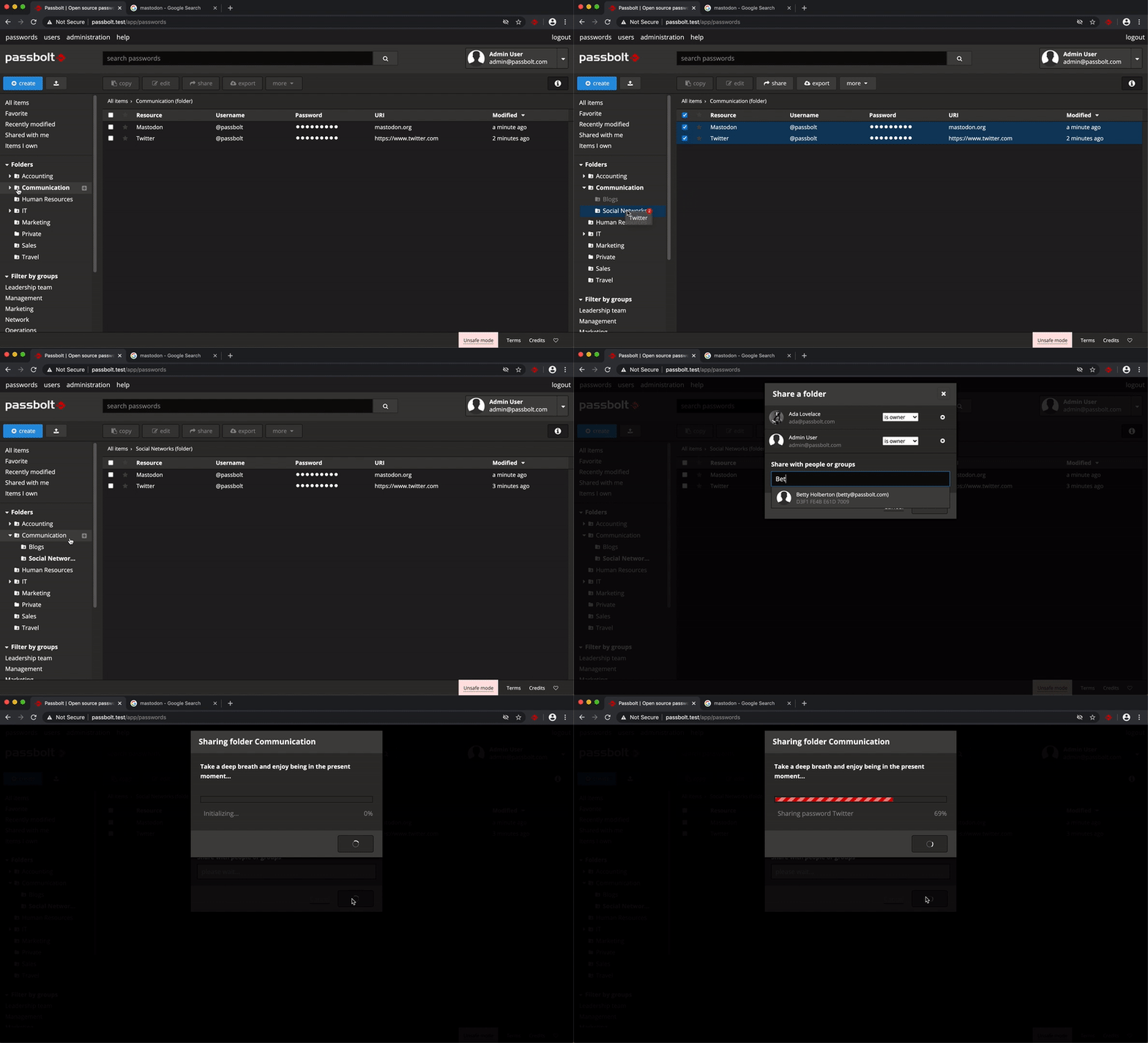
Why is is this better than Bitwarden?? - https://bitwarden.com
Not necessarily better, different. Folders management for instance : https://help.passbolt.com/assets/img/help/2020/05/rc1/folder...
81–90 of 101 posts
Why is is this better than Bitwarden?? - https://bitwarden.com
Earlier quoted context omitted.
I did a pretty thorough review of PassBolt a couple of years back when I was trying really hard to get a company to adopt it and give up their "we store our all of our passwords on a spreadsheet" approach. I don't have my notes any more, but off the top of my head, the big points in favor were: - Self-hostable. The tech guy in charge just resolutely would not use any hosted service, period. In his evaluation, trustin…
> - Built with PHP. Same guy was uncomfortable with Python, Node, and all that, and insisted that he be able to maintain and troubleshoot the codebase himself if necessary, so it had to be PHP. Now that's an interesting perspective, I don't think I've heard anyone consider PHP to be more secure than Python before.
Earlier quoted context omitted.
> I don't think I've heard anyone consider PHP to be more secure than Python before If you heard anyone discuss language X being more secure than language Y, then I'm sorry - but that person has no clue what they're talking about. PHP is as secure or insecure as Pythong / Ruby / Go / . Hammer depends on the one holding the hammer.
Of course; the best comparison you can make in security here is the amount of raw memory access. People condemn languages for two security reasons: the average level of competence in products usually written in a language, and the amount of footguns a language provides. PHP is very easy to learn, which is why a lot (really, a _lot_) of open source software is of very questionable quality. For many, it's the first pro…
You say it as if it didn't happen to Python and Go. Also experienced programmers are luxury.
You just need git, ssh and pass ( https://www.passwordstore.org/ ), see https://fr.jeffprod.com/blog/2019/gerez-vos-mots-de-passe-av... (french)
Or https://github.com/gopasspw/gopass if you want something passwordstore compatible but with additional team features.
self hosted system requirements seem much more lightweight compared to Bitwarden
Earlier quoted context omitted.
Of course; the best comparison you can make in security here is the amount of raw memory access. People condemn languages for two security reasons: the average level of competence in products usually written in a language, and the amount of footguns a language provides. PHP is very easy to learn, which is why a lot (really, a _lot_) of open source software is of very questionable quality. For many, it's the first pro…
>problematic history You say it as if it didn't happen to Python and Go. Also experienced programmers are luxury.
It might have something to do with the fact that PHP is still taught in a lot of web dev classes (though NodeJS has taken its crown) and that Go is relatively unknown for beginning programmers. Python generally just runs on your own machine because it's not as optimized for being a web language like PHP has been.
Pros - free open source - group management can be delegated - works fine with mac, linux & windows browsers - maintenance free self hosted on k8s for 2 years - lack of mobile apps has not been issue - UX is ok, no complaints - requires little end-user support Cons - only password field is encrypted - no warning that Notes are not encrypted - promises ‘Secure files & notes (Coming soon)’ for more than year - password…
Just to clarify, I was never a developer of Passbolt. I think they based their repository off of CakePHP (which I do maintain) and inherited all the commit history that way.
Earlier quoted context omitted.
Just to clarify, I was never a developer of Passbolt. I think they based their repository off of CakePHP (which I do maintain) and inherited all the commit history that way.
Yes the repository was forked from CakePHP v2, before the framework was moved as a composer dependency, so v2 contributors are shown as Passbolt contributors.
The last contribution was over 4 years ago (first contribution was 12 years ago), which would be the remnants of the fork.
Pros - free open source - group management can be delegated - works fine with mac, linux & windows browsers - maintenance free self hosted on k8s for 2 years - lack of mobile apps has not been issue - UX is ok, no complaints - requires little end-user support Cons - only password field is encrypted - no warning that Notes are not encrypted - promises ‘Secure files & notes (Coming soon)’ for more than year - password…
Does sentry have password management options now?
  - free open source
  - teams management can be delegated
  - works fine with mac, linux & windows browsers
  - maintenance free self hosted on k8s for 2 years
  - lack of mobile apps has not been issue
  - UX is ok, no complaints
  - requires little end-user support
Earlier quoted context omitted.
Likewise, and I'm loving Bitwarden so far! Although I'm using the dockerized rust API (1) for self-hosting it, and so far it's been working great for months! I am keeping a close eye on the container, and backing up the data hourly to ensure I don't need to worry about loosing anything. (1): https://github.com/dani-garcia/bitwarden_rs
I was evaluating Bitwarden years ago (before bitwarden_rs), but was thrown off by the lack of support for 2FA tokens without a subscription. Does selfhosting with bitwarden_rs solve this ? or do i still need a subscription for storing 2FA tokens along with passwords ? I have absolutely no problem paying once per major version for software, open source or not, but i refuse to pay any subscription. At least when buying…