Live data from Hacker News

A Tour of Acme (2012)

research.swtch.com

51–60 of 61 posts

Re: A Tour of Acme (2012)

#51
post #49

Earlier quoted context omitted.

One of the main argument for Acme was that keyboard navigation is tends to be one dimensional, whereas navigating with mouse is two dimensional. I find it curious that a higher-than-one dimensional representation of a program is not present: proper syntax highlighting makes debugging much faster. Say, I want to see some expression with deeply nested parenthesis (lisp-style, or nested function calling in Python) is ma…

I consider the lack of highlighting part of a "calm" interface: the only thing that changes as I type, are the characters that I type. But maybe that's just Stockholm Syndrome after 15 years of Acme! :) When I need to check nesting levels, I use a little acme-trick: double-click on the closing mark (works for parentheses, curly brackets, quotes, probably more) and it'll highlight everything contained within that leve…

Regarding syntax highlighting, I created my own Emacs theme a few years ago to have only a few constructs highlighted:

* The name of a function being defined

* Comments

* String and character literals

The result is very calm [1], but I can still rely on colors to know orient myself and know when I forgot to close a string literal.
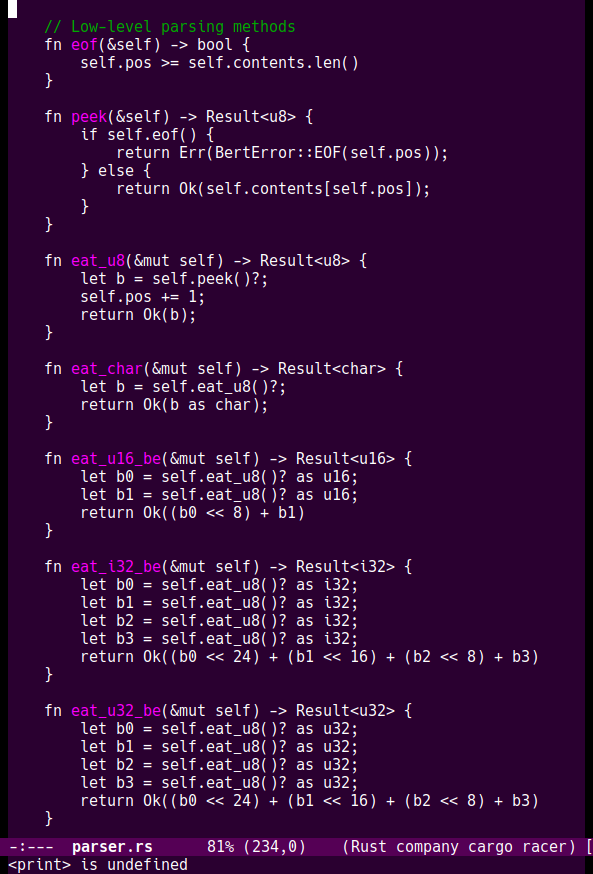
[1] https://vfoley.xyz/syntax-highlighting/purp3.png

Re: A Tour of Acme (2012)

#52

Acme must be very useful in a Plan9 system. But on UNIX, I don't see any single thing it does that cannot be done by vim, with some configuration. And of course vim can do more.

I have written quite a few hacks to replicate the Acme experience and it includes many tools outside the text editor part: terminal, shell, window manager ...

Sure vim is a vastly superior text editor and acme is a better "integrating" text environment. Something as different as a Jupyter notebook.

As for vim limits: poor mouse support, window management, plumber support, notebook like features (emacs org Babel), editable interface, jump to /path/to/file:/search pattern/ and other Sam expressions ...

Re: A Tour of Acme (2012)

#53
post #16

I use Acme (from Plan9Port) as my every-day editor for work. I run it full-screen on a 4K monitor. I've got a co-worker who likes to grumble about mice, but somehow when we're debugging something on a call, I'm always in the appropriate file at the appropriate line number long before he is :) There are some tools (acmego [9fans.net/go/acme/acmego], A [github.com/davidrjenni/A]) that make working with Go a lot more pl…

Perhaps this might sound like a noobish question but I found the video super cool. That said, does acme has syntax highlighting? I think with that I'd be willing to learn it.

Re: A Tour of Acme (2012)

#54
post #16

I use Acme (from Plan9Port) as my every-day editor for work. I run it full-screen on a 4K monitor. I've got a co-worker who likes to grumble about mice, but somehow when we're debugging something on a call, I'm always in the appropriate file at the appropriate line number long before he is :) There are some tools (acmego [9fans.net/go/acme/acmego], A [github.com/davidrjenni/A]) that make working with Go a lot more pl…

Perhaps this might sound like a noobish question but I found the video super cool. That said, does acme has syntax highlighting? I think with that I'd be willing to learn it.

No.

Re: A Tour of Acme (2012)

#55

Earlier quoted context omitted.

Emacs is built on Unix like vi and everything else. The fact that vi has a less elegant language doesn't affect me, because I don't see much value in adding extensions to the editor. What I need is a sane user interface, which vim provides.

The original Emacs was written for Multics at a time when people outside of Bell Labs were largely unaware of the existence of Unix[1]. It also doesn't follow the Unix philosophy of making small CLI utilities composed with pipes. As I understand it (though I haven't used it), Acme is extended with external programs which communicate through pipes just like the traditional Unix utilities. [1]: https://www.jwz.org/doc/…

The first version of Emacs was not made in lisp, instead it used TECO, a horrible programming editor/programming language.

Re: A Tour of Acme (2012)

#56
post #22

I've been using acme for ~6 years now and it's still my daily editor. I wrote a LSP client for it ( https://github.com/mjibson/acre ). acme is so weird because when you start out it's like "wait so I have to write little shell scripts to do everything?". But then it slowly dawns that larger programs (like acre) are possible that are much more interactive, like modern IDEs.

This looks pretty cool. But I'm having a hard time grasping concept of double-clicking for things like goto definition. Which makes me bring up this question, is acme useable with with 99% keyboard?

Re: A Tour of Acme (2012)

#57
post #7

Earlier quoted context omitted.

Sometimes it just feels faster to think about and execute keyboard shortcuts, although the actual tests I've read about that seem to be from the early Macintosh age, which feels a bit like measuring anything by looking at your university's students...

I don't understand what you're saying. That evidence of keys being faster than the mouse are old? Why would the speed change over time? It's measuring the human, not the machines; and we are no faster.

That's an assumption that needs to be verified. Sure, over a generation it's quite unlikely that evolution made for better mouse users.

But we don't need to go that far. I mean, when you were testing during the development of the Mac, it was what, 1983? The mouse was a new thing, CUA didn't exist yet, I doubt that many vim and emacs users were part of the target group.

I doubt that speed changes if you test the same demographic as back then, although it's harder to find people as unaccustomed to mice.

In addition, has there ever been a test that includes mouse chords as used in Acme/Oberon?

Re: A Tour of Acme (2012)

#58
post #17
post #8

Earlier quoted context omitted.

It is convenient with a pointer or trackpad close to your thumb. Three buttons associated with such pointer or trackpad would be nice, but it would work much better with more buttons. Two or three buttons for each hand would be awesome.

I used acme for years with a laptop and no external mouse, just using the trackpad (and trackpoint). I never missed more buttons.

So currently control, option, and command are three buttons. I'm wondering if it would be better with the left and right sides functioning differently. You could get many more chording combinations.

Re: A Tour of Acme (2012)

#59
post #8
post #3

Acme is an incredible, fascinating editor... that relies too much on rat wrestling to be useful to me. I really find it interesting how it takes advantage of Plan 9's aggressive Unix philosophy to provide functionality that would've been plugins or extensions in other editors as separate C programs or scripts. But having to use the mouse for everything just drives me nuts. It's easier for my fingers to acquire even E…

It is convenient with a pointer or trackpad close to your thumb. Three buttons associated with such pointer or trackpad would be nice, but it would work much better with more buttons. Two or three buttons for each hand would be awesome.

Sorry, but a trackpad or TrackPoint just makes things worse. It's much harder to precision-highlight a chunk of text with those than with the mouse (or my Logitech TrackMan).

Re: A Tour of Acme (2012)

#60
post #22

I've been using acme for ~6 years now and it's still my daily editor. I wrote a LSP client for it ( https://github.com/mjibson/acre ). acme is so weird because when you start out it's like "wait so I have to write little shell scripts to do everything?". But then it slowly dawns that larger programs (like acre) are possible that are much more interactive, like modern IDEs.

This looks pretty cool. But I'm having a hard time grasping concept of double-clicking for things like goto definition. Which makes me bring up this question, is acme useable with with 99% keyboard?

It's a single click. There's no double clicks in acme. Did you watch the youtube video? Acme is about 5% usable with a keyboard.
Post reply on HN