Earlier quoted context omitted.
you should productize this idea. I would use it. It's a bit hassle to print to PDF every time, but if the barrier is low enough, it would be useful.
There's nothing to productize. You just use CMD[,Control}-P, select "Print to PDF", save to a relevant folder, and off you go. If that's too many steps, use Automator or whatever the equivalent is on your OS to make a shorter hotkey. (I had a Hammerspoon script for this once, but reverted to just doing it manually, since my muscle memory on the keystrokes is sufficiently well trained that it supplants my desire to fi…
WorldBrain's Memex: Bookmarking for the power users of the web
71–80 of 215 posts
Re: WorldBrain's Memex: Bookmarking for the power users of the web
#72Earlier quoted context omitted.
You can grep the saved archives and they often save working copies of local interactive content in a way PDF doesn't. Internal structure and annotation is also preserved. I'm not sure I understand the formatting comment, you seem to be saying formatting is not lost and supporting that with an example of how formatting is lost. Don't get me wrong, it should definitely be easier to save, index and otherwise manipulate…
It depends on the site - but I haven't found 'lost formatting' to be an issue at all - since, when I want to do a granular search I'm using 'pdftotext' to search on plaintext, and when I find a PDF of interest, I open it and can go directly back to the web page from which it was printed by way of the footer/header which contains a clickable URL. Most of the time though, the formatting isn't an issue. It depends on th…
Re: WorldBrain's Memex: Bookmarking for the power users of the web
#73This is still not as powerful as my one, simple trick to handle all bookmarks, ever: Print to PDF. I've been doing it since last century, and I have 10's of thousands of PDF's of every single web page I've ever found interesting, sitting right there in a directory on my computer. Its indexable, searchable, grok'able, available off-line, allows me to harvest data without fuss, and gives me access to anything I can rem…
There is also some degree of messiness even with printing to PDF. For example let's say I want to save an HN or Reddit discussion along with the comments - I would need to make sure I capture all the comments that overflow to "More" on HN or are behind a "load more comments" link on Reddit. Is there any elegant way to traverse all that and capture it?
Re: WorldBrain's Memex: Bookmarking for the power users of the web
#74Re: WorldBrain's Memex: Bookmarking for the power users of the web
#75Re: WorldBrain's Memex: Bookmarking for the power users of the web
#76Re: WorldBrain's Memex: Bookmarking for the power users of the web
#77Re: WorldBrain's Memex: Bookmarking for the power users of the web
#78This is still not as powerful as my one, simple trick to handle all bookmarks, ever: Print to PDF. I've been doing it since last century, and I have 10's of thousands of PDF's of every single web page I've ever found interesting, sitting right there in a directory on my computer. Its indexable, searchable, grok'able, available off-line, allows me to harvest data without fuss, and gives me access to anything I can rem…
Re: WorldBrain's Memex: Bookmarking for the power users of the web
#79This is still not as powerful as my one, simple trick to handle all bookmarks, ever: Print to PDF. I've been doing it since last century, and I have 10's of thousands of PDF's of every single web page I've ever found interesting, sitting right there in a directory on my computer. Its indexable, searchable, grok'able, available off-line, allows me to harvest data without fuss, and gives me access to anything I can rem…
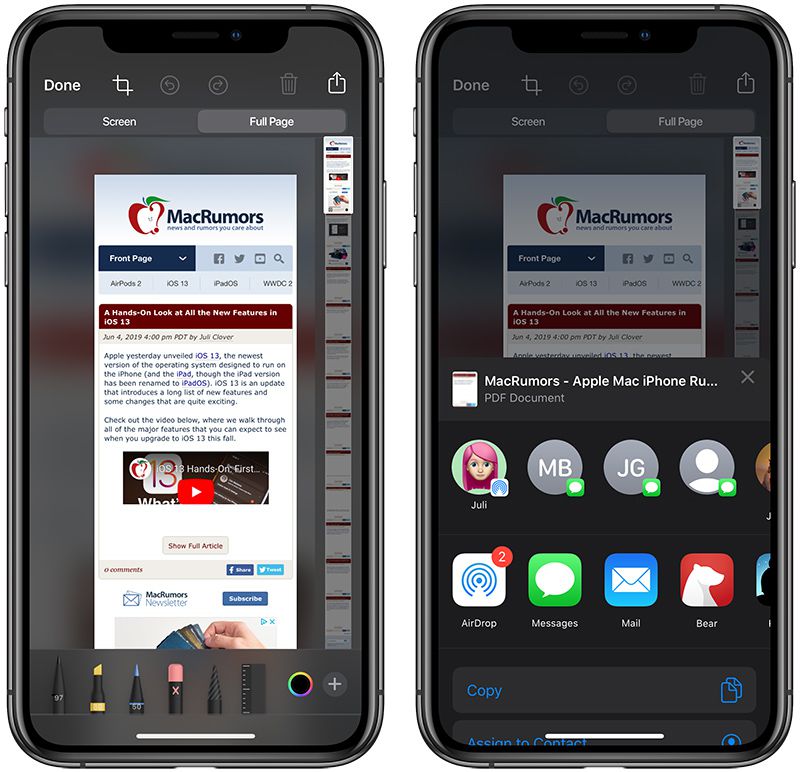
It's too bad browsers don't have an easy way to print to browser-page-sized PDF. Standard 8.5x11/A4 paper sized PDFs of webpages tend to look pretty terrible. I used to use the Scrapbook plugin for Firefox but I realized for the most part just plaintext might be best. So I'm in the process of setting up a workflow that will save article in markdown in one click and sync between my phone and my computer.
https://images.macrumors.com/t/zbOsBhKGQj6VvA9oq8KaZkLxXUc=/...
(note the scrollable preview at right edge of screen, the main preview is only showing a small fraction of the document)
Re: WorldBrain's Memex: Bookmarking for the power users of the web
#80Earlier quoted context omitted.
It's too bad browsers don't have an easy way to print to browser-page-sized PDF. Standard 8.5x11/A4 paper sized PDFs of webpages tend to look pretty terrible. I used to use the Scrapbook plugin for Firefox but I realized for the most part just plaintext might be best. So I'm in the process of setting up a workflow that will save article in markdown in one click and sync between my phone and my computer.
You could try the awesome SingleFile extension: https://github.com/gildas-lormeau/SingleFile It might be a good compromise between PDF and plain text. It's pretty nice because it essentially serialises a snapshot of the current DOM tree, so it works with all kinds of JS-generated pages. The files should be relatively grep-able, because it's normal HTML. Of course, you might want to strip HTML tags for more sophistica…