Live data from Hacker News

Don't touch my clipboard

alexanderell.is

221–230 of 322 posts

Re: Don't touch my clipboard

#221
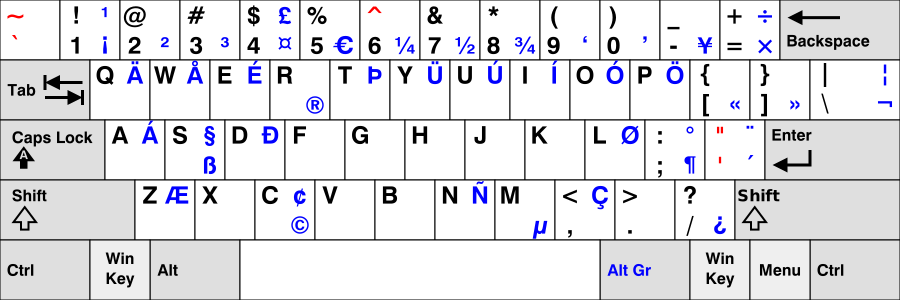
On a related note, I find it interesting how modern US-ANSI layout keyboards (even the International version [1]) still has such a limited set of characters.

We have ¼, ½, and ¾, but not en (–) and em (—) dashes; and I get that (') and (") are leftovers from typewriters and ASCII, but wouldn't it be nice to have proper 6-9 (‘…’) and 66-99 (“…”) quotation marks?

Then again, you often see Europeans online misusing acute (´) and grave ( `) accents as apostrophes (writing don´t or don`t, instead of don't or don’t). So perhaps the availability of more similar looking keys would just lead to even more misuse?

[1]: https://upload.wikimedia.org/wikipedia/commons/2/22/KB_US-In...
Re: Don't touch my clipboard

#222

The wrongest thing about this, from my perspective, is that my browser fires off a js 'copy' event when I press control-c. There are times when I've found it helpful that a browser can copy text to my clipboard when I click a button, but I can't think of a single time when I want a site to react to my attempt to copy text off if it. Is there any way to configure my user agent (Firefox) not to do this? A hack is ok.

What about the X clipboard, e.g. just selecting text and then being able to paste with middleclick - did you check that as well? I suppose it should circumvent that?

Re: Don't touch my clipboard

#223
post #154

I can read & write a language that I don't have a keyboard for (I use a standard US 101 key layout), so I work around this by cut & pasting single characters around to fix up the missing accent characters. Usually even a partially fixed word is enough for the spell checker to kick in and correct the rest, making this surprisingly fast. The thing that annoyed me recently is that if I cut & paste a single character in…

> I work around this by cut & pasting single characters around to fix up the missing accent characters. Let me save you some time in the future. You did not identify the OS and language/script you have trouble with, so my answer has to be kinda generic. First have a look whether your OS keyboard settings or a third party provides an en_US-101 compatible logical layout that adds more accented characters (typically acc…

It seems strange that compose u o → ů is u-with-circle-on-top, but compose U G → Ğ is G-with-u-on-top, since it means it's sometimes modifier-first and sometimes base-first.

(FWIW I use the compose key! Just not those particular characters, my set is incidentally consistent :-))

Re: Don't touch my clipboard

#224

Earlier quoted context omitted.

How do you want the clipboard to work then? To my mind, the whole point is to provide a way to move information within and between applications.

Here's a stab at defining a function: The clipboard should act at an only at user direction to copy content from one application or context to another. The clipboard should not, nor should applications be able to, alter the copied content from the visibly-selected content. Applications, other than when clearly and unambiguously directed by the user be able to access or read clipboard contents. I'd suggest additionall…

> The clipboard should not, nor should applications be able to, alter the copied content from the visibly-selected content.

This might feel intuitively right, but it severly limits the usefulness of the clipboard.

It then becomes a basic plain text clipboard

Try opening an rich text editor (e.g. https://quilljs.com/playground/) and selecting two words of which one is bold. Hit Ctrl+C. What is now on the clipboard? What happens when you paste? You have your formatting preserved. The editor has intercepted the copy command and stored data only it knows how to create and parse. The same would happen in a diagram editor (a selected shape would perhaps be stored as some json representation), or an image editor.

The problem is that the clipboard as an established concept already means "area where programs write their custom formatted data and where any app can read the same data upon paste".

Restricting it might be a good idea in some cases, but it's the user expectation so it's what apps (including browsers) need to do as the default. This unfortunately means that abusing it as in the article will be possible. There is no way for the browser to know whether the changed content was formatting tags (good) or trashing the selection by adding a copyright (bad).

Re: Don't touch my clipboard

#225

Earlier quoted context omitted.

How do you want the clipboard to work then? To my mind, the whole point is to provide a way to move information within and between applications.

Here's a stab at defining a function: The clipboard should act at an only at user direction to copy content from one application or context to another. The clipboard should not, nor should applications be able to, alter the copied content from the visibly-selected content. Applications, other than when clearly and unambiguously directed by the user be able to access or read clipboard contents. I'd suggest additionall…

That’s a good start, but it’s tricky.

How are you going to distinguish between user and programmatically-initated actions? Adding something like a “Secure Copy Key”, akin to control-alt-delete in Windows might work, but it’ll need kernel-level support.

Determining whether the clipboard contents faithfully represent the “visibly-selected” content is also very hard, possibly AI-hard. Suppose I copy an image while zoomed? What size should the clipboard contents be: the original size it’s apparent size?

One mitigation, if you’re worried about this now, might be to run certain programs as another user. I don’t think the clipboard is shared then.

Re: Don't touch my clipboard

#226

Furthermore don't touch my ability to paste into web forms. Some banks do this, and I have no idea why (some incredibly misguided idea of security?). I disabled the ability for websites to disable pasting using Firefox's about:config, but 99.9% of users won't know they can do this.

Do you know the key for this? Can't find it with a quick search.

You want dom.event.clipboardevents.enabled set to false

Re: Don't touch my clipboard

#227
post #175

Earlier quoted context omitted.

PowerShell acknowledged smart quotes and dashes in its language design and allows proper quotes interchangeably with ASCII straight quotes. I always found that an interesting design choice, although I'm not sure how useful it actually is to allow people to copy/paste code from dubious web pages. On the other hand, they'll do that anyway, so why bother making it harder?

This is going down a rabbit hole. “This” is an English quote, whereas „this“ is a German quote; note that the open quote character in the English quote is equal to the close quote character in the German quote. Then there is a less-often used style of quoting, similar to the French style, but: «this» is the French quote, whereas »this« is the German version. Yes, the open and close quotes are swapped. I applaud the i…

All of “”" parse the same as ", so bracketing doesn't really enter into it. This is just to prevent smart quotes from destroying code, not to have more levels of nesting.

Re: Don't touch my clipboard

#228
post #175

Earlier quoted context omitted.

PowerShell acknowledged smart quotes and dashes in its language design and allows proper quotes interchangeably with ASCII straight quotes. I always found that an interesting design choice, although I'm not sure how useful it actually is to allow people to copy/paste code from dubious web pages. On the other hand, they'll do that anyway, so why bother making it harder?

This is going down a rabbit hole. “This” is an English quote, whereas „this“ is a German quote; note that the open quote character in the English quote is equal to the close quote character in the German quote. Then there is a less-often used style of quoting, similar to the French style, but: «this» is the French quote, whereas »this« is the German version. Yes, the open and close quotes are swapped. I applaud the i…

Don't forget that the French quotes should have (non-breaking) spaces inside « like this » - only when used with the French language though, other languages usually don't use such spaces.

Re: Don't touch my clipboard

#229
post #223
post #154

Earlier quoted context omitted.

> I work around this by cut & pasting single characters around to fix up the missing accent characters. Let me save you some time in the future. You did not identify the OS and language/script you have trouble with, so my answer has to be kinda generic. First have a look whether your OS keyboard settings or a third party provides an en_US-101 compatible logical layout that adds more accented characters (typically acc…

It seems strange that compose u o → ů is u-with-circle-on-top, but compose U G → Ğ is G-with-u-on-top, since it means it's sometimes modifier-first and sometimes base-first. (FWIW I use the compose key! Just not those particular characters, my set is incidentally consistent :-))

Order does not matter with compose, that also makes it more user friendly than dead keys.

The modifiers' proper names are "ring above" and "breve".

Re: Don't touch my clipboard

#230
post #51

It's not just a browser thing. Apple Books does this with their e-books, which is infuriating if you're working with a coding book and just want to copy-paste stuff into your editor/terminal. You get something like: “ghci> putStrLn (pretty 10 value)” Excerpt From: Bryan O’Sullivan, John Goerzen, and Donald Bruce Stewart. “Real World Haskell.” Apple Books. When you only copied: ghci> putStrLn (pretty 10 value) Note th…

It also messes with dictionary lookup! It adds this nonsense if you select more than two Chinese characters, and so it makes it really hard to look up four-character Chinese idioms in my dictionary (which are, inexplicably, frequently missing from the built-in “lookup” dictionary). Apple Books is so close to being a nice reading interface, but there are so many stupid little bugs. Highlighting is another horrid littl…

The entire Apple dictionary system is a PoS AFAICT. It only works with perfect spelling and it only works with single words. How about finding closest match and how about letting me select lots of text and go through all the words.

I can only guess no one on the team actual uses the feature.

As a language learner I use Rikaikun for Japanese on my desktop browser. While I'd really like it if I could also run a similar extension in my mobile browser I'd be okay of Apple's dictionary actually worked with a fuzzy search and multiple terms... but no....

Post reply on HN