Live data from Hacker News

Autocomplete as an Interface (2015)

benkuhn.net

21–30 of 197 posts

Re: Autocomplete as an Interface (2015)

#21
post #11

It's not just how zsh displays the completions. The fact that I can complete from the middle of the filename is quite important to me.

Yep. Also the fact that it can complete in more places. Git history, remote hosts for ssh, ...

In fairness Bash can do that as well. It's not a shell specific thing, autocompletion is just a shell script after all, the issue is whether someone has written those scripts (which they have for Bash) and if your package manager ships them (which some do but others do not).

However I do agree that Bash generally feels outdated these days. In fact autocompletion was the primary reason behind me writing my own readline API
Re: Autocomplete as an Interface (2015)

#22
post #8

You should probably try TabNine ('autocompletion with deep learning'). It is trained on a compendium of pre-existing code, and suggests really sophisticated completions. Sometimes it freaks me out how it suggests solutions, almost like having somebody code for me.

The downside of TabNine is that it removes predictability. With regular completion, semantic or not, if I have a long function name I can reliably write a couple letters of it and get the completion without even having to look at the suggestions.

Re: Autocomplete as an Interface (2015)

#23
post #3

I could not agree more to this article. Not only am I a happy IPython and zsh user, but also like searchable menus (also refered to as "OSD search" or similar in non-Mac OS X contexts). My feeling is that we experience a revival of keyboard-based searchable/explorable GUIs due to two reasons: (1.) Many people use notebooks where both hands rest on the keyboard (in contrast to an external mouse where one hand permanen…

IPython dev here,

Thanks to you (and the author) for being happy users of IPython; but if you don't have complaints you are not using it enough :-) We do our best to provide good completion; but most of the work is thanks to Jedi (Dave Halter) for the completion and prompt_toolkit (Jonathan Slenders) for the UI , at least in terminal.

There is a lot of improvement that could be done to completion (time and funding missing), and we are always looking for Feedback and Pull Requests.

Side Note while I agree about the statement about Julia and bar(foo) vs foo.bar(); nothing prevent the completer to add text not at the cursor position. Having foo) suggesting to prepend `bar(` is a possibility.

(also hijacking top comment...)

Re: Autocomplete as an Interface (2015)

#24
Along the same lines, I've been thinking a lot lately about how I'd love to have a voice recognition equivalent of a CLI. I see this as almost the only way to truly get away from keyboards.

Imagine how efficient is is to type "kubectl get pod my_pod" versus clicking around in a clunky web-based dashboard. Now imagine if your smart speaker's set of commands were as strict or well documented as most CLI apps.

Re: Autocomplete as an Interface (2015)

#25
> Instead, for most people the killer feature of zsh is that it doesn’t re-output the prompt when you autocomplete

Actually, this, coupled with the "complete on first tab hit" is the reason I stayed away from zsh. I tried it a few times, simply because so many people are raving about how much better it is than bash, but never really switched and the autocomplete is one of the major reasons.

1. I like to see autocomplete as a history. I hit tab (twice, but I will get to that in a second) and see what my options are. I type another letter or a few and hit tab again. If I made a mistake, I can catch it by comparing the previous set of choices to the new one. With zsh, if I made a typo, all I get is an empty list and a sense of confusion.

2. Every once in a while (more often than I a willing to admit), I will hit tab for completion when I don't really mean to. Like I will type something like ls -l /usr/local/bin/. Bash will beep at me to ask if I am really sure. Zsh will freeze and compile a list of hundreds of completions. Not much else to say about that.

Re: Autocomplete as an Interface (2015)

#26
post #20

You know, I realize I'm the weird one here, but: when writing code, I almost always turn off autocomplete. Sometimes you basically have to have it on (when the language is demands it) but I usually turn it off. It's too much visual noise, too distracting. It's a thing that pops up that demands your attention. If I want to type if (myVector->empty()) { fillVector(myVector); } autocomplete will pop up a window like 4 t…

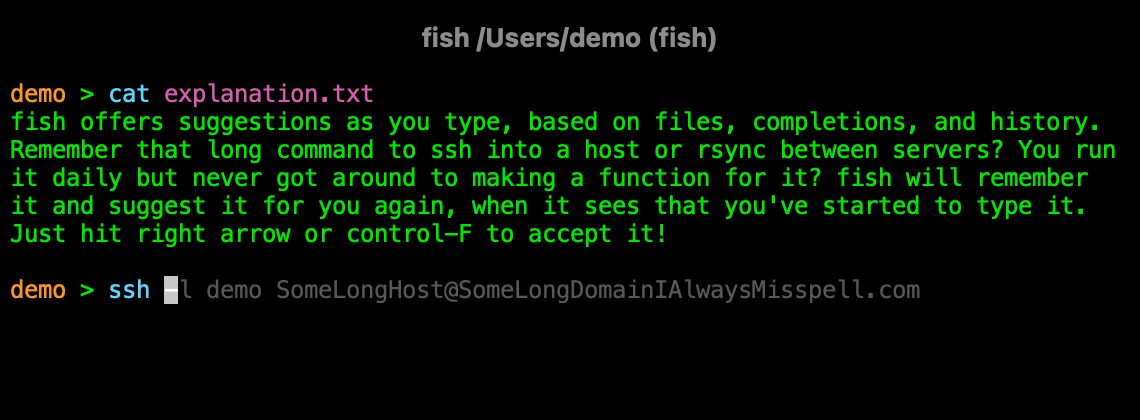
I'm right there with you. But there are alternative interfaces for auto complete. I personally prefer the "autosuggestion" style used in fish: https://fishshell.com/assets/img/screenshots/autosuggestion....

Re: Autocomplete as an Interface (2015)

#27
Autocomplete is the first step. Then you get linting, static analysis, autoformat on save, and code snippets. All built into your fancy IDE with plugins. You are super productive, you learn from its suggestions that you can quickly flip through, and your coworkers are happy that they only have to check your code for correctness and implementation, not style and edge cases.

Re: Autocomplete as an Interface (2015)

#28
post #20

You know, I realize I'm the weird one here, but: when writing code, I almost always turn off autocomplete. Sometimes you basically have to have it on (when the language is demands it) but I usually turn it off. It's too much visual noise, too distracting. It's a thing that pops up that demands your attention. If I want to type if (myVector->empty()) { fillVector(myVector); } autocomplete will pop up a window like 4 t…

I'm a bit confused - isn't autocomplete utterly benign if you don't use it? Using Visual Studio I've never had to autocomplete unless I wanted to, so I've lost no time by having it on if I just want to trudge through, but there's plenty of times I can auto-complete away whole expressions by typing a letter or two and then hitting tab.

Regarding nightmarish Java type names I'd rather the name for things be the fully written out description (like "httpClientFactory") than something that's easier to type - at a glance I know what it is and does, and autocomplete is smart enough that I can type "h" and tab and it has the variable there already. And if I don't know what it does, all that takes is a "h", a tab, and a ".", and now I have access to all its functions with descriptions, saving me a context switch and jump to the documentation.

Re: Autocomplete as an Interface (2015)

#29
post #20

You know, I realize I'm the weird one here, but: when writing code, I almost always turn off autocomplete. Sometimes you basically have to have it on (when the language is demands it) but I usually turn it off. It's too much visual noise, too distracting. It's a thing that pops up that demands your attention. If I want to type if (myVector->empty()) { fillVector(myVector); } autocomplete will pop up a window like 4 t…

But they're customisable, if you can be bothered. I have set up a few as is, and some defaults are really handy too!

For example, `err.nn` expands to ``` if err != nil {

} ```

And that's a default for GoLand. I have set up a few custom ones that are pretty handy as well, which frees up time from typing, to actually thinking through and solving problems, as well as making any necessary verbosity easier to deal with.

While most variable names are kept short, I do go for 2-3 word variables when necessary, and have some pretty long winded function names that, IMO, improve readability by a mile, like `GetNonEmptySliceElements()`.

Re: Autocomplete as an Interface (2015)

#30

I wish more engineers cared about auto complete. A lot of software people I know say "just use vim" or "just remember things" and I feel these view points really stifle progress. Just recently I've been trying to use Bazel for for a personal project. When you use gRPC you don't get any auto completions on generated code. I haven't been able to locate anyone who cares about this because they use some text editor confi…

> I wish more engineers cared about auto complete. A lot of software people I know say "just use vim" or "just remember things" and I feel these view points really stifle progress.

They are not very well versed in vim if they don't know about the autocomplete capabilities of it.

The most basic form is matching with ctrl-n in insert mode. http://vimdoc.sourceforge.net/htmldoc/insert.html#i_CTRL-N

This can be beefed up by coupling it with ctags and even goes up to 11 with full language server protocol support by using coc.nvim.

Never let anyone tell you can't do that in vim. Most of the time, they are wrong.

Post reply on HN