Live data from Hacker News

The Joys of Unix Keyboards

donatstudios.com

21–30 of 144 posts

Re: The Joys of Unix Keyboards

#21
post #8

Earlier quoted context omitted.

There are many ways to rebind caps lock to be escape on press and control when used in combination with another key. Karbiner elements on macos and xcape on Linux come to mind immediately. But some keyboard firmwares are programmable enough to do it themselves too. However. What I found best as a vim user was to use ^[ as escape. It has the added bonus of actually being faster to process by vim too.

You don't need any extra software to map Caps to Esc on X11: Just enable the caps:escape option. In context: https://github.com/majewsky/system-configuration/blob/6c4478...

Yeah. That’s cool, but I’m talking about conditional context switching.

ESC if pressed once.

CTRL it pressed with another key.
Re: The Joys of Unix Keyboards

#22
Every keyboard I've ever used I've remapped the caps lock to control, whether in hardware (like on my pok3r) or in software (on my work computer). I have a hard time ever using a keyboard without this remapping done.

Re: The Joys of Unix Keyboards

#23
post #5

Control in Caps Lock is only a small improvement for emacs users. The best option is to put a little pad in the control keys and use your palms to hit it: https://www.reddit.com/r/emacs/comments/7zvw2b/my_weapon_aga...

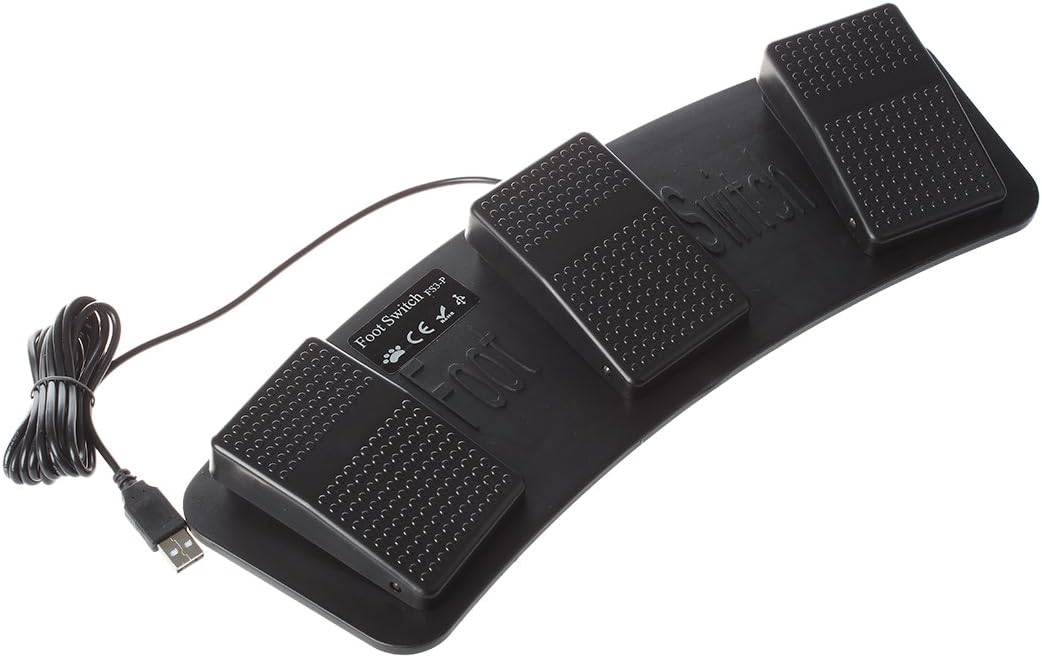
Or use USB pedals

https://images-na.ssl-images-amazon.com/images/I/61Uvir1H0AL...

Re: The Joys of Unix Keyboards

#24
post #19

Unicomp (the company that took over IBM/Lexmark's buckling spring tooling) makes a Sun layout keyboard which is also worth mentioning for those who like a larger keyboard: https://www.pckeyboard.com/page/product/40PSA (Not affiliated with Unicomp, I'm just a fan of the Sun keyboard layout)

Good to see that there are still really good keyboards being manufactured new. Thanks for the link, I think I will order one :-).

Re: The Joys of Unix Keyboards

#25
For those of you, looking for a keyboard with backspace right above the Enter key, look no further than on basically any European keyboard. We have tall Enter instead of wide one on american keyboards, so backspace it directly above it. It basically looks like that: https://i.imgur.com/OtPxJSF.png

You can find any number of different keyboards from different manufactures. I once had american keyboard with wide enter, and I don't want to return to it.

Re: The Joys of Unix Keyboards

#26
post #6

There are several Sun to USB adapters if you really want to use an old Sun keyboard on a PC or Mac. There even used to be inline devices that filtered the L1-A /STOP signal. Because if you hit that key on a Sun server console, it paused the whole server.

You can get a Sun type 6 keyboard with native USB, no adapter required. [1] I went through a few over the years before giving up on "new old stock" because they had a tendency to fail.

As I recall we have IBM to thank for the Ctrl/capslock swap. The IBM PC keyboard featured that change and was a carry over from the selectric typewriter and possibly other IBM terminal keyboards. It was very annoying for those of us with muscle memory with Ctrl where it was supposed to be. Particularly for programs like Wordstar that had heavily used keys clustered within easy reach of the pinky finger resting on control in the "right" place.

In fact there appear to be programs and macros that still allow Wordstar mode in emacs (deprecated), vim and word. So I guess it's still popular. Supposedly George RR Martin still writes in Wordstar, preferring it to modern word processors.

In fact in a similar vein of using what you know I'm a little surprised there hasn't been a Kickstarter to reproduce the space cadet keyboard or similar just for the emacs fans out there.

[1] https://www.ebay.com/sch/i.html?_nkw=type+6+usb+sun&_trksid=...

Re: The Joys of Unix Keyboards

#27
post #19

Unicomp (the company that took over IBM/Lexmark's buckling spring tooling) makes a Sun layout keyboard which is also worth mentioning for those who like a larger keyboard: https://www.pckeyboard.com/page/product/40PSA (Not affiliated with Unicomp, I'm just a fan of the Sun keyboard layout)

If I wasn't working solely from laptops these days, I'd be all over that. Finally, a proper USB keyboard:

https://www.pckeyboard.com/page/product/UB40B5A

But the real gold is on this page:

https://www.pckeyboard.com/page/category/Buttons

Meta-Super-Hyper FTW!

Re: The Joys of Unix Keyboards

#28
post #22

Every keyboard I've ever used I've remapped the caps lock to control, whether in hardware (like on my pok3r) or in software (on my work computer). I have a hard time ever using a keyboard without this remapping done.

Seems like only a small win for such a large key. I type a lot of math and have been happy mapping Caps Lock to ”Change keyboard layout to Greek” (macOS). It gives me quick and effortless access to the full greek alphabet.

Re: The Joys of Unix Keyboards

#29
post #23
post #5

Control in Caps Lock is only a small improvement for emacs users. The best option is to put a little pad in the control keys and use your palms to hit it: https://www.reddit.com/r/emacs/comments/7zvw2b/my_weapon_aga...

Or use USB pedals https://images-na.ssl-images-amazon.com/images/I/61Uvir1H0AL...

I'm glad they are all screwed together. Years ago I broke my wrist and couldn't rotate my left wrist in all of the proper ways. I tried some key pedals, which were helpful but very finicky, there wasn't good tactile feedback and I had to screw them to a piece of plywood.

What did work very well was taking a Kinesis Freestyle [1] (two completely separate keyboard halves attached with a cable) and mounting the left side to a hobbyist vise [2]. I removed the vise (clamping part) and kept the base. Then I made an adapter plate (plywood) that allowed me to mount the left half on the base. Then I could position that half at any angle and rotation I wanted. This probably got me typing again four weeks earlier.

[1] https://kinesis-ergo.com/shop/freestyle2-for-pc-us/

[2] https://www.harborfreight.com/2-3-4-quarter-inch-articulated...

Re: The Joys of Unix Keyboards

#30
post #21

Earlier quoted context omitted.

You don't need any extra software to map Caps to Esc on X11: Just enable the caps:escape option. In context: https://github.com/majewsky/system-configuration/blob/6c4478...

Yeah. That’s cool, but I’m talking about conditional context switching. ESC if pressed once. CTRL it pressed with another key.

This is the sort of thing I'd want to modify the keyboard firmware for. QMK has explicit support for this kind of thing, for example: https://docs.qmk.fm/#/feature_advanced_keycodes?id=mod-tap
Post reply on HN