Live data from Hacker News

Windows 95 UI Design

twitter.com

21–30 of 312 posts

Re: Windows 95 UI Design

#21
post #10

Earlier quoted context omitted.

25 years later, we still don't have good, standardized, robust Ui controls for browsers. Why is there no HTML tag for creating menu bar and nested dropdown menu? Instead we have to search through thousands of libraries or plugins with mixed bag of accessibility. Just that control alone will probably save companies globally billions of dollars in wasted labor searching, building, and maintaining.

There is the menu element, but I guess it was just meant to be semantic and didn't really catch on. I think JS killed the adding of more GUI elements to HTML. Developers prefer their libraries. It's weird how things progress in three steps forward, two backward kind of way. The web has certainly illustrated that in many ways.

IMHO it's closer to one step forward, two steps backward. There are plenty of other articles on HN about how annoying and unusable the "modern Web" has become.
Re: Windows 95 UI Design

#22
I used to play with VB5 and VB6, the RAD process was better than any of today's separated backend/frontend antd CSS-layout scaffolding data binding frameworks bullshit.

The best part of the unified UI controls is you can use tools like Spy++ to discover programs on the fly. Today's Internet there are thousands of web frameworks and you need thousands of source mapping or else it's an ocean of minified gibberish.

Re: Windows 95 UI Design

#24
post #20

The Windows 95 UI was inspired by NextStep. See https://en.wikipedia.org/wiki/NeXTSTEP#/media/File:NeXTSTEP_... Before Windows 95 was released there was CTL3D.DLL which gave a NextStep-like look & feel to Windows 3.1. See this image for the improvement made by CTL3D.DLL: http://www.win3x.org/screens/15nvtbm.gif

Wow - does this bring back some memories.

I remember when CTL3D.dll was all the rage.

Good times.

To think we used to worry about VB programs needing a separate runtime to distribute them and Delphi programs, while stand-alone, took up almost 200KB for a minimal app!

Re: Windows 95 UI Design

#25

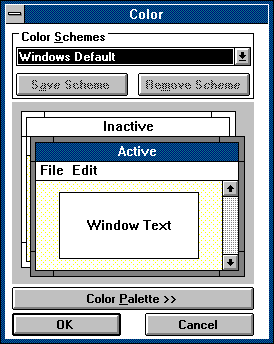
Back then you also could create your own theme. You could set the colors for text, backround, buttons etc. and every App did respect and use it. Today you can choose dark or light mode and almost no App does respect it, instead they bring there own colors and options.

Do not worry for the market is ready for this. Iphone started with fixed backgrounds, then later they demonstrated the oh so amazing feature of custom backgrounds. In some 80s computer chronicles episode you can find the ex-act-same-speech from a windows sales rep explaining how win 1.0 was limited, but now you can set up your own background pattern. iOS 15 will introduce ML generated computer vision trained custom t…

Yes, it's funny when some new app announces "now we have dark mode!" with much fanfare and commotion, when the ability to adjust the colours and appearance of individual UI elements across the whole OS was the norm back in Windows 3.

https://guidebookgallery.org/pics/gui/settings/appearance/wi...

Re: Windows 95 UI Design

#26

Earlier quoted context omitted.

Just wait a little. Soon there will be a movement for UI consistency and they will reinvent a lot of stuff Apple and MS did about UI in the 90s. Just give it a fancy new name. You can see this on the iPad. Suddenly you have multiple windows, keyboard, just in slightly different form.

And absolutely no documentation on how it works. I've turned the multiple windows stuff off on the iPad because it's so damn inconsistent and incomprehensible.

I have tried to figure it out a few times but it's so unintuitive I always forget after a few days.

Re: Windows 95 UI Design

#28
My two favorite things to hate about the windows UI: white on white text entry fields have been difficult to find since win 7 and have been held over into win10. Now the scroll bars are white on white and you have to hover your mouse cursor over the invisible scrolling square button to reveal where it is in order to see how far along in the scroll you are instead of referring at a glance. What were they thinking?

Re: Windows 95 UI Design

#29
post #22

I used to play with VB5 and VB6, the RAD process was better than any of today's separated backend/frontend antd CSS-layout scaffolding data binding frameworks bullshit. The best part of the unified UI controls is you can use tools like Spy++ to discover programs on the fly. Today's Internet there are thousands of web frameworks and you need thousands of source mapping or else it's an ocean of minified gibberish.

Serious question: if it was so much better, why is it gone now?

Re: Windows 95 UI Design

#30
post #12

UI is different on the web and mobile devices but if you fire up the Win 10 file explorer, almost all of the items shown are still there or arguably better. Maybe resize (which you can now do from any window edge) is a little more finicky.

There’s way more file metadata now and the file Explorer smartly displays it when many items in a folder have it.
Post reply on HN