Live data from Hacker News

Ask HN: A modern-looking UML diagram tool?

news.ycombinator.com

81–90 of 92 posts

Re: Ask HN: A modern-looking UML diagram tool?

#81
post #42

For all sorts of diagrams, this software is awesome: yEd https://www.yworks.com/products/yed Favorite feature: automatically reorganize the chart according to your preferences/constraints (e.g. fewer line intersections, hub-spoke, hierarchical, etc)

yEd isn't exactly modern-looking though. I've recently used it on Ubuntu 16.04 but my colleague on Ubuntu 18.04 couldn't because the menu or window handles were cut off. As IntelliJ shows, using Java/Swing is no excuse for an app to look like a Windows 3.1 app migrated over to Windows95. But then UML is from a time and mindset when win32-like and Java-like OOP and Hungary notation were sold to people and I guess a ce…

(Disclaimer: yWorks employee and developer here)

We do have a more modern web-based graph editor: https://www.yworks.com/yed-live/ It may lack features you need, as the idea was a less cluttered and more modern UI, not to bring over everything and the kitchen sink.

As far as yEd Desktop goes, Java becomes an increasingly unattractive platform for desktop development, with Swing showing varying degrees of brokenness on different platforms and Java releases. The new hotness right now seems to be to either get working printing or working High-DPI support, but not both in the same Java release.

It's due for a minor UI overhaul, though, and this may come in the future. We probably cannot and won't completely restructure yEd's UI (such things also serve well to piss off long-time users).

Re: Ask HN: A modern-looking UML diagram tool?

#82
post #42

For all sorts of diagrams, this software is awesome: yEd https://www.yworks.com/products/yed Favorite feature: automatically reorganize the chart according to your preferences/constraints (e.g. fewer line intersections, hub-spoke, hierarchical, etc)

Would like to second yed. I've been told that it feels a bit non-native outside Windows, but it's so fast to make diagrams with it, it's nuts. It has some weird defaults though, eg the "create node on click" is weird. Turn that off :-) It has lovely alignment features, making it super easy to make clear diagrams. It doesn't align things to a grid, but to surrounding nodes/edges in a really nice way. Try putting two n…

(yWorks employee and developer (though not on yEd) here.)

Thanks for the kind words. One note: yEd does have grid snapping (look for the grid-like icon in the toolbar or View > Grid). Personally, though, I rarely need the grid, as the normal snapping features work rather well for quickly making things line up or the same size. Also, automatic layout takes care of many alignment needs :-)

There's also Tools > Snap to Grid for a one-time grid snapping operation of everything (or a selection). Didn't even know that one existed until now.

Re: Ask HN: A modern-looking UML diagram tool?

#83
post #42

For all sorts of diagrams, this software is awesome: yEd https://www.yworks.com/products/yed Favorite feature: automatically reorganize the chart according to your preferences/constraints (e.g. fewer line intersections, hub-spoke, hierarchical, etc)

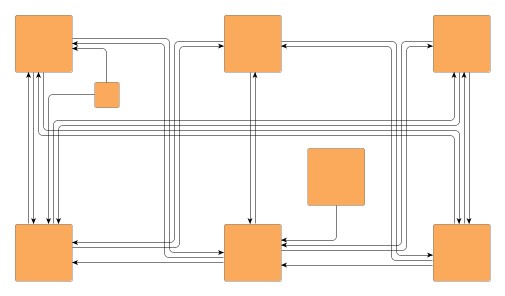
I also use yEd for UML and other related diagrams. As mentioned the auto-organization is great, and you can also separately re-route signals and labels. I have used yEd for hardware diagrams as well, although I still haven't found a great way to draw out busses of signals between nodes (to be clear I haven't found anything besides manual drawing which works!)

There's a bus-like edge router under Layout > Edge Routing > Orthogonal / Bus-style. This may require some tweaking of the settings for your particular drawing. https://i.imgur.com/YV3NFAQ.png

Re: Ask HN: A modern-looking UML diagram tool?

#84
post #81

Earlier quoted context omitted.

yEd isn't exactly modern-looking though. I've recently used it on Ubuntu 16.04 but my colleague on Ubuntu 18.04 couldn't because the menu or window handles were cut off. As IntelliJ shows, using Java/Swing is no excuse for an app to look like a Windows 3.1 app migrated over to Windows95. But then UML is from a time and mindset when win32-like and Java-like OOP and Hungary notation were sold to people and I guess a ce…

(Disclaimer: yWorks employee and developer here) We do have a more modern web-based graph editor: https://www.yworks.com/yed-live/ It may lack features you need, as the idea was a less cluttered and more modern UI, not to bring over everything and the kitchen sink. As far as yEd Desktop goes, Java becomes an increasingly unattractive platform for desktop development, with Swing showing varying degrees of brokenness o…

If Java becomes increasingly unattractive, what are you eying as replacement? I won't defend Java/Swing, but at least it does HiDPI (in contrast to eg. JavaFX and RCP last I checked, even though printing is broken w/ HiDPI as you said). There aren't that many alternatives for cross-platform desktop apps (qtk comes to mind, but it's a rather big departure from Java I guess).

Re: Ask HN: A modern-looking UML diagram tool?

#85
post #82

Earlier quoted context omitted.

Would like to second yed. I've been told that it feels a bit non-native outside Windows, but it's so fast to make diagrams with it, it's nuts. It has some weird defaults though, eg the "create node on click" is weird. Turn that off :-) It has lovely alignment features, making it super easy to make clear diagrams. It doesn't align things to a grid, but to surrounding nodes/edges in a really nice way. Try putting two n…

(yWorks employee and developer (though not on yEd) here.) Thanks for the kind words. One note: yEd does have grid snapping (look for the grid-like icon in the toolbar or View > Grid). Personally, though, I rarely need the grid, as the normal snapping features work rather well for quickly making things line up or the same size. Also, automatic layout takes care of many alignment needs :-) There's also Tools > Snap to…

Well aware, but like you said,you don't need the grid because the gridless snapping generally works even better.

Compliment the team for a great app! Inventing great UX isn't trivial and you guys aced it.

Re: Ask HN: A modern-looking UML diagram tool?

#86
post #81

Earlier quoted context omitted.

(Disclaimer: yWorks employee and developer here) We do have a more modern web-based graph editor: https://www.yworks.com/yed-live/ It may lack features you need, as the idea was a less cluttered and more modern UI, not to bring over everything and the kitchen sink. As far as yEd Desktop goes, Java becomes an increasingly unattractive platform for desktop development, with Swing showing varying degrees of brokenness o…

If Java becomes increasingly unattractive, what are you eying as replacement? I won't defend Java/Swing, but at least it does HiDPI (in contrast to eg. JavaFX and RCP last I checked, even though printing is broken w/ HiDPI as you said). There aren't that many alternatives for cross-platform desktop apps (qtk comes to mind, but it's a rather big departure from Java I guess).

For us the most attractive option would probably be to wrap yEd Live in Electron. We're not a large team and rewriting yEd with something else is a major undertaking (especially for a tool given away for free). That makes it hard to justify development costs.

Personally, I'm still hoping for Microsoft to see the need for a good cross-platform managed-code UI toolkit. Perhaps they're open to funding or adopting Avalonia. But perhaps that's just me being open to rewriting an aging Java application in C# ;-)

Re: Ask HN: A modern-looking UML diagram tool?

#87
post #83

Earlier quoted context omitted.

I also use yEd for UML and other related diagrams. As mentioned the auto-organization is great, and you can also separately re-route signals and labels. I have used yEd for hardware diagrams as well, although I still haven't found a great way to draw out busses of signals between nodes (to be clear I haven't found anything besides manual drawing which works!)

There's a bus-like edge router under Layout > Edge Routing > Orthogonal / Bus-style. This may require some tweaking of the settings for your particular drawing. https://i.imgur.com/YV3NFAQ.png

Thanks for the tip! That looks good! After playing around I found what I was actually thinking about is called "channels" and it works well!

http://docs.yworks.com/yfiles/doc/developers-guide/figures/c...

Re: Ask HN: A modern-looking UML diagram tool?

#88
post #86

Earlier quoted context omitted.

If Java becomes increasingly unattractive, what are you eying as replacement? I won't defend Java/Swing, but at least it does HiDPI (in contrast to eg. JavaFX and RCP last I checked, even though printing is broken w/ HiDPI as you said). There aren't that many alternatives for cross-platform desktop apps (qtk comes to mind, but it's a rather big departure from Java I guess).

For us the most attractive option would probably be to wrap yEd Live in Electron. We're not a large team and rewriting yEd with something else is a major undertaking (especially for a tool given away for free). That makes it hard to justify development costs. Personally, I'm still hoping for Microsoft to see the need for a good cross-platform managed-code UI toolkit. Perhaps they're open to funding or adopting Avalon…

Interesting. Btw I have an old half-finished Java Swing diagramming (not UML) app lying around waiting to see the light of the day in ... this millenium hopefully ;) Electron is surprisingly good-behaving and I get that it's of course attractive to develop mostly a web app that can also be deployed as desktop app, but isn't entirely without problems (for one, it isn't accepted in the App Store as it is). Things always look brighter on the other side of the fence, but throwing away your whole Java code base is kindof gross. Maybe we Java old schoolers could push JetBrains to open their Swing refactorings (of which I suppose there must be many) or sell their renovated Swing + Addons as a rich desktop appdev product. It's only in their best interest for Swing to have a future. And as IntelliJ shows, Swing isn't half bad a GUI toolkit in the hands of competent developers.
Post reply on HN