Live data from Hacker News

Why iOS 13 and Catalina Are So Buggy

tidbits.com

271–280 of 368 posts

Re: Why iOS 13 and Catalina Are So Buggy

#271

Earlier quoted context omitted.

I believe the contacts list you’re referring to is generated by AirDrop based on nearby contacts The 12 year old girl across the street who helps me walk our dogs on a regular basis (hence why she's in that bar), whose father works for Google, and has an Android phone is most certainly not showing up due to AirDrop when I'm in my living room. And I'm with parent comment: I DO NOT WANT 12 year old girls to be one acci…

Only one of the settings is limited to contacts; AirDrop can also be set to find “everyone”, which probably uses WiFi Connect or some other trickery to locate nearby devices even on other platforms.

I have it set to only contacts. I'm looking at the share sheet right now: there is no one in that list that is within WiFi range. My wife: at work in Redmond. Dog walk girl: at school, in Redmond. My mother: 3000 miles away in Florida. My bluegrass pickin' buddies..., oh, you get the point. Me: at work in Bellevue, WA.

But you prompted me to remember: "Aha! AirDrop uses a different icon than what I see right now!" Observe the following:

https://media.idownloadblog.com/wp-content/uploads/2019/06/i...
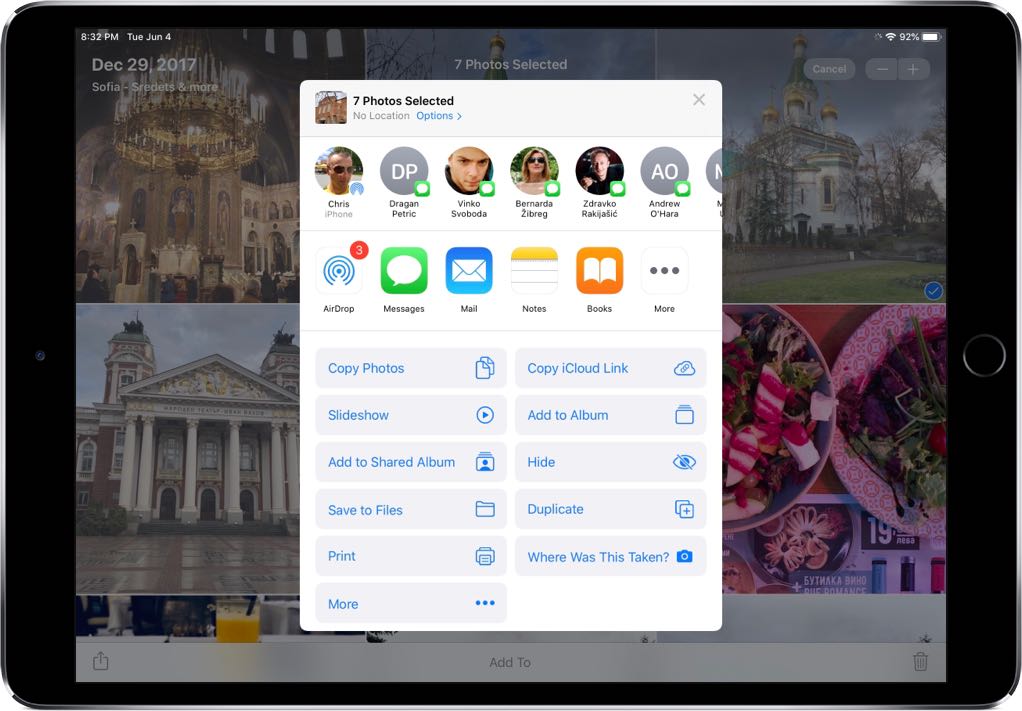
Note the contact on the left, and icon: it's the AirDrop icon. But the rest have a Messages icon. That, I'm assuming, comes from contacts I've recently messaged and has nothing to do with AirDrop. I could have my phone on airplane mode, and those still show up.

Re: Why iOS 13 and Catalina Are So Buggy

#272

Earlier quoted context omitted.

> Running older Android versions reminds me of how fast and slick they were Those are some rose-tinted glasses for sure. Android lacked basic performance and stability for years after release.

I apologize for not being clear; I was referring primarily to 4.4 "KitKat". Still have a tablet that I run with that on it (offline) to read ebooks. Quite nice. You are correct though - pre-4.0 was pretty rough.

Yeah agreed. I am torn presently between the feature creep and the fact that new phones are so physically faster computationally that Android can finally scroll smoothly.

Re: Why iOS 13 and Catalina Are So Buggy

#273
post #262

Yesterday a coworker was frustrated with his computers, and said something insightful: "When software gets past a certain age it just gets bad." He was referring primarily to Android and Windows (10) but it applies to every piece of software that suffers from feature creep. If it's a cash cow they have to keep stuffing new things in and periodically repainting it to make it look new again. Around 10.9, MacOS reached…

I'm reading this on a late-2013 MBP retina running 10.9.5 and not only does it do everything I need it to do, "upgrading" from here would actually cause me to lose essential functionality (which is why I haven't done it). I have a stash of replacement MBPs to replace this one with when it finally does die, but I don't know what I'm going to do when they're all gone because AFAICT everything Apple is producing nowaday…

Although older software usually does what we need it to do, I question the wisdom of running an Internet-connected machine with software that no longer receives security fixes. If the various Linuxes might give you what you need, I encourage you to check them out. Debian with XFCE and Xubuntu's LTS are both very good options that stay stable and secure.

Out of curiosity, what would you lose functionality-wise by upgrading? What's your mission-critical workflow?

Re: Why iOS 13 and Catalina Are So Buggy

#274
Why do any SW/QA engineer routinely accept to work night and WE? Of course this is gonna be non productive and produce only buggy crap. I expect any reasonable person to understand that, and only very naive and/or junior people to not.

So just don't. What is your employer going to do? Fire you? Good, you don't want to work there anyway. And especially if you work at Apple, it is going to be easy to find a new job.

Refuse to ship crap. Refuse to work in insane conditions. If you don't it is not your employer's fault. It is yours. (I'm saying that in the context of highly qualified jobs, like engineering -- it does not apply to other situations where the employer has all the power and people are easily replaceable and sometimes have a hard time to find a job.)

Re: Why iOS 13 and Catalina Are So Buggy

#275
post #200

Earlier quoted context omitted.

If Apple spent more than $11 dollars on documentation they also might not be in the situation they're currently in. So much of what happened in Catalina is just flat out not written down in the Developer Documentation. Apple's documentation has been waning for a while, but it's fallen off a cliff in the last eighteen months. It's impossible to believe that's not having an impact on external software quality, and it's…

I remember doing my first hackintosh, due to an attempt at a startup where we wanted to have a iOS and OSX client. The documentation blew me away, nicely packaged with XCode, and made it really look like a platform that would care about developers, especially given how niche it was. That was 10.6 time. Currently, I have a Mac forced on me by company. I look at docs... and they are the same docs I remember, with bits…

I had the same experience trying to write a plugin for Logic Pro early this year. None of the old documentation or examples were relevant, and I never did find anything from Apple that did work. I finally used someone else's framework as a starting point.

Re: Why iOS 13 and Catalina Are So Buggy

#276
But if you file a bug report, and the QA engineer determines that bug also exists in previous releases of the software, it’s marked “not a regression.”

In case you were wondering why 13.1 got rolled out so fast. Snark aside, this annoys me because the message is, "haha, didn't find it fast enough, and now we don't have to fix it." And you jackasses think this clown shoes attitude should be enshrined on a t-shirt?

Re: Why iOS 13 and Catalina Are So Buggy

#277
Ya'll just have hindsight issues.

Every MacOS upgrade has been a problem for a non-trivial number of users. It's much more likely that YOU didn't have a problem because you were new the platform and didn't have much stuff to migrate. If you just got a Mac in 2018 moving to Catalina is no problem at all. It will probably go flawlessly and the only issue you might is with Adobe software… but if you use Adobe software on any platform that's nothing new either.

Moving from PowerPC to X86 had a bunch of problems. Remember when they dropped Rosetta completely? Or when they dropped support for the first Intel Macs because they were 32-bit only that was a problem. Remember when they changed QuickTime? Or dropped AFP? How about dropping Firewire? Or how about the changes to Filevualt? Or when they integrated your Apple ID into the user login and then removed it? Or how about all those times you upgraded and iTunes stopped working and you had to reinstall it manually. Oh man, how about that total abandonment of OS X Server.

Apple has NEVER been good about upgrades. Ever. You buy an Apple device and it's good for that point in time. In 2-3 years when the warranty is up and the platform evolves it's anyone's guess as to what will happen.

Re: Why iOS 13 and Catalina Are So Buggy

#278

Yesterday a coworker was frustrated with his computers, and said something insightful: "When software gets past a certain age it just gets bad." He was referring primarily to Android and Windows (10) but it applies to every piece of software that suffers from feature creep. If it's a cash cow they have to keep stuffing new things in and periodically repainting it to make it look new again. Around 10.9, MacOS reached…

You'd be amazed at home much time and how many resources useless UI animations take up. Go turn "Animation Scale" to 0 in the android developer settings page, and it will feel like your phone is 10x faster.

Re: Why iOS 13 and Catalina Are So Buggy

#279
post #262

Earlier quoted context omitted.

I'm reading this on a late-2013 MBP retina running 10.9.5 and not only does it do everything I need it to do, "upgrading" from here would actually cause me to lose essential functionality (which is why I haven't done it). I have a stash of replacement MBPs to replace this one with when it finally does die, but I don't know what I'm going to do when they're all gone because AFAICT everything Apple is producing nowaday…

Although older software usually does what we need it to do, I question the wisdom of running an Internet-connected machine with software that no longer receives security fixes. If the various Linuxes might give you what you need, I encourage you to check them out. Debian with XFCE and Xubuntu's LTS are both very good options that stay stable and secure. Out of curiosity, what would you lose functionality-wise by upgr…

> If the various Linuxes might give you what you need

Oh, how I wish! The problem is it's not just me. I'm the IT department for my wife as well, and there is no way she's going to switch to Linux. For on thing, she's a writer, and she uses MS Word. That is not going to change. :-(

Also, what to do for a mobile device? They all suck big fat honking weenies AFAICT. We both have iPhone SE's which, AFAICT, are the least bad of all the available options. We both tried Android once and it was a disaster.

Re: Why iOS 13 and Catalina Are So Buggy

#280

Has anyone done back of the envelope calculations into how much it costs Apple in bandwidth to push an update? I wonder if that is a reason there isn’t a stream of x.1 updates every few weeks as things are fixed?

this already happens, but x.1 updates are beta tested. If you’re running the beta channel, you’ll get x.1 updates shortly after launch.

These beta updates can go through a couple iterations before being released to the public, which is why it seems like there’s a long delay.

Post reply on HN