Live data from Hacker News

Tell HN: Thank you for not redesigning Hacker News

news.ycombinator.com

101–110 of 398 posts

Re: Tell HN: Thank you for not redesigning Hacker News

#101
I love hearing stories about people choosing to forego large frontend frameworks, or even not using JS altogether.

Is there a community or name for this? If not, I'm going to call it #neverscript. I find the web works far better, more often, for me when SPAs and JS aren't used. There's something about minimalistic sites that's very appealing to me. I know it doesn't work for all sites, but a lot of the web could be improved by reducing the frontend bloat.
Re: Tell HN: Thank you for not redesigning Hacker News

#102
post #81
post #78

Earlier quoted context omitted.

What do you mean? Haven't had that issue. Am on desktop version, unsure if mobile exists

The tap targets are minuscule and close to each other.

Related question: what is the easiest way to increase the tap zone of a HTML element using CSS?

Aside: I have noticed Safari auto-inceases the touch zone for inputs and elements with ontouch/onclick events (I noticed because I had to fix an issue caused by this!)

Re: Tell HN: Thank you for not redesigning Hacker News

#103
post #81

Earlier quoted context omitted.

The tap targets are minuscule and close to each other.

I had to pinch-to-zoom to upvote this comment. :-)

That's a feature IMO -- HN could even make them even smaller.

It should take conscious effort to vote, and the small target size mentally reinforces this model; that it's not supposed to be the most common action.

EDIT: See, clearly the vote targets simply aren't small enough!

Re: Tell HN: Thank you for not redesigning Hacker News

#104

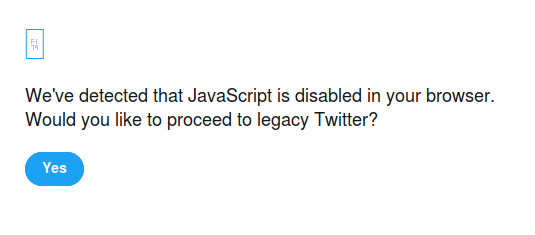
For twitter you can disable JS and it will fallback to a ""degraded"" (a.k.a. Much faster & usable) experience.

Yes, but you have to click past an annoying prompt[1] every time. Does that not happen for you?

[1]: https://i.postimg.cc/jjBSVmCX/Screenshot-at-2019-09-01-15-23...

Re: Tell HN: Thank you for not redesigning Hacker News

#105
post #24

There should be an extension that automatically redirects common websites to their lite versions. reddit.com -> old.reddit.com facebook.com -> mbasic.facebook.com cnn.com -> lite.cnn.com npr.org -> text.npr.org twitter.com -> twitter.com (with JS disabled) gmail.com -> gmail.com (HTML version)

Twitter is barely usable with JS disabled. Any time you follow a link to it you'll get a worthless interstitial "would you like to proceed to legacy twitter??" with only one button: "Yes." As of recently, if you have cookies disabled for their domain as well you'll end up in a redirect loop and never be able to see the 140 characters of text. *As for reddit though, if you log in with an account you can set it to alwa…

No, you can set "Use new Reddit as my default experience ". At the bottom of the page, "beta options".

https://old.reddit.com/prefs/

There is no "always use old reddit"

Re: Tell HN: Thank you for not redesigning Hacker News

#107
post #57

HN is lightweight in some ways, but also quite bad in others. For example, every single time you vote on anything, the site sends back a 302 redirect and then a copy of the entire page's HTML in response. This means that every vote results in a response that's usually around 10KB gzipped. As of right now, for me, voting on any comment in this thread currently causes a 14KB response and takes about 1.3 seconds to fini…

Truly awful.

Re: Tell HN: Thank you for not redesigning Hacker News

#108

For reddit, try old.reddit.com, or you can set your account to always use old in preferences. It's not as clean as hn, but way better than "new" reddit. (I use it even on my fast connection.)

https://i.reddit.com is also simple and AFAIU more lightweight.

Tends to work better than either www or old for console browsers (lynx, w3m, etc.)

Some features, notably search, are broken, however.

Re: Tell HN: Thank you for not redesigning Hacker News

#109
post #81
post #78

Earlier quoted context omitted.

What do you mean? Haven't had that issue. Am on desktop version, unsure if mobile exists

The tap targets are minuscule and close to each other.

That's weird - must be an iPad specific thing. It works just fine on Android Chrome.

Re: Tell HN: Thank you for not redesigning Hacker News

#110
post #81

Earlier quoted context omitted.

The tap targets are minuscule and close to each other.

Related question: what is the easiest way to increase the tap zone of a HTML element using CSS? Aside: I have noticed Safari auto-inceases the touch zone for inputs and elements with ontouch/onclick events (I noticed because I had to fix an issue caused by this!)

a {padding: 1rem}

This increases area by padding the link. Just don’t want the rap areas of different elements to overlap with too much padding.

You can also put a border around the new area, or a box shadow, to indicate larger click area, making it a button sort of:

{border: thin solid grey}

Post reply on HN