Earlier quoted context omitted.
It’s all, cough, implementation dependent. You can run two VideoBIOS implementations, and chances are only one will install an int10h handler, but both will set up the registers and whatnot in the GPUs. My AMD TAHITIs for instance need VideoBIOS to start some form of thermal management loop - otherwise they just run full-throttle on the fan. Then whichever card prevails (BIOS has the ability to select the initializat…
I always assumed the VideoBIOS runs on the GPU, but if I understand you correctly this is code run on the CPU?
PCI Express on the Raspberry Pi 4
131–140 of 166 posts
Re: PCI Express on the Raspberry Pi 4
#132Earlier quoted context omitted.
Hack’s creator here - it’s on my list of things to try. GPUs are notoriously hard to get to work on non-intel, having tried to get a few up on Alpha and Itaniums in the past. VideoBIOS expects to run and expects a well behaving Intel CPU to do the power-up. That said X can sometimes emulate these quite well. On ARM we’d also run into alignment issues and likely other quirks - but in principle...
OpenBSD has radeondrm enabled on mips64, powerpc and arm64. It can initialize the board just fine without emulating x86, since KMS. Working 3D acceleration is another story. OpenBSD even has (or had, build breaks often) packages for chromium browser on arm64 that were tested on this.
Why? I recently enabled amdgpu on FreeBSD arm64 — as soon as KMS happened, 3D just worked. There was some buffer corruption (https://user-images.githubusercontent.com/208340/60443774-97...) for which I've had to cherry-pick this tiny Linux patch: https://patchwork.kernel.org/patch/10778815/
> packages for chromium browser on arm64
And we have Firefox, which doesn't break, has a working JS JIT, works on Wayland, renders with WebRender :)
Re: PCI Express on the Raspberry Pi 4
#133Aren't PCIe lanes shared? Why would I need to remove the USB 3.0 chip rather than just hooking right to the pins on the device where it's soldered in place? E: Apparently it's the PCI bus that is shared, not PCI Express lanes. Ty.
AFAICT lanes are not shared but there are chipsets which can break lanes out into other sets of lanes which are then routed back onto the original set of lanes. So if your CPU has 16 lanes you can hang a chip off of it which then provides more lanes which are then signaled back to the CPU over some subset of those lanes. It’s not clear if the lanes themselves can be multiplexed with packets from many devices but they…
They can be, this is what the chipsets do on most platforms. AMD's X570 splits out 4x gen4 PCI-E lanes into 8x gen4 PCI-E lanes + a bunch of other stuff: https://i.imgur.com/8Aug02l.png
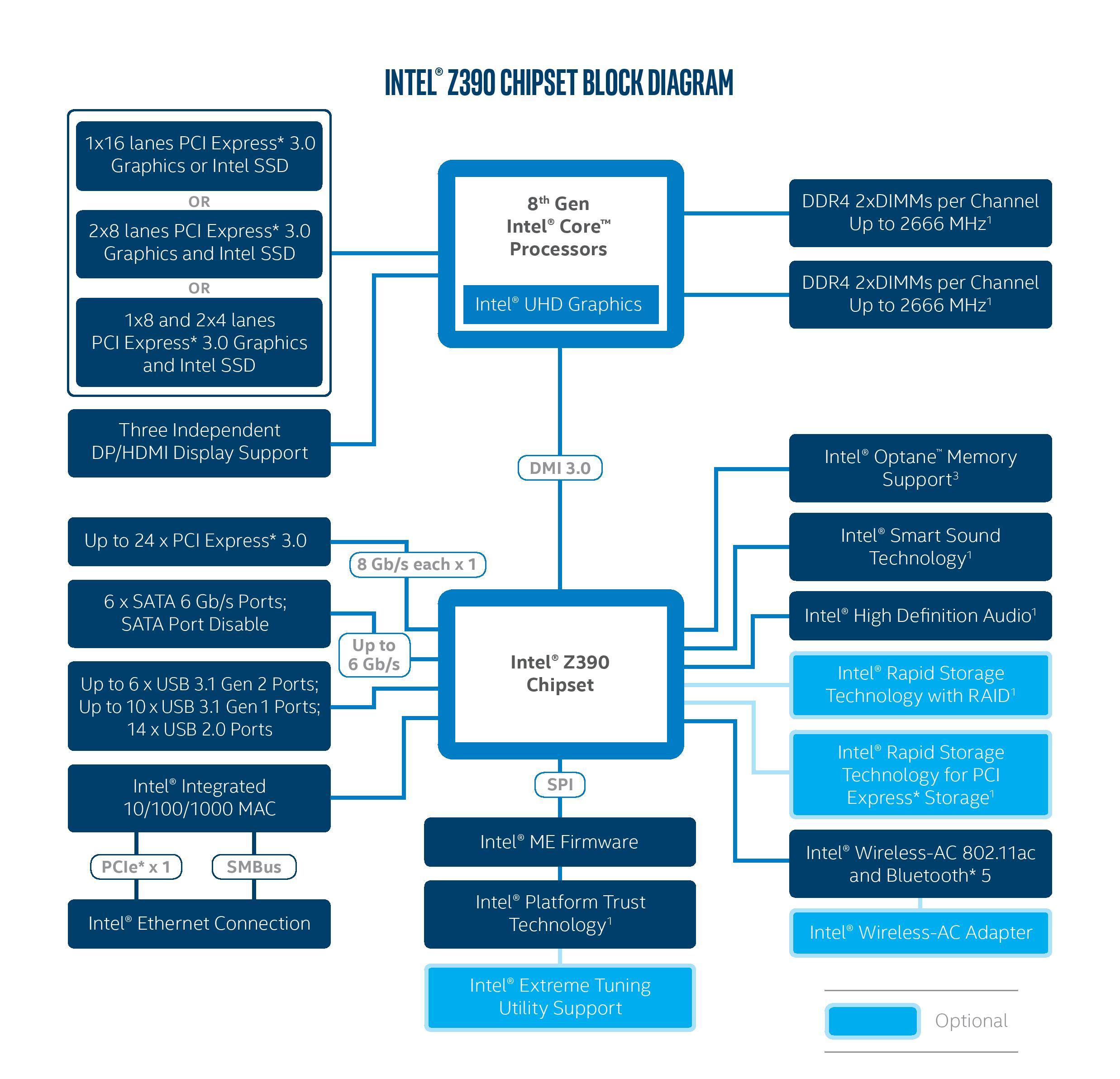
Intel's been doing this better and is what their marketing calls "platform lanes" - the Z390 for example provides 24 PCI-E gen3 lanes from what is essentially a single 4x gen3 uplink to the CPU: https://images.anandtech.com/doci/12750/z390-chipset-product... (DMI 3.0 is essentially PCI-E x4 gen3 in all but name)
Re: PCI Express on the Raspberry Pi 4
#134If a Pi is capable of this already, why not replace the Ethernet, charging, micro-HDMI, and USB ports with a boatload of type-C Thunderbolt ports (plus support for the HDMI 1.4 alt mode)? Would 8xUSB-C cost that much more than 1xUSB-C+1xEthernet+2xMicro-HDMI+2xUSB3+2xUSB2 (with no PCI Express), in exchange for a considerably more flexible device?
Because there's no where remotely close to enough PCI-E lanes off of the SoC to do that. Thunderbolt 1/2 requires a pcie gen2 x4 connector to have enough bandwidth. The SoC in the pi4, the Broadcom BCM2711, has just a single gen2 pcie lane. 1/4th the required bandwidth for thunderbolt 1/2, and a mere 1/8th the requirement for thunderbolt 3. To get a full 8x thunderbolt 3 connectors you need a staggering 32 pcie gen3…
Even though it would be limited, a Thunderbolt 3 port would expand the connectivity of the Pi, and very few, if any, devices require the maximum bandwidth to operate at all.
Re: PCI Express on the Raspberry Pi 4
#135If a Pi is capable of this already, why not replace the Ethernet, charging, micro-HDMI, and USB ports with a boatload of type-C Thunderbolt ports (plus support for the HDMI 1.4 alt mode)? Would 8xUSB-C cost that much more than 1xUSB-C+1xEthernet+2xMicro-HDMI+2xUSB3+2xUSB2 (with no PCI Express), in exchange for a considerably more flexible device?
Additionally, this would require adding more PCIe lanes to the SoC, as there isn't bandwidth to provide the two 4K HDMI outputs and the other connectivity would be severely bottlenecked.
Re: PCI Express on the Raspberry Pi 4
#136Interesting install a SATA card and make a NAS. I think better than a usb.
I would love something with 4x SATA ports for a NAS like this one[1]. I've seen PCIe on devices like these, but I've heard there are issues getting drivers to work properly. I haven't actually tried it, but other limitations (RAM, CPU, Ethernet) have prevented me from actually giving it a shot (I want ZFS, which is a bit memory hungry). The Pi has just enough that I think it's doable. I would absolutely love it if th…
https://shop.allnetchina.cn/products/m-2-pci-e-protocol-to-4...
Re: PCI Express on the Raspberry Pi 4
#137Earlier quoted context omitted.
Because there's no where remotely close to enough PCI-E lanes off of the SoC to do that. Thunderbolt 1/2 requires a pcie gen2 x4 connector to have enough bandwidth. The SoC in the pi4, the Broadcom BCM2711, has just a single gen2 pcie lane. 1/4th the required bandwidth for thunderbolt 1/2, and a mere 1/8th the requirement for thunderbolt 3. To get a full 8x thunderbolt 3 connectors you need a staggering 32 pcie gen3…
Thunderbolt 3 controllers have a 4x link to provide one or two ports or 2x in the case of JHL6240. Additionally PCIe is designed to support backwards compatibility and link scaling. I don't see any reason why the 1x gen2 lane of the pi 4 couldn't host a Thunderbolt 3 port; it would just severely bottleneck the bandwidth of tunnelled PCIe links. Even though it would be limited, a Thunderbolt 3 port would expand the co…
> I don't see any reason why the 1x gen2 lane of the pi 4 couldn't host a Thunderbolt 3 port; it would just severely bottleneck the bandwidth of tunnelled PCIe links.
But that's kind of literally the reason? An entire ecosystem of products assumes a reasonably high amount of bandwidth from the connector. That's its singular reason to exist. If you take away the bandwidth from Thunderbolt 3 it just becomes USB, and at that point why not just offer USB connectors which have even broader support and not as many cabling restrictions?
Re: PCI Express on the Raspberry Pi 4
#138If a Pi is capable of this already, why not replace the Ethernet, charging, micro-HDMI, and USB ports with a boatload of type-C Thunderbolt ports (plus support for the HDMI 1.4 alt mode)? Would 8xUSB-C cost that much more than 1xUSB-C+1xEthernet+2xMicro-HDMI+2xUSB3+2xUSB2 (with no PCI Express), in exchange for a considerably more flexible device?
Considering the fact that 1 USB C Thunderbolt port can power a dock that could do multiple HDMI, Ethernet, USB, VGA, etc, I agree completely and I hope that they release a Raspberry Pi4C.
Re: PCI Express on the Raspberry Pi 4
#139Earlier quoted context omitted.
https://lb.raspberrypi.org/documentation/hardware/raspberryp... This says, there's OTG controller intended to be used in "peripheral device only" mode. I haven't found datasheet for BCM2711, so it's hard to tell.
There's an XHCI controller in the device tree, but my guess is that there's some silicon bug in it, hence the third party chip off of PCIe instead.
Re: PCI Express on the Raspberry Pi 4
#140Ohh I see where this is going qdot_me — would love to be able to hook up a GPU to a RPi4 to crypto-mine. So useful for so many applications ! I will seriously fund you if you can make this happen, hit me up by email. My contact info is on zorinaq.com
Let me clarify a bit for the public here why the comment is relevant: in the crypto mining community, some groups are looking into what minimal single board computer can provide a PCIe signal to connect a single GPU. Idea is to be cheap and reliable. If you have a many-PCIe board failure (http://bitcoin.zorinaq.com/many_pcie/) you have 10-20 GPUs going down at once. Not good. By isolating each GPU on its own motherboard, you can isolate failures, thus increase mining profits. When I saw the OP mention cryptocurrency in the blog post, I thought hey maybe that's what he is looking to do...