Live data from Hacker News

KABOOM in 180 lines of bare C++

github.com

11–20 of 68 posts

Re: KABOOM in 180 lines of bare C++

#11

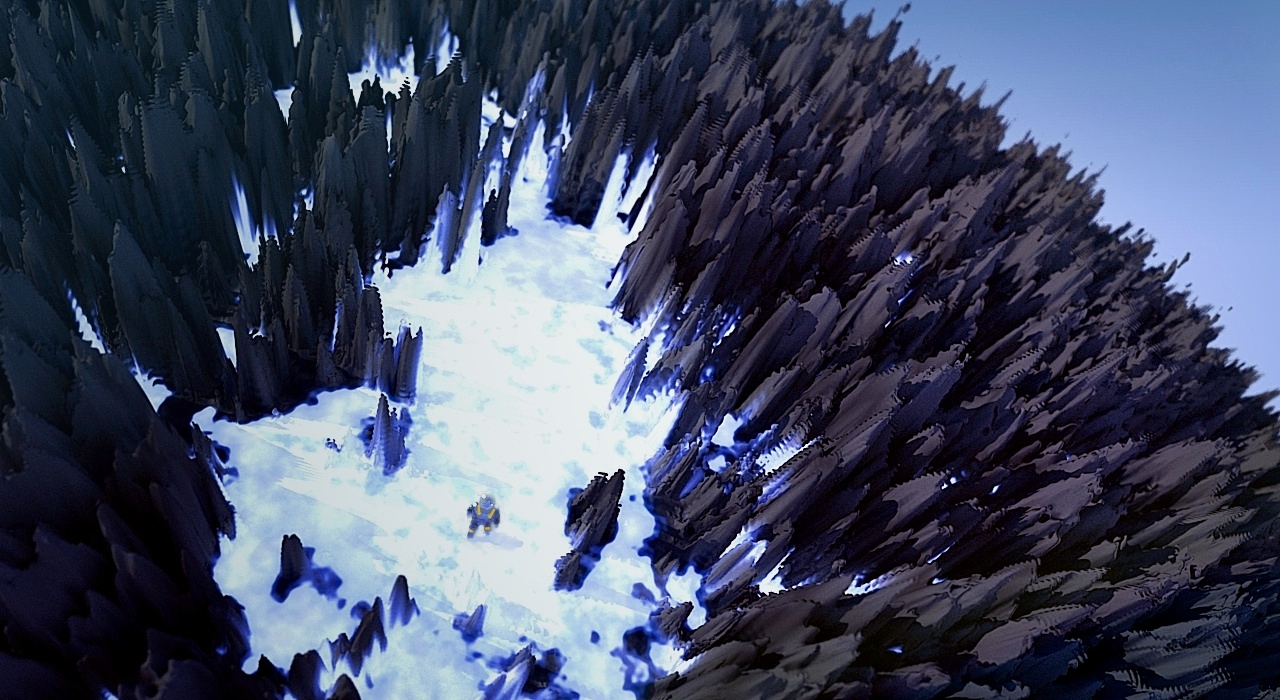
Wow, this is very similar to the way I use procedural 3D textures and displacement maps to draw planets and things. So much so that I don't even see the explosion, just a growing planet (really, just tweak the mapped color gradient a bit). Example: https://www.friendlyskies.net/images/266.jpg So much of 3D graphics is "hmm, this random thing I just made slightly resembles an $X". "OK, so let's say I just created a me…

Very interesting indeed!

Off-topic: May I suggest that you switch to using imgur instead of the image host you chose? The ads on imgur are much less intrusive.
Re: KABOOM in 180 lines of bare C++

#13

Wow, this is very similar to the way I use procedural 3D textures and displacement maps to draw planets and things. So much so that I don't even see the explosion, just a growing planet (really, just tweak the mapped color gradient a bit). Example: https://www.friendlyskies.net/images/266.jpg So much of 3D graphics is "hmm, this random thing I just made slightly resembles an $X". "OK, so let's say I just created a me…

Very interesting indeed! Off-topic: May I suggest that you switch to using imgur instead of the image host you chose? The ads on imgur are much less intrusive.

Imgur doesn't work on the old iPod I was using while my phone charged. It never loads fully, but TBF I never upgrade iOS past 2 major versions. So iOS 7 and the first "plain" image host search result it is... :-)

Edit: Found the image link on my own site:

https://www.friendlyskies.net/images/266.jpg

Re: KABOOM in 180 lines of bare C++

#14

Earlier quoted context omitted.

Very interesting indeed! Off-topic: May I suggest that you switch to using imgur instead of the image host you chose? The ads on imgur are much less intrusive.

Imgur doesn't work on the old iPod I was using while my phone charged. It never loads fully, but TBF I never upgrade iOS past 2 major versions. So iOS 7 and the first "plain" image host search result it is... :-) Edit: Found the image link on my own site: https://www.friendlyskies.net/images/266.jpg

Understandable. Unfortunate but understandable.

Re: KABOOM in 180 lines of bare C++

#16

Earlier quoted context omitted.

Imgur doesn't work on the old iPod I was using while my phone charged. It never loads fully, but TBF I never upgrade iOS past 2 major versions. So iOS 7 and the first "plain" image host search result it is... :-) Edit: Found the image link on my own site: https://www.friendlyskies.net/images/266.jpg

Understandable. Unfortunate but understandable.

Found a copy on my web server and linked above.

Re: KABOOM in 180 lines of bare C++

#17
post #8

Really well written. The other articles in the series on computer graphics are excellent too. The use of GitHub to show diffs of each step is quite effective.

> The use of GitHub to show diffs of each step is quite effective. Little off-topic, but that's one of the reasons I like to use Magit on Emacs, you can see the diff of each commit interactively and intuitively. [1]: https://magit.vc/

Git can show you the diff of any commit as well, though I guess maybe the interactivity you mentioned is important.

Anyhow, with just git.

Diff of most recent commit:

  git show HEAD
Diff of preceding commit:

  git show HEAD^
Diff of commit before that again

  git show HEAD^^
Of course you don’t want to type ^ 200 times. Fortunately you don’t have to. Diff of commit three steps back before most recent:

  git show HEAD~3
Or you can look at the log first

  git log
And find a specific commit and then use the first few characters of the id of that commit, e.g.

  git show af4c
And of course I would be remiss to not mention

  git diff
And

  git diff --cached
These two show you unstaged and staged changes before you commit. I use these commands all the time. So much that they are two of the commands I have created very short two-letter aliases for in my .bashrc

  alias di="git diff --cached"
  alias dp="git diff"

Re: KABOOM in 180 lines of bare C++

#18

Wow, this is very similar to the way I use procedural 3D textures and displacement maps to draw planets and things. So much so that I don't even see the explosion, just a growing planet (really, just tweak the mapped color gradient a bit). Example: https://www.friendlyskies.net/images/266.jpg So much of 3D graphics is "hmm, this random thing I just made slightly resembles an $X". "OK, so let's say I just created a me…

That's a common trick in PC 4k intros.

Despite the apparent variety, most 4k intros rely on a single effect, maybe two. There isn't enough space for more. The only things that change are the parameters.

Interestingly, the technique used here is signed distance field raymarching. A technique that is used by maybe 90% of all 4k intros today.

So basically, write the code in GLSL instead of C, add music, play a bit with the parameters, use a good exe packer like crinkler and you have a nice 4k intro.

Re: KABOOM in 180 lines of bare C++

#19
post #18

Wow, this is very similar to the way I use procedural 3D textures and displacement maps to draw planets and things. So much so that I don't even see the explosion, just a growing planet (really, just tweak the mapped color gradient a bit). Example: https://www.friendlyskies.net/images/266.jpg So much of 3D graphics is "hmm, this random thing I just made slightly resembles an $X". "OK, so let's say I just created a me…

That's a common trick in PC 4k intros. Despite the apparent variety, most 4k intros rely on a single effect, maybe two. There isn't enough space for more. The only things that change are the parameters. Interestingly, the technique used here is signed distance field raymarching. A technique that is used by maybe 90% of all 4k intros today. So basically, write the code in GLSL instead of C, add music, play a bit with…

That's really cool, in part because it's comforting to hear. :-) Sometimes I feel a bit guilty about how much variety can be had from abusing a single distance function + various texture maps, camera angles and focal settings, environment colors, etc.

Re: KABOOM in 180 lines of bare C++

#20
post #8

Earlier quoted context omitted.

> The use of GitHub to show diffs of each step is quite effective. Little off-topic, but that's one of the reasons I like to use Magit on Emacs, you can see the diff of each commit interactively and intuitively. [1]: https://magit.vc/

Git can show you the diff of any commit as well, though I guess maybe the interactivity you mentioned is important. Anyhow, with just git. Diff of most recent commit: git show HEAD Diff of preceding commit: git show HEAD^ Diff of commit before that again git show HEAD^^ Of course you don’t want to type ^ 200 times. Fortunately you don’t have to. Diff of commit three steps back before most recent: git show HEAD~3 Or y…

I’m a noob on a new team with git (well versed on TFS though) thank you for posting this.
Post reply on HN