Live data from Hacker News

SSD Storage: 2018 in review

anandtech.com

91–100 of 131 posts

Re: SSD Storage: 2018 in review

#91
post #11

Not sure if I'm asking this correctly but, all SSDs now have their own internal filesystem for managing access to blocks right? Are we getting to a point where traditional filesystems like NTFS or ext4 will simply go away? Or will they still stick around and just act as lightweight layers on top of the SSD filesystem?

At the SSD level, the drives are actually doing block management, not file management. You still need a filesystem to store metadata, manage the layout of the data, etc. An example of something that a SSD's controller does that the operating system/filesystem doesn't have to worry about is managing bad blocks. If the SSD detects a bad block, it will replace it with a working block and update the data used by its flas…

> This is completely opaque to the operating system; as far as it knows its underlying storage works exactly the same (until there are so many bad blocks that the drive can't keep up this convenient deception).

Is there a way for the drive to tell the fs that a block is bad? Or does the drive simply keep a bunch of blocks apart just in case?
Re: SSD Storage: 2018 in review

#92
post #34

Earlier quoted context omitted.

Meanwhile Apple is charging $1,200 for a 1 TB MacBook upgrade. Hoping this year we see a significant jump in consumer availability of these drives. I’ve been using a 512gb laptop since 2010 at least. Would be nice to start seeing multi-terrabyte drives in devices besides after market or external drives.

> Meanwhile Apple is charging $1,200 for a 1 TB MacBook upgrade. This is specifically one of the reasons I ended up switching to a Lenovo Thinkpad X1 Yoga, even though I'd planned to buy the new MacBook Air. The Thinkpad's SSD is officially user-replaceable and I bought a 2TB WD Blue SSD for less than a third of the cost of Apple's upgrade. Even an NVMe SSD would have been half the price of Apple. One caveat is that…

Sometimes manufacturers put a bit of blue Loctite on the threads... makes the torque needed to initially 'break' the threads/unscrew a bit higher. I wouldn't be that concerned, buying a replacement screw kit for the HDD caddy will be a couple dollars on Ebay if you really do strip the head.

Re: SSD Storage: 2018 in review

#93

Whoa, check out that Samsung NF1 form-factor [0]. Looks like you could pack a ton of small finger-sized SSD drives vertically into a small space. [0] https://images.anandtech.com/doci/13752/IMGP2727_575px.jpg This is one way in which it's a cool time to be alive. I'll never forget circa 1996 when I waited 20+ minutes for my Apple Performa 550 to read and load a 30MB file from the scsi disk into memory. All so quickti…

That must get really hot, I wonder how well it cools?

Don't they just use 1W each, making up 16W in total? I might be dead wrong. But 16W should be easily transported off by the metallic case and a smallish fan?

Re: SSD Storage: 2018 in review

#94
post #34

Earlier quoted context omitted.

Meanwhile Apple is charging $1,200 for a 1 TB MacBook upgrade. Hoping this year we see a significant jump in consumer availability of these drives. I’ve been using a 512gb laptop since 2010 at least. Would be nice to start seeing multi-terrabyte drives in devices besides after market or external drives.

> Meanwhile Apple is charging $1,200 for a 1 TB MacBook upgrade. This is specifically one of the reasons I ended up switching to a Lenovo Thinkpad X1 Yoga, even though I'd planned to buy the new MacBook Air. The Thinkpad's SSD is officially user-replaceable and I bought a 2TB WD Blue SSD for less than a third of the cost of Apple's upgrade. Even an NVMe SSD would have been half the price of Apple. One caveat is that…

I just bought the X1 Extreme with 256gb ssd and 16gb of ram because I can upgrade it later.

Re: SSD Storage: 2018 in review

#95

Earlier quoted context omitted.

> Meanwhile Apple is charging $1,200 for a 1 TB MacBook upgrade. This is specifically one of the reasons I ended up switching to a Lenovo Thinkpad X1 Yoga, even though I'd planned to buy the new MacBook Air. The Thinkpad's SSD is officially user-replaceable and I bought a 2TB WD Blue SSD for less than a third of the cost of Apple's upgrade. Even an NVMe SSD would have been half the price of Apple. One caveat is that…

I just bought the X1 Extreme with 256gb ssd and 16gb of ram because I can upgrade it later.

How long have you had it /how do you like it so far? I've been considering getting the 4k version but I worry about battery life. Seems there's a bios/driver bug that keeps the Nvidia GPU running always

Re: SSD Storage: 2018 in review

#96

Earlier quoted context omitted.

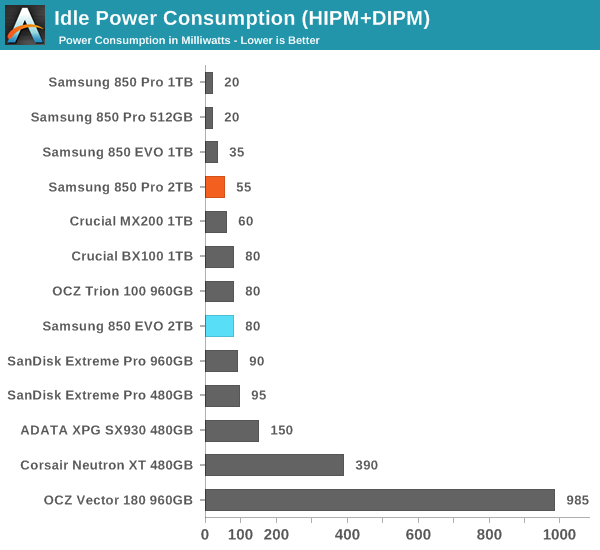
I don't think that's true https://techreport.com/r.x/wd-red-4tb/power-idle.gif

Those HDDs have more than 10 times more capacity. This means you need more than 10 times as many SSDs. Even with the most efficient 0.5W SSD that means all 10 of them would consume 5W which HDDs still manage to beat. In reality that 0.5W SSD is an outlier and they consume 1W so in truth the power consumption is closer to 10W for the same amount of storage. That's above the least efficient HDD. Perhaps bigger SSDs enj…

No. Actually the image I posted before is outdated. Modern 1TB/2TB SSDs consume a lot less. Milliwatts.

https://images.anandtech.com/graphs/graph9451/75923.png

Full article:

https://www.anandtech.com/show/9451/the-2tb-samsung-850-pro-...

Re: SSD Storage: 2018 in review

#97

Earlier quoted context omitted.

To be fair, the $200 1TB SSD linked above is just a standard 2.5" SSD where the Apple SSDs are M.2 with triple the I/O speeds. These Apple(s) can't be compared to the list of oranges above.

https://www.amazon.com/Samsung-970-PRO-Internal-MZ-V7P1T0BW/... -- $439, 1TB.

Things really have changed over the years. I used to shop in the US and bring everything back with me to Europe because computer parts were half the price. Now I'm thinking about doing the reverse[0] (240€ for the same NVMe SSD over here).

[0]: https://www.amazon.de/gp/product/B07CGJNLBB/ref=ppx_yo_dt_b_...

Re: SSD Storage: 2018 in review

#98

Earlier quoted context omitted.

I await the day I can fill my NAS with SSDs. Might save on power usage as well.

I had planned on doing this but even with gigabit wifi, and half gigabit transfer speeds for the SSD, NAS encryption algorithms seems to cap the transmission speeds to around 100 megabytes per second I have all the parts I just haven't formatted my SSDs to go into the NAS yet and I'm not sure if I will

100 megabytes per second sounds more like the limit of a gigabit connection than an encryption algorithm. Most NAS boxes of the last 5 years should be doing encryption offload on the CPU via things like AES-NI instructions which should be hitting ~500 MB/s per core.

Re: SSD Storage: 2018 in review

#99

Earlier quoted context omitted.

No it is not, I linked to the external Thunderbolt SSD (last one) so there are many more pieces involved in the Samsung SSD. But it's true that the Apple one is a lot faster since it's internal.

Sure, it connects via thunderbolt, but it's still just a SATA style SSD (max speeds around 550MBps). I'd love to find an external M.2 to get 1200MBps via external, but this seems to be a unicorn still. Although, I'm still happy to have 550MBps on a SATA SSD vs 110MBps via platters.

If you want USB, forget it. The best you'll get from a USB 3.1Gen2 > NVMe case is about 1GB/sec.

If you're willing (to pay) and able (to plug it in) to use Thunderbolt 3, there are several commercial products that use an NVMe internally and boast up to 2500MB/sec.

Re: SSD Storage: 2018 in review

#100

Earlier quoted context omitted.

I would counter that the SSD's aren't entirely the same. The most comparable consumer NVME M.2 would be the 960 pro and it's still around $300. Definitely cheaper than Apple, but it's also not in the $150 range for the same performance.

99% of the time SSDs are a boolean: "Do you have a SSD? Yes/No" and performance between different SSDs is basically unnoticeable. Change my mind

> performance between different SSDs is basically unnoticeable

Spinning rust drives will likely give you up to ~110 MB/sec.

A SATA SSD will likely give you to up ~550 MB/sec, a 5x increase.

An NVMe SSD will double the write and quadruple the read speed of a SATA SSD, in 1/3 the size.

Yes, any SSD is likely good enough for your average user to feel like a computer is fast. If anything you do is even remotely heavy on I/O, more speed = better.

Post reply on HN