Live data from Hacker News

Everything – Locate files and folders by name instantly on Windows

voidtools.com

51–60 of 61 posts

Re: Everything – Locate files and folders by name instantly on Windows

#51

Earlier quoted context omitted.

Their WizKey program looks like it might solve one of my biggest Windows frustrations after switching from the Mac. If it can reproduce the Mac's way of typing accented characters (eg Cmd-U followed by o to type ö) then I'll be buying it shortly. https://antibody-software.com/web/software/software/wizkey-m...

have you tried https://github.com/samhocevar/wincompose

I haven't tried that one, I'll add it to the list. So far I've been using AutoHotKey and a script I found somewhere, which mostly works, but is a bit awkward to setup.

This looks promising, thanks for the tip!
Re: Everything – Locate files and folders by name instantly on Windows

#52

I switched away from this to Wizfile [0] and I really recommend it. That plus Wiztree [1] as a replacement for Windirstat have made me a real fan of the devs. [0] https://antibody-software.com/web/software/software/wizfile-... [1] https://antibody-software.com/web/software/software/wiztree-...

Their WizKey program looks like it might solve one of my biggest Windows frustrations after switching from the Mac. If it can reproduce the Mac's way of typing accented characters (eg Cmd-U followed by o to type ö) then I'll be buying it shortly. https://antibody-software.com/web/software/software/wizkey-m...

I use the Japanese input method (from the language pack) to solve this. Wish I was joking, but when in hiragana input, you're still able to input words from a Romanji base, and entire English input in full width characters if you start you word with a capital. As the IME has to compensate for having multiple words from the same keystrokes in Japanese, with Roman characters, you get accented characters in the same menu.

I don't exactly see this as a great solution, but with my limited use, it surprises me that this is restricted to a CJK input

Re: Everything – Locate files and folders by name instantly on Windows

#53
Interface-wise we got Fsearch (https://github.com/cboxdoerfer/fsearch) on Linux, but it's not feature complete. I love Everything, and I get a bit nostaligic over these simple but feature packed windows apps that are all but living fossils in the .NET and WFP times.

Re: Everything – Locate files and folders by name instantly on Windows

#55

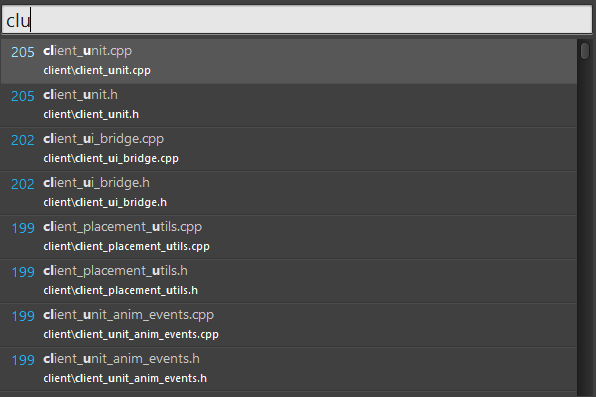
I discovered this tool last week and suddenly fell in love with it. Is it possible to bind it to a hotkey like spotlight? However if it where to fuzzy match like sublime’s super+p I would love it even more.

It's fuzzy alright: https://i.imgur.com/rYXDsgs.png – or did you mean something different? You can hotkey it if you have a shortcut stored somewhere. Right-click on the shortcut → Properties → Shortcut menu → Shotcut Key line

With fuzzy I mean that:

"foobar" may match a file named foosomethingbar.

Like this: https://cdn-images-1.medium.com/max/1600/1*VeGVAZsCVUYXrbI37...

Re: Everything – Locate files and folders by name instantly on Windows

#56
Shameless plug for my open source project for a better way to search and browse videos files you have: Video Hub App - https://github.com/whyboris/Video-Hub-App

I love VidTools Everything - but for videos you might want to see previews of the content ;)

Re: Everything – Locate files and folders by name instantly on Windows

#57
post #30

Earlier quoted context omitted.

Does this support network locations? Mapping to a drive to make it work in everything works for some things but in general everything is pretty bad at non-physical and non-local drives. Edit: Doesn't seem like it. The drive that I can add as a folder in Everything doesn't show up at all in WizFile

I'm not 100% sure as I don't search network locations, but from what I can see you can add Network-ed computers via Options -> Select Drives -> Add Folder. I only have my own machine right now to test but searching seemed like it might work?

They don't show up at all, even the one that is mapped as a drive and works in everything.

They don't show up as normal folders in explorer.

Re: Everything – Locate files and folders by name instantly on Windows

#58

I switched away from this to Wizfile [0] and I really recommend it. That plus Wiztree [1] as a replacement for Windirstat have made me a real fan of the devs. [0] https://antibody-software.com/web/software/software/wizfile-... [1] https://antibody-software.com/web/software/software/wiztree-...

Their WizKey program looks like it might solve one of my biggest Windows frustrations after switching from the Mac. If it can reproduce the Mac's way of typing accented characters (eg Cmd-U followed by o to type ö) then I'll be buying it shortly. https://antibody-software.com/web/software/software/wizkey-m...

The "international English" keyboard adds a few shortcuts to help.

Re: Everything – Locate files and folders by name instantly on Windows

#59

This, along with xplorer2, are among two most used programs on my Windows computer. Really quick in general, including thumbnail generation for pdf/images/etc and monitoring folders/files in realtime. custom keyboard shortcuts: CTRL+SHIFT+E - open everything CTRL+SHIFT+ALT+q - filter pdf -> ext:pdf CTRL+SHIFT+ALT+e - filter excel -> ext:xlsx;xlsm;xlsb;xltx;xltm;xlt;xls;xlam;xla;xlw CTRL+SHIFT+ALT+d - filter all docum…

Add switcheroo to that list.

Best alt-tab supplement out there, lets you change programs by typing their name with auto-complete.

Re: Everything – Locate files and folders by name instantly on Windows

#60

I switched away from this to Wizfile [0] and I really recommend it. That plus Wiztree [1] as a replacement for Windirstat have made me a real fan of the devs. [0] https://antibody-software.com/web/software/software/wizfile-... [1] https://antibody-software.com/web/software/software/wiztree-...

Great suggestion. For those comparing Everything and Wizfile (which I just installed), it looks like Wizfile doesn't support regex whereas Everything does.
Post reply on HN