Live data from Hacker News

Show HN: Don't code your UI, draw it

github.com

131–140 of 148 posts

Re: Show HN: Don't code your UI, draw it

#131
post #128

Earlier quoted context omitted.

Yes, but those layout managers were also incompatible with UI designers, generally speaking. (WinForms designer technically supports them. But it's less "drag and drop", and more like "drag and ... um, what the hell is this thing doing there now?").

For me it was always "drag and drop" + setting the respective properties, not sure what the problem is, other than not bothering to learn how to use them. The only problem is how buggy VS designer in some releases tends to be, forcing to restart VS from time to time. But that affects all kind of stuff, including apps not using layout managers. And regarding Motif, I surely recall the GUI designers being relatively go…

> Likewise with Java Swing and designers like Netbeans Matisse.

Matisse is the only UI designer that I know that does true drag and drop (letting you position widgets exactly where you want them) while also producing flexible layout. And IIRC they had to write a custom Swing layout manager for that.

Re: Show HN: Don't code your UI, draw it

#132

Earlier quoted context omitted.

> 400pt wide to 2560pt wide There are 2 major strategies for responding to such a difference: 1. Vector scaling. It will make the difference irrelevant and the resulting UI will look approximately the same on whatever a resolution. 2. Capacity scaling. I.e. keep the same font letting more information to fit in the control without scrolling. It may be a little bit hard to formalize but these two can be combined intell…

Note I mentioned display _points_ rather than display _pixels_ - how do you create a UI that scales from a phone to a 27" monitor. This is more than just scaling up assets and turning on word wrap.

> This is more than just scaling up assets and turning on word wrap.

Why? What else is there? I'm actually curious. I personally have never dealt with displays bigger than 1280x1024.

Re: Show HN: Don't code your UI, draw it

#133
post #128

Earlier quoted context omitted.

For me it was always "drag and drop" + setting the respective properties, not sure what the problem is, other than not bothering to learn how to use them. The only problem is how buggy VS designer in some releases tends to be, forcing to restart VS from time to time. But that affects all kind of stuff, including apps not using layout managers. And regarding Motif, I surely recall the GUI designers being relatively go…

> Likewise with Java Swing and designers like Netbeans Matisse. Matisse is the only UI designer that I know that does true drag and drop (letting you position widgets exactly where you want them) while also producing flexible layout. And IIRC they had to write a custom Swing layout manager for that.

That custom Swing layout manager is a standard Java layout manager since Java 6, released in 2006.

https://docs.oracle.com/javase/6/docs/api/javax/swing/GroupL...

Sun prototyped it on Netbeans, made it open source and then when everyone was happy, it became yet another layout manager available in any Java compliant platform.

That is the whole point of a layout manager engine, they are extensible.

Which is why project Houdini is having a layout engine APIs as well.

https://developers.google.com/web/updates/2016/05/houdini#la...

Re: Show HN: Don't code your UI, draw it

#134

For my whole life I've been "drawing" real GUIs and writing the logic code, not GUI code then. It started with VisualBasic 1.0 for DOS, then there were different versions of VisualBasic for Windows, then Borland C++ Builder and Delphi (I was using the former), then NetBeans Swing designer and WinForms designer in VisualStudio. And now building a GUI is such a problem that a huge number of almost-useless (I really pre…

Just a note, C++ Builder, Delphi and it's open source counterpart - Lazarus (cross-platform) are still here and involving.

But they feel really obsolete. I don't feel like coding C++ or Pascal when there are modern languages like Python, Clojure, C#, Rust etc and intelligent code editors like Idea/PyCharm that are a lot less boring and more relevant. Sure, old-style visual RAD is still here but it has been forgotten behind as the programming languages progress skyrocketed.

Re: Show HN: Don't code your UI, draw it

#135
post #59

For my whole life I've been "drawing" real GUIs and writing the logic code, not GUI code then. It started with VisualBasic 1.0 for DOS, then there were different versions of VisualBasic for Windows, then Borland C++ Builder and Delphi (I was using the former), then NetBeans Swing designer and WinForms designer in VisualStudio. And now building a GUI is such a problem that a huge number of almost-useless (I really pre…

It really is disappointing how modern web GUI environments are harder to use than what was around 20+ years ago. There are still Visual Basic Apps from the 1990s floating around in large corporations and in government. Users who were expert in the process but not expert developers could easily code up tools to their exact specifications. https://en.wikipedia.org/wiki/Visual_Basic#1990s Admittedly the deployment of we…

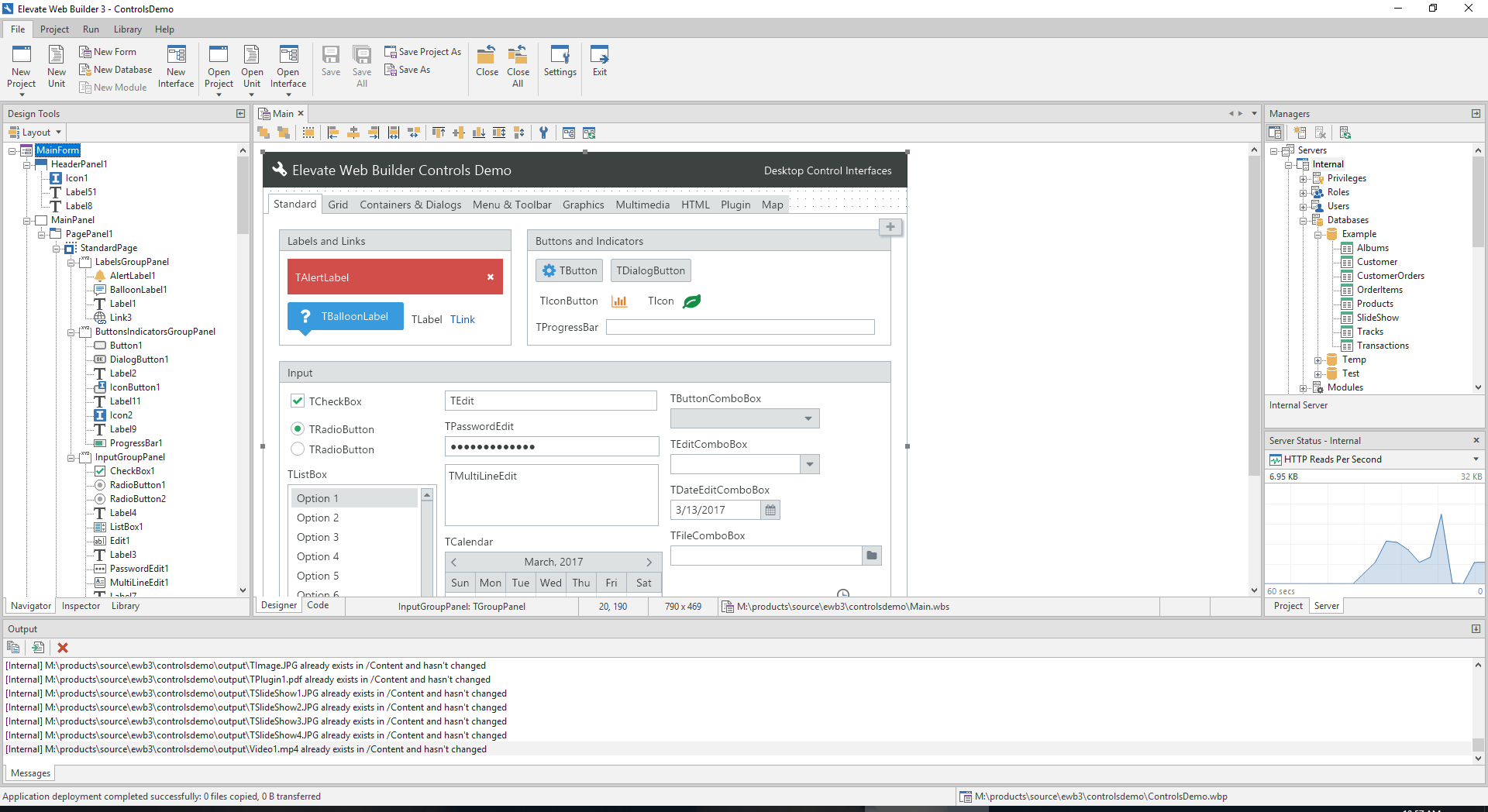
We have such an environment, called Elevate Web Builder:

https://www.elevatesoft.com/products?category=ewb&type=web

Pros:

- Uses a statically-typed language (Object Pascal), compiled to JS, code compression is a simple build option, and the compiler is very fast:

https://www.elevatesoft.com/manual?action=viewtopic&id=ewb2&...

- Layout management is universal (not various, competing forms of layout) and easy to use:

https://www.elevatesoft.com/manual?action=viewtopic&id=ewb2&...

- You can create your own non-visual components and controls and install them into the IDE or share them with others:

https://www.elevatesoft.com/manual?action=viewtopic&id=ewb2&...

(the source code to the entire runtime and component library is included with the product)

- The look and feel of every control in an EWB application can be customized:

https://www.elevatesoft.com/manual?action=viewtopic&id=ewb2&...

- Uses icon fonts for icons (you can also use raster images, if you want), so applications look crisp on any device:

https://www.elevatesoft.com/manual?action=viewtopic&id=ewb2&...

- You can use any existing external JS code by coding an external interface to the external JS code (FFI), so even external JS code references will be type-checked by the compiler:

https://www.elevatesoft.com/manual?action=viewtopic&id=ewb2&...

Cons:

- The code editor is rudimentary and requires some more polish (code-completion, etc.)

- Debugging isn't supported via the IDE, yet

- There are still a few missing controls like a treeview and charts, but you can interface with JS products like HighCharts without issue

- The compiler still needs some work in the areas of interfaces, generics, and set support

We have a new Elevate Web Builder 3 coming out soon that has a new IDE and web/application server with built-in TLS, authentication, session management, role-based access control, database API, remote application deployment, and event logging. You can, effectively, manage and monitor any EWB 3 web server remotely from within the new IDE:

https://www.elevatesoft.com/ewb3ide_screenshot.png

Initially EWB 3's web server will be available for Windows only, but we will be offering a Linux/Mac daemon version in early 2019.

The ultimate goal for the product is to provide a single-language solution to both front-end and back-end applications with one-click application deployment and deployment of server instances.

(Sorry for the "advertisement" - I just see this sentiment come up a lot here, and I think it's important for people to know that that there are companies working on solutions)
Re: Show HN: Don't code your UI, draw it

#136

Earlier quoted context omitted.

Don't get excited. The thing that this demo shows in minutes could've been typed up in text in seconds . It is not a productive way to do things. There's a reason that these systems never catched on, they are unnecessary. You may say, but "non-programmers" will use it! No, they won't. Designers will use real design tools to create (non-functional) visual designs. Programmers will bring those visual designs to functio…

Yo - I did the Airbnb project linked ^^^ which I believe was the first of this wave of deep learning-powered sketch->UI projects (though standing on the shoulders of decades of R&D projects) Our take was that we really do design on paper or whiteboard first & foremost, which is why our project emphasized the webcam + sharpie thing rather than drawing in-browser etc. Here's a related thing I wrote about the need for d…

> ...so so so much process waste is because developers have to re-implement static pictures of designs.

Okay, but did you attack that problem in a way that actually is more efficient than established UI paradigms?

Let's split the problem in two parts:

- "Semantic" Design (Checkbox, ImageView, TextInput...)

- Visual Design (fonts, colors, margins, ratios)

Your solution covers only the "semantic" part. Just look at the data. It's basically a simple component tree. It would be more efficient to just type it up. It also would be more efficient to just drag rectangles from a toolshelf instead of defining the type of the rectangle by drawing extra hints.

As for the visual design, that's where you use a design tool like Illustrator or Photoshop. Typing that up (e.g. in CSS) is surely a pain, but sketching it all up is out of the question. I certainly do see room for improvement in the workflow here, but a sketchy interface isn't helping.

You have to question a lot of assumptions here, but also consider how designers are most efficient with the tools they already know and have used for years. Don't mistake something that you want to create for something that users will actually want to use.

Re: Show HN: Don't code your UI, draw it

#137

Earlier quoted context omitted.

It sounds like you don't. But many in my org come to me with an idea, and having them think through the logical pieces and build a functional wireframe would help under resourced people like me so much. Also, many people just think that business logic for sanitization and validation "just happens." The barrier to wireframing, for them, is too high so they don't. But in this idea, I could see someone submitting a wire…

I agree with your main point about empower people. It seems that people are coming to you to help estimate how long an idea takes to implement. If that's the case, I agree with everything you've said. But if they're proposing an idea, say a new sign up form to increase conversions, phone number validation is an irrelevant detail to worry about at this point (unless that was a significant problem with the old sign up…

In your scenario, I agree, number validation is irrelevant. So I'd ask that you pick something that is relevant for your environment.

Whatever it may be, would a tool that educates and puts some of the cost back on the "idea person" or stakeholder be a good thing? I think it would.

Re: Show HN: Don't code your UI, draw it

#138

Earlier quoted context omitted.

Hello, thank you for your interest ! I have fixed the repo structure and added instructions on how to build and run. Hopefully that is fine, if not please tell me about it and I shall update it as soon as possible.

Thank you for fixing, I think it's close. Now, flask says "index.html" is missing :-) also step 2 should have "pip3 install -r" instead of "python3 -r".

done :)

Re: Show HN: Don't code your UI, draw it

#139
post #49

Earlier quoted context omitted.

> many people just think that business logic for sanitization and validation "just happens." The barrier to wireframing, for them, is too high so they don't Maybe the barrier is where it should be. Or maybe it should be even higher! People who can't understand the logic of an interface have no business creating or suggesting interfaces. An UI is meant to be used, not looked at like a pretty picture in a frame. It sho…

I take your point about usability as opposed to visual design, and that many slick-looking UIs actually lower productivity. But: In this example, unless not handling international phone numbers leads to failure of the project, that can be handled later, say once the project is approved and time estimation is being done. If I'm building a notes app, and someone is proposing a new sign up form to increase conversions,…

> handling international phone numbers

Imo this is one of those things best left unhandled, eg. "just use a plain mostly unvalidated textfield, and throw and error only when you want to use that data via another system like for a text message campaign". Mostly in real-life if you want to target the entire freaking planet (not just 99% of phone using people, but 99.999%), you'll get to realize that any validation is not enough and that some phone numbers need to contain arbitrary letters and symbols in them (better don't ask... the world is big and weird :P), and that yeah, those numbers will not be procesable by things like Twillio, but human users with local knowledge will know how to actually "dial" them...

But it needs to be a conscious decision, to consciously choose to not-validate and to understand that you give up the ability to 100% target phone numbers for things like 2-factor-auth later on.

Not "forget that phone numbers need to be validated" and then, go and say, "oh, let's do phone-based 2-fa mandatory" or whatever user interaction messup like that.

Post reply on HN