Live data from Hacker News

Mac mini Late 2018 Teardown

ifixit.com

51–60 of 197 posts

Re: Mac mini Late 2018 Teardown

#51
post #23

Earlier quoted context omitted.

The two I installed this week are using 70GB and 90GB all set up for development with my files. I think there are plenty of people who needn’t spend on an extra 128GB. Especially since the USB ports are plenty fast for bulk, non speed critical storage should you decide to archive something locally.

128 GB doesn't work because it doesn't scale well with age. You can run MacOS or Windows on 256 GB almost indefinitely, even as they grow it would be five or more years before it becomes a headache, to keep 128 GB happy you have to babysit/rebuild semi-regularly. I'm yet to see an OS which doesn't bloat as it ages, even on mobile devices. 30 GB free won't be 30 GB the next major OS update, including rollback files, l…

On SSDs, you also want as much as free space as possible, to avoid wearing out due to write amplification the few free blocks that are constantly rewritten.
Re: Mac mini Late 2018 Teardown

#52
post #2

A bit disappointing to see that the storage is not user-upgradable. I guess it matters less on a device like this where you could more easily use external storage, but still. I wish Apple stopped soldering in stuff and just made things a centimeter taller if that was the tradeoff.

I think it's more because of the PCIe interface, and access control and encryption through the T2 chip. The PCIe interfaces SSDs that Apple's been using allow really fast speeds of upto 3Gbps, which is almost double those offered by other interfaces like M2 or even more faster than SATA. What's disappointing is the base storage. 128GB in 2019 is so ridiculous. I would't otherwise mind a soldered SSD when I can just u…

> What's disappointing is the base storage.

But that just depends on use-case.

There are plenty of scenarios where you just need the built-in storage to handle the OS, apps and miscellaneous storage while your large scale storage is external somewhere.

Why make people get (and pay for) more storage than they have use for?

Re: Mac mini Late 2018 Teardown

#53
post #2

A bit disappointing to see that the storage is not user-upgradable. I guess it matters less on a device like this where you could more easily use external storage, but still. I wish Apple stopped soldering in stuff and just made things a centimeter taller if that was the tradeoff.

> I guess it matters less on a device like this where you could more easily use external storage, but still. I wish Apple stopped soldering in stuff and just made things a centimeter taller if that was the tradeoff. Here it's a bit more than just that: T2 is the secure boot system, but also the SSD controller (and a few other I/O things). They could have put an m.2 slot though.

I do wish they had gone with m.2. It really feels like T2 is wasted in the Mac mini and just there to check a feature list. It doesn't even make much sense in a machine that is turned off instead of put to sleep.

Re: Mac mini Late 2018 Teardown

#54
post #34
post #2

A bit disappointing to see that the storage is not user-upgradable. I guess it matters less on a device like this where you could more easily use external storage, but still. I wish Apple stopped soldering in stuff and just made things a centimeter taller if that was the tradeoff.

The trade-off isn't height--an M.2 slot takes up a relatively large amount of floor space on the motherboard. There's nowhere to put it: https://d3nevzfk7ii3be.cloudfront.net/igi/ZLFbiRsOdiemeWLA.h... .

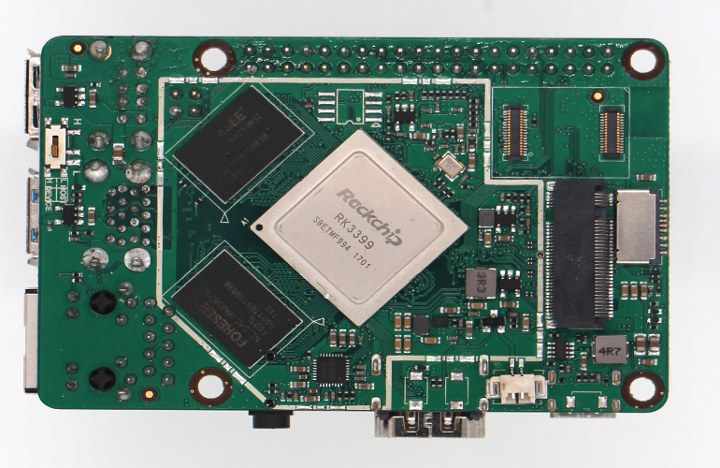
It doesn't take up that much space. Here's a Raspberry Pi sized board with an M.2 slot: https://www.cnx-software.com/wp-content/uploads/2018/11/RK33...

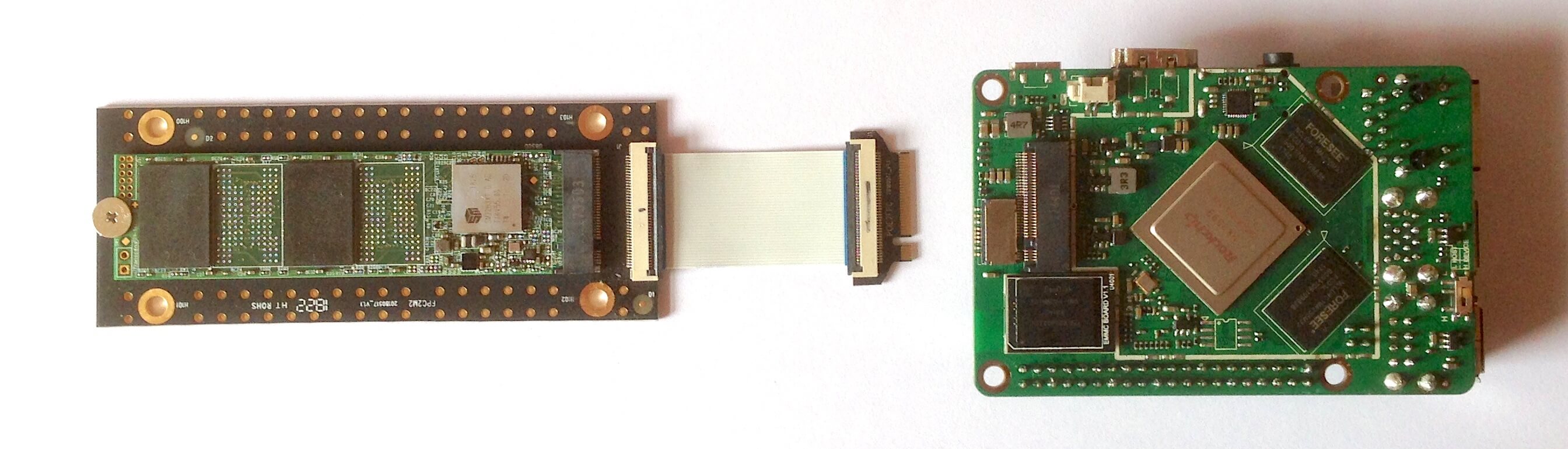
I think there'd easily be room, given that the soldered-on NAND chips could be removed from the board.

edit: If you're wondering how that works, here's a hint: https://raw.githubusercontent.com/ThomasKaiser/Knowledge/mas...

Re: Mac mini Late 2018 Teardown

#55
post #39

Earlier quoted context omitted.

I plan to ditch NAS and just connect external storage directly to the mini, and it needs to run 24/7. ECC should give me better reliability, no?

I have done this for 6 years, mini with two drobos connected to it running plex 24x7. No issues without ECC ram. I have since switched to a synology because it's easier to manage and won't have bit rot.

To clarify, I’m more concerned about silent data corruption instead of crashing. Why does Synology not have bit rot? Becuase of ZFS? I thought ECC memory is almost required for ZFS?

Re: Mac mini Late 2018 Teardown

#56
post #39

Earlier quoted context omitted.

I plan to ditch NAS and just connect external storage directly to the mini, and it needs to run 24/7. ECC should give me better reliability, no?

Yeah, but for a NAS it’s overkill in my opinion. You’re more likely to run into on disk than in RAM issues with silent bitrot depending on OS and FS even then pretty rare but if your NAS is huge becomes more likely just law of averages.

Bit rot on cold storage is at least detectable if using filesystem with checksumming (e.g. ZFS).

I’m not aware of any solutions to detect bit rot in RAM other than ECC.

Re: Mac mini Late 2018 Teardown

#57
post #2

A bit disappointing to see that the storage is not user-upgradable. I guess it matters less on a device like this where you could more easily use external storage, but still. I wish Apple stopped soldering in stuff and just made things a centimeter taller if that was the tradeoff.

I think it's more because of the PCIe interface, and access control and encryption through the T2 chip. The PCIe interfaces SSDs that Apple's been using allow really fast speeds of upto 3Gbps, which is almost double those offered by other interfaces like M2 or even more faster than SATA. What's disappointing is the base storage. 128GB in 2019 is so ridiculous. I would't otherwise mind a soldered SSD when I can just u…

> The PCIe interfaces SSDs that Apple's been using allow really fast speeds of upto 3Gbps

AnandTech reported int heir review of the 2015 Macbook that this was just NVMe. Has something changed since then?

This is just Apple again trying to pass off a standard as their own innovation to justify their proprietary incarnation.

Re: Mac mini Late 2018 Teardown

#59
post #24

Earlier quoted context omitted.

Maybe Apple should build SSD storage thingies that are exactly the same size as the mini so they can be stacked. They're already stacking them for demos and it would definitely look cool. Especially if you get Thunderbolt cables that exactly match 1-4 mini heights (since it got 4 Thunderbolt ports) + daisy chaining.

Those already exist but it's kind of missing the point. An NVMe SSD is the size of a stick of gum, I'd much rather plug one of those in than have to stack a box the size of the Mini on top of my Mini and connect it with TB3. In the end you've got something more expensive, probably slower, and less portable than the obvious solution.

You could put a 3.5” drive in a Mac Mini sized box. And with Tunderbolt you could have it double as a hub or dock

Re: Mac mini Late 2018 Teardown

#60
post #34
post #2

A bit disappointing to see that the storage is not user-upgradable. I guess it matters less on a device like this where you could more easily use external storage, but still. I wish Apple stopped soldering in stuff and just made things a centimeter taller if that was the tradeoff.

The trade-off isn't height--an M.2 slot takes up a relatively large amount of floor space on the motherboard. There's nowhere to put it: https://d3nevzfk7ii3be.cloudfront.net/igi/ZLFbiRsOdiemeWLA.h... .

My previous Mac Mini had 2 HDD slots and upgradable ram, so it IS possible, for Apple even. Apple has gotten from a 1 step backwards, 2 forwards to a 1 step forwards 2 backwards company. The devices where they removed optical drives were groundbreaking. Nowadays their devices are compromise ridden.
Post reply on HN