I actually really like that the power block can be separated from the charging cable now. Yeah the tabs may have been nice, but the base of the cable would always get mashed.
Basic features that will hopefully return to the MacBook Pro
51–60 of 83 posts
Re: Basic features that will hopefully return to the MacBook Pro
#52The current state of Apple users is pitiful. Wishing for features that were removed? How can you support a company so much for caring about you so little?
If they never removed features, Apple computers would still have serial ports and scsi busses. I'm not saying I don't miss many of the features in this article, nor am I being an Apple apologist, but sometimes you need to take a step back before you go forward.
Re: Basic features that will hopefully return to the MacBook Pro
#53Good luck getting those in the next MBP. Once a company exceeds a certain size, the normal rules of designing a product for the users stop applying. Mag safe, headphone jack, multiple USB ports, escape key - why were they removed? Who made these decisions? I might add a lack of dedicated PgUp/PgDn/Home/End keys on larger laptops. There's plenty of space, but no, we are going to use the same keyboard for all of them (…
I might add a lack of dedicated PgUp/PgDn/Home/End keys on larger laptops. There's plenty of space, but no, we are going to use the same keyboard for all of them (makes sense from a supply perspective!)
Mildly unrelated, but many split-keyboard designs put an arc of thumb-keys like this http://xahlee.info/kbd/i04750/keyboardio_m1_rgb_44488.jpg
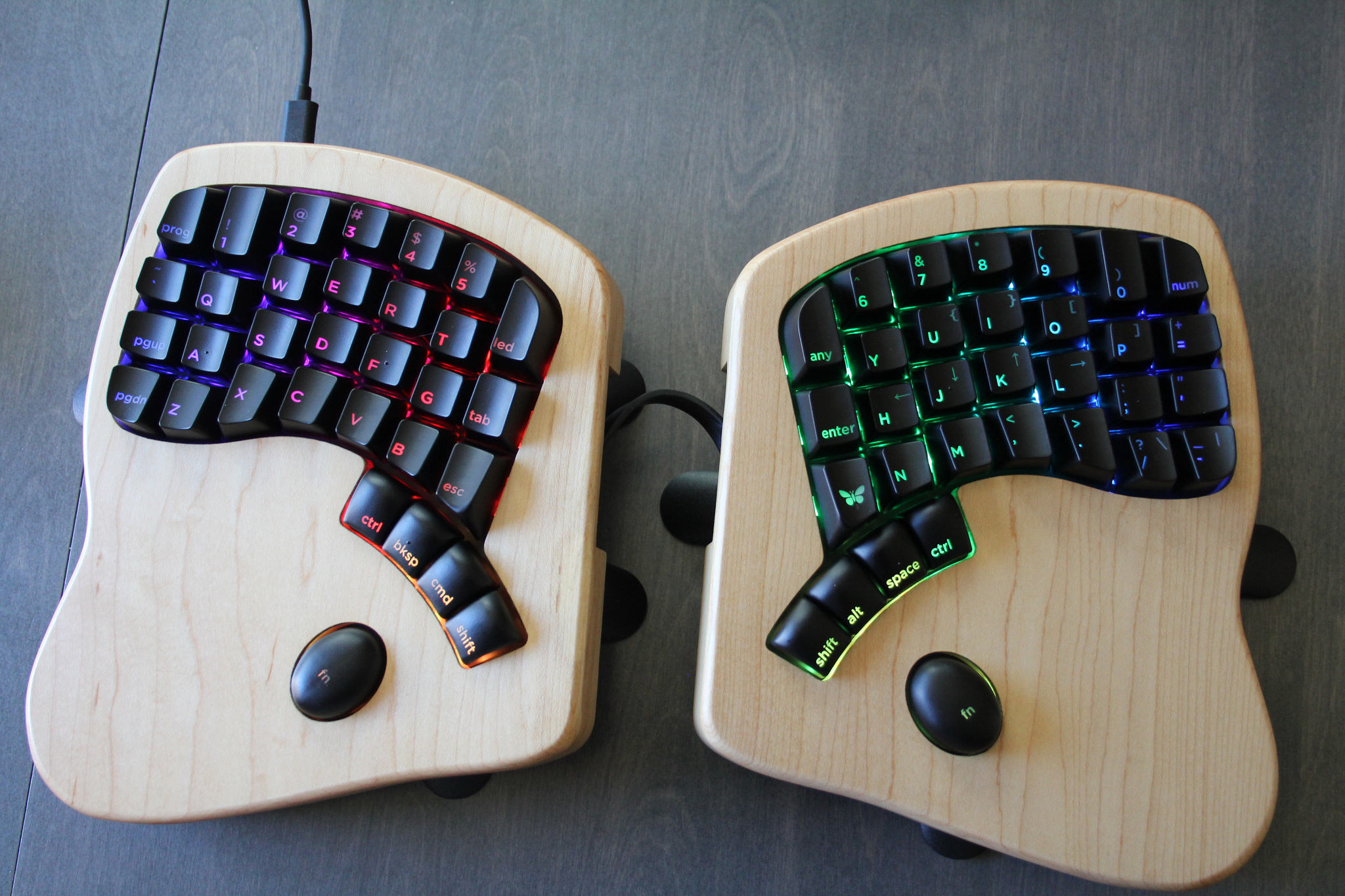
There's plenty of opportunity for normal rectangle keyboards to put 2+ new metakeys below space bar, and almost none of them do.
But what about on a laptop - could there be key chords where the thumbs are on the trackpad? Could you have right_thumb_trackpad_top_right + j/k for PgUp/PgDn (picking from Vim bindings) ?
Re: Basic features that will hopefully return to the MacBook Pro
#54> When Apple first launched MagSafe, the company loudly proclaimed they did so because customers kept breaking the connectors that plugged into the laptop. You know, like what’s in the current MacBook. I have a new MBP and I don't miss the MagSafe, to be honest. Mostly because I have the USB-C power cable connect through a USB-C hub -- what I lose in the usability of MagSafe, is mostly made up in flexibility. And wit…
Let's see how the USB-C female connector fares after the same amount of use. Something tells me it'll be busted long before the cable part wears out. All Apple cables seem to have a weakness where the cable joins to the connector. A short PVC tube is no match for a gradually tapered part found on some Ethernet cables. And the fact that the user usually just yanks the cable instead of pulling on a tiny connector part.…
There's an art to designing strain relief. Apple doesn't bother with it.
I have a new electric kettle with a plug that incorporates a ring into the strain relief -- your fingers will always grab the ring to pull it out of the outlet, and that's where the cable-to-plug connection is strongest.
Re: Basic features that will hopefully return to the MacBook Pro
#55The elimination of MagSafe is nearly too painful to talk about. It was magical. Now it’s dead. Here’s how it worked: The power cable was magnetic. Instead of sticking into the laptop, it connected to the side of it. If someone tripped over the cable, the cable would harmlessly disconnect from the laptop. That feature was really removed? I've accidentally yanked the power cord multiple times on my laptop. MagSafe save…
The most Apple solution to that I can think of will be to create a magnetic USB-C port on the next generation of Macbooks, that will require an additional adapter from magnetic USB-C to USB-C.
Re: Basic features that will hopefully return to the MacBook Pro
#56I was originally on board for comments like "If a person buys a MacBook Pro and iPhone, that person cannot connect their iPhone to their new MacBook Pro without buying an adapter or cable." But I can't remember a time I've plugged my current iPhone into a computer, ever. I had the original iPhone, where I had to plug it in constantly to manage music, sync contacts, and update the OS, but it hasn't been like that in m…
How do you reinstall OS or make non-iCloud backup without computer?
I can't think of a time I've wanted to reinstall the OS. I've wanted on several occasions to factory wipe the device (trading in the phone, fresh start, repurposing it, etc), but "Reset all content and settings" is an option locally on the device.
As far as backups: as a matter of general data hygiene I don't let my iPhone or my laptop be the source-of-truth for anything. Contacts sync to iCloud and Google, Photos to Google and Dropbox, etc etc.
Re: Basic features that will hopefully return to the MacBook Pro
#57Re: Basic features that will hopefully return to the MacBook Pro
#58Earlier quoted context omitted.
control [ is the escape character, if useful...I use it in vi that way all the time.
Or just map Caps-lock to Esc..
Or buy a ThinkPad X1 Extreme, it comes with a functioning keyboard including a dedicated escape key! Upgradeable RAM to 64GB and plenty of ports are a bonus.
Re: Basic features that will hopefully return to the MacBook Pro
#59Not a returning feature but what about a Macbook that updates with the lid closed? Or is that asinine?
In answer to your question, that would be asinine. That's one of the few things Apple has (almost) consistently gotten right on their laptops—close the lid, it goes to sleep. Period. I can't describe how frustrating it is to use computers that think they are smarter than you (or are just unable to work properly) and stay on when you close them.
Except, that doesn't happen like you described it. A process can "prevent sleep", at which point closing the lid will still leave the laptop running (you can view apps/processes that do this in Activity Monitor - there is a separate column titled "Preventing sleep").
http://www.chriswrites.com/mac-refusing-sleep-figure-whats-k...
Re: Basic features that will hopefully return to the MacBook Pro
#60All of these features are on my mid-2014 model.
Due to the design of the case, the bottom has bowed out from temperature changes, but the battery is fine.
Shame what they did to the new ones. I ended up getting a Razer Blade 13” to use at home, which seems tantalizing close to what new MacBook Pros should be.