Live data from Hacker News

PyQt5 Tutorial: Create a Python GUI in 2018

build-system.fman.io

141–150 of 211 posts

Re: PyQt5 Tutorial: Create a Python GUI in 2018

#141
post #4

I like the tutorial, but I don't know why you would use PyQt these days. Tkinter is more permissive and has wrappers like appJar which make it disgustingly easy to put together a quick, ugly GUI. If you're building a desktop app that needs to really look good and be fast, why are you using Python?

In my research [1] [2] [3], Tkinter was said to be better for basic applications, PyQt better for more advanced projects. 1: https://stackoverflow.com/a/1094530/1839209 2: https://www.reddit.com/r/learnpython/comments/108zfq/tk_or_q... 3: https://www.quora.com/Should-I-use-PyQt-GTK3-or-tkinter-for-...

if you make use of editable tables, then Qt's is really powerful (the delegate thing is super cool)

Re: PyQt5 Tutorial: Create a Python GUI in 2018

#142
post #97

Still using tkinter here which is python's default GUI, what's the license for PyQt5? For me learning Qt in general is another big investment of limited time, so far I have been using tkinter with python and it works well.

PyQt is GPL or commercial.

Pyside/"Qt for Python" is LGPL.

You then need a license for QT, which is LGPL or commercial. You can use the LGPL version of Qt with commercial PyQt, but I never understood the hoops you might have to jump through in order to comply with the LGPL. Packaging python apps is painful enough without having to worry about that, might as well spend a little to avoid the aggravation. LGPL Qt also lacks a few advanced packages.

Re: PyQt5 Tutorial: Create a Python GUI in 2018

#143

Earlier quoted context omitted.

The "threading" functionality in Python is a significant downside to the language. I don't know why they went with the idea that people don't need real threads like they can get in C/C++, Java, C#.

Python threads are real (operating system) threads. Note that the "threading" and "_threading" modules wrap thread creation and otherwise just use interpreter C APIs. Their design flaw is that they assume that they are the only ones using the interpreter API.

I assume parent is referring to the GIL, which limits the performance benefits you get from threads.

Re: PyQt5 Tutorial: Create a Python GUI in 2018

#144
I was interested in trying out fbs as I've always had many problems trying to get an executable build for Windows. I tried the simplest example he shows, but after running 'freeze' command I get a LookupError saying it can't find msvcr110.dll. Some investigation later, I install said dll from microsoft, and try again. It builds to exe now, so I go into the build folder and try to run it and just get a crash dialog.

Re: PyQt5 Tutorial: Create a Python GUI in 2018

#145
post #143

Earlier quoted context omitted.

Python threads are real (operating system) threads. Note that the "threading" and "_threading" modules wrap thread creation and otherwise just use interpreter C APIs. Their design flaw is that they assume that they are the only ones using the interpreter API.

I assume parent is referring to the GIL, which limits the performance benefits you get from threads.

Oh I know, sometimes I just like being pedantic.

Re: PyQt5 Tutorial: Create a Python GUI in 2018

#146

Earlier quoted context omitted.

The API still looks messy and unpythonic though, sadly. Look at the basic hello world example. Why do I need to pass QApplication an empty array? Why am I calling a method ending with _ to launch the program? And the fact the label magically attaches to the app through some side effect is also confusing. Does anyone know if there's any good shim/wrapper around PyQt that has a better API?

The now-official bindings (Qt for Python as mentioned in the article) has a waaay more Pythonic API. I actually liked it. The advantage of PyQt5 is that you can look up the Qt documentation.

Qt for Python and PyQt5 have almost exactly the same API, to the point where it took me 30 min to migrate my 15kLoC project [1] from the latter to the former, mostly by changing a few imports. Maybe you meant something else?

1: https://fman.io

Re: PyQt5 Tutorial: Create a Python GUI in 2018

#147
post #131

Earlier quoted context omitted.

Looking at a tutorial, it looks like all it does is layout the form for you. That's a shame. Things closer to what the original VB was are sorely missed in modern computing.

It gives you ui for connecting signals and slots and configuring stuff as well, but few people use it. And qt singals and slots model is far superior to VB/Delphi style callbacks or c# delegates, but you have to program for a while to get why. Also - layouts in VB/Delphi weren't responsive, layouts made in QtDesigner are.

> ui for connecting signals and slots and configuring stuff as well, but few people use it.

I try hard to do that (it saves on boilerplate), but the challenge is always in finding signals and slots with the same precise amount of parameters. Say I trigger a signal with no parameters and I want to connect it to a slot that takes a boolean always with the same value (e.g. a pressed() connected to a setEnabled(bool), where bool should always be True), I can't do that in Designer, it has to be in actual code - a trivial one-liner, sure, but still one more line of technical debt.

(INB4 "ur doing it wrong": yes, I know about clicked(bool), toggled(bool) etc, it was just an example to explain the concept.)

Re: PyQt5 Tutorial: Create a Python GUI in 2018

#148

Earlier quoted context omitted.

The now-official bindings (Qt for Python as mentioned in the article) has a waaay more Pythonic API. I actually liked it. The advantage of PyQt5 is that you can look up the Qt documentation.

Qt for Python and PyQt5 have almost exactly the same API, to the point where it took me 30 min to migrate my 15kLoC project [1] from the latter to the former, mostly by changing a few imports. Maybe you meant something else? 1: https://fman.io

Had a very similar experience a few years back migrating from PySide to PyQt when PySide wasn't able to keep up with Qt. Fixing the imports took minutes and we were off to the races.

Re: PyQt5 Tutorial: Create a Python GUI in 2018

#149
post #139

Earlier quoted context omitted.

that's an interesting definition of "non-ugly". I would hesitate a lot before making an app that looks like this screenshot public.

well it's a bit old school but it certainly looks functional. If the program under it is good, it's a very superficial comment. If only you'd see my emacs screen, it's unbelievably ugly and somehow, I work with it every day !

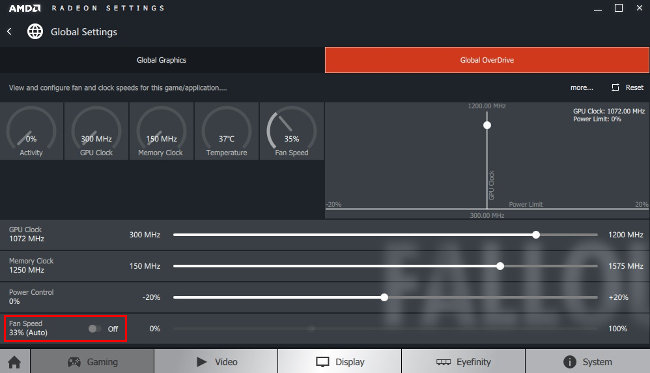
I was replying to a post that stated specifically that it was "non-ugly". In 2018, non-ugly means this :

* https://assets.guitar-pro.com/1.3/images/www/guitar-pro-7/ca...

* https://www.awn.com/sites/default/files/styles/original/publ...

* http://www.comptoir-hardware.com/images/stories/_software/am...

it's not what I use myself, being more of an i3/terminal guy, but it's absolutely what the clients want

Post reply on HN