GraphQL editor – Visual node editor for GraphQL
1–10 of 25 posts
Re: GraphQL editor – Visual node editor for GraphQL
#2The interface looks really slick, but isn't intuitive at all. I constantly have to refer back to the video to find out how to do anything.
You build the graph from right to left (unusual but ok), but if you try to actually draw your lines from right to left they don't connect, you have to draw them left to right.
To rename something you click the element and type the name. Fairly straightforward, except that the interface gives no indication that this is possible. No blinking text cursor or anything of the sort.
The "arguments" category actually has nothing to do with arguments, it's just "use stuff you named previously". Why is that not something that's connected on the graph?
Oh, right, that's because of the way queries/mutations work. The name of the query is combined from the name of the query node and the name of the output node. But instead of a query having two connectors, one for input and one for output, it just has everything at a depth of one as outputs, and the child nodes of the output are the inputs (actually, that's how types and everything else works too). I certainly wouldn't have guessed that.
Compare Blender's node editor: https://code.blender.org/wp-content/uploads/2012/01/node_gro...
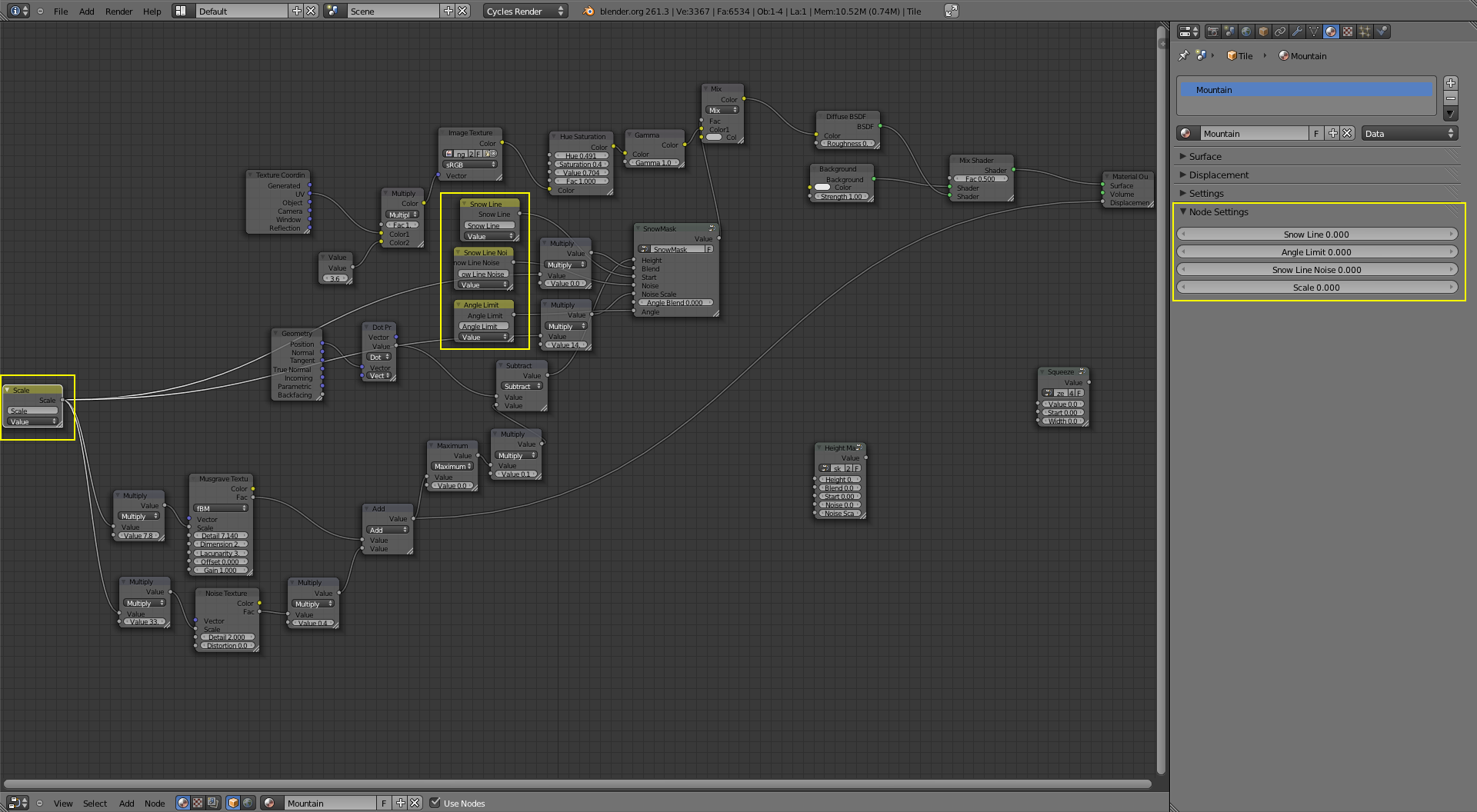
Anyone can look at a screenshot of Blender's editor and knows what's going on: labeled connectors, no magic with different layers, etc. Creating them is also straightforward. In comparison, if you show a graph from this tool to a random developer that works with GraphQL he/she likely won't understand what schema the graph is supposed to represent.
Re: GraphQL editor – Visual node editor for GraphQL
#3I wonder why we're still programming primarily in text - we ought to see more visual editors that operate on top of a source file, where changes to file sync immediately to editor, and vice-versa.
Also, that's the sexiest README I've ever seen.
Re: GraphQL editor – Visual node editor for GraphQL
#4The interface looks really slick, but isn't intuitive at all. I constantly have to refer back to the video to find out how to do anything. You build the graph from right to left (unusual but ok), but if you try to actually draw your lines from right to left they don't connect, you have to draw them left to right. To rename something you click the element and type the name. Fairly straightforward, except that the inte…
Thanks for that feedback. This is really valuable for me. I will correct everything you described here. I am not an UX designer to, so maybe this is the reason of bad UX and UI.
- I will correct drawing the lines - I will add a blinking cursor during renaming of the node - I will correct the query node to have input and output
So definitely there is lot of work to do. Deadline for these 3 - Thursday.
I used to work for Visual Effects industry 7 years ago. I was a TD and python scripts programmer. That's why you have spacebar menu ( similar to this in Maya - "Hotbox" ).
Your feedback is so constructive, THANK YOU Man.
Re: GraphQL editor – Visual node editor for GraphQL
#5The interface looks really slick, but isn't intuitive at all. I constantly have to refer back to the video to find out how to do anything. You build the graph from right to left (unusual but ok), but if you try to actually draw your lines from right to left they don't connect, you have to draw them left to right. To rename something you click the element and type the name. Fairly straightforward, except that the inte…
Thanks for that feedback. This is really valuable for me. I will correct everything you described here. I am not an UX designer to, so maybe this is the reason of bad UX and UI. - I will correct drawing the lines - I will add a blinking cursor during renaming of the node - I will correct the query node to have input and output So definitely there is lot of work to do. Deadline for these 3 - Thursday. I used to work f…
>Your feedback is so constructive, THANK YOU Man
I'm glad you take criticism so well :)
> I am not an UX designer to, so maybe this is the reason of bad UX and UI.
UX design is a bit like programing: if you just do stuff and never test it it's unlikely to work. The single most valuable thing you can do for UX is to grab somebody from your target group and let them use your program. If you don't explain and don't comment, you can watch how they will struggle with things you thought would be obvious. Then just change those parts and test with someone fresh until it really is obvious to someone not intimately familiar with the inner workings of the software.
Re: GraphQL editor – Visual node editor for GraphQL
#6On a related note, can someone recommend a good modern library to build similar visual block editor? Blocky is good, but it shows its age. Preferably not depend on React.
Re: GraphQL editor – Visual node editor for GraphQL
#7This is really cool. We already have a large GraphQL schema that we'd like to make some changes to. It'd be nice to be able to bring in our existing schema to visualize.
Re: GraphQL editor – Visual node editor for GraphQL
#8I wonder why we're still programming primarily in text - we ought to see more visual editors that operate on top of a source file, where changes to file sync immediately to editor, and vice-versa. Also, that's the sexiest README I've ever seen.
Seconded. Great README.
Re: GraphQL editor – Visual node editor for GraphQL
#9This is really cool. We already have a large GraphQL schema that we'd like to make some changes to. It'd be nice to be able to bring in our existing schema to visualize.
Thanks for feedback. I'm adding that to our list!
Re: GraphQL editor – Visual node editor for GraphQL
#10I wonder why we're still programming primarily in text - we ought to see more visual editors that operate on top of a source file, where changes to file sync immediately to editor, and vice-versa. Also, that's the sexiest README I've ever seen.
Seconded. Great README.
Thanks guys! I'm part of the team. We were inspired by https://github.com/apex/up :)