Live data from Hacker News

Inside the Windows Console

blogs.msdn.microsoft.com

131–140 of 259 posts

Re: Inside the Windows Console

#131
post #24

I tried using PowerShell or Hyper. But these are just so slow to start. So I'm always coming back to cmd.exe. It is fast and serves my basic needs just perfect. When I need more, I just type 'bash'. And bash also starts faster than PowerShell or Hyper. So I don't see why they now change WIN+X and Explorer to use PowerShell rather than cmd.exe. Keep improving cmd.exe. But please don't make it bloated.

Do you have something custom going on in powershell? I’m not a power user of windows shells but it opens very quickly for me. So much so that I never thought about the speed of either terminal.

"very quickly" is subjective, but compared to cmd it is noticeably slower even in a fresh install of Windows --- the few times I'm forced to actually use it to configure some things.
Re: Inside the Windows Console

#132
post #62

Earlier quoted context omitted.

So, MS has finally realized they're 40 years behind the civilized world Yes they should be emulating a teletype like enlightened folk!

Very appropriate comment. Last year I was tinkering with the implementation of a TUI (Text User Interface), and I wanted it to be cross-platform. I started developing it under Windows, using the Console API (sorely lacking in features, but at least it is just an API to be called from C). I had to abandon the project once I realized that it would have been too hard to harmonize this approach with the weird way you are…

SSH connections are nearly the most common interface. At the very least, optimizing for them is a good idea.

Re: Inside the Windows Console

#134
post #47

Earlier quoted context omitted.

Wow, so that's fixed after almost 30 years! Flat out amazing, what a team!

...so if they don't fix it, the console sucks. But if they do fix it you still find the need to be snarky?

I think the concept is that if they had added it a long time ago, is that would be good or average. Adding it very late is not worthy of praise, and lacking it for years is still worthy of condemnation. While the change may be part of a broader positive trend, it does not absolve them of the past.

Re: Inside the Windows Console

#135
post #86
post #24

I tried using PowerShell or Hyper. But these are just so slow to start. So I'm always coming back to cmd.exe. It is fast and serves my basic needs just perfect. When I need more, I just type 'bash'. And bash also starts faster than PowerShell or Hyper. So I don't see why they now change WIN+X and Explorer to use PowerShell rather than cmd.exe. Keep improving cmd.exe. But please don't make it bloated.

There's actually an option in Settings to swap between Powershell and cmd.exe in the Win + X menu. On top of that you can actually go in and customise it quite a bit to your own liking as it's just a folder inside your local app data: C:\Users\YourWindowsUsername\AppData\Local\Microsoft\Windows\WinX

Unfortunately it has no effect on the menu in Windows Explorer which also dropped cmd for PowerShell recently.

Re: Inside the Windows Console

#136
post #123

Earlier quoted context omitted.

The terminals you use in Linux must either be painfully slow or you must be very insensitive to latency issues because the latency on Windows console is really high. When I type something I expect it to appear immediately ( A lot of basic commands in general run more slowly on Windows but I don't think that's the terminal's fault so much as it's lack of optimisation on the command itself.

Afaik, 10ms is not achievable nowadays, unless you use a very old computer. https://danluu.com/input-lag/

I'd be curious to see the original IBM PC/XT/AT tested too. I guess it would be near the low end of the list too.

Also, the last entry in the list provides another reason why Lisp machines never became popular --- 300ms of input lag! That's definitely in unusable territory, especially when other machines of the time were almost an order of magnitude faster.

Re: Inside the Windows Console

#137

Earlier quoted context omitted.

Do you have something custom going on in powershell? I’m not a power user of windows shells but it opens very quickly for me. So much so that I never thought about the speed of either terminal.

"very quickly" is subjective, but compared to cmd it is noticeably slower even in a fresh install of Windows --- the few times I'm forced to actually use it to configure some things.

I think powershell is kept in memory so only the first start should be slow. Although I don't really notice the first start being slower anymore - maybe it preloads depending on settings or is just fast enough with an ssd?

Re: Inside the Windows Console

#138
post #14
post #11

So they have been working on uograding this since 2014? So far, the visible results seem a bit underwhelming for the invested time and effort. How big is the team? What am I missing here?

Well, the team is small, we're up to three whole devs now. Since 2014 we've been doing a lot of work o help bring our VT implementation up to par (to help enable WSL), as well as implementing new features such as 256/RGB color support, improved accessibility features, and we're even releasing a pty-like API for Windows. Not only that, but since the team was founded we discovered that conhost was not the only console…

Please ignore the parent you replied to. The changes you've put into the console are so fundamentally important - and brilliant. Being able to snap a window and have the code flow properly and fill the window completely is great.

In the same way that the Linux desktop has fast caught up with the Windows desktop, the Windows terminal is fast catching up with the Linux terminal.

The stuff your changing most people will never notice, but you've done more for the console in 3 years than was done in the previous 20 as far as I can tell.

It's getting very close to where I can actually use Vim full time at a DOS prompt - it's actually waiting for Vim to catch up with the 24-bit colour changes that you made [0]. Plus there's the nicety of bold/italic fonts but I'd imagine that might not occur for a while.

[0]: https://github.com/vim/vim/issues/1270

Re: Inside the Windows Console

#139
post #8

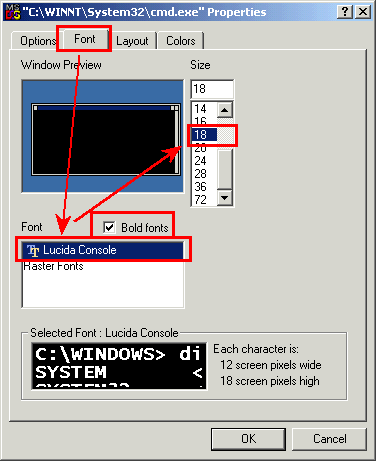
> The Windows Console code-base is currently (July 2018) almost 30 years old ... older, in fact, than the developers who now work on it! Which really shows, especially since you still can't use a TTF-font without editing the registry .

That's just flat out wrong: https://i.imgur.com/ae1yyXI.png We added support for TTF fonts a few releases ago.

...and by "few releases ago", you mean Windows 2000?

http://unixwiz.net/images/console-setup3.gif

(Personally, I don't care for TTF since I prefer the contrast and sharpness of a good pixel font, like this one: http://www.hassings.dk/lars/fonts.html )

Re: Inside the Windows Console

#140
post #82
post #21

Earlier quoted context omitted.

Thank you for explaining! Please don't take my initial post as criticism of your work. There is just this visible disconnect between approximately 4 years of work and comparatively simple features that have been shown off so far. So there must be a story there. I was not aware of Windows having had different console implementations in the past. Can you elaborate on that point? How did that come to pass? Also,I am cur…

As I understand it Windows 3 ran in DOS, Windows 98 had DOS integrated, Windows NT had it emulated and ME was somewhere in between. It wouldn't surprise me if parts from all four have survived til today for compatibility.

These should help you and others. They cover some of the errors in the above, as well as the change to the console implementation in Windows NT 6.1.

* https://superuser.com/a/319187/38062

* http://jdebp.info./FGA/a-command-interpreter-is-not-a-consol...

* http://jdebp.info./FGA/tui-console-and-terminal-paradigms.ht...

Post reply on HN