Also, see ScanTailor by Joseph Artsimovich. Excellent tool.
Compressing and enhancing hand-written notes (2016)
11–20 of 78 posts
Re: Compressing and enhancing hand-written notes (2016)
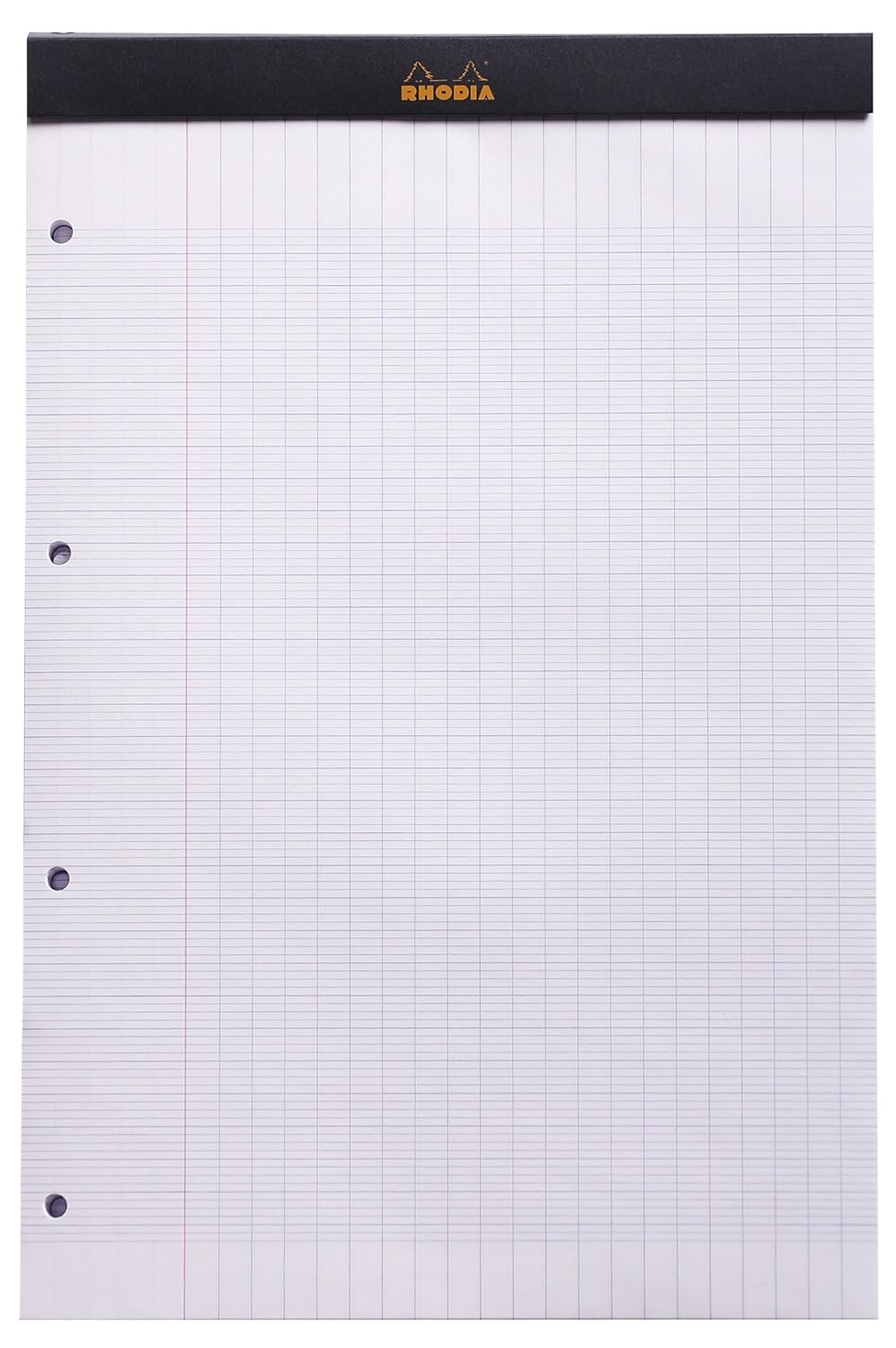
#12I wonder if your technique could remove some lines for the paper we use in France [1].
I never really understood why they were so many lines...
[1]: https://images-na.ssl-images-amazon.com/images/I/815WQQdAHBL...
Re: Compressing and enhancing hand-written notes (2016)
#13This is GEM!
Re: Compressing and enhancing hand-written notes (2016)
#14Looks interesting. Normally when I'm "cleaning" up scans I use unpaper, but although there is some overlap in functionality it doesn't do the same. Anyway very nice writeup and I will add it to my arsenal and give it a closer look later. Could be useful for my document archive+ocr solution. Edit: too bad seems like it didn't see any activity in the last year
Could you expand on your archive+ocr? I long wanted to start doing something like this, but never got to. I guess reading others' experience can be useful.
Re: Compressing and enhancing hand-written notes (2016)
#15Earlier quoted context omitted.
> Edit: too bad seems like it didn't see any activity in the last year That's not necessarily bad: sometimes a piece of software can be done, or nearly so.
Yup but a project like this would have an empty issue tracker this one not so much ;) (which doesn't mean that it's a bad project or that I wont use it. it means that I will probably start to work on it)
There actually was some activity in three different branches in january: https://github.com/kskyten/noteshrink/network
Re: Compressing and enhancing hand-written notes (2016)
#16Looks interesting. Normally when I'm "cleaning" up scans I use unpaper, but although there is some overlap in functionality it doesn't do the same. Anyway very nice writeup and I will add it to my arsenal and give it a closer look later. Could be useful for my document archive+ocr solution. Edit: too bad seems like it didn't see any activity in the last year
I have made some progress on this as my home project using same compression and scan. I call it DFA - digital file analytics where data/images/scanned documents are sent remotely using Kafka to Hadoop and then run OCR to extract text and compression. If the document is more then 10MB go to HBase otherwise HDFS. Near real-time streaming using Spark and Flink is done too. Visualization using Banana dashboard is not so cool as it shows word counts, storage location, images and tags. Analytics on top of extracted data using ML would like to do next.
More you can find at https://medium.com/@mukeshkumar_46704/digital-files-ingestio...
Re: Compressing and enhancing hand-written notes (2016)
#17I have an observation about scanning documents that results in good quality and smaller files, but I can't satisfactorily explain why it works. Consider these two cases:
(1) Scan document at very high resolution as a JPG and then use a third-party program (like Photoshop or whatever) to re-encode the JPG at your preferred low resolution.
(2) Scan document at your preferred low resolution as a JPG straight away. Don't re-encode afterward.
Intuition says that the results of #1 vs #2 should be identical, or that #1 should be worse because you're doing two passes on source material. But I always get better results with case #1 (i.e., high-res scan and re-encoding afterward) regardless of the type or model of scanner, or whether the scanner does the JPG encoding on-board the device itself or through a Windows/Linux/Mac driver bundled with the scanner.
My theory is that scanner manufacturers are deliberately choosing the JPG encoding profile that gets them the fastest result. They want to brag about pages per minute which is an easily measured metric. Quality of JPG encoding and file size take effort to compare, but everyone understands pages per minute.
If anyone has contrary experience I'd like to hear it. I've been seeing this for years with different document scanners and flatbed scanners -- regardless of how I tweak the scanner's settings, I can always get good quality in a small file by re-encoding afterward.
Re: Compressing and enhancing hand-written notes (2016)
#18A simpler way of achieving the same thing is to duplicate the layer, blur the top layer heavily, and then set it to "divide".
Re: Compressing and enhancing hand-written notes (2016)
#19I have an observation about scanning documents that results in good quality and smaller files, but I can't satisfactorily explain why it works. Consider these two cases: (1) Scan document at very high resolution as a JPG and then use a third-party program (like Photoshop or whatever) to re-encode the JPG at your preferred low resolution. (2) Scan document at your preferred low resolution as a JPG straight away. Don't…
> My theory is that scanner manufacturers are deliberately choosing the JPG encoding profile that gets them the fastest result.
This is more-or-less correct. The chips in the printers have a lot less power than your CPU, and the algorithms are a lot worse than those in Photoshop.
Re: Compressing and enhancing hand-written notes (2016)
#20I wonder if your technique could remove some lines for the paper we use in France [1]. I never really understood why they were so many lines... [1]: https://images-na.ssl-images-amazon.com/images/I/815WQQdAHBL...
Is this really standard writing paper? I assume it would be useful for calligraphy or learning how to write (as you can use the subdivision to draw letters to the correct height) but I find it weird for it to be standard issue paper.