Live data from Hacker News

Cockpit – Administer Linux servers via a web browser

cockpit-project.org

71–80 of 152 posts

Re: Cockpit – Administer Linux servers via a web browser

#71
post #46
post #15

Personally I'd much rather see a GUI that can help string together snippets of Terraform/CFN and Ansible/Chef/Puppet/Salt/whathaveyou. A visual IDE for infrastructure automation, if you will.

So the idea is that you would choose your changes in the GUI, but instead of actually changing the target, it spits out the required code to do it for you in a repeatable way? I would definitely find that useful for Terraform and Cloudformation. Searching for it, I see that AWS has a tool targeted at that: Cloudformation Designer. https://aws.amazon.com/blogs/aws/new-aws-cloudformation-desi... https://docs.aws.amazon…

A better idea would be to spit out a spec that tools could use to perform the thing, and get tools to follow the spec. Unfortunately, even though most tools do virtually the exact same thing, they all use their own incompatible ways to describe it in a config. I'm not sure why devs enjoy reinventing the wheel in incompatible ways all the time.

For example: you have Puppet, Chef, Ansible, Salt, etc. They can all make a directory. They do exactly the same thing on almost all systems they support, because POSIX.

They literally all just run this syscall: int mkdir(const char pathname, mode_t mode);.

But each tool has their own goofy way of being told to make the directory. Why can't I just pass "{'mkdir': [ '/the/path/name', '0700' ]}" to all of them? This is literally all they will be doing, and all they need to know. Just make this path with this permission. This is declarative programming, without a custom language!

Anything else, like directory ownership, should be an extra object, like "{'chown': [ '/the/path/name', '1000', '1000' ] }". Again, this is literally called the same way everywhere: int chown(const char pathname, uid_t owner, gid_t group);.

You can combine the two into one JSON blob in the output of this config management tool (that's what this GUI really is - a GUI CM with a dashboard). You can have sets of blobs with tags that are discrete reusable pieces of configuration. And every tool can just read them, follow a spec based on POSIX, and execute them.
Re: Cockpit – Administer Linux servers via a web browser

#72

Earlier quoted context omitted.

Probably because these "security guides" just repeat what others said without any real consideration? In fact, using key-based authentication just shifts the weak point from one server to another, and, if implemented incorrectly (let's login without passwords to several servers - how convenient!), it's a security disaster. People need to think rather than follow recommendations blindly.

I'd appreciate a good argument apart from downvoting. In every discussion I had about it with fellow sysaddmins we agreed the convenience of passwordless logins can't be considered a security feature in spite of what someone wrote and what others repeat.

No glove fits everyone. There are many answers to the problem and each depends on the set of circumstances in which your service exists. Security is, simply put, risk management. To put things into a context: the 'average Joe' user is rarely going to be targeted specifically - which means that the biggest attack vector of the average user is brute forcing by bots and phishing attempts or maybe a key/password stealing malware. Hence your argument that 'key-based auth' just shifts the attack vector is partially incorrect because automated attacks do not focus on a specific target but on a specific vulnerability - like password guessing bots for example which move from IP to IP and try a bunch of simple password. If these passwords don't work, the bots will not try to hack a dev's workstation, they'll just find an easier target.

So for the average user it makes sense to move to key based auth because it will remove a big attack vector. It is still possible that the workstation where the private key resides becomes compromised, but thats another attack vector that needs to be addressed by different security methods (eg, passphrase on the private key).

Re: Cockpit – Administer Linux servers via a web browser

#73
post #61

Earlier quoted context omitted.

I'm neither a sysadmin nor a securyt expert, so I might be terribly wrong, but, as I understood it, password-based authentication was undesirable because the attacker could try to brute-force it. Key-based auth doesn't have this flaw so it's arguably safer in that it has one less entry point. On the other hand, not sure I fully understand your argument. You are saying that not being vulnerable to password brute-forci…

>what exactly do you mean by "just shifts the weak point ... to another"? I'm not the person who made that argument, but I can give you my reasoning to support it. Your key is on your laptop and unlocks your server, now your server is safe. But your laptop is just secured with a password. I brute-force the password on your laptop, and now I have no barriers preventing me from accessing your server. Your server is sec…

Why would you not have a passphrase on your key? Passphrase encryption is the default in ssh-keygen and probably every other ssh key generation utility. Having a magic file that grants access to a server scares the crap out of me -- but use the passphrase feature and it's far more secure than password auth.

Re: Cockpit – Administer Linux servers via a web browser

#74
post #61

Earlier quoted context omitted.

I'm neither a sysadmin nor a securyt expert, so I might be terribly wrong, but, as I understood it, password-based authentication was undesirable because the attacker could try to brute-force it. Key-based auth doesn't have this flaw so it's arguably safer in that it has one less entry point. On the other hand, not sure I fully understand your argument. You are saying that not being vulnerable to password brute-forci…

>what exactly do you mean by "just shifts the weak point ... to another"? I'm not the person who made that argument, but I can give you my reasoning to support it. Your key is on your laptop and unlocks your server, now your server is safe. But your laptop is just secured with a password. I brute-force the password on your laptop, and now I have no barriers preventing me from accessing your server. Your server is sec…

> But you also have to protect your keys and any machine those keys are installed on, otherwise you're just shifting the weak point to another machine.

I’m okay with this, personally. What’s riskier: a public server listening on port 22 for any SSH traffic or my personal laptop which doesn’t accept random requests from the entire internet and is almost never out of my sight? And even if someone compromised my machine (e.g. theft), they probably don’t care or even understand what SSH keys are; they’ll probably just wipe the thing and sell it on the black market.

That’s not a good reason to ignore sound security practices, but threat model-wise, my laptop is much less likely to be targeted and successfully compromised physically by someone who wants to SSH into my build server.

Re: Cockpit – Administer Linux servers via a web browser

#75
post #29

For those who may wonder, it looks like this is GNU/Linux only, no support for BSD or any Linux distro that doesn't use systemd . That means no Alpine Linux and no OpenBSD/FreeBSD.

cockpit is not dependent on systemd. They don't ship sysvinit scripts, but there's no hard dependencies on systemd anywhere. I'd expect that the system logging may not be very nice without journald, but the vast majority of the interface runs over dbus or spawns processes on the server. It _is_ dependent on dbus.

dubs means it will be linux only, maybe should write an agent that deals with dbus, meanwhile the agent can work with other OSes to provide info cockpit needs.

Re: Cockpit – Administer Linux servers via a web browser

#77
post #5
post #4

Its pretty, usable, friendly, however No one is going to use this to manage more then a few systems.

cockpit has cluster support for kubernetes http://cockpit-project.org/guide/133/feature-kubernetes.html https://www.youtube.com/watch?v=Fcfsu22RssU

It looks neat and all, but I'm not sure why I should use this over Kubernetes internal Dashboard?

Re: Cockpit – Administer Linux servers via a web browser

#78
post #46

Earlier quoted context omitted.

So the idea is that you would choose your changes in the GUI, but instead of actually changing the target, it spits out the required code to do it for you in a repeatable way? I would definitely find that useful for Terraform and Cloudformation. Searching for it, I see that AWS has a tool targeted at that: Cloudformation Designer. https://aws.amazon.com/blogs/aws/new-aws-cloudformation-desi... https://docs.aws.amazon…

A better idea would be to spit out a spec that tools could use to perform the thing, and get tools to follow the spec. Unfortunately, even though most tools do virtually the exact same thing, they all use their own incompatible ways to describe it in a config. I'm not sure why devs enjoy reinventing the wheel in incompatible ways all the time. For example: you have Puppet, Chef, Ansible, Salt, etc. They can all make…

because most of these systems also support non-Unixy target systems

Re: Cockpit – Administer Linux servers via a web browser

#79

Earlier quoted context omitted.

>what exactly do you mean by "just shifts the weak point ... to another"? I'm not the person who made that argument, but I can give you my reasoning to support it. Your key is on your laptop and unlocks your server, now your server is safe. But your laptop is just secured with a password. I brute-force the password on your laptop, and now I have no barriers preventing me from accessing your server. Your server is sec…

Why would you not have a passphrase on your key? Passphrase encryption is the default in ssh-keygen and probably every other ssh key generation utility. Having a magic file that grants access to a server scares the crap out of me -- but use the passphrase feature and it's far more secure than password auth.

You'd be surprised. ssh-keygen allows you to just hit enter and bypass the passphrase with no hoops to jump through and insufficient warning (IMO). Maybe that should be changed. But right now it's all too easy and convenient.

Re: Cockpit – Administer Linux servers via a web browser

#80
post #40

Why does it require that the server has password logins enabled? This seems contrary to every "secure your server" guide I've seen and opens your server up to the password guessing game. It seems like a cool product, but that's a huge non-starter. The target server will need to have password based authentication enabled in sshd. When this is setup for the first time, Cockpit will ensure that the user connected to pri…

I don't think it does. That quote is from the section explaining how to configure "Password" authentication. i.e. to use Password authentication, you must enable it on the target server. It then goes on to list how to use Kerberos or Public Key methods.

You are right, I missed the one liner above this that stated it needed one of these methods: [password, kerberos, or public key]. However, it does sound like if you use the docker image that you need password logins on the primary machine unless you modify the docker image to add a public key. I may just be reading wrong again though.

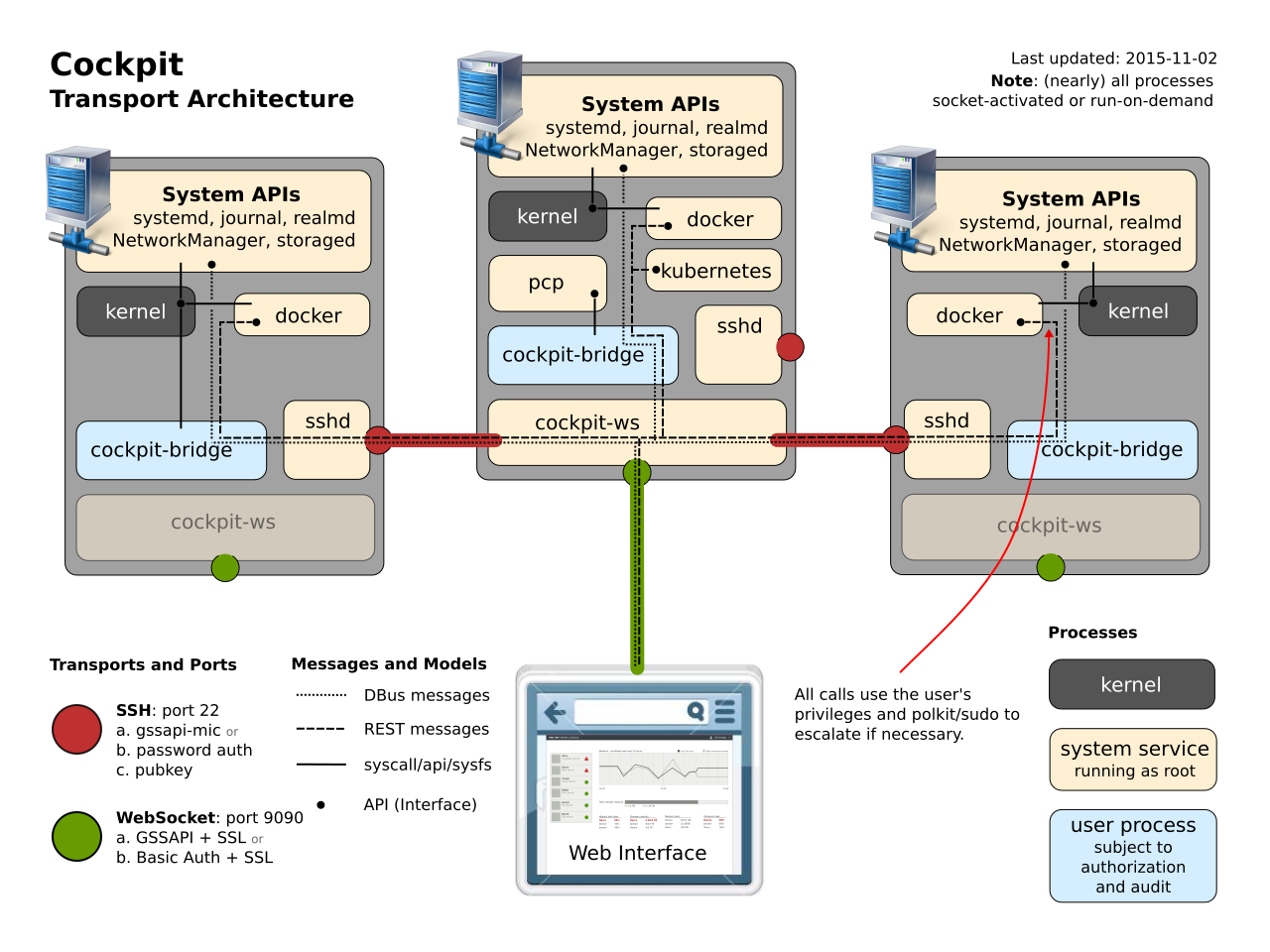
[Edit]: This diagram was really helpful: https://raw.githubusercontent.com/cockpit-project/cockpit/ma...

Post reply on HN