Hello :) I'm the author of this notebook if you have any questions.
I'm also currently working on a plugin for Adobe Illustrator based on this. Screenshot: https://i.imgur.com/tIPTjLsr.png
11–20 of 45 posts
I'm also currently working on a plugin for Adobe Illustrator based on this. Screenshot: https://i.imgur.com/tIPTjLsr.png
Hello :) I'm the author of this notebook if you have any questions. I'm also currently working on a plugin for Adobe Illustrator based on this. Screenshot: https://i.imgur.com/tIPTjLsr.png
Hello :) I'm the author of this notebook if you have any questions. I'm also currently working on a plugin for Adobe Illustrator based on this. Screenshot: https://i.imgur.com/tIPTjLsr.png
Great work. How hard was it to integrate it as an Illustrator plugin ?
The one thing left that I can't figure out is how to have the curvature comb update live as you drag the Bezier control points. Currently it only updates when you mouse up.
In a drawing program, the stiffness could be depicted by using grayscale values.
I'm wondering how well one could define curves by using the physical model of a strip of material, and allowing one to change the properties (stiffness) of the material at different points along the curve, or to insert more material at a given point. Of course, there should be the usual constraints that the strip should pass through a bunch of given (x,y) coordinates, and there could be constraint that "pins" the str…
I'm wondering how well one could define curves by using the physical model of a strip of material, and allowing one to change the properties (stiffness) of the material at different points along the curve, or to insert more material at a given point. Of course, there should be the usual constraints that the strip should pass through a bunch of given (x,y) coordinates, and there could be constraint that "pins" the str…
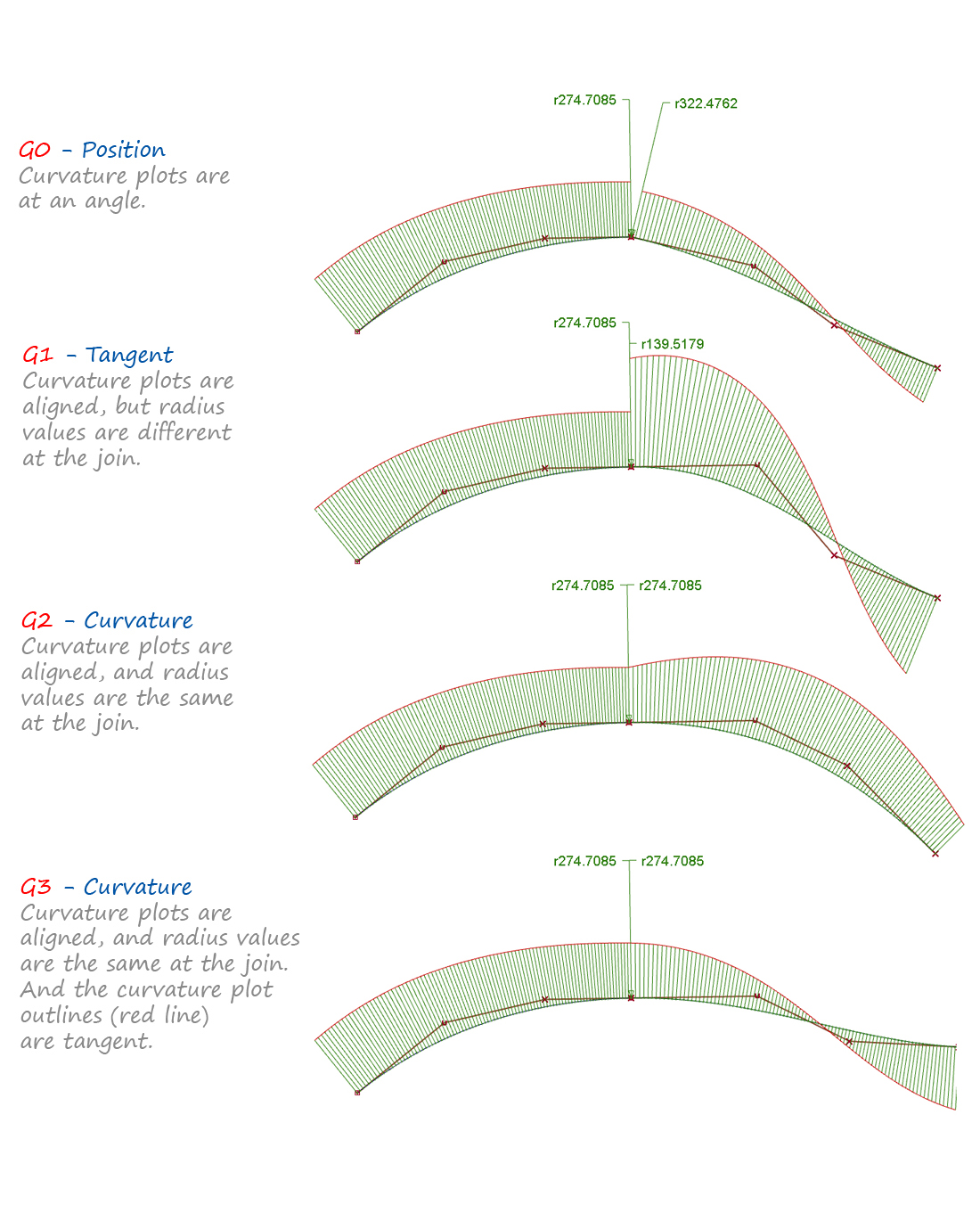
Here's what different degrees of curvature continuity look like: http://help.autodesk.com/cloudhelp/2017/ENU/Alias-Tutorials/...
.. or in 2d: http://help.autodesk.com/cloudhelp/2017/ENU/Alias-Tutorials/...
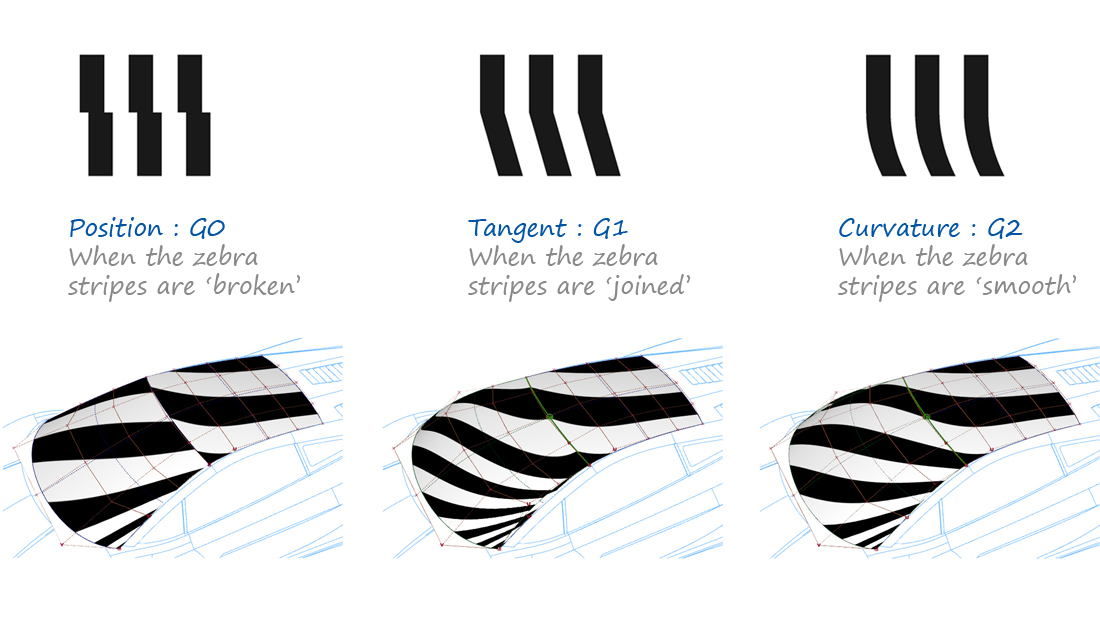
To make smooth surfaces you just need the tangents to line up. This is called G1.
But if you also want surface reflections to look smooth you need a higher degree of curvature continuity. G2 or higher.
http://help.autodesk.com/cloudhelp/2017/ENU/Alias-Tutorials/...
I'm wondering how well one could define curves by using the physical model of a strip of material, and allowing one to change the properties (stiffness) of the material at different points along the curve, or to insert more material at a given point. Of course, there should be the usual constraints that the strip should pass through a bunch of given (x,y) coordinates, and there could be constraint that "pins" the str…
It's really interesting if you look at how CAD handles this stuff. It lets you set the degree of curvature-continuity/smoothness you want—and it kind of takes care of filling in the curve for you. You have to give up some direct control over the curve if you need it to meet these constraints. Here's what different degrees of curvature continuity look like: http://help.autodesk.com/cloudhelp/2017/ENU/Alias-Tutorials/.…
I'm wondering how well one could define curves by using the physical model of a strip of material, and allowing one to change the properties (stiffness) of the material at different points along the curve, or to insert more material at a given point. Of course, there should be the usual constraints that the strip should pass through a bunch of given (x,y) coordinates, and there could be constraint that "pins" the str…
It doesn't talk about dynamically varying stiffness along the curve, but is otherwise a very detailed dive into splines.
Earlier quoted context omitted.
Great work. How hard was it to integrate it as an Illustrator plugin ?
Thanks! Actually it wasn't too difficult. It's all in C++ but the Adobe Illustrator SDK came with some examples that were pretty close to what I wanted already. Once I'd figured out the maths I had a prototype working in about a day. The one thing left that I can't figure out is how to have the curvature comb update live as you drag the Bezier control points. Currently it only updates when you mouse up.