Live data from Hacker News

Designing Windows 95’s User Interface

socket3.wordpress.com

271–280 of 402 posts

Re: Designing Windows 95’s User Interface

#271

Earlier quoted context omitted.

> Maximize on Mac was NOT designed for the window to fill the whole screen, but rather to resize the window to optimally display its contents. The problem with this approach is I definitely do not need someone else making the decision of what is "optimal" for me. I've been using macOS for about as long as I used to use Windows now, and at this point, macOS seems to have largely abandoned the concept, which is great.…

I get it, it's your computer, etc., etc. The reason this is done is of course that most applications don't have content that fill the entire screen, so maximizing, in most cases, is meaningless - and hinders the usability of the system. It makes more sense to leave some space over for other apps than have a big empty area on both sides of the screen. Interestingly, I noticed that it's only Windows-switchers who compl…

> most applications don't have content that fill the entire screen, so maximizing, in most cases, is meaningless

It's a matter of where you place responsibility. It's like saying, "most websites aren't responsive, so naturally it makes sense to restrict the size of your browser window and leave space for other apps." But most would laugh at this and say it's the responsibility of the website/webapp to build a responsive layout. Why should we hold desktop applications to a different standard?

I completely that it is probably almost entirely windows-switchers who complain about it. I'd, obviously, self-aggrandizingly suggest it's because we've tasted something better. People don't complain about the taste of food they've never tasted ;)
Re: Designing Windows 95’s User Interface

#272
post #85

Earlier quoted context omitted.

Yes, this is something I do to on linux, and it's great particularly when you're doing something that gets quite messy with lots of windows open - when you're working with lots of files, or you the program (like GIMP) opens up several windows. If you need to do something else it's so nice to just leave it all and move onto a nice clean workspace without having to minimize everything.

You do have multiple workspaces on Windows 10... Though if you mean "automatically assign application X to workspace Y", which many Linux WMs are able to do, you're out of luck.

Sadly the workspaces are very much mouse oriented (want to switch between workspaces? Thats win+ctrl+number!).

And there is no proper UI element for checking if you have anything open in a different workspace without opening the switcher.

Re: Designing Windows 95’s User Interface

#273
post #41

Earlier quoted context omitted.

The term folder was already common in other systems, before being adopted on Windows 95. Directory is a UNIX thing. On AS/400 (now IBM i) there are no directories or folders, rather catalogs. Similarly other systems also had other denominations for group of files.

Directory was a DOS thing too, if you used cmd in Win95 you'd use dir.

Yep, a concept that MS-DOS inherited from UNIX, when they added directory support on MS-DOS 2.0.

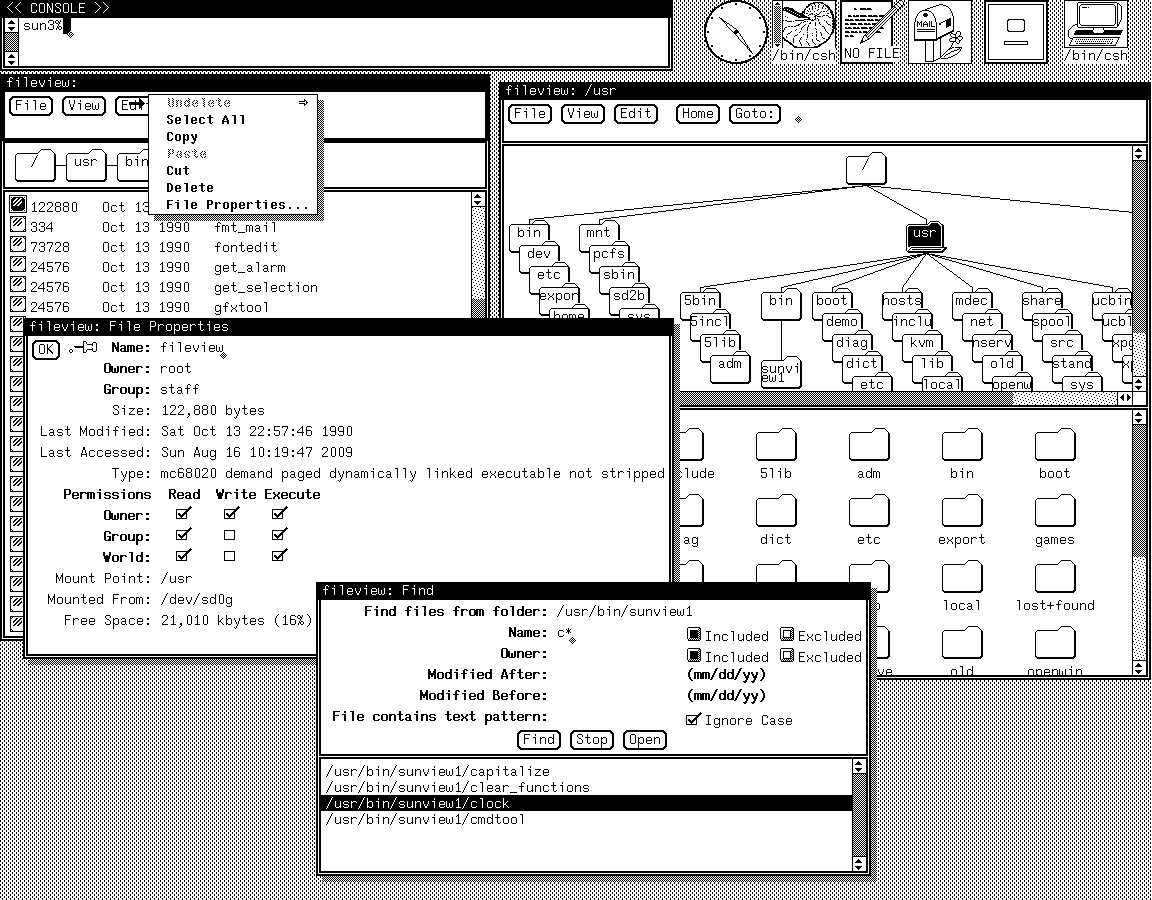
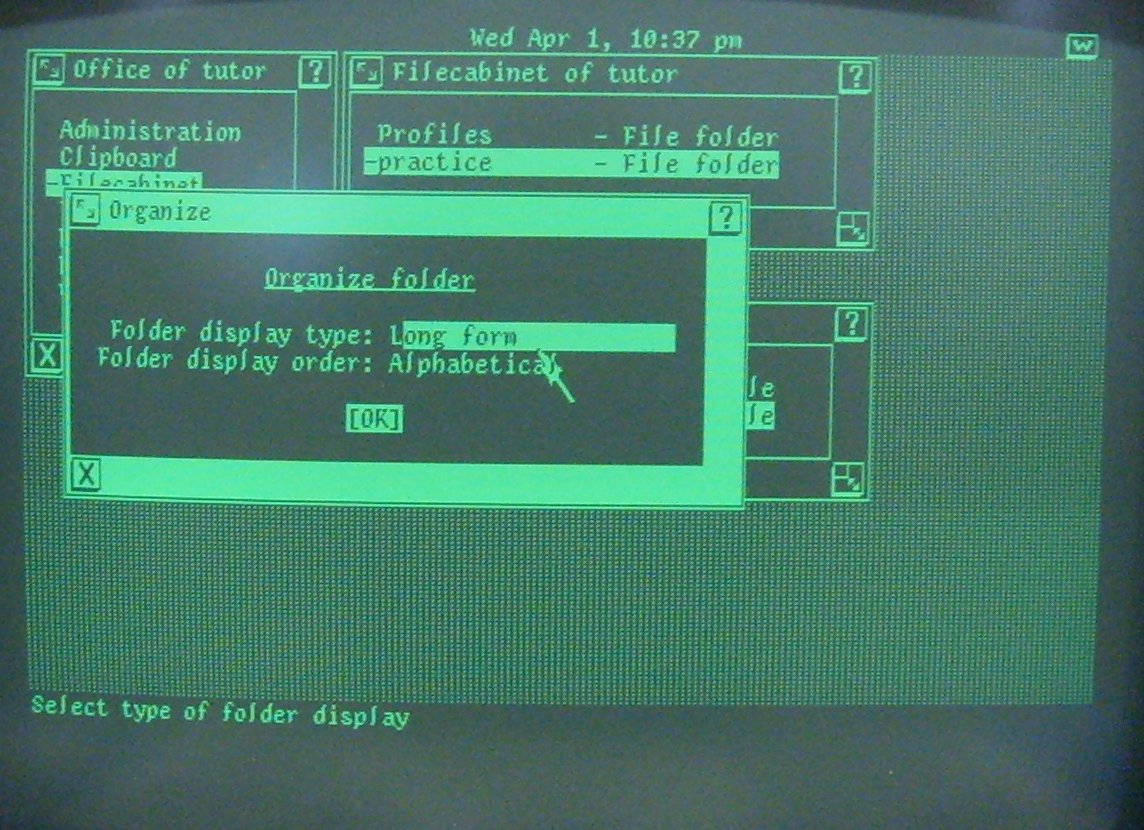
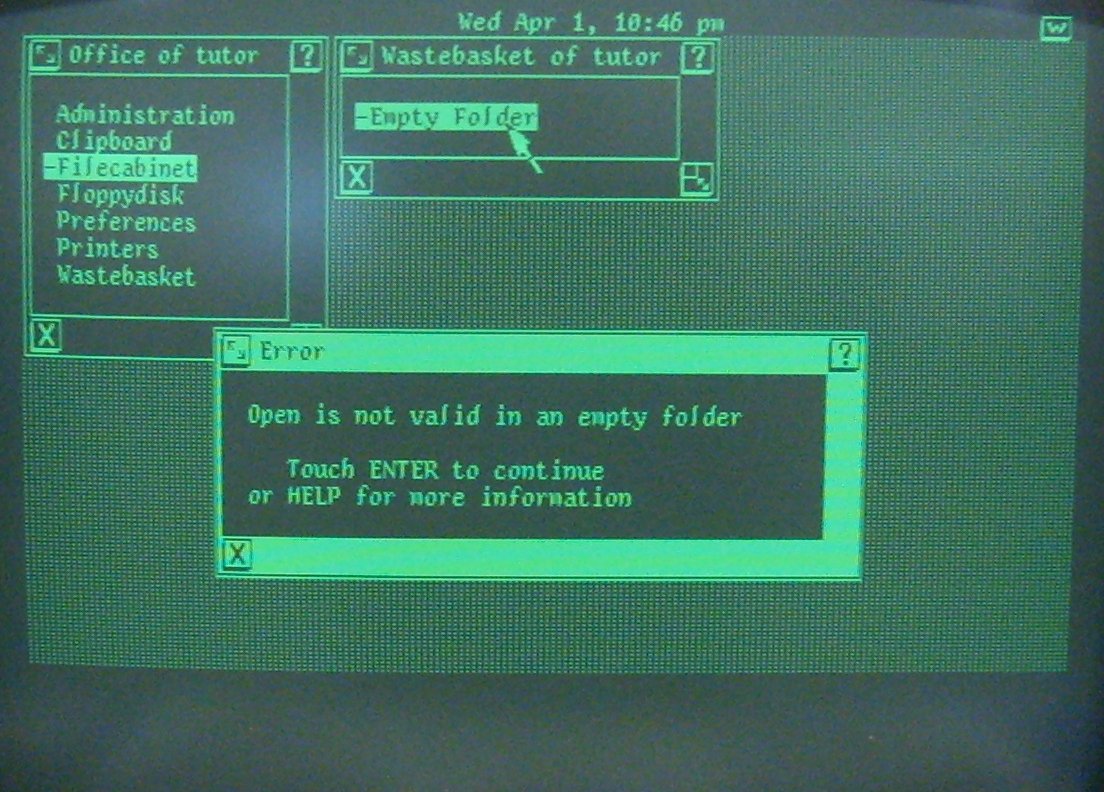
However, even UNIX later adopted the folder designation for its GUI variations.

http://toastytech.com/guis/unixpcorganize.jpg

http://toastytech.com/guis/unixpcerrors.jpg

http://toastytech.com/guis/sv411fileview2.png

https://docs.oracle.com/cd/E19504-01/802-5817/6i9i42q3l/inde...

There are plenty of other examples of folder use, so it isn't something that Microsoft just decided to invent for Windows 95.

Re: Designing Windows 95’s User Interface

#274
post #168

Earlier quoted context omitted.

I was using Macs back in the late '90s, and none of the things you say ring true. Extensions could easily bring down the entire system because there was no memory protection. Full OS crashes (what modern macOS calls kernel panics) were a daily occurrence for the typical Mac-using professional who ran complex software. The window system was often difficult to understand because apps tended to use a plethora of little…

The funny thing I have always thought about mac vs win is that mac was so set on doing it “their way(think different)” that they ignored UX that really was intuitive and “just worked” Mac was so set on being different, that they aschewed UX tropes that were natural.. and had to spend ridiculous amounts of resources trying to convince people that their way was the right way, but clearly it was not. This, IMO, is where…

> “think different, so long as it’s exactly how I am designing you to think”

That's Macintosh all over. "You're holding it wrong" is not a new failing of Apple, nor is it exclusively post-Jobs.

Jobs was just better at convincing people that, yes, they were holding it wrong.

Re: Designing Windows 95’s User Interface

#275

Earlier quoted context omitted.

> Compare it to other GUIs at the time, like CDE, IBM's Presentation Manager, or even Mac OS 8 and there's no comparison. Well, I agree that there was no comparison with System 8, but not in the sense you mean. I think that the Mac back then was head-and-shoulders a better system than Windows. It might still be, but they're both so painful to use now that it's very difficult to pick a winner. The Macintosh system was…

Windows 95 was no paragon of stability when you started loading it up with tray apps and running big nasty applications or trying to use the damn printer with its piece of shit driver. We are spoiled these days by how stable our computers are. I agree with you that keeping the file metadata in a separate fork is far superior to keeping the file metadata in a three character extension, but sadly the world zagged on th…

The resource fork idea is great if everyone agrees on it and everyone preserves them, even across OSes.

Or if you're going to Very Deliberately Ignore the Other OSes and go do things your own way. VDIing like that seems to be a very Apple trait.

My point is, I'm not sure how well the resource fork model could have ever survived prolonged and sustained contact with the Internet and modern pervasive networking.

Re: Designing Windows 95’s User Interface

#276

Earlier quoted context omitted.

> I agree with you that keeping the file metadata in a separate fork is far superior to keeping the file metadata in a three character extension Since we're talking about Win95, then the 3 characters limit doesn't apply (long filenames was a major new feature of this OS after all). .jpeg and .html were relatively common for example at the time, and worked fine. I find the extension system still kludgy, but arguing th…

Yet for the same compatibility reasons most people stuck with .jpg and .htm, at least in the Windows world. Even now it's very unusual to see a .jpeg extension on a filename. The metadata that Macs kept in the resource fork go way beyond file type and creator too. It included things like the file's Icon, creation/modification information (so it would survive a trip over the Internet!), loads of stuff for applications…

You don't see .jpeg because people are used to .jpg. There's nothing incompatible with long names that we care about.

Also, that Windows feature you mention is called ADS - alternate data stream.

Re: Designing Windows 95’s User Interface

#277

Earlier quoted context omitted.

>So, whenever I design UI/UX for an app, I ask my mom to test. I have an informal rule that I will try to get someone at my job that has never seen or used the application to be the one to test out new features or UI changes. Generally just asking when they have some time, handing them a phone or laptop, and asking them to do a task in the app (with a small amount of background about the task if needed). There has ne…

Because you can't "formalize" humbleness. In fact, a lot of the tech culture, today, is anti-humble.

It isn't humility, it's learning.

Once you've learned something, you can no longer remember what it's like to not know it. Not fully, anyway, and certainly not without deliberate effort. It takes quite a lot of mental effort to stop knowing something, and approach a task with the mindset of someone who's never known it.

Good QA people should be able to do that, but it must be hard even for them.

Re: Designing Windows 95’s User Interface

#278
post #247

Earlier quoted context omitted.

The late '90s I remember had a mishmash of NT, NetWare, and some (or maybe several) variant(s) of Unix on the bits that lived in the room with all the air conditioners. Windows 9x and maybe OS/2 were far and away the dominant OSes on actual workstations. Macs and even aging Amigas at some creative shops, some more Unix workstations at places where most people could recognize and identify the purpose of (if not actual…

I suppose it depends a lot on geography and business. I remember Windows NT/2000 rapidly displacing Macs in the creative fields, and being widely used as developer workstations.

Especially developers moved from Win95 to NT in hordes during late 90s.

Re: Designing Windows 95’s User Interface

#279

"not understanding how folders could exist inside of other folders" -- My mom is 70 years old now, and I easily get frustrated whenever she's stuck with seemingly simple tasks with her computer. I usually scold her and yell at her, "This is so obvious, how come you don't know?" -- I always regret doing that afterwards. After I'm calm, I ask her why, trying to understand it from her perspective. Every time I do this,…

Drag and drop is one of those things that looks oh so fancy on demos, but is horribly imprecise to use as a daily action.

It also gets in the way when trying to use Windows via a touch screen.

Re: Designing Windows 95’s User Interface

#280

Earlier quoted context omitted.

Depending on how you've configured your Dock, Minimize is pretty simple. Either the window just moves to the Dock, or it minimizes into the application icon (then you can right-click on the Dock icon to view a list of the windows that are minimized, or click to open the last minimized window) Maximize on Mac was NOT designed for the window to fill the whole screen, but rather to resize the window to optimally display…

> Maximize on Mac was NOT designed for the window to fill the whole screen, but rather to resize the window to optimally display its contents. The problem with this approach is I definitely do not need someone else making the decision of what is "optimal" for me. I've been using macOS for about as long as I used to use Windows now, and at this point, macOS seems to have largely abandoned the concept, which is great.…

The difference is that Windows never really embraced universal drag and drop and the Mac did.

Macs used drag and drop for file management between windows representing separate locations on disk. Windows users tended to select files and choose cut or copy then navigate to the second location and paste.

The same held true for moving content between documents in an application or moving content between applications. Mac users preferred to use drag and drop, while Windows users relied on copy and paste.

The problem with keeping every window maximized is that you're giving up system wide drag and drop as the primary user interaction method.

Post reply on HN