Live data from Hacker News

Oh shit, git: Getting myself out of bad situations

ohshitgit.com

261–270 of 520 posts

Re: Oh shit, git: Getting myself out of bad situations

#261
post #129

Earlier quoted context omitted.

rebase can be dangerous, but so productive. I think it's important to teach new devs how to properly use it. Especially if you're working in a continuous deployment environment, where you may need to quickly revert something.

You already have git-revert, for reverting commits without rewriting history.

You're misunderstanding the purpose i'm describing. Imagine 100 commits a day, maybe more. (I worked at a company that averaged 500 or more commits a day to the master branch. There were 1000 developers working in a monorepo). Some code is out in production, and suddenly we realize a specific commit is causing a problem. The idea here is to revert the commit as soon as you can, and then spend your time fixing it. When reverting code is easy, and the company has good logging to identify problems, you can deploy more often. It's a good thing.

But to enable this "revert-first" culture, you have to design your commits to basically be super easy to revert. That means no merges in the master branch, you want to keep your revision history as clean as possible. One commit, as little dependencies as possible. Rebase is the right tool to use for this. The goal is a tidy linear history.
Re: Oh shit, git: Getting myself out of bad situations

#262

Adopted a git GUI years ago and haven't looked back. I get looks sometimes, but I can't help but gloat when I can stage and unstage individual lines in less than a second. I think anyone who uses the CLI is either trying too hard or hasn't realized the beauty of a git GUI. Takeaways: - My commit time is usually much faster than coworkers, with higher accuracy (less frequent accidental commits, etc.) - I don't remembe…

Android Studio has a git UI built-in so it's really useful.

Re: Oh shit, git: Getting myself out of bad situations

#263

Earlier quoted context omitted.

because I actually learned how it works The argument is focused on those who can not learn how it works. See some of the other excerpts from the essay that are in this thread. Also, it's important to note that everything on that list is something that actually happened. Be careful about comparing your advanced skills to people with less skill than you.

> The argument is focused on those who can not learn how it works. If you're a software developer who uses branches and merges, you absolutely should learn how it works. If you're an artist, git is not for you. It can neither store large binary files efficiently, nor merge them. There are other VCS that supposedly can, but I haven't tried them. > Also, it's important to note that everything on that list is something…

If you're an artist, git is not for you.

Exactly. That is the entire argument. From the essay:

------

I agree, Git is amazing and very powerful. What I’m suggesting is that we should recognize that it has a very high cost. It might empower complex workflows for sophisticated teams of experienced computer programmers, but it exiles the rest of the staff, and this has significant productivity costs.

...Git is very powerful? I’m willing to go along with that line of thought so long as we all understand that using a tool that is more powerful than needed can lead to problems.

http://www.smashcompany.com/business/business-productivity-h...

[ EDIT ]

Also, this bit from the essay might make the argument more clear:

For many years, I had a refrain which I gave as advice to each client I worked with: “Your software developers are expensive, so try to shift work away from them.” Ideally, software developers should only do work that relies on skills that no one else has. If a task can be done by a graphic designer, then it should be done by a graphic designer, because generally graphic designers are paid less than software developers (obviously not in all cases, but most of the time). I co-founded a startup in 2002, and I stayed with it till 2008, and we ran a team of 8 people using this principle: push work to the less skilled people, if they can handle it. Save the tough stuff for the computer programmer. We had great success with this style of work.

Re: Oh shit, git: Getting myself out of bad situations

#264

Adopted a git GUI years ago and haven't looked back. I get looks sometimes, but I can't help but gloat when I can stage and unstage individual lines in less than a second. I think anyone who uses the CLI is either trying too hard or hasn't realized the beauty of a git GUI. Takeaways: - My commit time is usually much faster than coworkers, with higher accuracy (less frequent accidental commits, etc.) - I don't remembe…

> I think anyone who uses the CLI is either trying too hard or hasn't realized the beauty of a git GUI.

Or just couldn't be bothered with leaving terminal. I refuse to reach for mouse for any repository operation when everything else I do from console.

Re: Oh shit, git: Getting myself out of bad situations

#265
post #129

Earlier quoted context omitted.

rebase can be dangerous, but so productive. I think it's important to teach new devs how to properly use it. Especially if you're working in a continuous deployment environment, where you may need to quickly revert something.

Reverting something does not require a rebase. It requires an aptly named command "git revert". Additionally, in the event that a deployed feature needs to be reverted, any halfway decent change management policy will want a history of what you reverted and why; a git revert commit can show both very cleanly. And, frankly, since all rebase does is re-write history, I fail to see how it's inherently productive, especi…

Completely agree. Rebase is practically only safe on single developer feature branches which haven't been merged or completely isolated repos that produces patches only. Keeping track of all requirements in the former is hard, especially if the dev doesn't know git pitfalls. No one should default to rebase in a day to day workflow, but it is quite common.

Re: Oh shit, git: Getting myself out of bad situations

#266
post #127

Earlier quoted context omitted.

Name me any software that doesn't need a guide like this. like, how do you even exit vim? You need a guide for that. Or to get it closer to git / this guide, how do you undo / redo?

You're comparing git to vim in terms of ease of use...

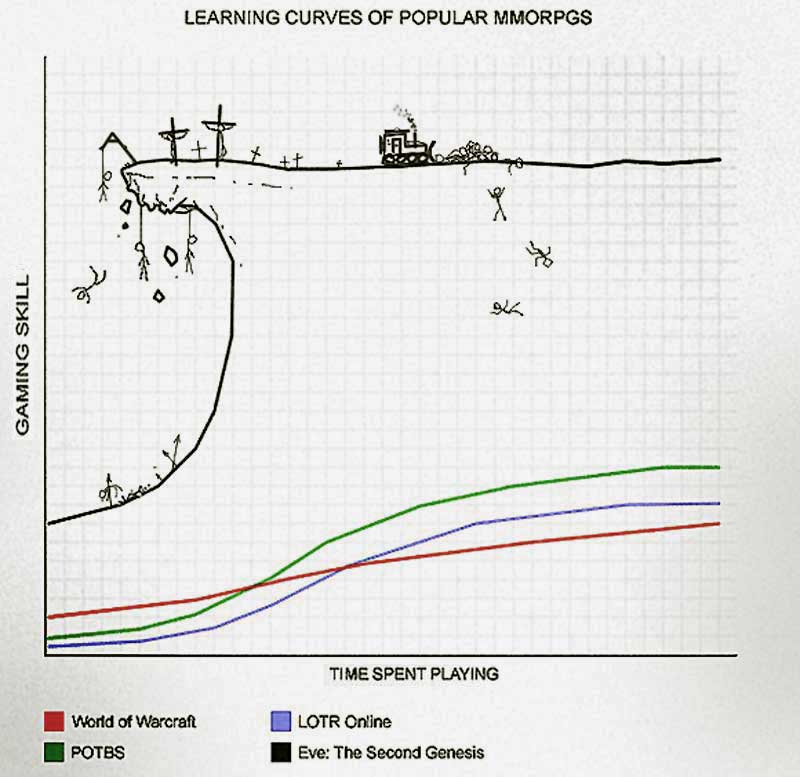
That's actually a rather good comparison. Both have learning cliffs of doom[1]but once you've spent a few months with them they're arguably more powerful than the other options. They're usually fast to use but very hard to learn. I wouldn't say either one is easy though.

[1] https://dementiagaming.files.wordpress.com/2010/08/learning_...

Re: Oh shit, git: Getting myself out of bad situations

#267

I think Git would be way more approachable if things were named better. A key part of Git is whether a file is untracked/unstaged/staged, yet the terminology around this is very confusing. Why aren't commands simply `git stage`, `git unstage`, `git add` (to track files), `git remove` (to untrack), `git undo`, etc? Not to mention the overloaded command names like `git checkout`, how is `git checkout -- someFile` intui…

Why not `git track` and `git untrack`?

TBH I'm not sure why I left add/remove in, track/untrack is simpler and more in line with what I was saying. :)

Re: Oh shit, git: Getting myself out of bad situations

#269
post #61

Earlier quoted context omitted.

I think git provides a sane level of abstraction. I don't think it provides the most consistent UI or helpful help, though. Once you move away from "learning git commands" to "learning how git works" and kind of figuring out which parts the commands refer to has helped also. That's still terrible though.

>I don't think it provides the most consistent UI or helpful help, though. Understatement! Git is one of the most user-hostile tools I've ever seen. And I've used Sendmail.

Just read the manual.

https://git-scm.com

Re: Oh shit, git: Getting myself out of bad situations

#270

Earlier quoted context omitted.

`git add -p` adds by the hunk, which is a unit of quantization bigger than a line. E.g. if you have two consecutive lines changed, it's not possible to split them, they are one "hunk". (Waiting for someone to chime in with how to split a hunk and change my life).

You use the 'e' option which allows you to edit the hunk. Remove the minus sign or the entire line with a '+'

[deleted]
Post reply on HN