Live data from Hacker News

Interactive Vim tutorial

openvim.com

161–170 of 230 posts

Re: Interactive Vim tutorial

#161
(Incoming controversial anti-Vim comment. Down voting because you disagree is a poor show and a poor argument. Convince me otherwise with words, good sirs and madams.)

Vim, beyond the very basics for server side administrative tasks, isn't worth your time.

Vim isn't worth the investment in time for me, as an average programmer, and I doubt it's worth the time of most other (average) developers as well. It's a big investment in retraining muscle memory and rethinking about how your editor works for, frankly, little gain.

"It speeds you up" - no it doesn't. It gives you access to keyboard shortcuts for moving around your buffer that other editors give you. It has a cool way of looking at text and once understood, you can do cool shit. I never could find a need for any of that stuff, even after spending a week or so learning it and adjusting muscle memory. After moving to VSCode, I've never missed that stuff neither. That says a lot about my personal use case I'll admit, but my use case in very common as an everyday programmer.

Funny enough, most editors have plugins to enable Vim modes and keyboard weirdness anyway.

So I've tried moving to Vim from Sublime, and I'm thankful for the time I invested, but I quickly realised that Vim (and Sublime, actually) fall short compared to VSCode or a serious IDEs. And yes, I'm aware you can make Vim behave like an IDE - I did it. I get it. It's not worth the time.

With modern, graphical editors and IDEs like VSCode, Atom, Eclipse, the IntelliJ family like IDEs, and so on, you get up and running straight away. You can extend them very quickly using a built in plugin system - you don't even have to leave the software.

I use VSCode, and I've found that I haven't had to leave the editor or install anything outside of VSCode plugins to make it operate as a Java IDE, Go IDE (OK, I had to install Delve), or Python IDE. It has saved me a lot of time tinkering and allowed me to just get going. It even PROMPTED me when I opened a Python, Go, or JavaScript file for the first and offered to install plugins for making the file easier to work with... YES PLEASE! And yes I know Vim can do these things (using external, third party plugins.) I did it. I get it. It's not worth the time.

I'm also aware that Vim uses kilobytes, perhaps megabytes, of RAM to operate and VSCode uses hundreds. And that's a problem how? I have 16GB of RAM on a system running a single VM for Docker and a browser. I'm the first person you'll find who will complain about how bloated and heavy applications are in this day and age, believing that us programmers are getting lazy due to an ever increase in resources, but a few hundred MBs of RAM for massive time savings and a great UI is worth it.

It's simply not worth the time invested. The basics allow you to do quick server side stuff and you'll be thankful for the knowledge, but beyond that use something designed for the job, even if it does eat RAM for breakfast.
Re: Interactive Vim tutorial

#162

Alternatively, don't try to hurry enlightenment. First, learn :q! Next h,j,k,l Then i and ESC Finally :w Now you know vim. Don't let people tell you you're using too many keystrokes. Are you still reaching for the mouse? If not, you're using vim just fine. Most of the good stuff in vim, you'll learn accidentally, because you're in normal mode when you think you're in insert mode, or because you have caps lock on in n…

I work at a company where we pair on everything. The feature that generally converts people is keyboard macros, after I use them to automatically perform some tedious code transformation.

Re: Interactive Vim tutorial

#163

Alternatively, don't try to hurry enlightenment. First, learn :q! Next h,j,k,l Then i and ESC Finally :w Now you know vim. Don't let people tell you you're using too many keystrokes. Are you still reaching for the mouse? If not, you're using vim just fine. Most of the good stuff in vim, you'll learn accidentally, because you're in normal mode when you think you're in insert mode, or because you have caps lock on in n…

If you are relying on accidentally f'ing things up then u and ctrl-r are essential too. u is my favourite!

If you mess up the whole undo/redo sequence by typing inbetween, :earlier and :later are nice to know about too.

Re: Interactive Vim tutorial

#164
Coincidentally we've recently shipped a tutorial for Nano except we've decided to build it strait into our editor! After you 'sudo apt update && sudo apt upgrade && sudo apt install nano' you can run 'nano' in your terminal. At the bottom of your terminal window you'll see a set of hand-picked lessons displayed for you. Anywhere you see "^" you just hold CNTRL on your keyboard. Unfortunately we didn't have the funds to implement our own content in the tutorial series. You'll have to provide your own textual media to practice on. You can do this by typing "nano " in the terminal which will launch our tutorial system with your file. The tutorial system is very unobtrusive and will remain on the bottom of your screen until you add 'set nohelp' to your nanorc.

Re: Interactive Vim tutorial

#165
post #158
post #110

Earlier quoted context omitted.

I have been using Vim for 15 years now and I completely agree with sevensor's comment. - Vim is not newbie-friendly regardless of whether you remove guioptions or not. One has to spend at least a few hours of study and practice to get comfortable with Vim. If one is forced to invest a few hours to learn an editor, one might as well get rid of guioptions and follow other advice provided in sevensor's comment. - Learni…

You might be right. It's true that vim has a learning curve one way or another. On the other hand, if I want to show someone the "good parts" of vim, I try to show them something they can't do in another editor, rather than something that they can do (arrow keys). Even if I 100% agree that arrow keys are a worse experience, it's just not as convincing as something that can't be done outside of vim. At least in my exp…

Yeah, but that's a good way to sell vim. Once you've shown someone vim and whet their appetite, it's probably best to show them about 2 or 3 features and let them fill in the blanks while being at least minimally productive.

I've recently taken this approach to emacs and org-mode. I'm a long-time vim user with a super-optimized vimrc, so I know what productivity feels like. I threw in spacemacs to reduce the learning curve, but I still was initially much less productive with org-mode and emacs than with markdown and vim for my TODO lists.

Now, after using org and emacs for three weeks, I'm at the point where several of the amazing features that I had heard about are in my bag of tricks, and it feels awesome! But I've barely tweaked my .spacemacs file, have only learned a bit of org, and am sure that I am nowhere near peak comfort/productivity/flow. But if I had tried to learn all of the things that I know are cool about org-mode, emacs, and spacemacs all at once, I wouldn't have gotten any work done over the past few weeks, and honestly I probably would have given up.

TL;DR: the fancy stuff is the best marketing, but it's best to start slow.

Re: Interactive Vim tutorial

#167
post #87

Alternatively, don't try to hurry enlightenment. First, learn :q! Next h,j,k,l Then i and ESC Finally :w Now you know vim. Don't let people tell you you're using too many keystrokes. Are you still reaching for the mouse? If not, you're using vim just fine. Most of the good stuff in vim, you'll learn accidentally, because you're in normal mode when you think you're in insert mode, or because you have caps lock on in n…

Sorry, but I think that's really bad advice. For one thing, it doesn't give new users any positive experience or reason to learn vim. If all you learn is to do things that are "pointless" (like learning hjkl), then you won't get any value out of vim. And if your way of learning is to do something that screws up your file and try to recreate how that happened, well, let's just say that every time I do something that s…

hjkl are the minimum keys needed to be able to move anywhere in vi[m], they're certainly not pointless.

Re: Interactive Vim tutorial

#168
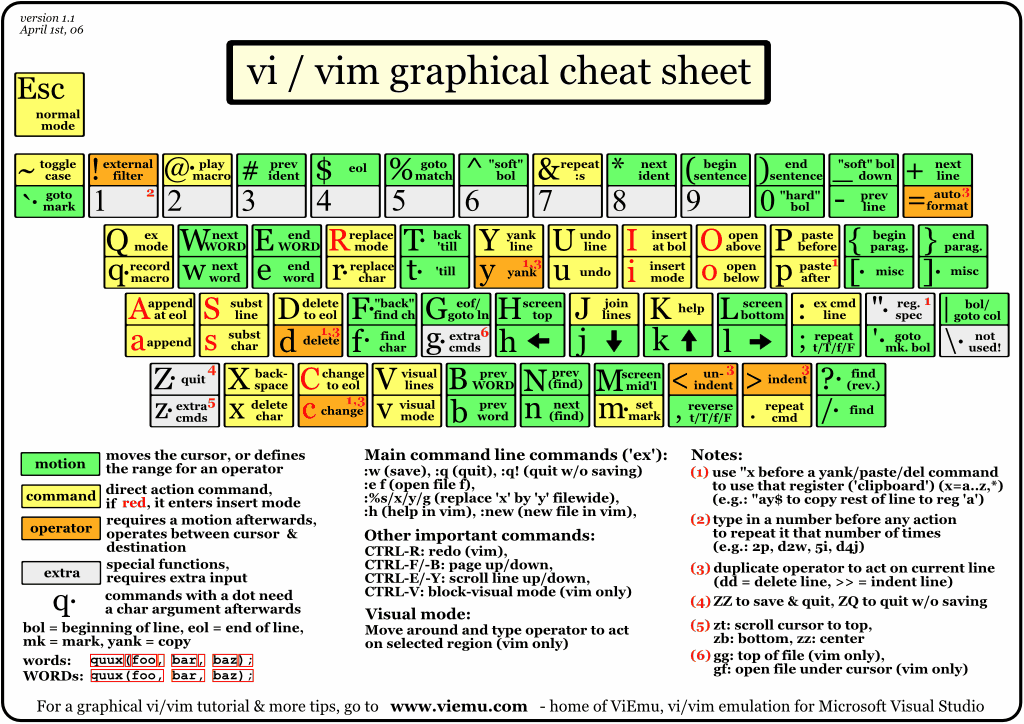
The single thing you need to do to learn vim is to download the ViEmu cheatsheet[0], print it out, and stick it on the wall where you can see it. Printing it out is mandatory - you need to be able to see it without switching windows.

Putting things up on the wall is like a free, albeit static, extra monitor. :-)

[0] http://www.viemu.com/vi-vim-cheat-sheet.gif

Re: Interactive Vim tutorial

#169

Alternatively, don't try to hurry enlightenment. First, learn :q! Next h,j,k,l Then i and ESC Finally :w Now you know vim. Don't let people tell you you're using too many keystrokes. Are you still reaching for the mouse? If not, you're using vim just fine. Most of the good stuff in vim, you'll learn accidentally, because you're in normal mode when you think you're in insert mode, or because you have caps lock on in n…

I missed my chance of learning vim properly and I never internalized h I j k. After trying a few episodes of forcing myself to use h I j k miserably, I question that wisdom. The fact is I never find arrow keys a hindrance, probably when I navigate with arrow keys, I am always unclear of my editing goals and I can use some slowdown thinking anyway

Re: Interactive Vim tutorial

#170
post #106

The first thing I do on a new system is map my Caps Lock key to Escape[1][2][3] so that I can use Vim conveniently without having to reach the physical Escape key placed awkwardly at the corner of the keyboard. The choice of Escape key to return to normal mode and H, J, K, L for navigation makes total sense if we look at the original Lear Siegler ADM-3A terminal[4] that Bill Joy used while creating vi, but in the mod…

You can use Ctrl-C as an ESC shortcut in vim.
Post reply on HN