Live data from Hacker News

Interactive Vim tutorial

openvim.com

101–110 of 230 posts

Re: Interactive Vim tutorial

#101

I've tried learning Vim several times, but the need to switch modes and back for cursor movement has been a huge turnoff, especially considering the location of the ESC key. It seems to just conflict with the way that I type, where I am frequently jumping my cursor around in the middle of text editing, which is effortless in Emacs. Maybe mastering Vim is not just about memorizing key combos but about changing your co…

Mastering vim is about learning a language (of verbs and objects) for communicating effectively with your text editor.

The modal aspects are there, but my experience has been that 80% of my editing time is spent reading and finding the right place to put something, and the default when opening a file is reading to find the right spot. Further, switching from read mode to write mode is often done with different purposes, and vim lets me express those different intents when changing modes (insert here, replace this word, replace this line, etc).

I think there is probably a little bit of changing your workflow, but for me it's been largely about learning how vim fits my workflow.
Re: Interactive Vim tutorial

#102

I've tried learning Vim several times, but the need to switch modes and back for cursor movement has been a huge turnoff, especially considering the location of the ESC key. It seems to just conflict with the way that I type, where I am frequently jumping my cursor around in the middle of text editing, which is effortless in Emacs. Maybe mastering Vim is not just about memorizing key combos but about changing your co…

> especially considering the location of the ESC key This can be solved by remapping ESC to Capslock.

You can also remap it to multiple keys. My preference is `jk`, since that letter combination is rarely used, still on home row, and can be typed about as fast as a single key. Useful, since it's a common action I take.

Re: Interactive Vim tutorial

#103

Alternatively, don't try to hurry enlightenment. First, learn :q! Next h,j,k,l Then i and ESC Finally :w Now you know vim. Don't let people tell you you're using too many keystrokes. Are you still reaching for the mouse? If not, you're using vim just fine. Most of the good stuff in vim, you'll learn accidentally, because you're in normal mode when you think you're in insert mode, or because you have caps lock on in n…

I like the "Learn Vim Progressively" guide. It starts with just a few commands, and introduces new ones in small batches when you feel comfortable with the ones you're using. http://yannesposito.com/Scratch/en/blog/Learn-Vim-Progressiv... I'd add windows to your list of things to take a look at once you feel comfortable with the editor. You can split your workspace with ctrl+w followed by 'v' (vertical) or 's' (split…

I feel like window management is a good way to introduce vimscript as well. Lets you tweak some of the features like having the windows open on the right instead of left or getting rid of the w so it's just ctrl+{hjkl}.

Re: Interactive Vim tutorial

#104

I've tried learning Vim several times, but the need to switch modes and back for cursor movement has been a huge turnoff, especially considering the location of the ESC key. It seems to just conflict with the way that I type, where I am frequently jumping my cursor around in the middle of text editing, which is effortless in Emacs. Maybe mastering Vim is not just about memorizing key combos but about changing your co…

> especially considering the location of the ESC key This can be solved by remapping ESC to Capslock.

Exactly. Or remap it to any key combination that makes sense for your work, if you like using Capslock for its original purpose, which I happen to.

For example, I have jj and jk mapped to ESC. So I just tap j twice while in insert mode, and it switches to normal/command mode. If you find yourself needing to type jj or jk often in insert mode, just pick other letters that make sense for you.

To use mine, plop these in your .vimrc:

  inoremap jj 
  inoremap jJ 
  inoremap jk 

Re: Interactive Vim tutorial

#105
post #98

Earlier quoted context omitted.

The Ubuntu shell on Windows 10 comes with vim and syntax highlighting.

As far as I know, the Ubuntu shell still uses the console. There is indeed highlighting but basically only 8 colours that are dubiously split to make 16. A recent Windows update was supposed to give 256 colours but I tried and couldn't get it to work. Even then though you still haven't got bold or italics. It's these little things that I missed.

I use Mintty and it has 256 colors. Not sure about bold and italics.

Re: Interactive Vim tutorial

#106
The first thing I do on a new system is map my Caps Lock key to Escape[1][2][3] so that I can use Vim conveniently without having to reach the physical Escape key placed awkwardly at the corner of the keyboard.

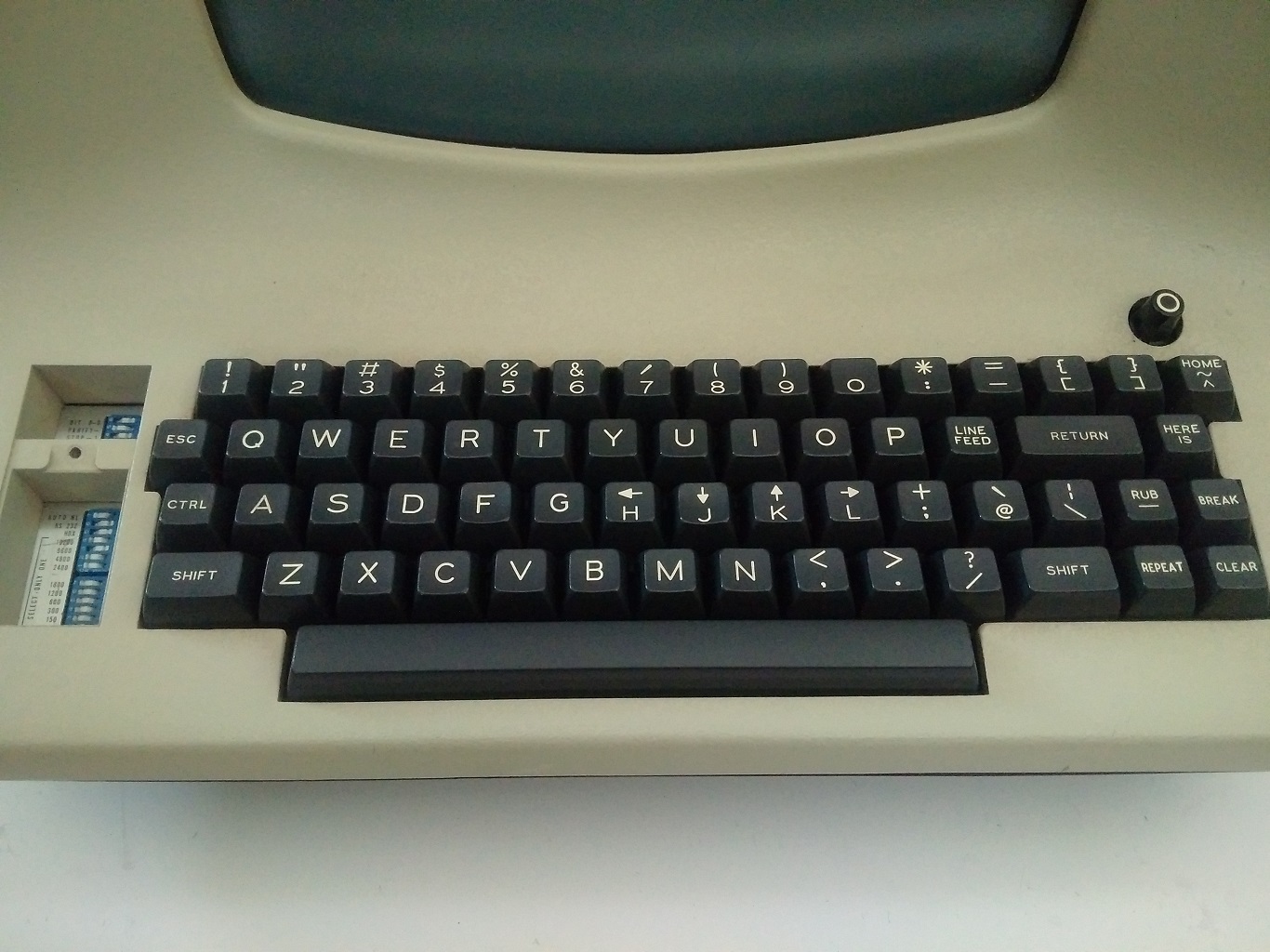
The choice of Escape key to return to normal mode and H, J, K, L for navigation makes total sense if we look at the original Lear Siegler ADM-3A terminal[4] that Bill Joy used while creating vi, but in the modern day keyboard, the choice of Escape key to return to normal mode really disturbs the otherwise fine ergonomics of using Vim.

[1]: https://github.com/susam/uncap#uncap

[2]: http://vim.wikia.com/wiki/Map_caps_lock_to_escape_in_Windows...

[3]: http://vim.wikia.com/wiki/Map_caps_lock_to_escape_in_XWindow...

[4]: https://vintagecomputer.ca/wp-content/uploads/2015/01/LSI-AD...

Re: Interactive Vim tutorial

#107

I've tried learning Vim several times, but the need to switch modes and back for cursor movement has been a huge turnoff, especially considering the location of the ESC key. It seems to just conflict with the way that I type, where I am frequently jumping my cursor around in the middle of text editing, which is effortless in Emacs. Maybe mastering Vim is not just about memorizing key combos but about changing your co…

I'm assuming you're jumping the cursor around to get to a different location in the text to make an edit? I use / (search forward) and ? (search backwards) a lot. It means that when you think to yourself "I need to edit XYZ" the command is, jump to XYZ, instead of down-across -across etc.

No doubt, becoming proficient in vim is a big commitment that you really have to work at. Personally I think it's a great editor though.

Re: Interactive Vim tutorial

#108

Earlier quoted context omitted.

> especially considering the location of the ESC key This can be solved by remapping ESC to Capslock.

You can also remap it to multiple keys. My preference is `jk`, since that letter combination is rarely used, still on home row, and can be typed about as fast as a single key. Useful, since it's a common action I take.

I go for jj since it removes the mental overhead. Often I'm just pawing through the code from top to bottom and in either normal or insert mode I just start hammering at jj and I start moving.

Re: Interactive Vim tutorial

#109
post #106

The first thing I do on a new system is map my Caps Lock key to Escape[1][2][3] so that I can use Vim conveniently without having to reach the physical Escape key placed awkwardly at the corner of the keyboard. The choice of Escape key to return to normal mode and H, J, K, L for navigation makes total sense if we look at the original Lear Siegler ADM-3A terminal[4] that Bill Joy used while creating vi, but in the mod…

I had a really hard time getting into Vim until I found out everyone I knew who was using it had mapped something else to escape. Once I did the same, it was much easier to get started.

Re: Interactive Vim tutorial

#110
post #87

Alternatively, don't try to hurry enlightenment. First, learn :q! Next h,j,k,l Then i and ESC Finally :w Now you know vim. Don't let people tell you you're using too many keystrokes. Are you still reaching for the mouse? If not, you're using vim just fine. Most of the good stuff in vim, you'll learn accidentally, because you're in normal mode when you think you're in insert mode, or because you have caps lock on in n…

Sorry, but I think that's really bad advice. For one thing, it doesn't give new users any positive experience or reason to learn vim. If all you learn is to do things that are "pointless" (like learning hjkl), then you won't get any value out of vim. And if your way of learning is to do something that screws up your file and try to recreate how that happened, well, let's just say that every time I do something that s…

I have been using Vim for 15 years now and I completely agree with sevensor's comment.

- Vim is not newbie-friendly regardless of whether you remove guioptions or not. One has to spend at least a few hours of study and practice to get comfortable with Vim. If one is forced to invest a few hours to learn an editor, one might as well get rid of guioptions and follow other advice provided in sevensor's comment.

- Learning hjkl is not really pointless. hjkl and other motion commands makes Vim a unique and ergonomically a very superior experience. If one does not want to spend time learning hjkl and other motion keys, then one might as well skip learning Vim and pickup Emacs, Sublime Text or another capable editor.

Post reply on HN